Introducció
This manual provides detailed instructions for the installation, operation, and maintenance of your LAXIHUB 5MP/2K+ Pet Dog Camera. Please read this manual thoroughly before using the product to ensure correct usage and optimal performance. Keep this manual for future reference.

Image: The LAXIHUB 5MP/2K+ Pet Dog Camera, a compact black dome-shaped device, is shown alongside a smartphone displaying a golden retriever. This illustrates the camera's primary function for pet monitoring via a mobile application.
Contingut del paquet
Verifiqueu que tots els elements que s'enumeren a continuació s'inclouen al vostre paquet. Si falta algun element o hi ha algun malmès, poseu-vos en contacte amb l'atenció al client.
- LAXIHUB 5MP/2K+ Camera (1X)
- USB Cable (1X)
- Power Adapter (1X)
- Mounting Bracket (1X)
- Cargols (3X)
- Guia d'inici ràpid (1X)

Image: An illustration showing the LAXIHUB camera, its retail packaging, and all included accessories: USB cable, power adapter, mounting bracket, screws, and a quick start guide.
Producte acabatview
Familiarize yourself with the main components of your LAXIHUB camera.
- Lent de la càmera: Captura vídeo footage.
- Micròfon: Per a la comunicació d'àudio bidireccional i la detecció de so.
- Ponent: Per a comunicació d'àudio bidireccional.
- Llum indicadora: Displays camera status (e.g., solid blue for connected, flashing red for waiting for connection).
- Port d'alimentació (Micro USB): Es connecta a l'adaptador de corrent.
- Botó de restabliment: Used to reset the camera to factory settings. Typically located near the SD card slot.
- Ranura per a targetes Micro SD: For local video storage (supports up to 128GB, FAT32 format).

Image: The LAXIHUB camera positioned on a table in a living room, demonstrating its two-way audio capability with a dog on a couch. This highlights the interactive features of the device.
Configuració
1. Download the LAXIHUB App
Cerca 'LAXIHUB' in the Apple App Store (for iOS devices) or Google Play Store (for Android devices) and download the application. Alternatively, scan the QR code provided in the Quick Start Guide.
2. Enceneu la càmera
Connect the provided USB cable to the camera's power port and the power adapter. Plug the adapter into a wall outlet. The camera will power on, and the indicator light will begin to flash, indicating it is ready for setup.
3. Configuració inicial i aparellament
- Open the LAXIHUB app and create an account or log in.
- Toqueu la icona "+" per afegir un dispositiu nou.
- Follow the on-screen instructions to select your camera model and connect it to your 2.4GHz Wi-Fi network. Ensure your phone is connected to the same 2.4GHz Wi-Fi network during setup.
- The app will guide you through scanning a QR code with the camera lens or using sound pairing.
- Un cop connectat, l'indicador lluminós es tornarà blau fix.
Note: If the indicator light does not flash or you encounter issues, press and hold the reset button for approximately 5 seconds until you hear a prompt or see the light change, then attempt setup again.
Instruccions de funcionament
Viu View i control de panoràmica/inclinació
Access the live video feed of your camera through the LAXIHUB app. Use the on-screen controls to pan (rotate horizontally up to 355°) and tilt (rotate vertically up to 93°) the camera lens to view diferents zones de l'habitació.
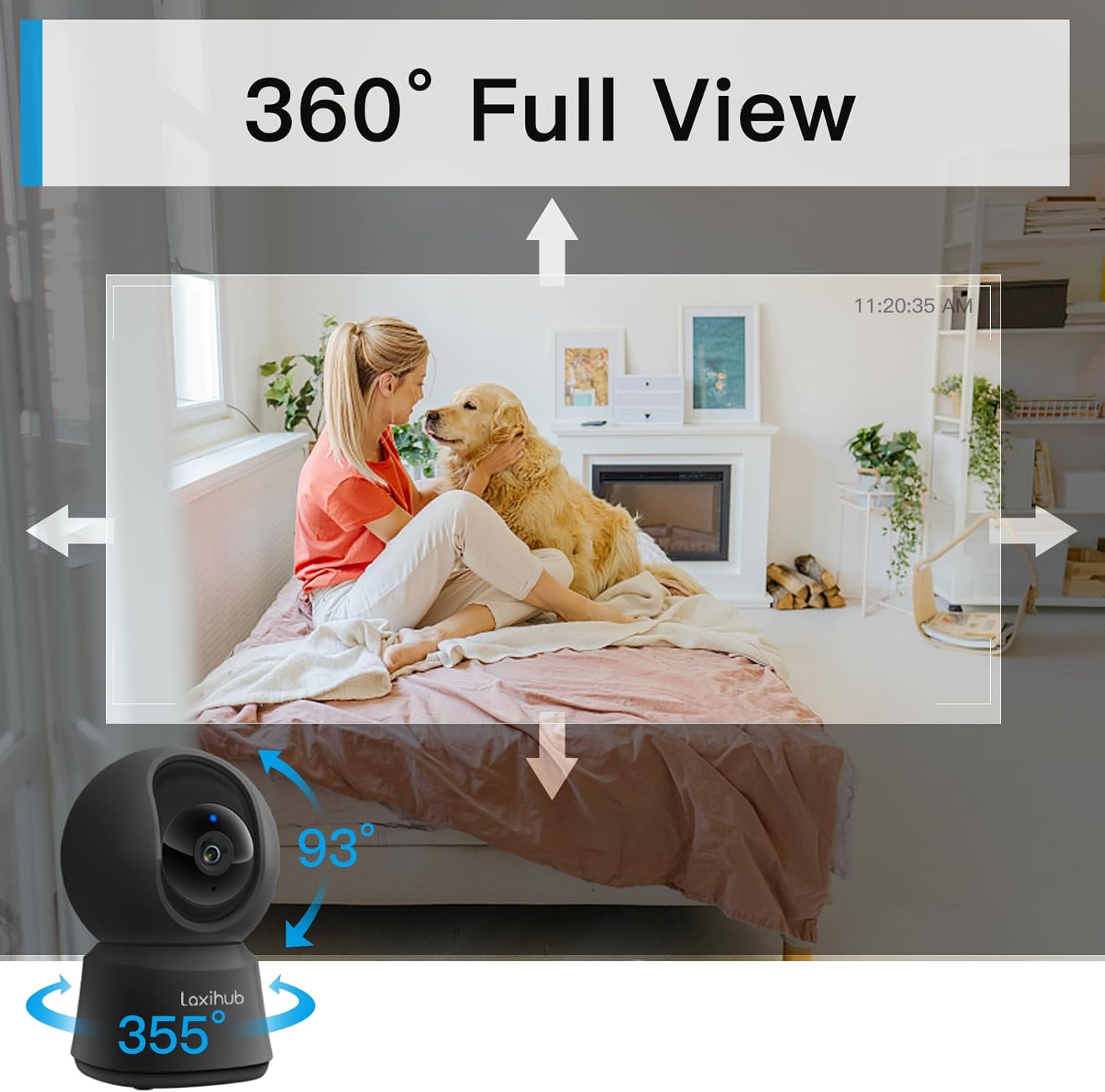
Image: The LAXIHUB camera is shown with arrows indicating its 355-degree horizontal pan and 93-degree vertical tilt capabilities, providing a comprehensive 360-degree view d'una habitació.
Àudio bidireccional
Utilize the built-in microphone and speaker to communicate with pets or family members. Tap the microphone icon in the app to speak, and release to listen.
Enregistrament i reproducció
The camera supports two storage options for video recordings:
- Targeta micro SD: Insert a FAT32 formatted Micro SD card (up to 128GB, sold separately) into the designated slot. Recordings will be stored locally.
- Emmagatzematge al núvol: The camera typically includes a free trial for cloud storage. Subscribe to a plan for continuous cloud recording and access.
Accés gravat footage via the 'Playback' section in the LAXIHUB app. You can review past events based on the timeline.

Image: A diagram illustrating the two storage options for the LAXIHUB camera: cloud storage, which includes a free 3-month trial, and an SD card slot compatible with FAT32 Micro SD cards up to 128GB.
Motion and Sound Detection & Alerts
Configure motion and sound detection settings within the app. When activity is detected, the camera will record a short clip and send an instant notification to your smartphone.

Image: The LAXIHUB camera is shown monitoring a dog, with a phone displaying an alert notification for detected motion, demonstrating the camera's motion tracking and instant alert features.
Visió nocturna
The camera is equipped with enhanced night vision, providing clear video footage in low-light conditions up to 32 feet (10 meters). Night vision activates automatically.

Imatge: Una divisió view demonstrating the camera's night vision. The top shows a dark room, while the bottom shows a smartphone displaying a clear, illuminated view of a sleeping baby, indicating effective low-light performance.
Integració d'Alexa
The LAXIHUB camera is compatible with Amazon Alexa. Link your LAXIHUB account to Alexa through the Alexa app to enable voice commands for live streaming on compatible Alexa-enabled devices (e.g., Echo Show).

Image: The LAXIHUB camera next to an Amazon Echo Show device, which displays a live feed from the camera showing a baby and a dog. A speech bubble indicates an Alexa command: "Alexa, show me the living room."
Manteniment
Neteja de la càmera
To maintain optimal image quality, gently wipe the camera lens with a soft, dry, lint-free cloth. Do not use harsh chemicals or abrasive cleaners. Clean the camera body with a slightly damp cloth if necessary, ensuring no moisture enters the ports.
Actualitzacions de firmware
Periodically check the LAXIHUB app for available firmware updates. Keeping your camera's firmware updated ensures access to the latest features, security enhancements, and bug fixes. Follow the in-app instructions for updating.
Gestió de targetes SD
If using a Micro SD card for storage, it is recommended to periodically format the card through the app to maintain performance and prevent data corruption. Back up any important recordings before formatting.
Resolució de problemes
- La càmera no es connecta a la Wi-Fi:
- Assegureu-vos que la vostra xarxa Wi-Fi sigui de 2.4 GHz. La càmera no admet xarxes de 5 GHz.
- Verifiqueu que la contrasenya del vostre Wi-Fi sigui correcta.
- Move the camera closer to your Wi-Fi router.
- Reset the camera by pressing the reset button for 5 seconds and try pairing again. - Sense canal de vídeo:
- Check if the camera is powered on and the indicator light is solid blue.
- Ensure your internet connection is stable.
- Restart the camera and the app. - L'àudio bidireccional no funciona:
- Check the microphone and speaker settings in the app.
- Ensure your phone's volume is up.
- Verify there are no obstructions blocking the camera's microphone or speaker. - Motion/Sound alerts not received:
- Check alert settings in the app to ensure they are enabled.
- Verify your phone's notification settings for the LAXIHUB app.
- Ensure the camera has a stable internet connection. - La targeta SD no grava:
- Assegureu-vos que la targeta SD estigui inserida correctament.
- Check if the SD card is formatted to FAT32.
- The SD card might be full; consider formatting it (after backing up data) or replacing it.
Especificacions
| Nom del model | P2F |
| Resolució de captura de vídeo | 5 MP (2K+) |
| Ús interior/exterior | Només interior |
| Protocol de connectivitat | Wi-Fi (només 2.4 GHz) |
| Font d'alimentació | Elèctric amb cable (5 volts) |
| Tipus de controlador | Amazon Alexa, Google Assistant |
| Tipus de muntatge | Muntatge de paret |
| Gamma de visió nocturna | Fins a 32 peus (10 metres) |
| Material | Plàstic ABS |
| Característiques especials | Motion Sensor, Night Vision, Pan/Tilt, 2-Way Audio |
| Opcions d'emmagatzematge | Targeta Micro SD (fins a 128 GB), emmagatzematge al núvol |
| Dimensions | 6.61 x 5.39 x 3.11 polzades (paquet) |
| Pes de l'article | 13.1 unces |
Garantia i Suport
For warranty information, please refer to the documentation included with your purchase or visit the official LAXIHUB website. If you encounter any issues not covered in this manual or require further assistance, please contact LAXIHUB customer support.
També podeu consultar el manual d'usuari oficial en PDF per obtenir més informació: LAXIHUB P2F User Manual (PDF)


