1. Introducció
The VILTROX DC-550 is a high-performance 5.5-inch camera field monitor designed to enhance your filmmaking and photography experience. It features a 1920x1080 Full HD IPS display with 1200 Nits of brightness, ensuring clear visibility even in bright outdoor conditions. With 4K HDMI input/loop output, 3D LUT support, and a range of professional monitoring functions, the DC-550 provides precise control and accurate color representation for various camera setups.
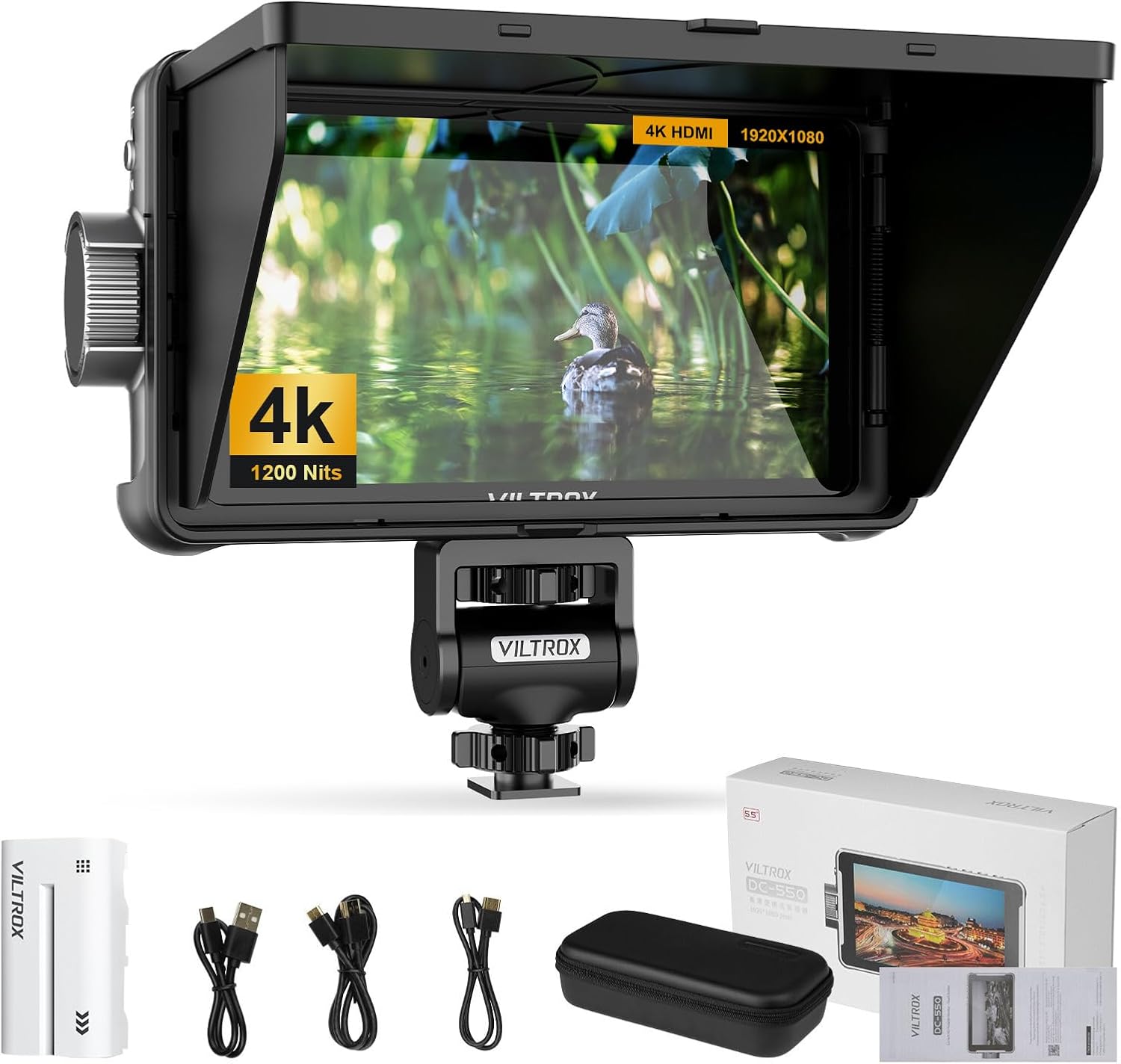
Figure 1.1: VILTROX DC-550 Camera Field Monitor and its accessories.
2. Configuració
2.1 Contingut del paquet
Abans de començar, comproveu que tots els elements estiguin presents al paquet:

Figure 2.1: Package Contents of the VILTROX DC-550.
- DC-550 Monitor (x1)
- Light Shields (Sun Hood) (x1)
- NP-F550 Lithium Battery (x1)
- Cloud Terrace (Mounting Bracket) (x1)
- Estoig de transport (x1)
- Cable tipus C (x1)
- Mini HDMI Cable (x1)
- Standard HDMI Cable (x1)
- Manual d'instruccions (x1)
- Caixa d'embalatge (x1)
2.2 Physical Components and Dimensions
Familiarize yourself with the monitor's physical layout and dimensions:

Figure 2.2: VILTROX DC-550 Physical Components and Dimensions.
- Dimensions: 165 mm (W) x 91 mm (H) x 28.5 mm (D)
- Pes: 280 g
- Components clau:
- Fan air intake
- Botó d'alliberament de la bateria
- Function button (F1/F2)
- Function button (F3/F4) - shortcut back
- Ranura per a targeta SD
- Port tipus C
- Fan air intake
- Botó d'alliberament de la bateria
- Interfície de muntatge
- Interruptor d’encès / apagat
- Pom de control
2.3 Encès
The DC-550 offers multiple power options for versatile use:

Figure 2.3: Multi-Power Options for the DC-550.
- NP-F Series Lithium Battery: Insert a compatible NP-F series battery into the battery slot.
- Entrada de CC (12-18 V): Connect an external DC power adapter to the DC IN port.
- Type-C (5V 3A): Use a Type-C cable to connect to a compatible power source for rechargeable power.
2.4 Connecting to a Camera (HDMI)
The monitor supports 4K 30Hz HDMI signal input and loop output for seamless integration with your camera setup.

Figure 2.4: HDMI Input/Loop Output Connection.
- Connect one end of the HDMI cable (Mini HDMI or Standard HDMI, depending on your camera) to your camera's HDMI output port.
- Connect the other end of the HDMI cable to the HDMI IN port on the DC-550 monitor.
- If you need to loop out the signal to another device, connect an HDMI cable from the HDMI OUT port on the DC-550 to your desired device.
2.5 Muntatge del monitor
The included mounting bracket allows for flexible positioning of the monitor.

Figure 2.5: Custom Swivel Head with 170° Pan and Tilt Monitoring.
- Attach the Cloud Terrace (mounting bracket) to the monitor's mounting interface.
- Secure the bracket to your camera rig or tripod using the appropriate screw mount.
- Adjust the monitor's angle using the swivel head, which offers a 170° tilt angle and 360° horizontal rotation.
3. Funcionament
3.1 Display Quality and Viewangle ing
The DC-550 features a Full HD 1920x1080 IPS display, providing a wide 178-degree viewangle de ing.

Figure 3.1: Full HD Resolution and Wide Viewangle ing.
3.2 Professional Monitoring Software
The DC-550 series is equipped with extensive monitoring functions to assist in precise image capture and analysis.
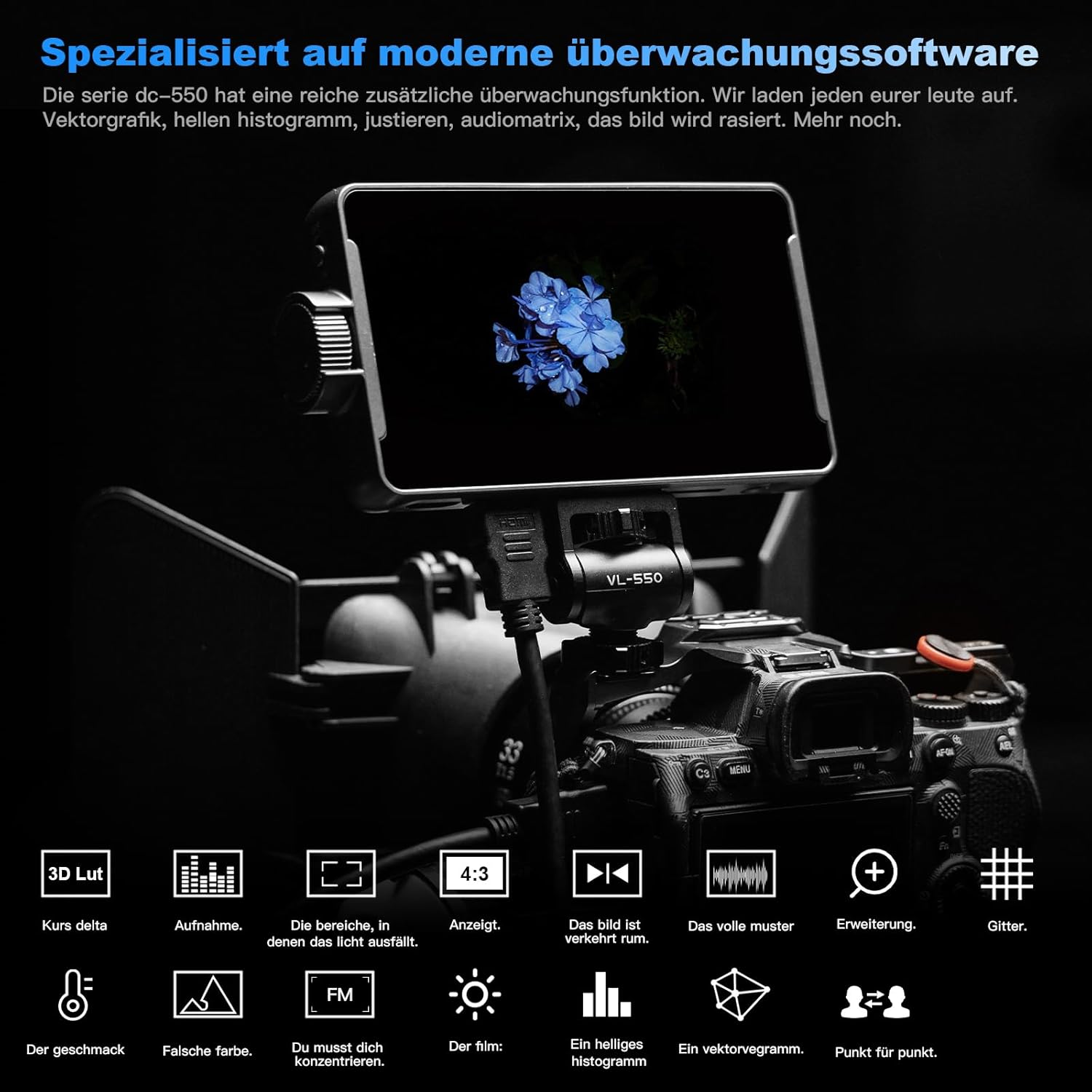
Figure 3.2: Specialized Monitoring Software Features.
- Parade Waveform: Visualizes the luminance and chrominance levels of your image.
- Vector Diagram: Displays the color saturation and hue.
- Histograma de brillantor: Shows the distribution of brightness levels.
- Assistència al focus: Destaca les zones enfocades per a un enfocament precís.
- Audio Column: Monitoritza els nivells d'àudio.
- Flip de la imatge: Inverteix la imatge horitzontalment o verticalment.
- Color fals: Aids in exposure adjustment by displaying different exposure levels as distinct colors.
3.3 3D LUT Import and True Color Rendering
The monitor supports importing 3D LUTs via SD card, allowing for precise color grading and monitoring of log footage.
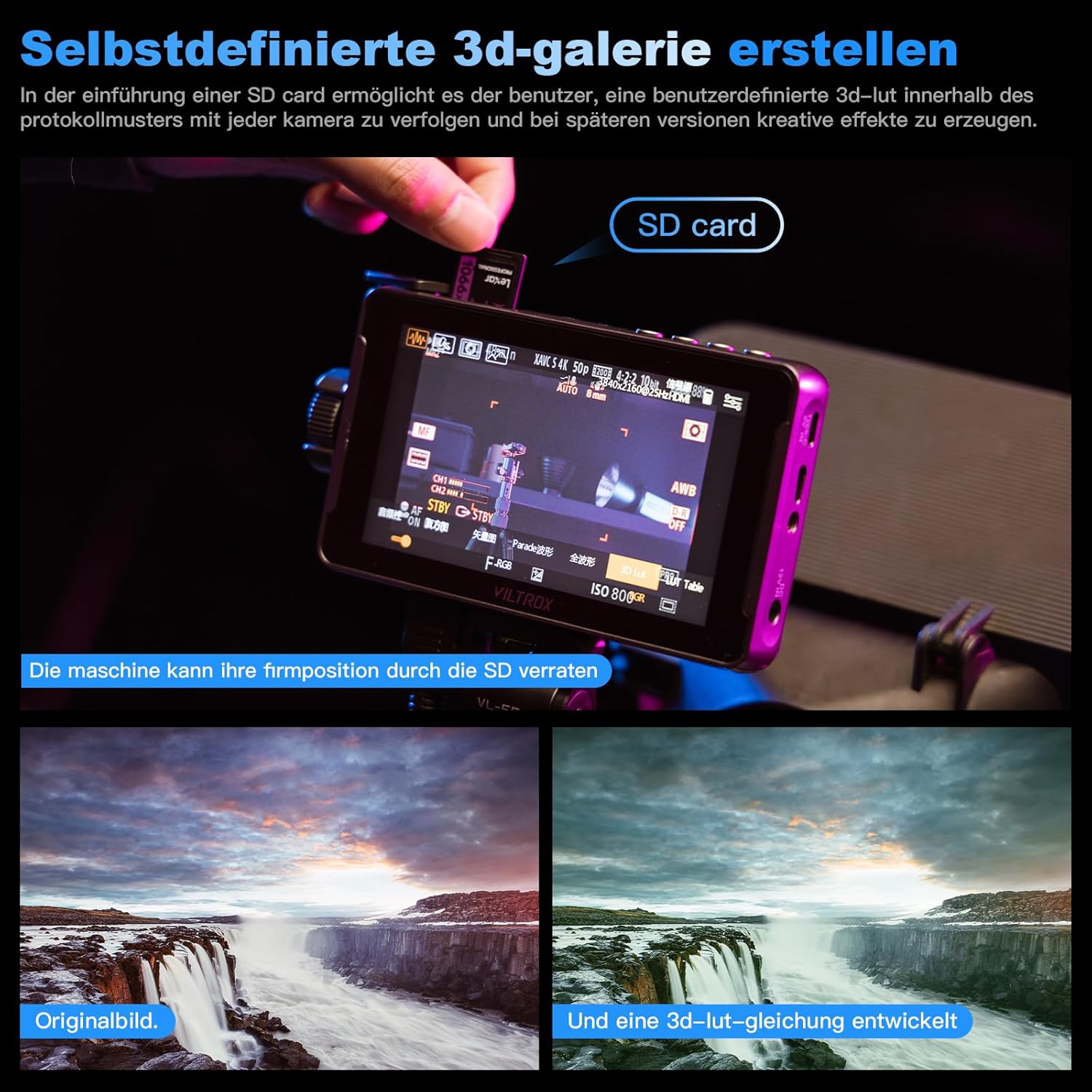
Figure 3.3: Creating Custom 3D LUTs.
The DC-550 adheres to the REC.709 international color standard, ensuring accurate and natural color reproduction without distortion.

Figure 3.4: REC.709 International Color Standard.

Figure 3.5: True Color Reproduction and False Color Function.
3.4 Funcionament de la pantalla tàctil
The DC-550 features a responsive touchscreen for intuitive control and navigation of its functions.

Figure 3.6: Smart Touchscreen Interface.
3.5 Quick-Release Sun Hood
The detachable sun hood effectively blocks light interference during outdoor shooting, improving monitoring visibility.

Figure 3.7: Foldable Hood with Quick Release.
4. Manteniment
4.1 Neteja
- Use a soft, lint-free cloth to clean the monitor screen. For stubborn smudges, a screen-cleaning solution designed for electronics can be used sparingly.
- Wipe the body of the monitor with a dry or slightly damp tela. Eviteu utilitzar productes químics o materials abrasius.
4.2 Sistema de refrigeració
The DC-550 features a built-in fan to ensure stable operation during extended use at high brightness, contributing to product longevity.

Figure 4.1: Built-in Fan and Cooling System.
- Ensure the fan vents are clear of obstructions to allow for proper airflow.
- When the fan is off, the heatsink holes in the metal dust filter act as a passive cooling system. When the fan is on, air is drawn in through the holes on both sides and exits below the board.
4.3 Emmagatzematge
- Store the monitor in its provided carrying case when not in use to protect it from dust and physical damage.
- Keep the monitor in a cool, dry place away from direct sunlight and extreme temperatures.
5. Solució De Problemes
This section addresses common issues you might encounter with your VILTROX DC-550 monitor.
- No Signal/Signal Loss:
- Ensure all HDMI cables are securely connected to both the camera and the monitor.
- Verify that the camera's HDMI output settings are compatible with the monitor's input (e.g., 4K 30Hz).
- Proveu de desconnectar i tornar a connectar tots els cables.
- Check if the monitor's input source is correctly selected.
- Durada de la bateria més curta del que s'esperava:
- High brightness settings consume more power. Reduce brightness if extended battery life is needed.
- Assegureu-vos que la bateria estigui completament carregada abans d'utilitzar-la.
- Consider using an external power bank via Type-C or a DC power adapter for longer shoots.
- Mounting Issues (e.g., loose thread):
- Ensure the mounting screw is properly aligned and tightened. Do not overtighten.
- If the thread appears damaged, contact customer support for assistance.
- Problemes d'actualització del firmware:
- IMPORTANT: Do not download firmware updates from unofficial sources. Always contact the official distributor for the latest and correct firmware version. Incorrect firmware can render the device unusable.
6. Especificacions
Detailed technical specifications for the VILTROX DC-550 Camera Field Monitor:
| Característica | Especificació |
|---|---|
| Número de model | CXASD101 |
| Mida de la pantalla | 5.5 polzades |
| Resolució | Pantalla IPS Full HD de 1920 x 1080 |
| Brillantor | 1200 Nit |
| Entrada/sortida HDMI | HDMI 1.4 (Supports 4K 30Hz) |
| Opcions d'energia | NP-F Series Battery, DC IN (12-18V), Type-C (5V 3A) |
| Dimensions (paquet) | 27.7 x 15.6 x 7.2 cm |
| Dimensions (element) | 10 x 10 x 10 cm (Note: This seems to be a generic placeholder, refer to Figure 2.2 for detailed dimensions) |
| Pes | 280 g |
| Piles necessàries | 1 Bateria de ions de liti |
| Components incorporats | DC-550ASZ |
For a comparison of VILTROX monitor models, refer to the following table:

Figure 6.1: VILTROX Monitor Model Comparison.
7. Garantia i Suport
7.1 Garantia del producte
The VILTROX DC-550 Camera Field Monitor comes with a 1 anys de garantia del producte.
7.2 Atenció al client
For any questions, issues, or technical assistance regarding your VILTROX product, please contact the official authorized distributor, PhoZoom E. They provide comprehensive services, including:
- Answering questions about operating instructions.
- Consulting on adaptable models and operating techniques.
- Providing the latest software versions for firmware updates.
PhoZoom E aims to respond to inquiries within 10 minutes during work hours.

Figure 7.1: Support and Firmware Update Guidelines.
Informació de contacte: Please refer to your purchase documentation or the official VILTROX website for the most current contact details for PhoZoom E.


