1. Introducció
This user manual provides detailed instructions for the installation, operation, and maintenance of the Reyee 6-Port Gigabit Managed PoE Switch (Model: RG-ES206GC-P). This device is designed to provide reliable and high-speed network connectivity with Power over Ethernet (PoE) capabilities, simplifying network deployment for various applications. It is a durable and strong networking solution.
2. Producte acabatview
2.1 Contingut del paquet
- Reyee 6-Port Gigabit Managed PoE Switch (RG-ES206GC-P)
- Adaptador d'alimentació
- Manual d'usuari
2.2 Descripció física
The Reyee RG-ES206GC-P switch features a robust metal casing designed for durability and efficient heat dissipation. The front panel includes all network ports and LED indicators for easy status monitoring.

Figure 2.1: Front Panel of the RG-ES206GC-P Switch
The front panel consists of four PoE-capable Gigabit Ethernet ports (1-4) and two Gigabit uplink ports (5-6). Each port has associated LED indicators to show link status and activity. A dedicated Status LED and LED mode switch are also present.

Figure 2.2: Rear Panel of the RG-ES206GC-P Switch
The rear panel includes the DC power input (DC--54V) and a reset button. An earthing point is also provided for proper grounding.
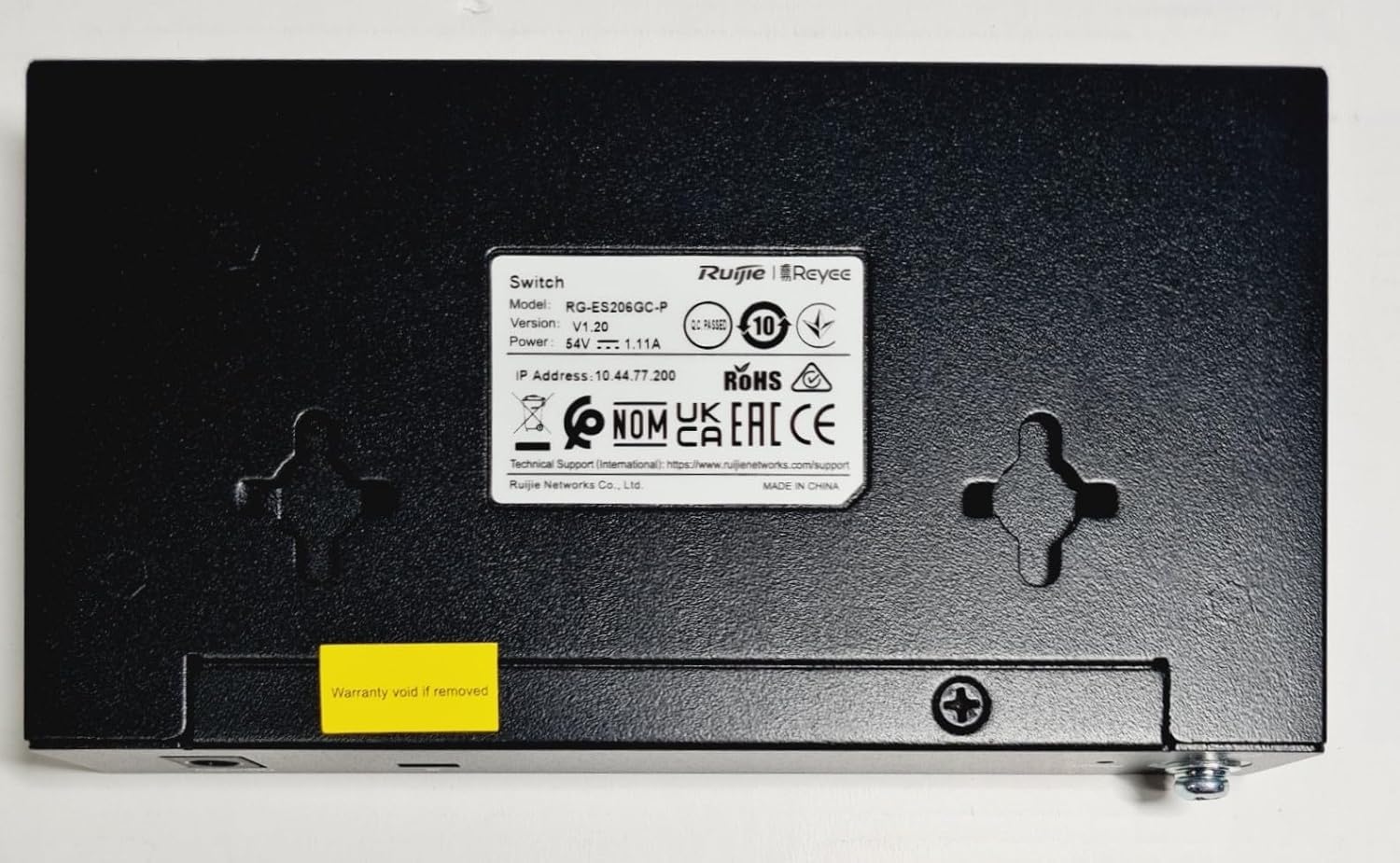
Figure 2.3: Bottom Panel of the RG-ES206GC-P Switch
The bottom panel features the product label with model, serial number, and technical information, along with mounting points for flexible installation.
2.3 Indicadors LED
The switch features LED indicators to provide real-time status information. The LED mode switch allows toggling between two display modes:
| Indicador | Estat | Descripció |
|---|---|---|
| LED estat | On | El dispositiu està encès i funciona normalment. |
| Port LEDs (Mode 1) | On | Enllaç establert. |
| Parpellejant | Activitat (transmissió/recepció de dades). | |
| Verd | 1000/100/10 Mbps speed. | |
| Port LEDs (Mode 2) | Verd | PoE Good Supply (power is being supplied correctly). |
| Parpellejant | PoE Over Load (power demand exceeds port capacity). |
3. Configuració
3.1 Abans de començar
- Ensure the installation environment is dry, well-ventilated, and within the recommended operating temperature range.
- Place the switch on a stable, flat surface or mount it securely using the provided mounting points.
- Verify that the power source meets the voltage requirements (110 Volts AC).
3.2 Instal·lació de maquinari
- Connectar l'alimentació: Connect the provided power adapter to the DC--54V input port on the rear panel of the switch, then plug the adapter into a suitable power outlet. The Status LED should illuminate.
- Connectar dispositius de xarxa:
- For non-PoE devices (e.g., computers, routers), connect them to any of the 6 RJ45 ports using standard Ethernet cables.
- For PoE-powered devices (e.g., IP cameras, VoIP phones, wireless access points), connect them to ports 1-4. The switch will automatically detect and provide power.
- Verifica les connexions: Check the LED indicators for each connected port. A solid green light typically indicates a successful link, and flashing indicates data activity. For PoE ports, ensure the PoE Good Supply LED is green.
4. Instruccions de funcionament
The Reyee RG-ES206GC-P is a managed PoE switch, offering advanced network management capabilities in addition to basic plug-and-play functionality. Once hardware installation is complete, the switch will begin forwarding network traffic.
4.1 Funcionament bàsic
- Encès/apagat: Simply connect or disconnect the power adapter. There is no separate power button.
- Transmissió de dades: The switch automatically learns MAC addresses and forwards data frames to the correct destination ports at Gigabit speeds (1000 Mbps).
- PoE Functionality: For devices connected to ports 1-4, the switch automatically detects PoE compatibility and supplies power according to IEEE 802.3af/at standards.
4.2 Network Configuration (Managed Features)
As a managed switch, the RG-ES206GC-P allows for advanced configuration and monitoring through a web-based management interface. For detailed instructions on accessing and configuring features such as VLANs, QoS, port mirroring, and PoE management, please refer to the comprehensive software user guide or the manufacturer's official support website. Typically, you will need to connect a computer to the switch and access its default IP address via a web navegador.
5. Manteniment
- Neteja: Regularly clean the exterior of the switch with a soft, dry cloth. Do not use liquid or aerosol cleaners. Ensure ventilation openings are free from dust and debris to prevent overheating.
- Ventilació: Ensure adequate airflow around the switch. Do not block the ventilation holes on the sides of the device.
- Actualitzacions de firmware: Periodically check the RUIJIE official weblloc web per a actualitzacions de firmware. Mantenir el firmware actualitzat garanteix un rendiment òptim, seguretat i accés a noves funcions.
- Condicions ambientals: Operate the switch within its specified temperature and humidity ranges to ensure longevity and stable performance.
6. Solució De Problemes
This section provides solutions to common issues you might encounter with your Reyee RG-ES206GC-P switch.
| Problema | Causa possible | Solució |
|---|---|---|
| No power (Status LED off) | L'adaptador de corrent no està connectat o està defectuós; problema amb la presa de corrent. | Ensure power adapter is securely connected to the switch and a working power outlet. Test the outlet with another device. |
| No link on a port (Port LED off) | Cable Ethernet defectuós o desconnectat; el dispositiu connectat està apagat o defectuós. | Check cable connections at both ends. Try a different Ethernet cable. Ensure the connected device is powered on and functioning correctly. |
| PoE device not powering on (PoE LED off or flashing) | PoE device not compatible; cable issue; PoE budget exceeded; PoE over load. | Ensure the device is PoE compatible (IEEE 802.3af/at). Check the Ethernet cable. Reduce the number of high-power PoE devices or use a separate power source for some devices if the PoE budget is exceeded. Check PoE LED Mode 2 for 'PoE Over Load' status. |
| Network performance issues | Cable quality; network loop; high network traffic. | Use high-quality Ethernet cables (Cat5e or Cat6). Check for accidental network loops. If managed, monitor network traffic and consider QoS settings. |
| No es pot accedir web interfície de gestió | Incorrect IP address; network configuration issue on PC. | Ensure your PC's IP address is in the same subnet as the switch's default IP. Verify the switch's IP address. Try resetting the switch to factory defaults (refer to manufacturer's guide for procedure). |
7. Especificacions
The following table outlines the key technical specifications for the Reyee 6-Port Gigabit Managed PoE Switch (RG-ES206GC-P).
| Característica | Especificació |
|---|---|
| Model | RG-ES206GC-P |
| Ports | 6 x RJ45 Gigabit Ethernet (4 x PoE, 2 x Uplink) |
| Velocitat de transferència de dades | 10/100/1000 Mbps (Gigabit) |
| Tipus de canvi | Switch PoE gestionat |
| Estàndard PoE | IEEE 802.3af / at |
| Voltage Entrada | 110 volts (CA) |
| Material de la caixa | Metall |
| Pes de l'article | 0.79 quilograms (1.74 lliures) |
| Dimensions del producte (L x A x A) | 19.69 x 19.69 x 11.02 polzades |
| Dispositius compatibles | Desktop, PoE-powered devices (e.g., IP cameras, VoIP phones, APs) |
| Fabricant | Ruijie |
8. Garantia i Suport
RUIJIE products are designed for reliability and performance. For information regarding the warranty period and terms for your Reyee 6-Port Gigabit Managed PoE Switch, please refer to the warranty card included with your product or visit the official RUIJIE weblloc.
For technical support, troubleshooting assistance beyond this manual, or to inquire about service, please contact RUIJIE customer support through their official channels. You can typically find contact information, FAQs, and additional resources on the manufacturer's weblloc.