1. Producte acabatview
The ANRAN Solar Security Camera Outdoor is a high-performance wireless surveillance solution designed for outdoor use. It features 5MP HD resolution, 360° pan and tilt capabilities, and is powered by a solar panel for continuous operation. The camera offers advanced features such as color night vision, PIR human detection, two-way audio, and smart siren alerts, ensuring comprehensive security for your property.

Figure 1: ANRAN Solar Security Camera Outdoor with solar panel.
Les característiques clau inclouen:
- 5MP Crisp Image & 360° View: Provides 355° horizontal and 140° vertical panoramic shooting with 5MP HD resolution.
- Solar Powered, Energy Efficient: Equipped with a solar panel for constant power in sunny conditions, reducing the need for manual charging.
- HD Colour Night Vision: Offers clear color night vision up to 15 meters, activated by four powerful spotlights upon human movement detection.
- Xerrada bidireccional: Built-in microphone and speaker enable real-time two-way audio communication via the mobile app.
- Smart Home Enabled: Compatible with Alexa/Google Assistant for voice control and live video streaming.
- Detecció PIR humana: Intelligent AI human detection triggers alerts and siren.
- Resistent a la intempèrie IP65: Dissenyat per suportar diverses condicions meteorològiques a l'aire lliure.
2. Què hi ha a la caixa
Verifiqueu que tots els components siguin presents al paquet abans de continuar amb la instal·lació.

Figure 2: Package contents of the ANRAN Solar Security Camera.
- 1 x 5MP Camera
- 1 x Panell solar
- 1 x cable USB
- 1 x Manual d'usuari
- 1 x paquet de cargols
- 1 x plantilla de muntatge
- 1 x suport
- 1 x Adhesiu de vigilància
3. Configuració
3.1 Càrrega inicial
Before first use, fully charge the camera's internal battery using the provided USB cable. Connect the USB cable to the camera's charging port and a 5V/2A USB power adapter (not included). A full charge ensures optimal performance, especially during initial setup and periods of low sunlight.
3.2 Instal·lació de l'aplicació i creació del compte
Download the official ANRAN app from the App Store (iOS) or Google Play Store (Android). Follow the on-screen instructions to create an account and log in.

Figure 3: ANRAN app availability and key features.
3.3 Emparellament de la càmera
Within the ANRAN app, select "Add Device" and follow the prompts to connect your camera to your 2.4GHz Wi-Fi network. Ensure your mobile device is connected to the same 2.4GHz Wi-Fi network during the pairing process. The camera supports 2.4GHz Wi-Fi only.
3.4 Muntatge de la càmera i del panell solar
Trieu una ubicació de muntatge que proporcioni una vista clara view de la zona que voleu monitoritzar i rep ample direct sunlight for the solar panel. Use the provided mounting template and screws to securely attach the camera and solar panel to a wall or other stable surface. Ensure the solar panel is positioned to maximize sun exposure throughout the day.

Figure 4: Illustrates the wireless setup and solar charging capability.
Connect the solar panel cable to the camera's charging port. The IP65 rating ensures the connection is protected from outdoor elements.
4. Funcionament de la càmera
4.1 Viu View i Enregistrament
Open the ANRAN app to access the live view of your camera. You can manually record video or capture screenshots directly from the live feed. The camera supports local storage via Micro SD card (up to 128GB, not included) and cloud storage (free 7-day trial available).

Figure 5: Cloud service and Micro SD card storage options.
4.2 Control de panoràmica i inclinació
Use the directional controls within the app to remotely adjust the camera's viewing angle. The camera offers 355° horizontal pan and 140° vertical tilt for comprehensive coverage without blind spots.

Figure 6: Demonstrates the camera's 360° pan and tilt capabilities.
4.3 Modes de visió nocturna
The camera automatically switches between day and night vision modes. It supports both infrared (IR) night vision for clear black and white images in complete darkness and 2.5K color night vision, enabled by its four powerful spotlights, which illuminate the scene for full-color recording.
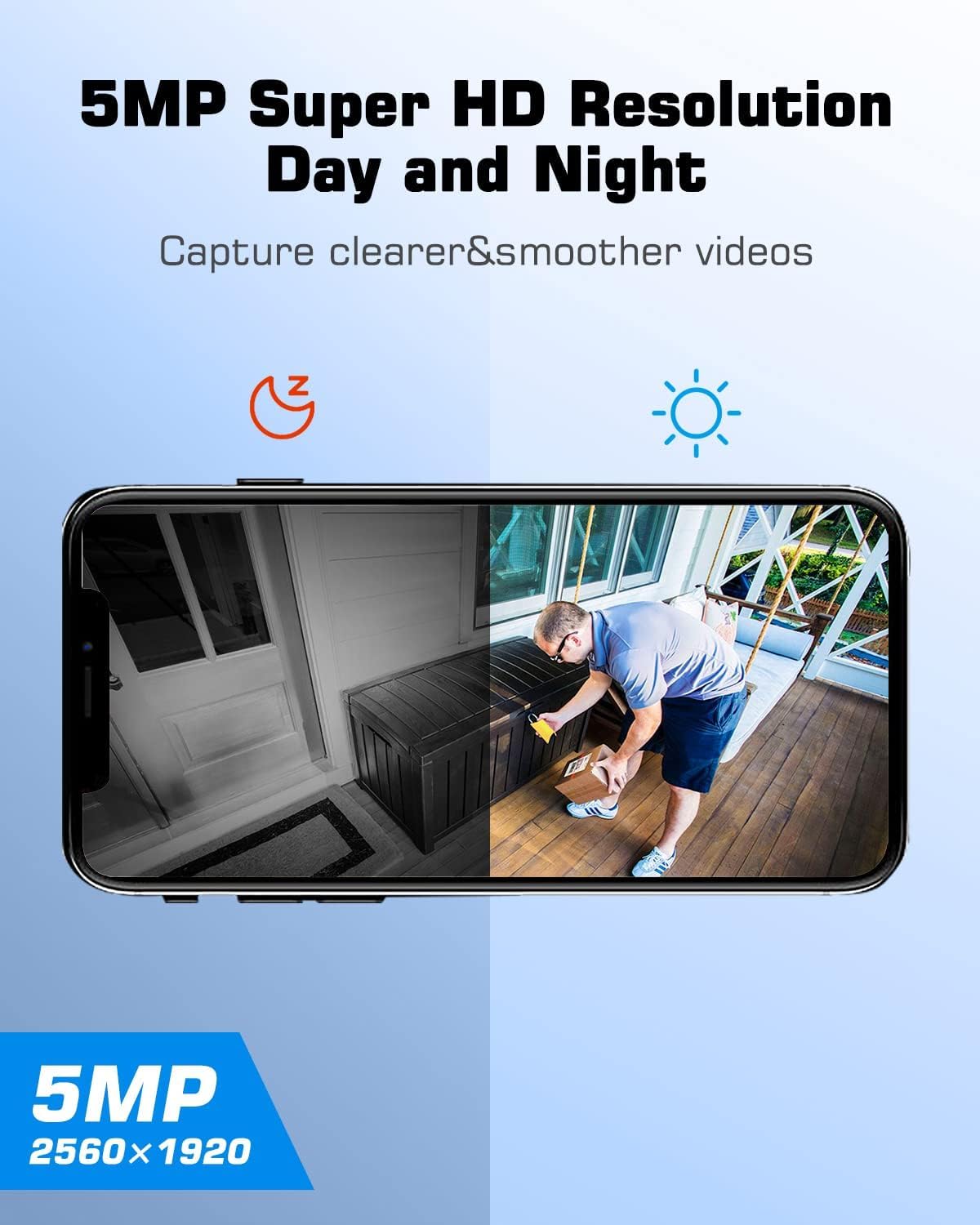
Figure 7: Comparison of day and night vision clarity.
4.4 Àudio bidireccional
Utilize the two-way audio feature to communicate with visitors or deter intruders. Tap the microphone icon in the app's live view to speak through the camera's speaker, and listen through its built-in microphone.

Figure 8: Demonstrates the two-way audio feature via the app.
4.5 PIR Human Detection and Alerts
The camera employs Passive Infrared (PIR) technology for accurate human detection, minimizing false alarms. When human motion is detected, the camera can automatically trigger a smart siren, activate spotlights, and send instant alerts to your mobile device. You can adjust the detection sensitivity in the app settings.

Figure 9: Illustrates the smart siren and instant alert system.

Figure 10: Adjustable detection sensitivity settings.
4.6 Smart Home Integration (Alexa/Google Assistant)
Integrate your ANRAN camera with Amazon Alexa or Google Assistant for convenient voice control. Once linked, you can ask your smart assistant to display the live feed from your camera on compatible smart displays.

Figure 11: ANRAN camera compatibility with Alexa.
5. Manteniment
5.1 Solar Panel Cleaning
Regularly clean the surface of the solar panel to ensure maximum sunlight absorption. Dust, dirt, and debris can reduce charging efficiency. Use a soft, damp cloth to gently wipe the panel.
5.2 Neteja de la lent de la càmera
Keep the camera lens clean for optimal image clarity. Use a soft, lint-free cloth to wipe away any smudges or dirt. Avoid abrasive materials that could scratch the lens.
5.3 actualitzacions de microprogramari
Consulteu periòdicament l'aplicació ANRAN per obtenir actualitzacions de firmware disponibles. Mantenir el firmware de la càmera actualitzat garanteix que disposeu de les funcions, millores de seguretat i correccions d'errors més recents.
6. Solució De Problemes
6.1 La càmera no es connecta a la Wi-Fi
- Assegureu-vos que la vostra xarxa Wi-Fi sigui de 2.4 GHz. La càmera no admet Wi-Fi de 5 GHz.
- Comproveu la intensitat del senyal Wi-Fi a la ubicació de la càmera. Si cal, acosteu la càmera al router.
- Verifiqueu que la contrasenya del Wi-Fi introduïda a l'aplicació sigui correcta.
- Reinicieu el router Wi-Fi i la càmera.
6.2 Battery Not Charging / Low Battery
- Ensure the solar panel is clean and receives direct sunlight for several hours daily.
- Comproveu la connexió entre el panell solar i la càmera.
- If sunlight is insufficient, manually charge the camera using the USB cable and a 5V/2A power adapter.
- Verify the ambient temperature is within the camera's operating range. Extreme cold can affect battery performance.
6.3 Mala qualitat d'imatge
- Netegeu la lent de la càmera per eliminar qualsevol brutícia o taques.
- Ensure adequate lighting in the monitored area, especially for color night vision.
- Check your Wi-Fi connection speed. A weak signal can lead to choppy video.
6.4 Falses alarmes
- Adjust the PIR detection sensitivity in the ANRAN app.
- Ensure the camera is not pointed at areas with frequent movement from non-human sources (e.g., trees swaying, busy roads).
7. Especificacions
| Característica | Especificació |
|---|---|
| Nom del model | P03 |
| Resolució de captura de vídeo | 1920p (5MP) |
| Tecnologia de connectivitat | Sense fil (Wi-Fi de 2.4 GHz) |
| Font d'alimentació | Alimentació solar, bateria |
| Viewangle ing | 110 Degrees (Fixed Lens) |
| Interval de panoràmica/inclinació | 355° horitzontal, 140° vertical |
| Gamma de visió nocturna | 55 peus (aprox. 15 metres) |
| Velocitat de fotogrames | 25 fotogrames per segon |
| Nivell de resistència a l'aigua | IP65 (impermeable) |
| Pes de l'article | 930 g |
| Bateries | Necessites 2 piles AA (incloses) |
| Dispositius compatibles | Amazon Alexa, Google Assistant |
8. Garantia i Suport
8.1 Garantia del producte
The ANRAN Solar Security Camera Outdoor comes with a 1 anys de garantia from the date of purchase. This warranty covers manufacturing defects and ensures the product functions as described under normal use. Please retain your proof of purchase for warranty claims.
8.2 Atenció al client
For any questions, technical assistance, or warranty claims, please contact ANRAN customer support. ANRAN provides multi-channel service including email, phone, and live chat, available 7x24 hours online. Our dedicated team is ready to provide high-quality and considerate service.

Figure 12: ANRAN after-sales service details.
You can find contact information in the user manual provided with your product or by visiting the official ANRAN weblloc.


