1. Informació de seguretat
Please read all safety instructions carefully before using the VILTROX Sprite 15B LED Panel Video Light. Retain this manual for future reference.
- No exposeu el dispositiu a l'aigua ni a una humitat excessiva.
- Avoid direct eye exposure to the LED light source, as it can cause discomfort or damage.
- Do not disassemble or modify the product. Repairs should only be performed by authorized service personnel.
- Mantingueu el dispositiu lluny de fonts de calor i de la llum solar directa.
- Use only the specified battery (NP-F550) and charging cable (USB-C) provided or recommended by VILTROX.
- Elimineu les piles d'acord amb la normativa local. No les incinereu.
2. Producte acabatview
The VILTROX Sprite 15B is a versatile 18W CCT LED panel video light designed for photography and videography. It offers adjustable color temperature, dimmable brightness, and smart control features.

Image: The VILTROX Sprite 15B LED light, showcasing its compact design, removable battery, and a smartphone displaying its control application.
2.1 Característiques clau
- Mode CCT: Adjustable color temperature from 2800K (warm) to 6800K (cool) to match various lighting conditions.
- Constant Power Output: Maintains a consistent 18W power output even when adjusting color temperature.
- Control de l'aplicació Bluetooth: Control multiple devices simultaneously via a smartphone app for simplified lighting setup.
- Efectes especials d'il·luminació: Includes 10 pre-programmed lighting effects for creative video production.
- Precise Dimming: Brightness adjustable from 1% to 100% with 100-level accuracy for smooth transitions and accurate light levels.
- Bateria recarregable: Equipped with a 2200 mAh Lithium Battery, providing approximately 80 minutes of operation at maximum brightness.
- Alimentació USB-C: Supports Type-C power input for flexible charging and continuous power options.
- Sortida de llum suau: Features a professional frosted surface to diffuse glare, producing soft and uniform illumination.
2.2 Què hi ha a la caixa

Image: Contents of the VILTROX Sprite 15B package. Shown are the LED light panel, a cold shoe adapter, an NP-F550 battery, and a USB-C charging cable.
- VILTROX Sprite 15B LED Light
- Adaptador de sabates fredes
- Bateria NP-F550
- Cable de càrrega USB-C
2.3 Identificació de components
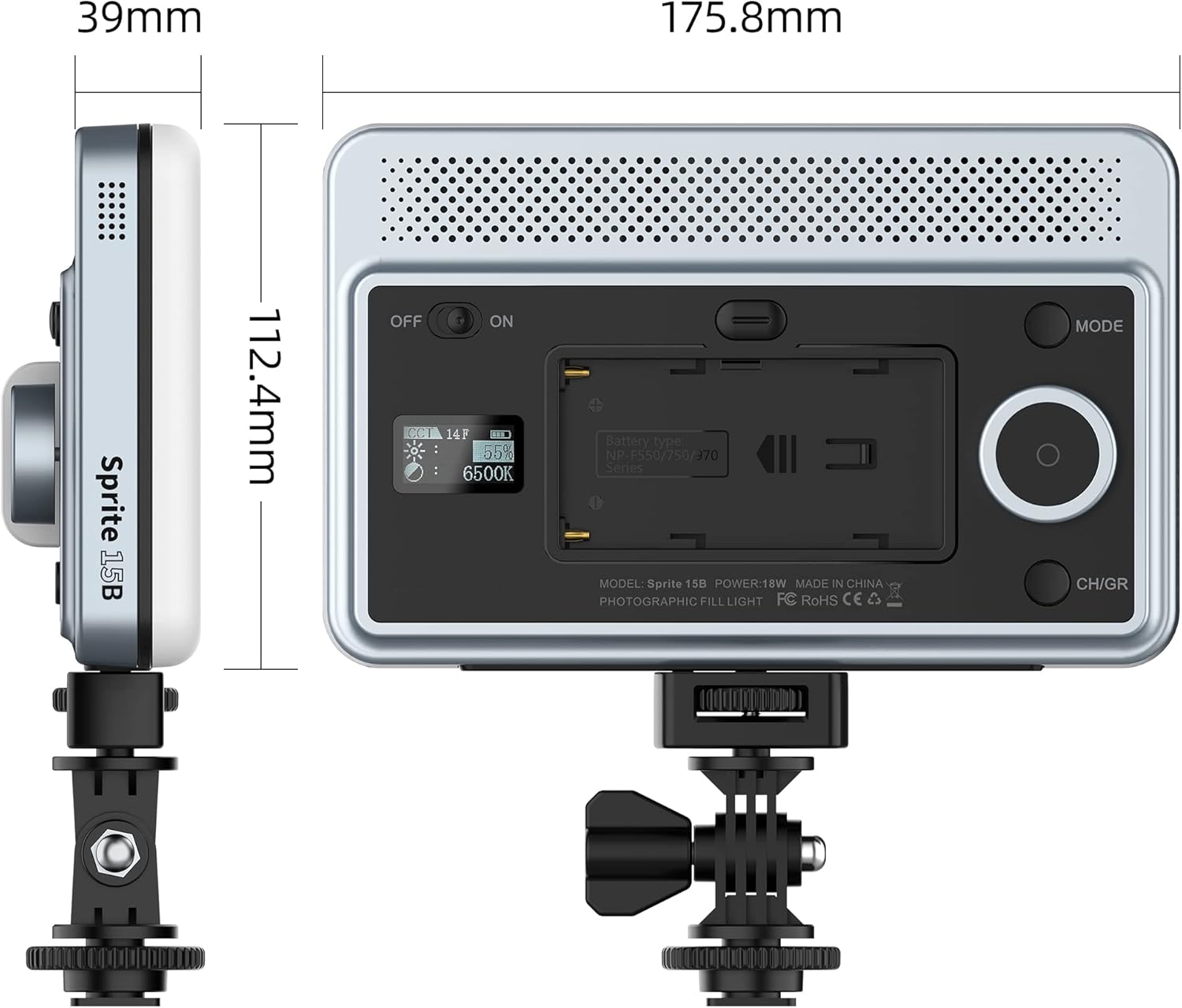
Image: Rear panel of the VILTROX Sprite 15B. Visible components include the ON/OFF switch, battery compartment, mode button, control dial, and CH/GR (Channel/Group) button.
- Interruptor ON / OFF: Encén o apaga el dispositiu.
- Compartiment de la bateria: Houses the NP-F550 battery.
- Port USB-C: For charging and external power supply.
- Botó de mode: Toggles between CCT mode and special effects mode.
- Marcatge de control: Adjusts brightness, color temperature, or effect parameters. Press to confirm selections.
- Botó CH/GR: Selects channel or group for multi-light control.
- Pantalla de visualització: Shows current settings (brightness, color temperature, battery level, channel/group).
3. Configuració
3.1 Instal·lació de la bateria
- Locate the battery compartment on the rear of the light.
- Insert the NP-F550 battery into the compartment, ensuring the contacts align correctly.
- Empenyeu suaument la bateria fins que encaixi al seu lloc.
3.2 Muntatge de la llum

Image: The VILTROX Sprite 15B LED light attached to a camera via its cold shoe adapter, demonstrating typical usage.
- Attach the cold shoe adapter to the 1/4-inch screw hole at the bottom of the LED light.
- Securely tighten the adapter.
- Slide the cold shoe adapter into your camera's hot shoe mount or a compatible light stand.
- Tighten the locking ring on the cold shoe adapter to secure the light in position.
3.3 Càrrega de la bateria

Image: The VILTROX Sprite 15B LED light connected to a USB-C charging cable, indicating the charging process.
- Connect the provided USB-C charging cable to the USB-C port on the light.
- Connect the other end of the cable to a compatible USB power adapter (5V/2A or 9V/2A recommended).
- The display screen will indicate the charging status.
- The light can be used while charging.
4. Funcionament
4.1 Encès/Apagat
Feu lliscar el ON/OFF switch located on the rear panel to the "ON" position to power on the light. Slide it to "OFF" to power off.
4.2 Ajust de la temperatura del color (mode CCT)
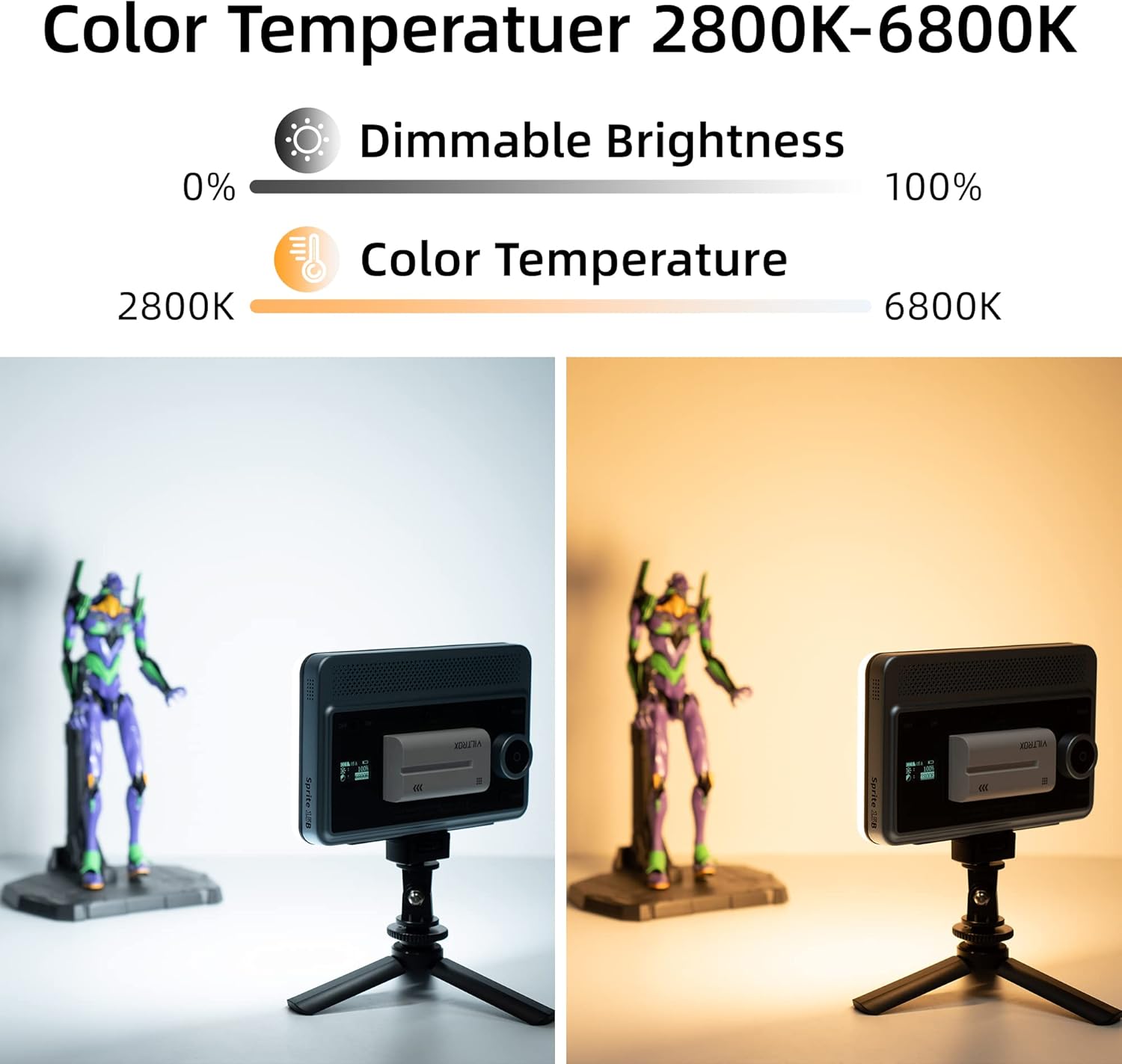
Image: Demonstrates the adjustable color temperature range of the VILTROX Sprite 15B, showing a warm 2800K light on the left and a cool 6800K light on the right.
- Ensure the light is in CCT mode. If not, press the MODE button until "CCT" or a similar indicator appears on the display.
- Gira el Marcatge de control to adjust the color temperature between 2800K and 6800K. The display will show the current Kelvin value.
4.3 Ajust de la brillantor
- In CCT mode, press the Marcatge de control once to switch to brightness adjustment. The brightness percentage will blink on the display.
- Gira el Marcatge de control per ajustar la brillantor del 1% al 100%.
- Premeu el botó Marcatge de control again to confirm the setting or to switch back to color temperature adjustment.
4.4 Special Effects Mode
- Premeu el botó MODE button to cycle through available modes until you reach the special effects mode.
- Gira el Marcatge de control to select from the 10 available lighting effects.
- Premeu el botó Marcatge de control to enter the selected effect's parameters (if applicable) and adjust them.
4.5 Control de l'aplicació Bluetooth

Image: A user controlling two VILTROX Sprite 15B LED lights remotely via a smartphone application, demonstrating the Bluetooth control feature in a content creation setting.
- Download the VILTROX app from your smartphone's app store.
- Ensure Bluetooth is enabled on your smartphone and the LED light is powered on.
- Open the VILTROX app and follow the on-screen instructions to pair your device(s).
- Use the app interface to adjust brightness, color temperature, select special effects, and manage multiple lights by assigning them to channels or groups using the CH/GR button on the light.
5. Manteniment
- Neteja: Use a soft, dry cloth to clean the light panel and body. Do not use abrasive cleaners or solvents.
- Cura de la bateria: For optimal battery life, avoid fully discharging the battery frequently. Charge the battery regularly, even if not in use for extended periods.
- Emmagatzematge: Store the light in a cool, dry place away from direct sunlight and extreme temperatures. Remove the battery if storing for a long duration.
6. Solució De Problemes
| Problema | Causa possible | Solució |
|---|---|---|
| La llum no s’encén. | La bateria està esgotada o no està instal·lada correctament. | Ensure battery is fully charged and correctly inserted. Check ON/OFF switch position. |
| La bateria no es carrega. | Faulty USB-C cable or power adapter. | Try a different USB-C cable and power adapter. Ensure the power adapter meets specifications (5V/2A or 9V/2A). |
| L'aplicació Bluetooth no es pot connectar. | Bluetooth is off on phone or light, or app issue. | Ensure Bluetooth is enabled on both devices. Restart the app and the light. Try re-pairing the device in the app. |
| La sortida de llum és inconsistent o parpelleja. | Bateria baixa o problema intern. | Charge the battery fully. If the problem persists, contact customer support. |
7. Especificacions
| Característica | Detall |
|---|---|
| Número de model | Sprite 15B |
| Poder | 18W |
| Interval de temperatura de color | 2800K - 6800K |
| Brillantor màxima | 1720 Lux @ 0.5m |
| CRI (índex de reproducció del color) | ≥95 |
| Rang de regulació | 1% - 100% |
| Angle del feix | 120° |
| Tipus de bateria | NP-F550 Lithium Ion (2200 mAh) |
| Durada de la bateria (brillantor màxima) | Aprox. 80 minuts |
| Font d'alimentació | USB-C (5V/2A, 9V/2A) |
| Pes de l'article | 1.28 lliures (aprox. 580 g) |
| Dimensions (L x A x A) | 175.8 mm x 112.4 mm x 39 mm (aprox.) |
| Fabricant | Shenzhen Jueying Technology Co, Ltd |
Nota: les especificacions estan subjectes a canvis sense previ avís.
8. Garantia i Suport
VILTROX products come with a standard manufacturer's warranty. For detailed warranty information, product support, or service inquiries, please visit the official VILTROX weblloc o poseu-vos en contacte amb el seu servei d'atenció al client.
Official VILTROX Weblloc: www.viltrox.com
VILTROX Amazon Store: VILTROX Official Store


