1. Introducció
The Andonstar AD409 Max Digital Microscope is a versatile tool designed for detailed observation and precision work, particularly in professional PCB soldering and maintenance. It features a 10.1-inch LCD screen, 300X magnification, and multiple output options including HDMI, PC, and WiFi. This manual provides essential information for setting up, operating, maintaining, and troubleshooting your device.
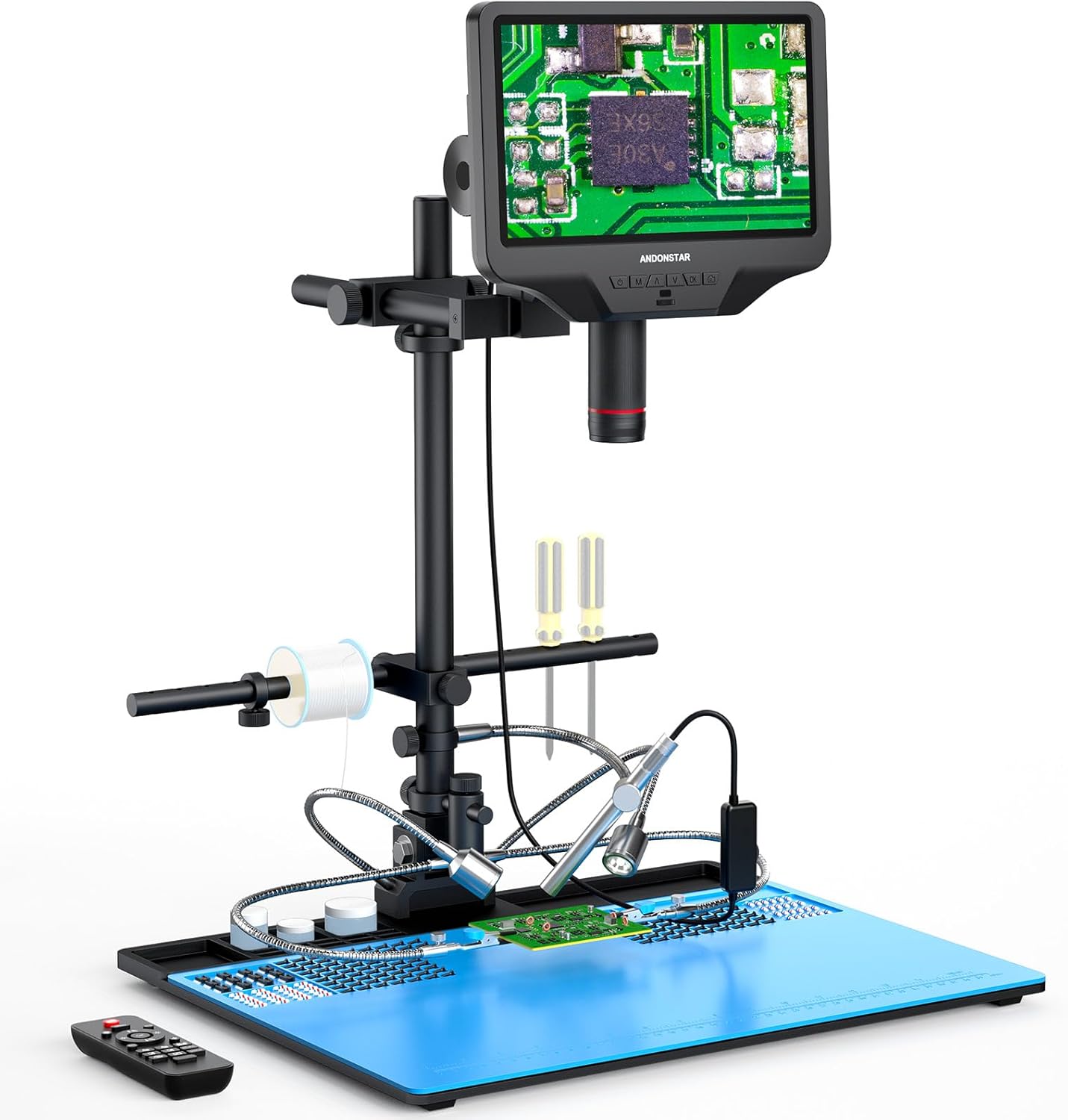
Figure 1.1: Andonstar AD409 Max Digital Microscope with its comprehensive soldering station setup.
2. Contingut del paquet
Verifiqueu que tots els elements que s'enumeren a continuació siguin presents al vostre paquet:
- Microscope Monitor (10.1'' LCD display)
- UV Filter (pre-assembled)
- Feix
- Columna
- Base (with integrated light)
- Repair Mat
- Comandament a distància sense fil
- Adaptador d'alimentació
- Cable d'alimentació
- Cable HDMI
- Cable USB
- Portaeines
- Soldar les mans d'ajuda
- Endoscopi
- Braç ajustable
- Endoscope Accessories
- Manual d'usuari
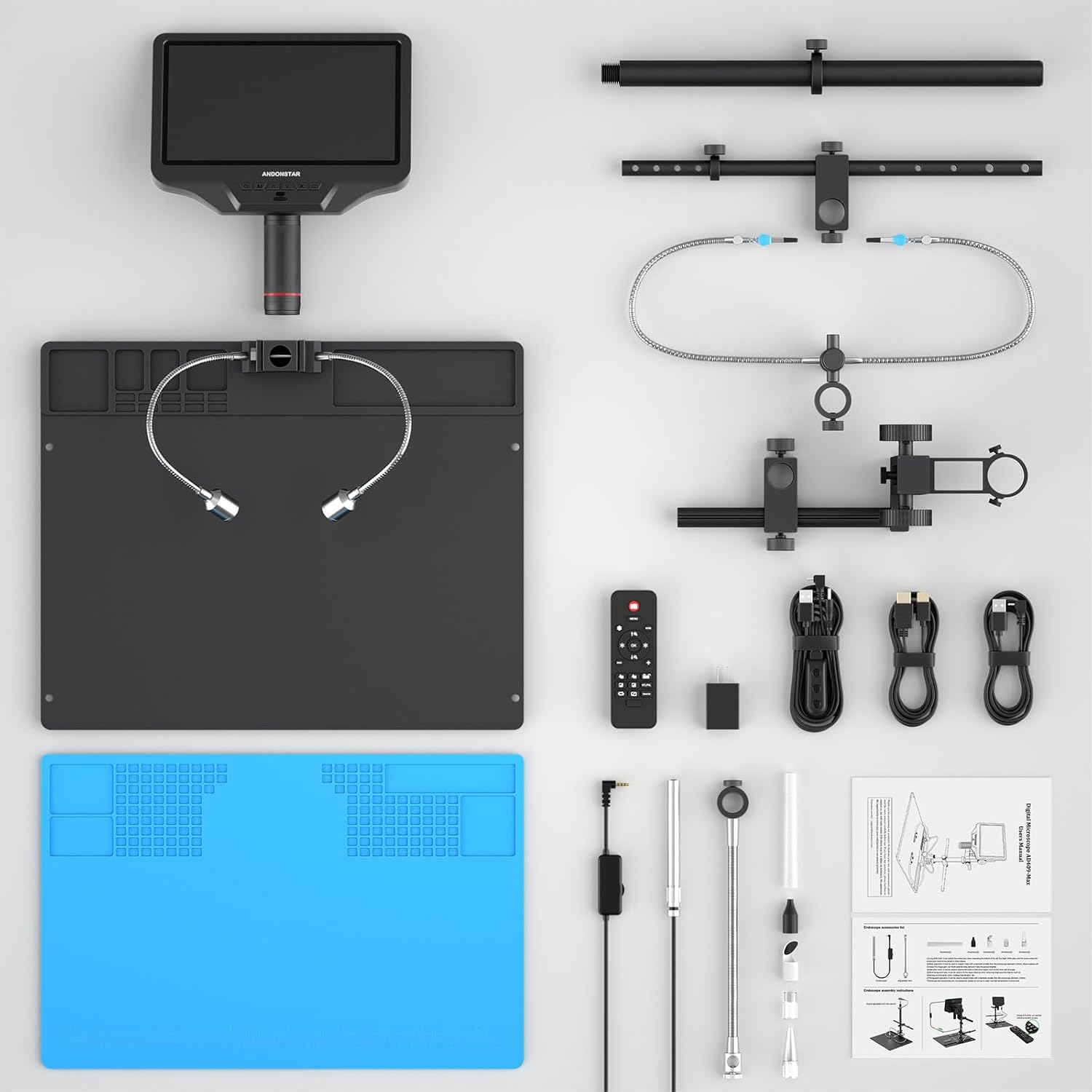
Figura 2.1: Mésview of all included components for the AD409 Max Digital Microscope.
3. Instruccions de configuració
3.1 Muntatge
- Attach the column to the base plate.
- Secure the microscope monitor to the column using the provided bracket and thumb screws.
- Install the beam and adjustable arm for the tool holder and soldering helping hands.
- Place the repair mat on the base plate.
- Connect the LED lights and endoscope to their respective ports.

Figure 3.1: Visual guide for assembling the microscope stand and attaching accessories.
3.2 Encès inicial
Connect the power adapter to the microscope and a power outlet. Press the power button on the monitor to turn on the device. The 10.1-inch IPS screen will display the live microscopic view.
3.3 Instal·lació del programari per a PC
To utilize the professional measurement software and PC output features, install the dedicated software on your Windows PC. Ensure the software is installed before connecting the microscope via the separate USB cable (not the one with the dimmer). Select 'PC Camera' mode on the microscope and then 'USB Camera' in the software.

Figure 3.2: Illustrated guide for connecting the microscope to a PC and using the measurement software.
4. Instruccions de funcionament
4.1 Funcionament bàsic
- Ajust del focus: Rotate the metal focusing wheel on the microscope body to achieve a clear image.
- Distància de treball: Use the bracket knob to fine-tune the working distance between the lens and the object.
- Llums LED: The 2 side lights on the metal base plate have 8 intensity levels. Adjust brightness and angle for optimal illumination.

Figure 4.1: Controls for focus, object distance adjustment, and remote control functions.
4.2 Output Methods
The microscope supports multiple output methods:
- Sortida HDMI: Connect an HDMI cable for ultra-high definition 2160P video recording on an external display.
- PC Output: Connect to a Windows PC via USB for viewing, measurement, photo, and video capture (endoscope not supported in PC mode).
- WiFi: Connect wirelessly for viewen dispositius compatibles.

Figure 4.2: The microscope supports HDMI, PC, and WiFi connectivity for various display and recording needs.
4.3 Using the Endoscope
The included endoscope provides a 360° all-around view, allowing observation of component sides and inside pipes, eliminating blind spots. Connect the endoscope to its dedicated interface on the monitor. Use the 'NTL/PAL' button on the remote or monitor to switch between microscope and endoscope views.

Figure 4.3: The endoscope offers a comprehensive 360-degree view for detailed inspection.

Figure 4.4: Switching between the main microscope view and the endoscope view a la pantalla.
4.4 Control remot sense fils
The wireless remote control allows for convenient operation from a distance. Functions include image adjustment, digital zoom, and switching between microscope and endoscope views.
4.5 Captura d'imatges i vídeo
Capture and store images or videos of the microscopic world directly to a Micro SD card (Class 10 high-speed memory card recommended, up to 64G). Use the dedicated buttons on the monitor or remote for capture.
Video 4.1: An official product video demonstrating the Andonstar AD409-Max Super Soldering Digital Microscope in use, highlighting its features and capabilities.
5. Manteniment
5.1 Cura de les lents
The AD409 Max features a high-quality metal lens with a unique UV filter. This filter protects the lens from soldering heat, smoke, and dust. Regularly clean the UV filter and lens with a soft, lint-free cloth and appropriate lens cleaning solution to maintain optimal image clarity.

Figure 5.1: The industrial metal lens and UV filter are designed for durability and protection against environmental factors.
5.2 Neteja general
Netegeu el cos i el suport del microscopi amb un drap sec o lleugerament humit.amp tela. Eviteu utilitzar productes químics o materials abrasius que puguin danyar l'acabat.
6. Solució De Problemes
- Display Resets/Power Issues: If the display resets when changing views or adjusting LED lights, ensure the power supply is adequate and all connections are secure. If issues persist, contact customer support.
- Soldering Mat Not Lying Flat: The repair mat is designed to fit securely. If it does not lay flat, ensure it is correctly aligned with the base plate's mounting holes.
- No Image on PC: Verify that the PC software is installed, the correct USB cable is used, and 'PC Camera' mode is selected on the microscope and 'USB Camera' in the software.
- Imatge poc clara: Adjust the focus wheel and working distance. Ensure the lens and UV filter are clean. Adjust LED light brightness and angle for optimal illumination.
7. Especificacions
| Nom del model | AD409-Max |
| Dimensions del producte | 18.1 x 14.6 x 18.7 polzades |
| Pes de l'article | 13.47 lliures |
| Mostra | 10.1-inch IPS LCD Screen |
| Ampliació màxima | 300x |
| Gravació de vídeo | 2160P Ultra-High Definition |
| Output Methods | HDMI, PC (Windows), WiFi |
| Tipus de font de llum | LED (8 levels adjustable) |
| Material | Metall |
| Color | Negre |
| Dispositius compatibles | Laptop, Personal Computer (Windows), Television |
8. Garantia i Suport
Andonstar provides professional after-sales service. For any inquiries, technical assistance, or support needs, please contact our customer service team. We offer 24-hour support to ensure your satisfaction with the product.


