Informació important de seguretat
Please read all instructions carefully before using the Lexibook Paw Patrol Karaoke CD Player. Keep this manual for future reference.
- No exposeu la unitat a la pluja o la humitat.
- No obstruïu cap obertura de ventilació.
- Utilitzeu només accessoris/accessoris especificats pel fabricant.
- Disconnect the apparatus during lightning storms or when unused for long periods.
- Ensure proper battery installation and disposal.
Contingut del paquet
Verifiqueu que tots els elements siguin presents al paquet:
- Lexibook Paw Patrol Karaoke CD Player
- 2 Micròfons
- Adaptador d'alimentació
- Manual d'instruccions
Producte acabatview
The Lexibook Paw Patrol Karaoke CD Player is designed for children to enjoy music and sing along with their favorite characters. It features a front-load CD player, two microphones, an LED display, and a headphone jack for private listening.

Imatge 1: The Lexibook Paw Patrol Karaoke CD Player, featuring a blue and red design with Paw Patrol characters, and two attached red microphones.
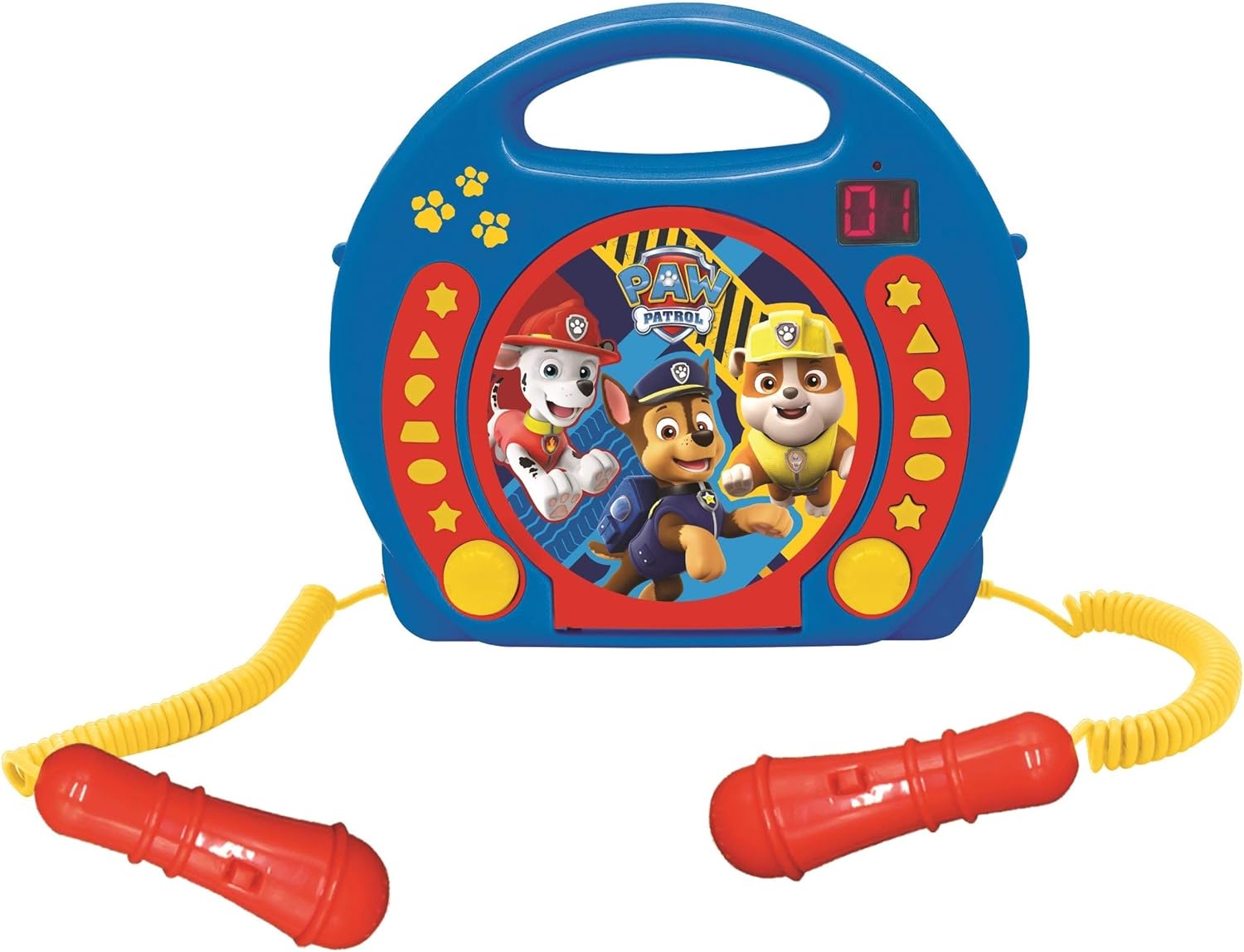
Imatge 2: A top-down perspective of the karaoke CD player, showing the central Paw Patrol shield design, control buttons, and the two microphones.
Vídeo 1: Un producte acabatview video demonstrating the features and design of the Lexibook Paw Patrol Karaoke CD Player.
Configuració
Connexió a la font d'alimentació
- Locate the DC IN jack on the back of the unit.
- Insert the small plug of the provided power adapter into the DC IN jack.
- Plug the other end of the power adapter into a standard wall outlet.
Instal·lació de la bateria
For portable use, the unit requires 4 'C' batteries (not included).
- Localitzeu el compartiment de la bateria a la part inferior de la unitat.
- Amb un tornavís, obriu la tapa del compartiment de la bateria.
- Insert 4 'C' batteries, ensuring correct polarity (+/-).
- Substituïu la tapa del compartiment de la bateria i fixeu-la amb el cargol.
Instruccions de funcionament
Reproducció de CD
- Open the CD compartment cover located on the top of the unit.
- Col·loqueu un CD a l'eix amb l'etiqueta cap amunt.
- Tanqueu bé la tapa del compartiment del CD.
- Press the 'PLAY/PAUSE' button to start playback.
- Use the 'SKIP' buttons (forward/backward) to navigate between tracks.
- Press the 'STOP' button to end CD playback.
Ús dels micròfons
- Ensure the microphones are securely plugged into their respective jacks.
- During CD playback, speak or sing into the microphones.
- Adjust the microphone volume using the dedicated volume control (if available) or the main volume control.
Funció de programació
The programming function allows you to create a custom playlist of tracks.
- With the CD stopped, press the 'PROGRAM' button.
- Use the 'SKIP' buttons to select the desired track.
- Press 'PROGRAM' again to add the track to the playlist.
- Repeat steps 2 and 3 to add more tracks.
- Press 'PLAY' to start playing your programmed sequence.
Ús d'auriculars
- Plug standard 3.5mm headphones (not included) into the headphone jack.
- Ajusteu el volum a un nivell d'escolta còmode.
- Note: Using headphones will mute the main speakers.
Manteniment
- Netegeu la unitat amb un drap suau i sec. No utilitzeu productes de neteja abrasius ni dissolvents.
- Keep the CD compartment free of dust and debris.
- Guardeu la unitat en un lloc fresc i sec quan no s'utilitzi.
Resolució de problemes
| Problema | Solució |
|---|---|
| La unitat no s'encén. | Check power adapter connection or ensure batteries are correctly installed and not depleted. |
| El CD no es reprodueix. | Ensure the CD is clean, not scratched, and correctly placed in the compartment. Close the compartment lid completely. |
| Microphones are not working. | Verify microphones are securely plugged in. Check microphone volume levels. |
| El so està distorsionat o massa baix. | Adjust the main volume control. Ensure the CD is not damaged. |
Especificacions
| Característica | Detall |
|---|---|
| Dimensions del producte | 10.35 x 3.98 x 8.27 polzades |
| Pes de l'article | 1.63 lliures |
| Edat recomanada pel fabricant | 3 anys i més |
| Bateries | Necessites 4 piles C (no incloses) |
| Característica especial | Pantalla LED |
| Color | Blau / Vermell |
| Components inclosos | Power adapter, CD player, handle, 2 microphones |
| Data de llançament | 11 d'abril de 2023 |
Garantia i Suport
Aquest producte ve amb un 2 anys de garantia limitada from the manufacturer, Lexibook.
For technical support, warranty claims, or further assistance, please contact Lexibook customer service. Refer to the product packaging or the official Lexibook weblloc web per obtenir la informació de contacte més actualitzada.


