1. Producte acabatview
The AINAVI 10.2-inch Android 12 Car Radio Stereo Head Unit is designed to upgrade the in-car entertainment and navigation experience for Honda Accord 7th Generation vehicles (2003-2007). It features a high-definition QLED touch screen, an 8-core processor, and supports wireless CarPlay and Android Auto for seamless smartphone integration. The unit also includes advanced audio processing with a 48-band EQ and DSP, along with support for a 1080P rear view càmera.

Figure 1: AINAVI 10.2 inch Android 12 Car Radio Stereo Head Unit, showing the main display, included rear camera, and a smartphone screen demonstrating Android Auto and CarPlay connectivity.

Figure 2: Illustration of the unit's internal components, emphasizing the 8-core processor, Android 12 operating system, 3GB RAM, and 32GB ROM for powerful performance and storage.
2. Què s'inclou
Verifiqueu que tots els components siguin presents al paquet abans de començar la instal·lació.
- Car Head Unit (1280*720) with Frame for Honda Accord 7th *1
- Manual d'usuari *1
- Cable d'alimentació *1
- AHD 1080P posterior View Càmera *1
- Micròfon *1
- Blue Frame Removal Tool *1
- GPS Antenna *1
- USB 4Pin Cable *1
- USB 6Pin Cable *1
- Cable RCA *1
- 24 Hours Engineer--Pre-sale and after-sale Services (Support)

Figure 3: Visual representation of all items included in the product package, including the head unit, frame, cables, and accessories.
3. Configuració i instal·lació
3.1 Notes generals d'instal·lació
Professional installation is recommended. Ensure the vehicle's power is disconnected before starting installation. Refer to your vehicle's specific disassembly instructions for removing the factory radio.
3.2 Connecting Wireless CarPlay/Android Auto
- Open the Bluetooth function on your iPhone or Android phone and on the Car Radio.
- Connect your mobile phone and car radio via Bluetooth. Use the password "0000" if prompted.
- Open the car radio application "T-Link" and select CarPlay (for iPhone) or Android Auto (for Android).

Figure 4: Depiction of the wireless CarPlay and Android Auto functionality, showing seamless integration between the head unit and a smartphone.
3.3 Connecting Wired Android Auto
- Connect your phone to the car radio via a 6-pin USB adapter.
- Install the "android auto" app on your Android phone (some Android phones support built-in Android Auto).
- Connect your mobile phone and radio through the original Android USB data cable.
- Open the Application "T-Link" and wait for it to automatically connect.
3.4 Using Wireless/Wired AirPlay MirrorLink
- Click on the T-Link app. A blue function switch button will be displayed in the bottom right corner, allowing you to select wired or wireless Mirroring for iPhone or Android.
- Wired iPhone Airplay/Android Mirroring: Connect the original power cord of your phone (IOS/Android) to the 4-pin USB interface to achieve wired Mirroring/Airplay.
- iPhone Wireless Airplay: Open your phone’s hotspot, connect to the car radio, and click iPhone Airplay.
- Duplicació sense fil d'Android: Download a Z-link APK. Connect to Bluetooth, open the phone hotspot, click on Z-link, and then click on "enable mirroring."

Figure 5: Demonstration of the mobile phone mirroring (Tlink) feature, allowing display of smartphone content on the head unit screen for both iPhone and Android devices.
4. Instruccions de funcionament
4.1 Navigation Service
The unit supports most satellite navigation services, with 5G WiFi enhancing accuracy. Utilize Google Maps for 2D and 3D perspectives, various route options (driving, cycling, pedestrian), obstacle broadcasts, and voice guidance for intelligent navigation.
Video 1: Demonstration of Google Earth and Google Maps functionality on the AINAVI head unit, showcasing navigation capabilities.
4.2 Funció de pantalla dividida
The powerful 8-core processor supports simultaneous operation of two applications using the split-screen function. This allows for convenient multitasking, such as running navigation and a media player concurrently without lag.

Figure 6: The split-screen feature in action, displaying two applications simultaneously for enhanced multitasking while driving.
Funcions d'àudio 4.3 (DSP i equalitzador)
The unit features a professional DSP (Digital Sound Processor) with a built-in 48-band EQ, allowing for extensive sound customization. You can adjust the sound point according to seating positions for optimal audio experience. Available sound modes include Normal, Jazz, Pop, Classical, Heavy Metal, Vocal, and Soft. Additionally, there are 6 surround sound patterns, Bass Boost, and individual speaker volume control.
- EQ Scene Mode: Choose from Normail, Jazz, Heavy metal, PoP, Classical, or custom modes.
- So envoltant: Includes Full Car Mode, Driver Mode, Copilot Mode, Passenger Mode 1, 2, and 3. Adjust sound delay up to 5ms.
- Control de zona: Control volume and frequency for speakers in 5 directions.
- Sound Section: Adjust High Freq, Compression, Voice, Loudness (Low, Medium, High), and Timbre.
- Filtre de baix: Enhance bass from 0-250 for a powerful audio experience.

Figure 7: The Intelligent Tone Adjustment System interface, demonstrating the extensive audio customization options available through the DSP and 48-band EQ.
5. Darrera View Funcionalitat de la càmera
The included AHD 1080P Rear View Camera provides clear, real-time video when the vehicle is in reverse gear. The display includes an astern ruler line for precise positioning and supports astern trajectory if your car is equipped with this feature, enhancing safety during parking and reversing maneuvers.
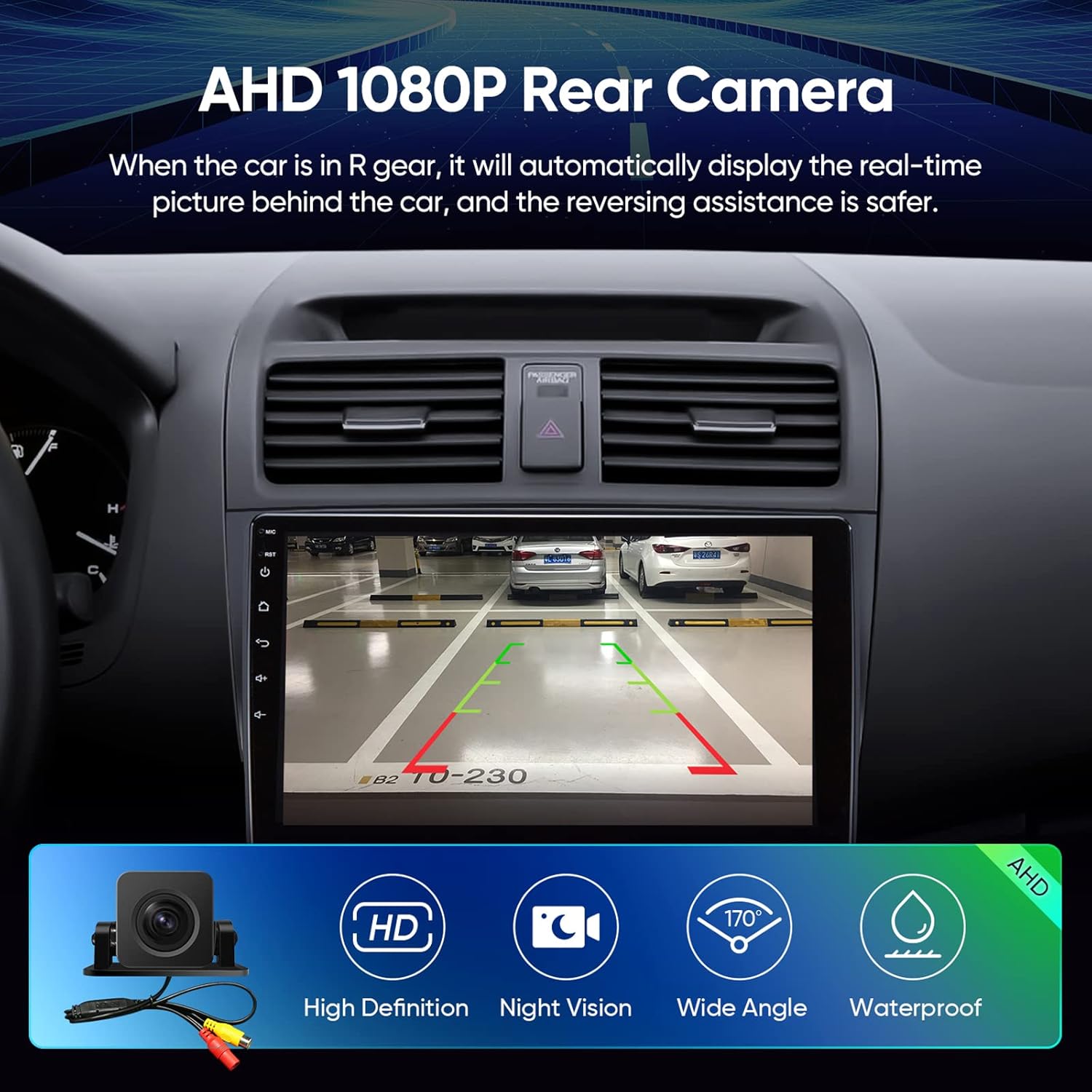
Figure 8: The AHD 1080P Rear Camera display, illustrating its high-definition view, parking assistance lines, and key features like night vision and wide-angle capture.
6. Connectivitat
6.1 connexions Wi-Fi
The unit supports 2.4GHz and 5GHz Wi-Fi networks, providing faster internet speeds for smooth application usage and real-time traffic information.
6.2 Bluetooth 5.0
Integrated Bluetooth 5.0 ensures stable and fast data transmission for hands-free calling, music streaming, and other connected features.
Connectivitat USB 6.3
Equipped with dual USB ports (4-pin and 6-pin) for various connections, including wired Android Auto and media playback. The unit also supports USB to RCA output for connecting external displays like headrest monitors (requires ASIN: B0CCV2GC25).
7. Manteniment
To ensure the longevity and optimal performance of your AINAVI head unit, follow these maintenance guidelines:
- Neteja de pantalla: Feu servir un drap suau i sense borrissol per netejar suaument la pantalla. Per a taques difícils, fregueu lleugeramentampNetegeu el drap amb aigua o un netejador de pantalles. Eviteu materials abrasius o productes químics agressius.
- Eliminació de pols: Regularly clean dust from the unit's vents and buttons using a soft brush or compressed air.
- Actualitzacions de programari: Periodically check for and install software updates to ensure system stability and access to new features.
- Control de temperatura: Avoid exposing the unit to extreme temperatures for prolonged periods. The unit is designed to operate within a wide temperature range (-4°F to 158°F / -20°C to 70°C), but prolonged exposure to direct sunlight or extreme cold can affect performance.
- Gestió d'energia: Ensure proper vehicle electrical system health. Avoid frequent power fluctuations.
8. Solució De Problemes
This section addresses common issues you might encounter with your AINAVI head unit. If the problem persists, please contact customer support.
| Problema | Causa possible | Solució |
|---|---|---|
| La unitat no s'encén. | Connexió d'alimentació fluixa, fusible fundit, problema amb la bateria del vehicle. | Comproveu tots els cables d'alimentació i les connexions. Inspeccioneu els fusibles del vehicle. Assegureu-vos que la bateria del vehicle estigui carregada. |
| No hi ha so dels altaveus. | Volume too low, mute activated, incorrect wiring, speaker issues. | Increase volume. Check if mute is on. Verify speaker wiring connections. Test with different audio sources. |
| El CarPlay/Android Auto no es connecta. | Bluetooth/Wi-Fi off, incorrect pairing, T-Link app issue, phone compatibility. | Ensure Bluetooth and Wi-Fi are enabled on both devices. Re-pair Bluetooth. Restart T-Link app. Check phone compatibility. |
| Senyal GPS feble o imprecis. | GPS antenna obstruction, poor satellite reception, outdated maps. | Assegureu-vos que l'antena GPS tingui una visió clara view of the sky. Update navigation maps if available. |
| La pantalla tàctil no respon. | System freeze, dirt on screen, hardware malfunction. | Restart the unit. Clean the screen. If problem persists, contact support. |
9. Especificacions
Key technical specifications for the AINAVI Car Radio Stereo Head Unit:
- Mida de la pantalla: 10.2 Inches (1280*720 resolution QLED screen)
- Sistema operatiu: Android 12
- Processador: CPU de 8 nuclis
- Memòria: 3 GB de RAM
- Emmagatzematge: ROM de 32 GB
- Connectivitat: Bluetooth 5.0, Wi-Fi (2.4GHz & 5GHz), USB (4Pin + 6Pin)
- Àudio: 48-band EQ, Professional DSP, Stereo Surround Audio Output
- Navegació: Supports Google Maps and other satellite services
- Entrada de càmera posterior: AHD 1080P (with parking guidelines)
- Característiques especials: Wireless CarPlay, Android Auto, MirrorLink (Airplay), Split Screen Function, Customizable Panel Light and Themes, Voice Control, RDS, FM Tuner, RCA Output.
- Pes de l'article: Aproximadament 5.17 lliures
- Dimensions del paquet: 15.63 x 13.35 x 5.55 polzades

Figura 9: Mésview of the unit's advanced features, including its Android 12 system, powerful 8-core processor, dual-band WiFi, high-quality QLED screen, and Bluetooth 5.0 connectivity.

Figura 10: Detallada view of the High Grade QLED Quantum Screen technology, highlighting its multi-layered construction for superior touch sensitivity and visual clarity.
10. Garantia i Suport
Garantia: The AINAVI Car Radio Stereo Head Unit comes with a 12 Months Manufacturer Guarantee.
Suport tècnic: Our professional technical support team is available to assist with installation and any other inquiries. Please contact us freely, and we will reply to you as soon as possible. Refer to the contact information provided with your purchase or on the official AINAVI weblloc.

Figure 11: AINAVI customer support is available to assist with any product-related questions or issues.

