Introducció
This manual provides comprehensive instructions for the installation, setup, operation, maintenance, and troubleshooting of your TEEHO TE002L Fingerprint Door Lock. Please read this manual carefully before installation and retain it for future reference.
Vídeo: Un overview of the TEEHO TE002L Fingerprint Door Lock, highlighting its key features and functionality.
Què s'inclou
The TEEHO TE002L Fingerprint Door Lock package includes the following components:
- Muntatge de teclat exterior
- Muntatge interior
- 2 manetes de palanca
- Pestillo de cèrcol
- Placa de muntatge
- Placa de vaga
- Screws and Installation Hardware
- Tecles de còpia de seguretat (2)
- Eina de restabliment
- Instruccions d'instal·lació

Image: All components included in the TEEHO TE002L Fingerprint Door Lock package, laid out for easy identification.
Instruccions d'instal·lació
Follow these steps to properly install your TEEHO TE002L Fingerprint Door Lock. Ensure your door is compatible with the lock's dimensions (1-3/8" to 2" thick, 2-3/8" or 2-3/4" backset).
1. Prepara la porta
- Remove any existing lock hardware from your door.
- Verify door dimensions and drill holes if necessary, according to the provided template (not included in this manual).

Image: Diagram illustrating door thickness and backset measurements for compatibility with the TEEHO TE002L lock, suitable for both left-handed and right-handed doors.
2. Instal·leu el pestell
- Insert the deadbolt latch into the door edge. Ensure the "TOP" indicator on the latch is facing upwards.
- Secure the latch with the provided screws.
3. Instal·leu el conjunt exterior
- Feed the cable from the exterior keypad assembly through the door hole and under the latch.
- Align the tailpiece with the center hole of the latch.
- Press the exterior assembly firmly against the door.
4. Instal·leu la placa de muntatge
- Place the mounting plate on the interior side of the door, aligning it with the exterior assembly.
- Secure the mounting plate using the long screws, ensuring the cable is not pinched.
5. Instal·leu el conjunt interior
- Connecteu el cable del conjunt exterior al conjunt interior.
- Ensure the thumbturn on the interior assembly is in the vertical (unlocked) position.
- Fixeu el conjunt interior a la placa de muntatge i fixeu-lo amb cargols.
- Test the thumbturn to ensure smooth operation.
6. Install the Lever Handles
- Insert the spindle of the exterior lever handle through the latch mechanism.
- Attach the interior lever handle, ensuring it engages correctly with the spindle.
- Secure both lever handles with the provided screws.
7. Instal·leu la placa de tancament
- Alineeu la placa de cop amb el pestell del marc de la porta.
- Secure the strike plate with the provided screws.
Video: Detailed installation guide for the TEEHO TE002L Fingerprint Door Lock, demonstrating each step from preparing the door to securing the components.
Configuració i Programació
After installation, you need to set up and program your lock. The default master code is 12345678. It is required that you change it to a code of your own before programming any other features.
1. Restore to Factory Settings (Initial Setup)
- Install 3 AA batteries into the interior assembly.
- Using the reset tool (or a similar pointed object), press and hold the reset button located inside the battery compartment.
- While holding the reset button, insert the 4th AA battery.
- Continue holding the reset button for 5 seconds until you hear a long "Beep". This indicates a successful reset.
2. Canvia el codi mestre
- Press the "TEEHO" button twice.
- Enter the current Master Code (default: 12345678).
- Press the "TEEHO" button.
- Press "1".
- Enter your new Master Code (4-10 digits).
- Press the "TEEHO" button.
- Re-enter your new Master Code.
- Press the "TEEHO" button. (A green light flash indicates success).
3. Add User Code
- Press the "TEEHO" button twice.
- Introdueix el teu codi mestre.
- Press the "TEEHO" button.
- Press "2".
- Enter a new User Code (4-10 digits).
- Press the "TEEHO" button.
- Re-enter the new User Code.
- Press the "TEEHO" button. (A green light flash indicates success).
4. Add User Fingerprints
- Press the "TEEHO" button twice.
- Introdueix el teu codi mestre.
- Press the "TEEHO" button.
- Press "4".
- Scan the user's fingerprint 8 times, each time succeeding with a short beep. (A green light flash indicates success).

Image: A hand demonstrating the fingerprint unlock feature on the TEEHO TE002L lock, highlighting its biometric identification capabilities.
5. Auto-Lock Feature
- To enable/disable Auto-Lock: Press the "TEEHO" button twice, enter Master Code, press "TEEHO", then press "7". Press "1" to enable or "2" to disable.
- To set Auto-Lock time delay (10-99 seconds): Press the "TEEHO" button twice, enter Master Code, press "TEEHO", then press "0". Enter the desired duration (e.g., 30 for 30 seconds), then press "TEEHO".

Image: A woman carrying a baby and groceries, illustrating the convenience of the auto-lock feature of the TEEHO TE002L lock, which can be set to lock automatically after 10-99 seconds.
6. Bloqueig amb un sol toc
- To activate one-touch locking, press and hold any key on the keypad for 2 seconds. The door will lock immediately.
7. One-Time PIN Code
- To add a one-time PIN code: Press the "TEEHO" button twice, enter Master Code, press "TEEHO", then press "9". Enter the new one-time user code, press "TEEHO", re-enter the code, then press "TEEHO". This code will be automatically deleted after one use.
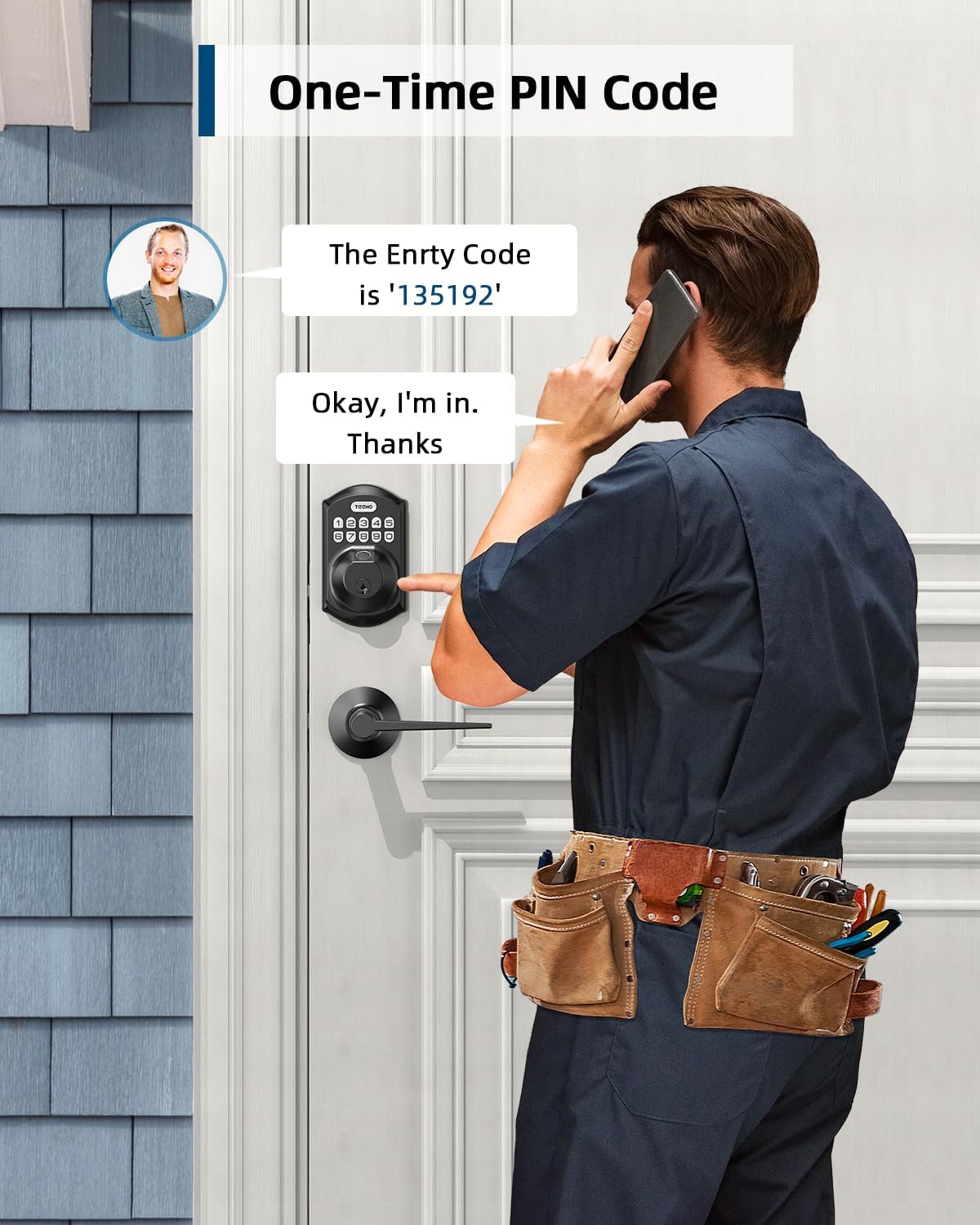
Image: A man receiving a one-time PIN code via phone, demonstrating the temporary access feature of the TEEHO TE002L lock for visitors or service providers.
8. Anti-Peeping PIN Code
- To prevent others from seeing your code, you can enter random digits before or after your actual PIN code. The lock will still recognize the correct sequence within the longer entry.

Image: A hand entering an anti-peeping PIN code on the TEEHO TE002L keypad, showing how random digits can be added before or after the actual code for privacy.
9. Mode de vacances
- To enable/disable Vacation Mode: Press the "TEEHO" button twice, enter Master Code, press "TEEHO", then press "8". (A green light flash indicates Vacation Mode is enabled). In this mode, all user codes and fingerprints are temporarily disabled, and only the Master Code or physical key can unlock the door.
10. Mode silenciós
- To enable/disable Silent Mode: Press the "TEEHO" button twice, enter Master Code, press "TEEHO", then press "6". Press "1" to enable or "2" to disable. This mutes all beeps and sounds from the lock.
Video: Programming guide for the TEEHO TE002L Smart Lock, detailing steps for changing the master code, adding user codes, adding fingerprints, and setting various modes.
Característiques i Funcions
- 3D Fingerprint Unlock: 99.99% biometric fingerprint recognition rate, unlocks in 0.3 seconds.
- Entrada sense clau: Supports up to 20 access codes (4-10 digits) and fingerprints. One-time PIN codes can be set for temporary access.
- Bloqueig automàtic: Can be set to lock automatically in 10-99 seconds.
- Bloqueig d'un sol toc: Press and hold any key on the keypad for 2 seconds to lock the door.
- Límit d'entrada de codi incorrecte: Keypad deactivates for 3 minutes after 10 unsuccessful attempts with an invalid password.
- Security Deadbolt: ANSI Grade 3 rated, made with sturdy lock cylinder and alloy.
- Potència: Powered by 4 AA batteries, providing over 1 year of battery life. Features a low battery indicator.
- Resistència a la intempèrie: IP54 rating, operates well in temperatures from -22°F to 158°F.

Imatge: Més deview of the TEEHO TE002L lock's key features, including support for multiple fingerprints and user codes, auto-lock, IP54 weather resistance, one-time PIN codes, one-touch locking, and a low battery indicator.
Manteniment
- Substitució de la bateria: Replace all four AA batteries when the low battery indicator appears. Use alkaline batteries for optimal performance.
- Neteja: Netegeu el teclat numèric i el cos del pany amb un drap suau i sec. Eviteu productes de neteja o dissolvents abrasius.
- Lubricació: Periodically lubricate the latch mechanism with a silicone-based lubricant to ensure smooth operation.
- Actualitzacions de firmware: Check the TEEHO website or app (if applicable) for any available firmware updates to ensure optimal performance and security.
Resolució de problemes
| Problema | Causa possible | Solució |
|---|---|---|
| Lock not responding / No power | Bateries esgotades. | Substituïu les quatre piles AA. |
| Keypad deactivated | 10 incorrect code entries. | Wait 3 minutes for the keypad to reactivate. |
| No es reconeix l'empremta digital | Finger is dirty, wet, or improperly placed. Fingerprint not registered. | Ensure finger is clean and dry. Place finger flat on the sensor. Re-register fingerprint if necessary. |
| Auto-lock not working | Auto-lock feature is disabled or time delay is too long. | Enable Auto-Lock and set the desired time delay in programming. |
| Lock does not lock/unlock smoothly | Misalignment of lock components or door frame. | Check installation for proper alignment. Ensure door frame strike plate is correctly positioned. |
Especificacions
- Marca: TEEHO
- Nom del model: Fingerprint Door Lock with 2 Lever Handles
- Número de model de l'article: TE002L
- Tipus de bloqueig: Biomètric
- Característica especial: Fingerprint, Keypad, Auto-Lock, One-Touch Lock, One-Time PIN Code, Anti-Peeping Code, Silent Mode, Vacation Mode
- Material: Acer d'aliatge
- Color: Negre mat
- Dimensions de l'article (L x A x A): 1 x 1 x 1 polzades
- Pes de l'article: 3.7 lliures (1.68 quilograms)
- Font d'alimentació: 4 piles AA (no incloses)
- Durada de la bateria: Més de 1 anys
- Resistència a la intempèrie: IP54
- Temperatura de funcionament: -22 °F a 158 °F
- Security Rating: ANSI Grau 3
- Protocol de connectivitat: No connectat
Garantia i Suport
TEEHO offers a 1-year warranty on all parts and lifetime customer service for the TE002L Fingerprint Door Lock. This includes online phone support from Monday to Friday, 9 AM to 5 PM PST, and 24/7 online email service.
For assistance, please contact TEEHO customer support:
- Suport telefònic: De dilluns a divendres, de 9:00 a 17:00 PST
- Suport per correu electrònic: 24/7 online service


