1. Introducció
Thank you for choosing the SABLUTE KM61 Wireless Mechanical Gaming Keyboard. This manual provides essential information for setting up, operating, maintaining, and troubleshooting your new keyboard. Please read it carefully to ensure optimal performance and longevity of your device.
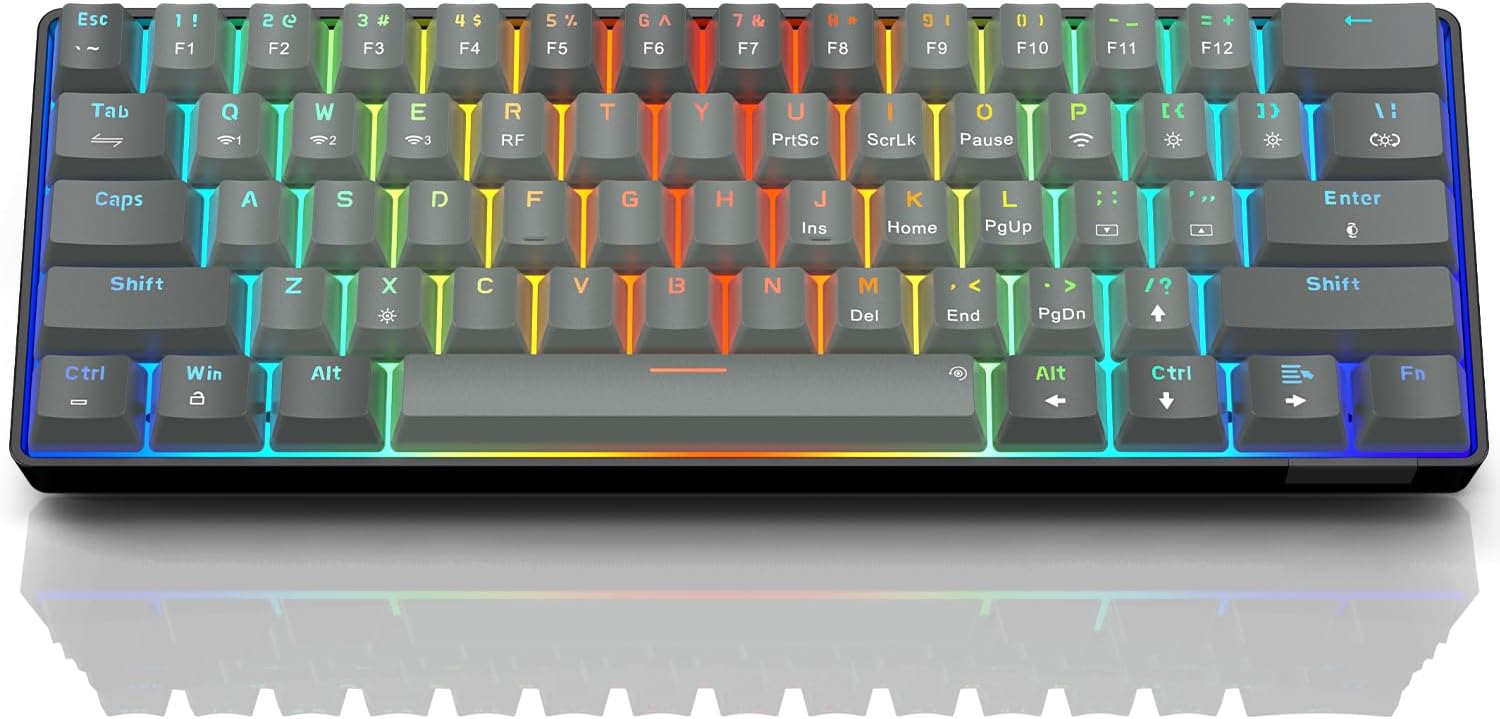
Image: The SABLUTE KM61 Wireless Mechanical Gaming Keyboard showcasing its compact design and vibrant RGB backlighting.
2. Què hi ha a la caixa
Si us plau, assegureu-vos que tots els elements estiguin presents al paquet:
- SABLUTE KM61 Wireless Mechanical Gaming Keyboard
- Cable USB-Type C
- USB-A 2.4G Wireless Dongle
- Manual d'instruccions
3. Característiques clau
- Connectivitat trimodal: Supports Bluetooth, 2.4G USB Wireless, and Wired (USB Type-C) connections.
- Disseny compacte al 60%: 61-key design for space-saving and portability.
- Mechanical Red Switches: Linear switches designed for fast response and durability (100,000,000 keystroke test).
- Intercanviable en calent: Allows for easy replacement of switches without soldering, supporting 3-pin/5-pin switches.
- Retroil·luminació RGB: Features 20 backlight effects, 7 pure colors, 5 brightness levels, and 5 speed adjustments.
- Estalvi d'energia intel·ligent: Includes a 60-second smart sleep mode, offering up to 600 hours of working time (with lights off) and 365 days of standby time.
- Disseny ergonòmic: Features a ladder key layout and adjustable height for comfortable typing.
- Canvi de clau N: Ensures every keypress is registered accurately, even during rapid typing or gaming.
- Àmplia compatibilitat: Compatible with Chrome OS, Android, Windows 7-11, Mac, and Linux systems.

Image: The compact 61-key layout of the SABLUTE KM61 keyboard, highlighting its space-saving design.
4. Configuració i connexió
The SABLUTE KM61 keyboard offers three connection modes: Wired, 2.4G Wireless, and Bluetooth. Ensure the keyboard is charged before initial wireless use.
4.1. Connexió per cable
- Connect the provided USB Type-C cable to the keyboard's Type-C port.
- Plug the other end of the USB Type-C cable into an available USB port on your computer.
- El teclat canviarà automàticament al mode amb cable i començarà a carregar-se.
4.2. Connexió sense fil 2.4G
- Locate the USB-A 2.4G wireless dongle. It is typically stored in a compartment on the back of the keyboard.
- Plug the 2.4G wireless dongle into an available USB-A port on your computer.
- Turn the power switch on the back of the keyboard to the 'ON' position.
- Premeu
Fn+Rto activate 2.4G wireless mode. The keyboard should connect automatically.
4.3. Connexió Bluetooth
El teclat admet fins a tres dispositius Bluetooth.
- Turn the power switch on the back of the keyboard to the 'ON' position.
- Premeu
Fn+Q,Fn+W, oFn+Eto select a Bluetooth channel. The indicator light for the selected channel will flash rapidly, indicating pairing mode. - Al dispositiu (ordinador, tauleta, telèfon intel·ligent), activeu el Bluetooth i cerqueu els dispositius disponibles.
- Select "SABLUTE KM61" or a similar name from the list to pair.
- Un cop emparellat, l'indicador lluminós deixarà de parpellejar i romandrà fix.
- Per canviar entre dispositius Bluetooth emparellats, premeu
Fn+Q,Fn+W, oFn+E.

Image: Visual representation of the three connection methods: Bluetooth, 2.4G USB Wireless, and Wired.
Vídeo: Un overview of the SABLUTE KM61 Mini Mechanical Gaming Keyboard, demonstrating its features and connectivity options.
5. Instruccions de funcionament
5.1. Control de retroiluminació RGB
The KM61 keyboard features customizable RGB backlighting:
- Change Backlight Effect: Premeu
Fn+|\to cycle through 20 different backlight effects. - Ajusta la brillantor: Premeu
Fn+[{to decrease brightness, andFn+]}to increase brightness (5 levels). - Ajustar velocitat: Premeu
Fn+;:to decrease effect speed, andFn+'"to increase effect speed (5 levels). - Canvia el color: Premeu
Fn+Enterto cycle through 7 pure colors. - Turn Backlight On/Off: Premeu
Fn+Xper activar/desactivar la retroiluminació.
Video: Demonstration of the RGB lighting effects and color changes on the SABLUTE keyboard.
Video: A close-up view of the SABLUTE keyboard with its backlight turned off, showcasing the keycap design.
5.2. Smart Power Saving
The keyboard enters a 60-second smart sleep mode when inactive to conserve battery. It can provide up to 600 hours of working time with the backlight off and 365 days of standby time. Keystroke will wake up the keyboard. Note that the backlight does not turn off when connected via Type-C cable.

Image: The keyboard connected via its Type-C cable, illustrating the charging process.
6. Manteniment
6.1. Neteja
To clean your keyboard, first disconnect it from all power sources. Use a soft, dry cloth to wipe down the keycaps and chassis. For deeper cleaning, use the provided keycap puller to remove keycaps and clean underneath with compressed air or a small brush.
6.2. Replacing Switches (Hot-Swappable)
The KM61 keyboard features hot-swappable switches, allowing you to easily replace them without soldering:
- Feu servir l'extractor de tecles per treure suaument la tecla desitjada.
- Use the switch puller to carefully grip the switch and pull it straight up to remove it from the PCB.
- Alineeu els pins del nou interruptor amb els forats de la placa de circuit imprès.
- Premeu suaument el nou interruptor al seu lloc fins que faci clic de manera segura.
- Torneu a col·locar la tapa de les tecles.

Image: A close-up of the keyboard demonstrating the hot-swappable feature, with switches being removed and inserted.
7. Solució De Problemes
- El teclat no respon: Ensure the keyboard is properly connected (wired, 2.4G dongle, or Bluetooth). Check battery level if using wireless modes. Try restarting your computer or device.
- Problemes de connexió sense fil: Ensure the 2.4G dongle is securely plugged in or Bluetooth is enabled and paired correctly. Move closer to the receiver/device to reduce interference.
- La retroiluminació no funciona: Ensure the backlight is turned on (
Fn+X). Adjust brightness levels (Fn+[{/]}). - Claus que no es registren o s'escriuen dues vegades: This could indicate a faulty switch. Utilize the hot-swappable feature to replace the affected switch.
- MacOS compatibility: Some multimedia keys may not be fully compatible with Mac systems. Refer to your Mac's system preferences for keyboard settings.
8. Especificacions
| Característica | Especificació |
|---|---|
| Model | KM61 |
| Connectivitat | Bluetooth, 2.4G USB Wireless, Wired (USB Type-C) |
| Tipus de canvi | Interruptor vermell mecànic |
| Disseny | 60% (61 tecles) |
| Llum de fons | RGB (20 effects, 7 colors, 5 brightness, 5 speeds) |
| Intercanviable en calent | Yes (3-pin/5-pin switches) |
| Bateria | 1 bateria de metall de liti (inclosa) |
| Working Time (Light Off) | Fins a 600 hores |
| Temps d'espera | 365 dies |
| Temps de càrrega | Aprox. 4 hores |
| Dimensions del producte | 11.5 cm de llargada x 4 cm d'amplada x 1.46 cm d'alçada |
| Pes de l'article | 1.35 lliures |
| Compatibilitat | Chrome OS, Android, Windows 7-11, Mac, Linux |
9. Garantia i Suport
SABLUTE products are designed for quality and reliability. For warranty information, technical support, or any product-related inquiries, please contact SABLUTE customer support. Refer to the contact details provided in your product packaging or visit the official SABLUTE weblloc.
Thank you for your purchase and support!


