1. Introducció
This manual provides detailed instructions for the setup, operation, and maintenance of your BuzzTV Essentials E1 Streaming Media Player. The E1 is designed for ultra-fast and easy-to-use media streaming, supporting video resolutions up to 4K (60fps).
Powered by an Amlogic S905W Arm-Cortex A53 processor and running on an optimized Android 9 operating system, the device features 2 GB DDR3 RAM and 8 GB eMMC internal storage. It includes Dual Band Wi-Fi (2.4 GHz) for stable streaming.

Imatge: Superior view of the BuzzTV Essentials E1 Streaming Media Player, showcasing el seu disseny compacte.
2. Contingut del paquet
Si us plau, verifiqueu que tots els elements que s'enumeren a continuació estiguin inclosos al vostre paquet:
- BuzzTV Essentials E1 Streaming Media Player
- Adaptador d'alimentació
- Cable HDMI
- Buzz TV Remote (Bonus)
- 4-Outlet Power Bar (Bonus)

Image: The bonus 4-outlet power bar, a supplementary item included with the BuzzTV Essentials E1.
3. Dispositiu acabatview
Familiarize yourself with the ports and connections on your BuzzTV Essentials E1 device.
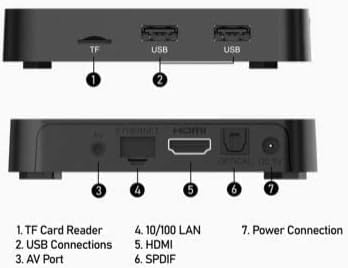
Image: Diagram illustrating the various ports and connections on the BuzzTV Essentials E1 streaming media player.
- Lector de targetes TF: For inserting a TransFlash (microSD) memory card to expand storage.
- Connexions USB: Two USB ports for connecting external devices such as USB drives, keyboards, or mice.
- Port AV: Analog video and audio output for older televisions.
- 10/100 LAN: Port Ethernet per a una connexió a Internet per cable.
- HDMI: High-Definition Multimedia Interface for connecting to an HDTV or monitor.
- SPDIF: Digital audio output for connecting to an audio receiver or sound system.
- Connexió d'alimentació: Input for the DC 5V power adapter.
4. Control remot sobreview
The Buzz TV Remote provides comprehensive control over your streaming media player and can also control certain TV functions.
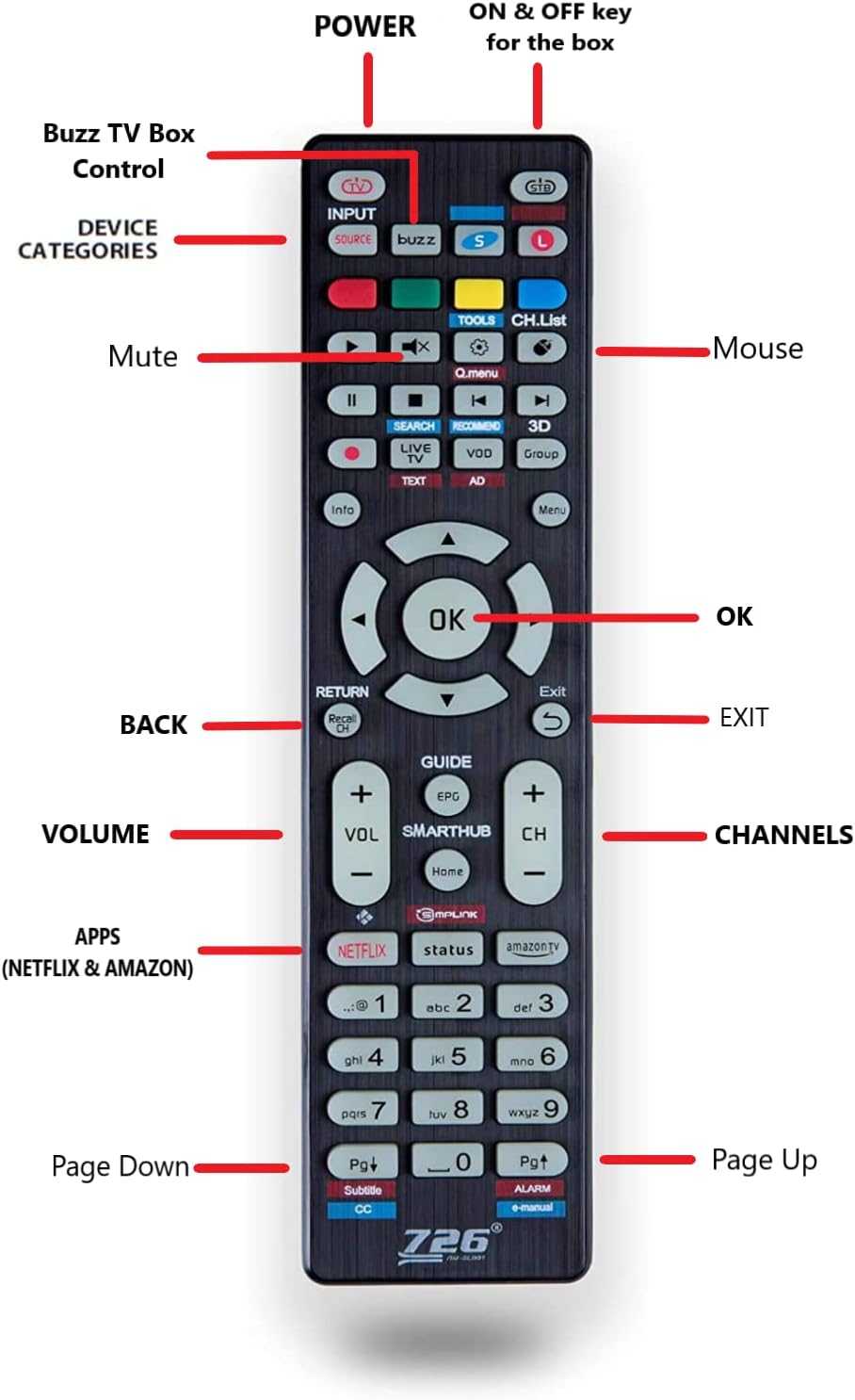
Image: Layout of the BuzzTV remote control, with labels indicating the function of each button.
- POTÈNCIA: Turns the BuzzTV box ON and OFF.
- STB Button: Located at the very top, this button controls the power for the BuzzTV box.
- Botó L: For controlling LG brand televisions.
- Botó S: For controlling Samsung brand televisions.
- Entrada/Font: Selects input source on your TV.
- Teclat de navegació (amunt, avall, esquerra, dreta, OK): Per a la navegació i selecció de menús.
- BACK/RETURN: Torna a la pantalla o menú anterior.
- SORTIDA: Surt de l'aplicació o del menú actual.
- VOLUM +/-: Ajusta el volum.
- CH +/-: Canvia de canal (si escau).
- Silenciar: Silencia o activa l'àudio.
- Ratolí: Activates/deactivates mouse mode for easier navigation in some apps.
- APPS (Netflix & Amazon): Dedicated buttons for quick access to Netflix and Amazon Prime Video.
- Pàgina amunt/avall: Scrolls through pages or lists.
5. Configuració
Follow these steps to set up your BuzzTV Essentials E1 Streaming Media Player:
- Connectar-se al televisor:
Connect one end of the HDMI cable to the HDMI port on the BuzzTV E1 and the other end to an available HDMI input on your television. Note the HDMI input number (e.g., HDMI 1, HDMI 2) for later selection on your TV.
- Connecteu-vos a l'alimentació:
Plug the power adapter into the DC 5V power connection port on the BuzzTV E1. Then, plug the power adapter into a wall outlet or the bonus power bar.
- Connect to Internet (Optional, but Recommended):
- Wi-Fi: For wireless internet, the device will prompt you to connect to a Wi-Fi network during initial setup. Select your network and enter the password. The E1 supports Dual Band Wi-Fi (2.4 GHz) for stable connections.
- Ethernet: For a wired connection, connect an Ethernet cable from your router to the 10/100 LAN port on the BuzzTV E1.
- Encès:
Turn on your television and select the correct HDMI input source using your TV remote. Press the PODER button on the BuzzTV remote to turn on the BuzzTV E1. The BuzzTV logo should appear on your screen.
- Configuració inicial:
Follow the on-screen prompts to complete the initial setup, which may include language selection, time zone, and Google account login (optional).
6. Instruccions de funcionament
Once set up, you can begin using your BuzzTV Essentials E1.
- Navegació: Utilitza el Bloc de navegació (Up, Down, Left, Right) and OK button on the remote to browse menus and select items.
- Accessing Applications: Des de la pantalla d'inici, navegueu fins a la secció "Aplicacions" per view and launch installed applications. You can also use the dedicated Netflix i Amazon buttons for quick access.
- Using the Bonus Remote for TV Control:
- To control your BuzzTV box, ensure the remote is in STB mode (indicated by the STB button).
- To control an LG TV, press the L botó.
- To control a Samsung TV, press the S botó.
- Ajust de la configuració: Access the "Settings" menu from the home screen to configure network settings, display options, audio output, and more.
- Actualitzacions de programari: Periodically check for system updates in the settings menu to ensure optimal performance and access to the latest features.
7. Manteniment
Proper maintenance ensures the longevity and optimal performance of your BuzzTV Essentials E1.
- Neteja: Feu servir un drap suau i sec per netejar el dispositiu. Eviteu netejadors líquids o materials abrasius.
- Ventilació: Ensure the device is placed in a well-ventilated area. Do not cover ventilation openings to prevent overheating.
- Apagueu quan no estigui en ús: For extended periods of inactivity, it is recommended to power off the device using the remote or by disconnecting the power adapter.
- Actualitzacions de programari: Regularly check for and install system updates to maintain security and performance.
8. Solució De Problemes
If you encounter issues with your BuzzTV Essentials E1, refer to the following common solutions:
| Problema | Possible solució |
|---|---|
| Sense alimentació / El dispositiu no s'encén |
|
| No Video / Black Screen |
|
| Sense àudio |
|
| Problemes de connexió Wi-Fi |
|
| El control remot no respon |
|
9. Especificacions
| Característica | Detall |
|---|---|
| Nom del model | E1 |
| Processador del sistema | AMlogic S905W Arm-Cortex A53 |
| Memòria del sistema (RAM) | 2 GB DDR3 |
| Emmagatzematge intern | eMMC de 8 GB |
| Sistema operatiu | Android 9 (Optimized) |
| Resolució de vídeo | Up to 4K (60fps), 2K, 1080p (60fps), 1080i, 720p, 720i, 576p, 576i, 486p, 486i |
| Connectivitat | Dual Band Wi-Fi (2.4 GHz), Ethernet (10/100 LAN) |
| Ports | HDMI, 2x USB, TF Card Reader, AV Port, SPDIF, DC 5V Power |
| Dimensions | 9 x 6 x 2 polzades |
| Pes de l'article | 1.74 lliures |
| Color | Negre |
| Serveis d'Internet compatibles | Amazon Prime Video, Hulu, Hulu Plus (and others via app installation) |
10. Garantia i Suport
For warranty information and technical support, please refer to the official BuzzTV weblloc web o contacteu directament amb el seu servei d'atenció al client. Conserveu el rebut de compra com a comprovant de compra per a qualsevol reclamació de garantia.
For further assistance, you may visit the BuzzTV store page on Amazon: BuzzTV Store


