1. Introducció
The ATTACK SHARK G6 Gaming Mouse is a versatile peripheral designed for both gaming and daily productivity. It offers three distinct connection modes: wired, 2.4G wireless, and Bluetooth, ensuring reliable and accurate transmission across various devices. Its ergonomic design, adjustable DPI settings, and customizable RGB lighting provide a tailored user experience.

Figure 1: The ATTACK SHARK G6 Gaming Mouse (Blue/White) with its USB receiver.
2. Característiques
- Connectivitat trimodal: Seamlessly switch between wired (USB-C), 2.4G wireless (via USB receiver), and Bluetooth connections for maximum flexibility.
- DPI ajustable: Features 5 adjustable DPI levels (1200/1600/2000/2400/4000) for precise control and responsiveness, suitable for various tasks from detailed work to fast-paced gaming.
- 11 Chroma RGB Lighting Modes: Customize your setup with 11 distinct RGB lighting effects, enhancing your gaming atmosphere.
- 10 botons programables: Equipped with 10 function buttons, strategically placed for easy access, allowing for quick actions like light changes, one-click web access, and navigation.
- Disseny ergonòmic: Specifically designed for right-hand users with a comfortable thumb rest, reducing fatigue during extended use.
- Botons de clic silenciós: Left and right buttons feature a silent click design, minimizing noise and preventing disturbance to others.
- Bateria recarregable: Built-in 500mAh lithium battery, rechargeable via Type-C, providing long-lasting use on a single charge (approx. 3-4 hours for full charge).
- Àmplia compatibilitat: Compatible with Windows, Mac, Android, and other operating systems, ensuring broad usability.

Figura 2: Mésview of the 10 programmable buttons and ergonomic finger rests.
3. Contingut del paquet
Si us plau, comproveu el contingut del paquet en desembalar-lo per assegurar-vos que hi hagi tots els elements:
- ATTACK SHARK G6 Gaming Mouse
- USB 2.4G Wireless Receiver
- Cable de càrrega USB-C
- Manual d'usuari (aquest document)
4. Configuració
4.1. Càrrega del ratolí
Before first use, it is recommended to fully charge the mouse. Connect the supplied USB-C charging cable to the mouse's Type-C port and the other end to a USB power source (e.g., computer USB port, USB wall adapter). The charging indicator will show status (refer to LED indicator section for details). A full charge typically takes 3-4 hours.

Figure 3: Charging the G6 Gaming Mouse via its Type-C port.
4.2. Modes de connexió
The G6 mouse supports three connection methods:
- Mode sense fil 2.4G:
- Locate the USB 2.4G wireless receiver, usually stored in a compartment on the underside of the mouse.
- Connecteu el receptor a un port USB disponible de l'ordinador.
- Turn on the mouse using the power switch on its underside. The mouse should automatically connect.
- Mode Bluetooth:
- Turn on the mouse and switch it to Bluetooth mode (refer to the switch on the underside).
- On your device (computer, tablet, phone), go to Bluetooth settings and search for new devices.
- Select "ATTACK SHARK G6" (or similar name) from the list to pair.
- Mode per cable:
- Connecteu el cable USB-C subministrat al port tipus C del ratolí.
- Connecteu l'altre extrem del cable a un port USB de l'ordinador.
- El ratolí funcionarà immediatament en mode amb cable i també es carregarà simultàniament.
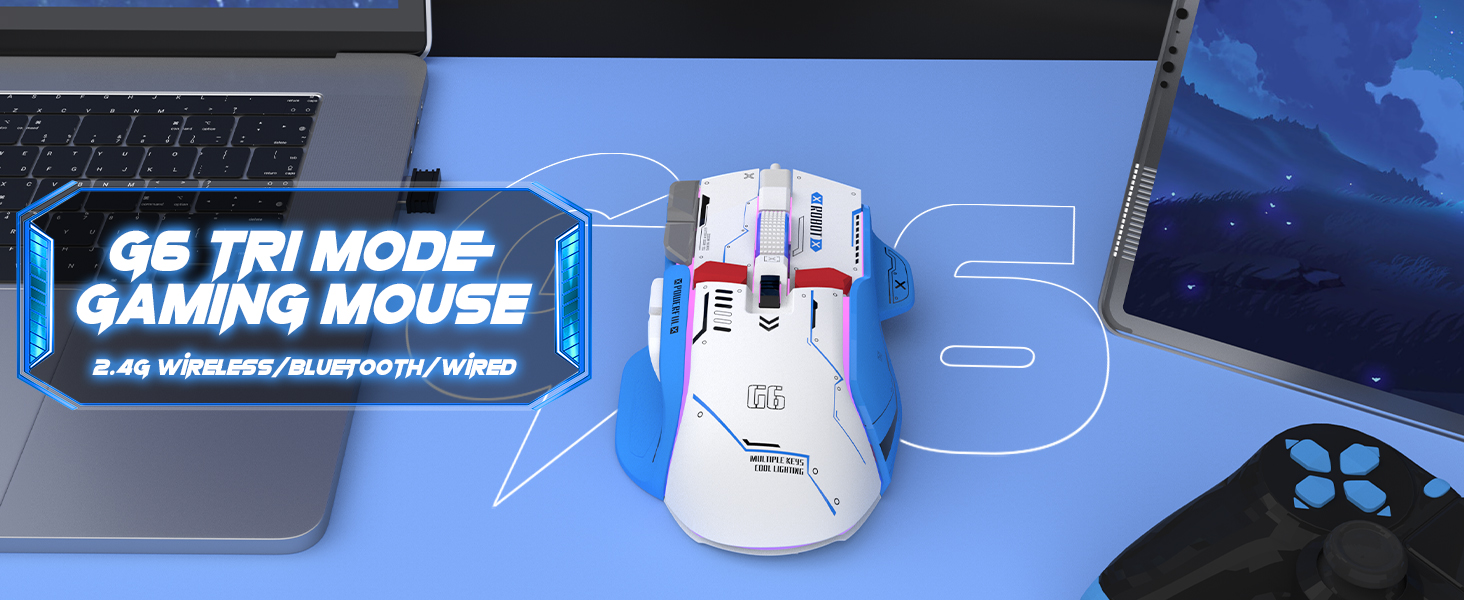
Figure 4: The G6 mouse supports 2.4G wireless, Bluetooth, and wired connections.
5. Instruccions de funcionament
5.1. Ajust de DPI
The G6 mouse features a dedicated DPI button (refer to Figure 2 for location) to cycle through 5 adjustable DPI levels: 1200, 1600, 2000, 2400, and 4000. Press the DPI button to switch between sensitivity settings to match your preference or game requirements.
5.2. Control de la il·luminació RGB
The mouse offers 11 Chroma RGB lighting modes. Use the dedicated Light Control button (refer to Figure 2) to cycle through the different lighting effects. To turn off the RGB lighting, continue pressing the button until the lights are off, or refer to the software if available for more advanced control.

Figure 5: The G6 mouse features 11 kinds of RGB backlight modes.
5.3. Funcions del botó
The G6 mouse has 10 function buttons. Their default functions are:
- Clic esquerre: Botó esquerre estàndard del ratolí.
- Clic dret: Standard right mouse button (silent click).
- Roda de desplaçament: Desplaça't amunt/avall, fes clic amb el botó central.
- Botó DPI: Passa ciclísticament pels paràmetres de DPI.
- Botó de control de la llum: Cycles through RGB lighting modes.
- Botó Endavant: Navega cap endavant web browsers/folders.
- Botó enrere: Navega cap enrere web browsers/folders.
- Botó de foc: Rapid fire function (default, may be programmable).
- Botó d'escriptori: One-click access to desktop.
- Webpage Button: One-click access to web navegador.

Figura 6: Detallada view of key features including finger rests and Type-C port.

Figure 7: The silent click feature ensures quiet operation, ideal for shared spaces.
6. Manteniment
To ensure the longevity and optimal performance of your ATTACK SHARK G6 Gaming Mouse, follow these maintenance guidelines:
- Neteja: Feu servir un drap suau i sec per netejar la superfície del ratolí. Per a la brutícia persistent, netegeu lleugerament.amp cloth with mild soap can be used, but ensure no liquid enters the mouse. Do not use harsh chemicals or abrasive materials.
- Emmagatzematge: Guardeu el ratolí en un lloc fresc i sec, allunyat de la llum solar directa i de temperatures extremes.
- Eviteu les gotes: Protect the mouse from drops and impacts, which can damage internal components.
- Cura del cable: When using wired mode or charging, handle the USB-C cable carefully to prevent bending or fraying.
7. Solució De Problemes
If you encounter issues with your ATTACK SHARK G6 Gaming Mouse, please refer to the following common solutions:
| Problema | Possible solució |
|---|---|
| Mouse not responding (Wireless/Bluetooth) |
|
| La configuració de DPI no canvia |
|
| La il·luminació RGB no funciona o està bloquejada |
|
| Connexió amb retard o intermitent |
|
7.1. Guia de vídeo del producte
For a visual guide on the mouse's features and operation, please watch the official product video:
Video: G6 Wireless/wired/bluetooth gaming mouse. This video demonstrates the RGB lighting effects and general appearance of the G6 gaming mouse in different colors.
8. Especificacions
| Característica | Detall |
|---|---|
| Marca | ATACA AL TAURON |
| Número de model | G6 |
| Tecnologia de connectivitat | Bluetooth, Wired, Wireless (2.4G) |
| Tecnologia de detecció de moviment | Òptic |
| Nivells de DPI ajustables | 1200/1600/2000/2400/4000 |
| Modes RGB | 11 Chroma RGB modes |
| Nombre de botons | 10 |
| Capacitat de la bateria | Bateria de liti recarregable de 500 mAh |
| Port de càrrega | Tipus-C |
| Pes de l'article | 7.4 unces (aproximadament 210 grams) |
| Dimensions del paquet | 6.38 x 5.43 x 2.13 polzades |
| Compatibilitat | Windows, Mac, Android, iOS |
9. Garantia i Suport
ATTACK SHARK products are designed and manufactured to the highest quality standards. This product is covered by a limited warranty from the date of purchase. For detailed warranty terms, technical support, or customer service inquiries, please contact your retailer or visit the official ATTACK SHARK weblloc.
Assistència en línia: Visit the ATTACK SHARK Store on Amazon


