1. Introducció i finalview
The Anykit 360° 4-Way Articulating Borescope is an advanced industrial inspection tool designed for detailed visual examination in hard-to-reach areas. Featuring a 0.26-inch (6.5mm) articulated snake camera, it offers unparalleled maneuverability with 4-way joystick control, allowing for comprehensive inspections from various angles. This device is ideal for applications in automotive repair, industrial machinery inspection, aircraft maintenance, and building inspection.

Image: The Anykit 360° 4-Way Articulating Borescope with a smartphone mounted, displaying a close-up view of internal gears. The flexible probe extends from the main unit.
Equipped with 6 adjustable LED lights, the borescope ensures clear imaging even in low-light conditions. Its IP67 waterproof rating for the gooseneck allows for use in wet environments, while an intelligent temperature detection system provides safety by alerting and disconnecting the device if temperatures exceed 158°F (70°C). The ergonomic design and compatibility with a wide range of mobile devices (iPhone 15 series, iPad Pro 2020, iPad Air 4, Galaxy S23, Android 8.0+ with OTG) make it a versatile and user-friendly inspection solution.
2. Guia de configuració
Follow these steps to set up your Anykit Articulating Borescope:
- Desempaquetar el dispositiu: Carefully remove all components from the carrying case. Ensure you have the borescope unit, various USB charging/connection cables (USB-C, old USB, iPhone), and the camera lens cover.
- Charge the Borescope: Locate the charging port on the borescope handle. Connect the appropriate charging cable to a power source. The internal 2600mAh battery provides up to 4 hours of continuous use on a full charge.
- Descarrega l'aplicació: Download the 'Smart Endoscope' app from your smartphone's app store. Refer to the QR code on the borescope itself or in the included manual for direct access.
- Attach Mobile Device: Screw the mobile phone holder onto the top of the borescope unit. Securely clamp your smartphone into the holder.
- Connecta el dispositiu mòbil: Use the provided USB cable that matches your phone's port (USB-C, old USB, or iPhone) to connect your smartphone to the data port on the borescope.
- Encès: Press and hold the power button on the borescope handle for two seconds to power it on. The app should automatically open on Android devices when the USB accessory is connected.
- Confirmeu la connexió: Once the app opens, you should see the live feed from the borescope camera on your smartphone screen.
3. Instruccions de funcionament
Operating your Anykit Articulating Borescope is intuitive:
- Articulating Camera Control: Use the joystick on the borescope handle to control the 360° 4-way articulation of the camera probe. This allows you to navigate and view objects from various angles (up, down, left, right) without needing to reposition the entire probe.
- Ajust de llums LED: The borescope is equipped with 6 high-intensity LED lights. Press the light adjustment button (often integrated with the power button or a separate button) to cycle through 4 levels of adjustable brightness, ensuring clear visibility in dark environments.
- Captura d'imatges i vídeos: Use the dedicated Photo/Video button on the borescope handle to capture still images or record video footage directly to your connected mobile device. The 'Smart Endoscope' app allows for detailed image and video recording for future analysis.
- Característiques de l'aplicació: The 'Smart Endoscope' app provides additional functionalities such as changing video quality (SD/HD), displaying temperature readings from the camera lens, and showing frames per second.
- Seguretat de temperatura: The intelligent temperature detection system will trigger an alert and automatically disconnect the device if the camera lens temperature exceeds 158°F (70°C) to ensure safe operation and longevity.
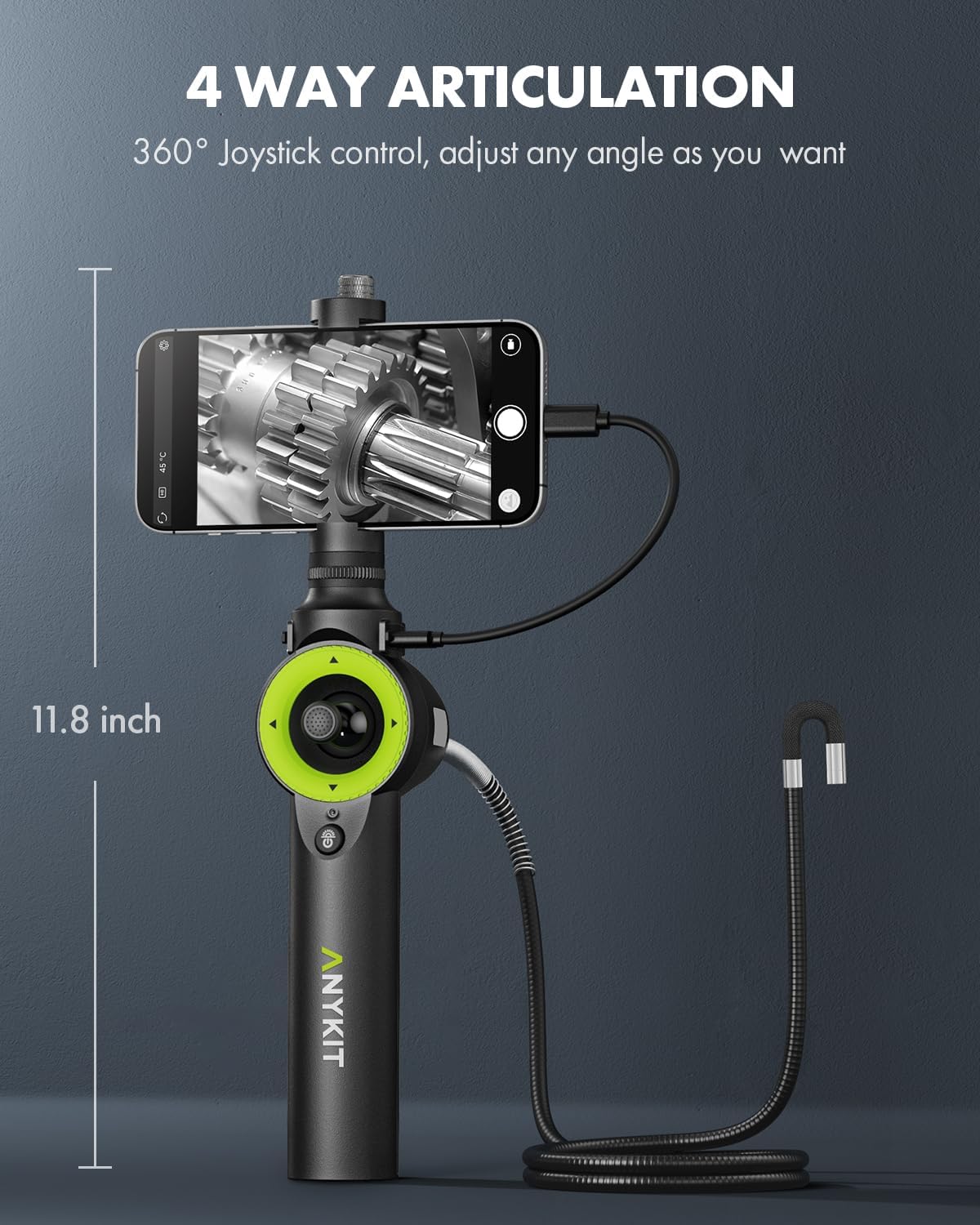
Image: A visual representation of the borescope's 4-way articulation feature, demonstrating how the camera head can bend and rotate 360 degrees using the joystick control.

Image: A user holding the borescope, with a smartphone attached, inspecting the internal components of a car engine. The phone screen shows a clear view of the engine parts.
4. Manteniment
Proper maintenance ensures the longevity and optimal performance of your borescope:
- Neteja de la lent: After each use, especially in dirty or oily environments, gently clean the camera lens using the provided cleaning cloth. Avoid using abrasive materials or harsh chemicals that could damage the lens.
- Càrrega: Recharge the borescope's internal battery regularly to maintain its capacity. Avoid completely draining the battery before recharging.
- Emmagatzematge: Store the borescope and all its accessories in the provided sturdy carrying case when not in use. This protects the device from dust, moisture, and physical damage.
- Cura impermeable: While the gooseneck is IP67 waterproof, ensure the main unit and connection ports are kept dry. If used in wet conditions, wipe down the gooseneck thoroughly before storing.

Imatge: Una imatge detallada view of the borescope's IP67 waterproof camera head, submerged in water droplets, highlighting its durability in wet environments. The adjustable LED lights are visible.
5. Solució De Problemes
If you encounter issues with your Anykit Borescope, consider the following common solutions:
- Sense imatge a la pantalla:
- Ensure the borescope is powered on (blue indicator light should be active).
- Verify that the USB connection cable between the borescope and your mobile device is securely plugged in at both ends.
- Confirm that the 'Smart Endoscope' app is open and has the necessary permissions to access USB devices.
- Check your mobile device's settings to ensure OTG (On-The-Go) functionality is enabled if required for your Android device.
- Mala qualitat d'imatge:
- Adjust the brightness of the LED lights using the dedicated button on the borescope handle.
- Clean the camera lens with the provided cleaning cloth to remove any debris or smudges.
- Ensure the object being inspected is within the macro focus range (1-10 cm).
- Check the app settings to ensure you are viewing in HD (High Definition) mode if available.
- Device Disconnects Unexpectedly:
- This may be due to the intelligent temperature protection system. If the camera lens exceeds 158°F (70°C), the device will automatically disconnect. Allow it to cool down before resuming use.
- Check the battery level of the borescope. A low battery can cause unexpected disconnections.
- Ensure the USB connection is stable and not being jostled during use.
For further assistance, please refer to the full Safety Information PDF document available from the manufacturer or contact Anykit customer support.
6. Especificacions
| Característica | Detall |
|---|---|
| Número de model | AN150 |
| Dimensions del producte | 11.8 x 9.1 x 3.3 polzades; 2.67 lliures |
| Diàmetre de la càmera | 0.26 polzades (6.5 mm) |
| Articulació | 360° 4-Way Joystick Control |
| Llums LED | 6 Adjustable LED Lights (4 levels brightness) |
| Classificació impermeable | IP67 (for gooseneck) |
| Bateria | 1 Lithium Ion battery (included), 2600mAh, up to 4 hours working time |
| Resolució de captura de vídeo | 1080p |
| Rang d'enfocament macro | 1-10 cm |
| Color | Negre |
| Protecció de temperatura | Automatic alert and disconnection beyond 158°F (70°C) |
| Compatibilitat | iPhone 15/15 Pro/15 Plus/15 Pro Max, iPad Pro 2020, iPad Air 4, Galaxy S23, Android 8.0+ devices (supports OTG) and more |
7. Garantia i Suport
For information regarding product warranty, returns, or technical support, please refer to the official Anykit website or contact their customer service directly. The manufacturer is Anykit.
Additional safety information is available in the Informació de seguretat (PDF) document.


