1. Introducció
This user manual provides comprehensive instructions for the Blackview Mini PC MP60, an ultra-compact and efficient desktop computer. Designed for various applications including home office, study, and multimedia, this mini PC offers powerful performance in a small form factor. Please read this manual thoroughly before operating the device to ensure proper usage and maintenance.
2. Informació de seguretat
- Utilitzeu només l'adaptador d'alimentació subministrat.
- No exposeu el dispositiu a l'aigua, la humitat ni a temperatures extremes.
- Eviteu col·locar el dispositiu a la llum solar directa o a prop de fonts de calor.
- Assegureu-vos que hi hagi una ventilació adequada; no obstruïu les reixetes de refrigeració.
- No intenteu desmuntar ni reparar el dispositiu vosaltres mateixos. Poseu-vos en contacte amb personal qualificat per al servei tècnic.
- Mantenir fora de l'abast dels nens.
3. Contingut del paquet
Verifiqueu que tots els elements siguin presents al vostre paquet:
- 1 x Negreview MP60 N150 Mini PC
- 1 x adaptador de corrent
- 1 x cable HDMI
- 1 x Suport de muntatge
- 1 x Manual d'usuari
4. Producte acabatview
El Negreview Mini PC MP60 is a compact yet powerful computing solution. Its small footprint allows for versatile placement, including mounting behind a monitor.

Figura 4.1: Negreview Mini PC MP60, showcasinel seu disseny compacte i els seus diversos ports.
4.1. Ports i interfícies
The MP60 is equipped with a variety of ports to ensure broad compatibility and expandability:
- USB 2.0 tipus A: 2 ports (for peripherals like keyboard, mouse)
- USB 3.0 tipus A: 2 ports (for high-speed data transfer)
- HDMI 1.4b Type A: 2 ports (supports dual 4K UHD display output at 60Hz)
- RJ45 Gigabit Ethernet: 1 port (for high-speed wired network connectivity)
- Jack DC: 1 port (for power input)
- 3.5mm Audio-in/out Jack: 1 port (for headphones or external speakers)
- Connectivitat sense fils: 2.4G+5.0G dual-band WiFi and Bluetooth 4.2

Figure 4.2: Detailed diagram of the Blackview Mini PC's ports and their functions.
5. Configuració
5.1. Connexió inicial
- Connect your monitor(s) to the HDMI ports on the back of the Mini PC using the provided HDMI cable(s).
- Connecteu el teclat i el ratolí als ports USB.
- For wired internet, connect an Ethernet cable to the RJ45 port. For wireless, ensure Wi-Fi antennas are connected (if external).
- Connect the power adapter to the DC Jack and then plug it into a power outlet.
- Premeu el botó d'engegada a la part frontal del Mini PC per engegar-lo.
5.2. Operating System Setup (Windows 11 Pro)
El Negreview Mini PC comes with Windows 11 Pro pre-installed. During the initial boot process, you will be guided through the Windows setup. Follow the on-screen instructions to configure your region, language, network settings, and user account.
Avís important: During the system boot process, if you cannot log in to your personal account, please turn off Wi-Fi and LAN, select the skip option, and then log in to your personal account in the system.
Vídeo 5.1: Un breu resumview del Negreview Mini PC Intel 12th N95, highlighting its features and compact design.
6. Instruccions de funcionament
6.1. Encendre/apagar
- Encès: Premeu el botó d'engegada del panell frontal.
- Apagar: Feu clic al botó Inici del Windows i, a continuació, seleccioneu Energia > Apagar.
- Reinicia: Feu clic al botó Inici del Windows i, a continuació, seleccioneu Energia > Reiniciar.
- Dormir: Feu clic al botó Inici del Windows i, a continuació, seleccioneu Energia > Suspensió.
6.2. Performance and Usage
Equipped with a 12th Gen Intel N95 processor, 16GB DDR4 RAM, and a 512GB M.2 2280 SSD, the MP60 is designed for efficient multitasking, web browsing, media playback, and office applications. Its enhanced CPU and GPU performance ensure a smooth user experience.

Figura 6.1: Mésview of the 12th Gen Intel N95 processor's capabilities and performance metrics.
6.3. Dual Display Setup
The dual HDMI ports allow you to connect two monitors simultaneously, creating an expansive workspace for increased productivity or immersive entertainment.

Figure 6.2: The Mini PC supporting dual 4K HDMI displays for an expanded workspace.
7. Ampliació d'emmagatzematge
El Negreview Mini PC MP60 offers flexible storage expansion. You can easily add a 2.5-inch SSD/HDD (not included) to increase storage capacity up to 2TB.
- Locate the detachable empty base on the bottom of the Mini PC.
- Carefully remove the base.
- Install your 2.5-inch SSD/HDD into the designated slot.
- Secure the drive and reattach the base.

Figure 7.1: Steps for easily extending storage with a 2.5-inch SSD/HDD.
8. Opcions de muntatge
The compact design of the Blackview Mini PC allows for various mounting options, including attaching it to the back of a monitor using the included mounting bracket, saving valuable desk space.

Figure 8.1: The compact size of the Mini PC allows for easy mounting behind a monitor.
9. Manteniment
9.1. Neteja
- Feu servir un drap suau i sec per netejar l'exterior del Mini PC.
- No utilitzeu netejadors líquids ni aerosols.
- Periodically check cooling vents for dust accumulation and gently clean them to ensure optimal airflow.
9.2. Sistema de refrigeració
The MP60 features an efficient cooling fan designed to keep the CPU temperature low and ensure stable performance. The fan operates quietly, even under load, to provide a comfortable working environment.
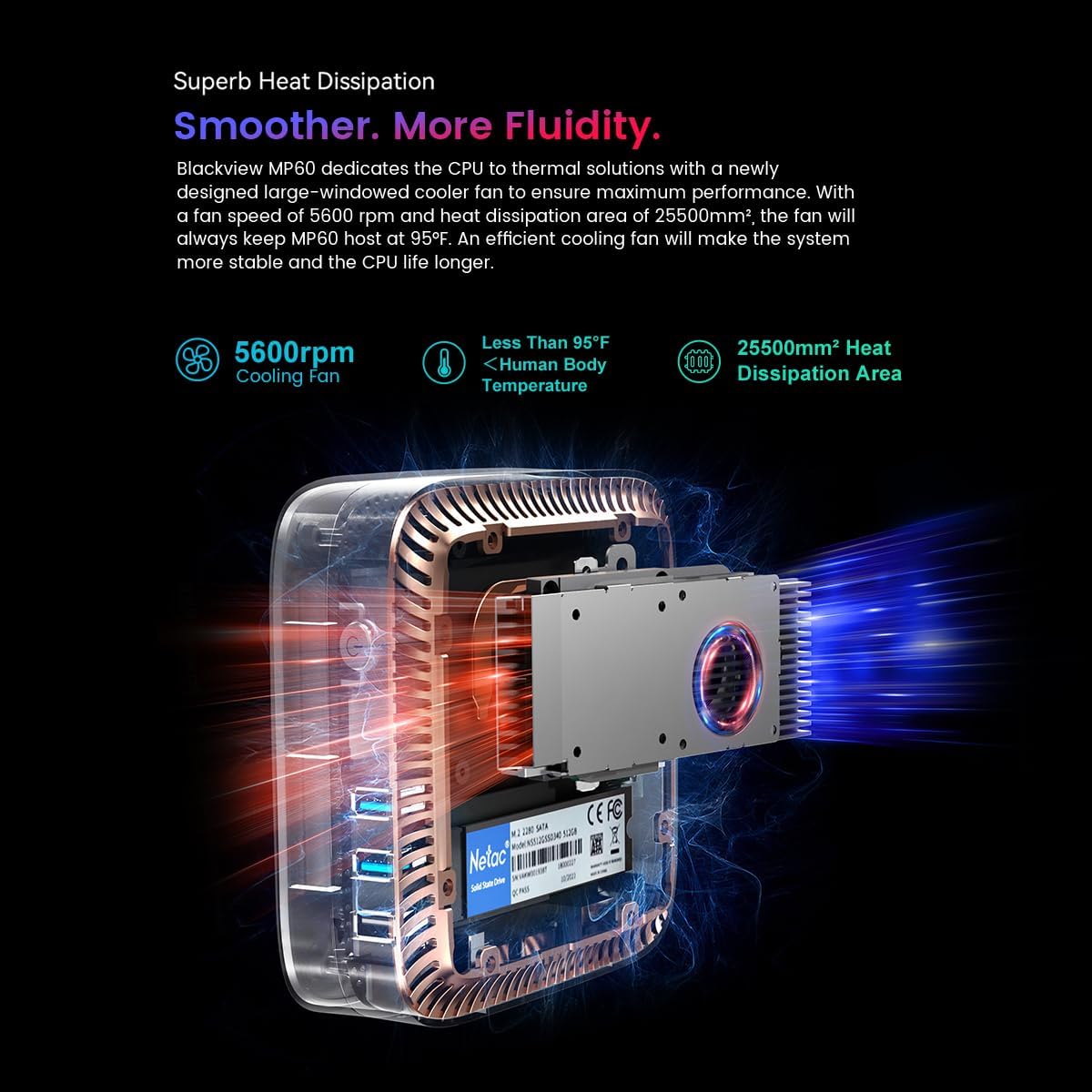
Figure 9.1: Illustration of the cooling system within the Blackview Mini PC, highlighting the fan and heat dissipation area.
10. Solució De Problemes
| Problema | Causa possible | Solució |
|---|---|---|
| Sense poder | L'adaptador de corrent no està connectat o la presa de corrent està defectuosa. | Ensure power adapter is securely connected and try a different power outlet. |
| Sense pantalla | Monitor not connected or input source incorrect. | Check HDMI cable connections. Ensure monitor input source is set to HDMI. |
| Wi-Fi/Bluetooth not working | Drivers missing or disabled in OS. | Check Device Manager for driver status. Ensure Wi-Fi/Bluetooth is enabled in Windows settings. |
| Rendiment lent | Too many applications running or insufficient storage. | Close unnecessary applications. Consider expanding storage or freeing up disk space. |
11. Especificacions
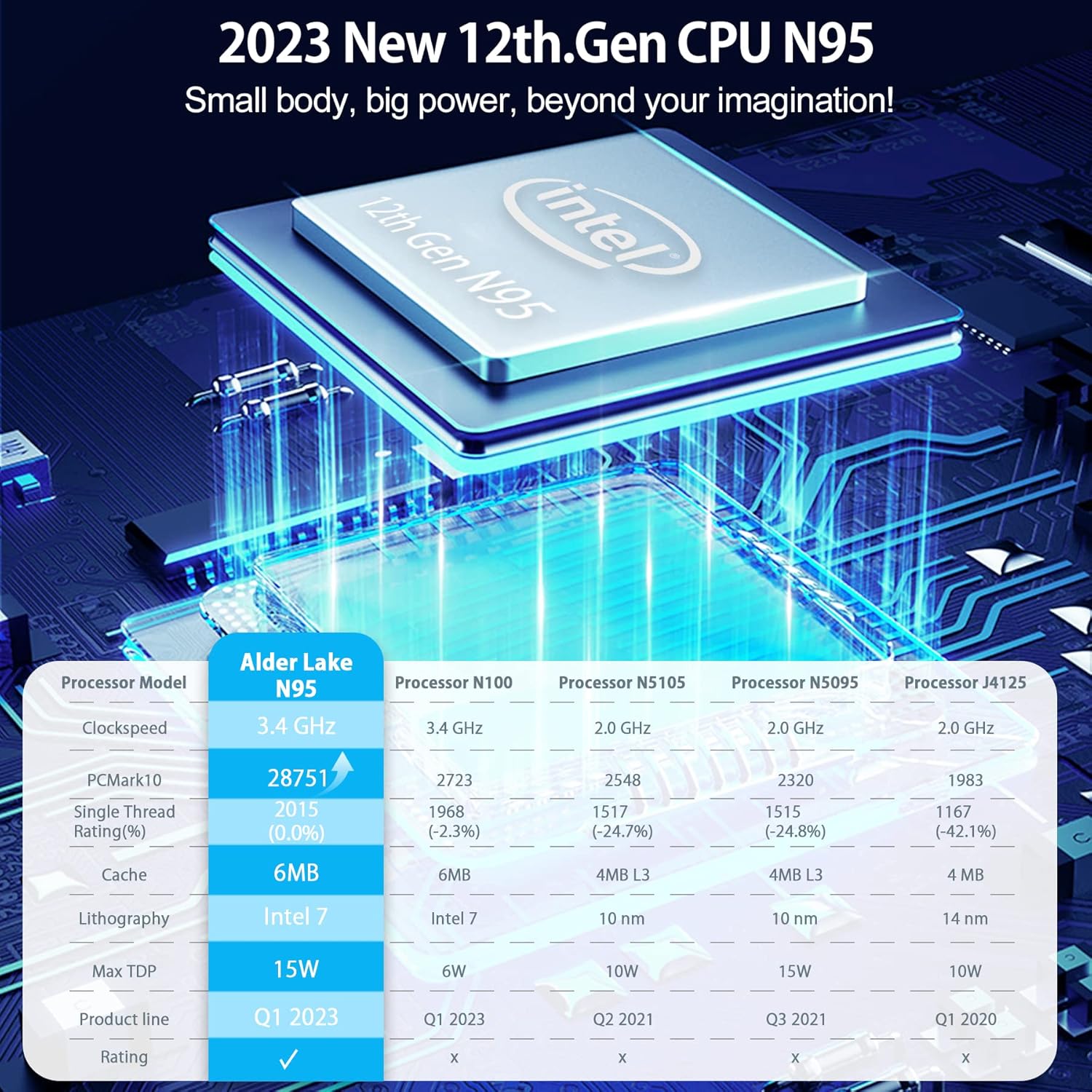
Figure 11.1: Performance comparison of the Intel 12th Gen N95 processor against other models.
| Característica | Detall |
|---|---|
| Processador | 12th Gen Intel N95 (up to 3.4 GHz) |
| RAM | 16 GB DDR4 |
| Emmagatzematge intern | SSD M.512 2 de 2280 GB |
| Ampliació d'emmagatzematge | Supports 2.5-inch SSD/HDD up to 2TB (not included) |
| Gràfics | Intel UHD Graphics 600 |
| Sortida de vídeo | Dual HDMI 1.4b (4K@60Hz) |
| Ports USB | 2x USB 2.0, 2x USB 3.0 |
| Xarxa | RJ45 Gigabit Ethernet, 2.4G+5.0G Dual Band WiFi |
| Bluetooth | Bluetooth 4.2 |
| Sistema operatiu | Windows 11 Pro (preinstal·lat) |
| Dimensions | Aprox. 9.72 x 7.68 x 2.72 polzades (paquet) |
| Pes | Approx. 2.23 pounds (Item) |
12. Garantia i Suport
Negreview provides comprehensive customer support for the MP60 Mini PC.
- Garantia: 2 years warranty from the date of purchase.
- Suport tècnic: 24/7 customer service support is available.
- Contacte: For product-related questions or support, you can contact the after-sales team via email at suport@blackview.hk.
- Alternatively, for Amazon-related support, log in to your Amazon account, navigate to "Your Orders," and select "Ask Product Question."


