Introducció
The Neumann KH 120 II DSP Powered Studio Monitor represents the next generation of compact nearfield monitoring. Building upon the success of its predecessor, this monitor features enhanced power, an integrated DSP engine, extended bass response, and higher SPL capabilities, delivering improved resolution for critical listening environments. Its internal DSP facilitates linear-phase crossovers and enables room-adaptive alignment through Neumann's MA 1 Automatic Alignment system. Designed for exceptional monitoring accuracy and robust build quality, the KH 120 II provides reliable performance for professional audio applications.

Figura 1: Frontal view of the Neumann KH 120 II DSP Powered Studio Monitor, showcasing its anthracite finish, 5.25-inch woofer, and 1-inch dome tweeter.
Configuració
1. Desembalatge i col·locació
Carefully remove the monitor from its packaging. Ensure the monitor is placed on a stable, flat surface, ideally at ear level in your listening environment. For optimal stereo imaging, position the monitors symmetrically and equidistant from the listening position.
2. Connexió del monitor
The KH 120 II offers various connectivity options. Connect your audio source to the monitor's input. The monitor supports both analog and digital inputs.
- Entrada analògica: Use a balanced XLR cable to connect your audio interface or mixer to the analog input.
- Entrada digital: Utilize the S/PDIF coaxial input for digital audio signals.
- Connexió d'alimentació: Connect the supplied power cable to the "MAINS POWER" inlet on the rear panel and then to a suitable power outlet.
- Control Ethernet: For advanced control and room correction using the Neumann MA 1 Automatic Alignment system, connect an Ethernet cable to the "ETHERNET CONTROL NETWORK" port.

Figure 2: Rear panel of the KH 120 II, illustrating the various input/output connections, power switch, and acoustic control switches.
3. Engegada inicial
After all connections are secure, switch the "ON" button on the rear panel to power on the monitor. A status indicator will illuminate, confirming the unit is operational.
Funcionament del monitor
1. Funcionament bàsic
Once powered on, the monitor is ready to receive audio signals. Adjust the volume from your audio source to a comfortable listening level. The KH 120 II is designed for accurate sound reproduction, so avoid excessively high volumes that could lead to hearing fatigue or damage.
2. Acoustic Controls
The rear panel features several acoustic control switches to adapt the monitor's response to your room acoustics. These include:
- Acoustical Controls (EQ): Adjustments for Bass, Low-Mid, and Treble to compensate for room modes and reflections.
- Output Level / Input Gain: Fine-tune the input sensitivity and overall output level to match your system.
- Ascensor de terra: Use this switch to eliminate hum or ground loop noise if present.
Refer to the markings on the rear panel (Figure 2) for specific switch settings and their effects.
3. DSP Functionality and MA 1 Alignment
The integrated DSP engine allows for precise linear-phase crossovers, ensuring accurate time alignment between the woofer and tweeter. For advanced room correction and optimal performance, utilize the Neumann MA 1 Automatic Alignment system. This system, accessed via the Ethernet port, measures your room's acoustic properties and automatically calibrates the monitors for the most neutral frequency response and phase coherence.

Figure 3: The Neumann MA 1 Automatic Alignment system, which includes a measurement microphone and software for precise room correction and monitor calibration.
Manteniment
To ensure the longevity and optimal performance of your Neumann KH 120 II monitors, follow these maintenance guidelines:
- Neteja: Use a soft, dry, lint-free cloth to wipe the cabinet. Avoid abrasive cleaners, solvents, or waxes, as these can damage the finish. Do not spray liquids directly onto the monitor.
- Ventilació: Ensure adequate airflow around the rear heat sink to prevent overheating. Do not block the ventilation slots.
- Emmagatzematge: If storing the monitors for an extended period, keep them in a cool, dry place, ideally in their original packaging or a protective case.
- Condicions ambientals: Avoid exposing the monitors to extreme temperatures, high humidity, or direct sunlight.
Resolució de problemes
If you encounter issues with your Neumann KH 120 II monitor, consult the following common troubleshooting steps:
| Problema | Causa possible | Solució |
|---|---|---|
| No hi ha alimentació / El monitor no s'encén | Power cable disconnected; Power outlet faulty; Power switch off | Check power cable connection; Try a different power outlet; Ensure the "ON" switch on the rear panel is engaged. |
| Sense sortida de so | Audio cable disconnected; Incorrect input selected; Source device not playing; Low input gain | Verify audio cable connections; Ensure correct input is selected (if applicable via software/MA 1); Check audio source playback; Adjust "Input Gain" on the rear panel. |
| Soroll de brunzit o brunzit | Ground loop; Faulty cable; Interference | Engage the "Ground Lift" switch on the rear panel; Try different audio cables; Ensure power cables are not running parallel to audio cables. |
| Sound is "flat" or unbalanced | Room acoustics; Incorrect EQ settings; Monitor placement | Utilize the MA 1 Automatic Alignment system for room correction; Adjust "Acoustical Controls (EQ)" switches on the rear panel; Experiment with monitor placement. |
If the problem persists after attempting these solutions, please contact Neumann customer support for further assistance.
Especificacions
Key technical specifications for the Neumann KH 120 II DSP Powered Studio Monitor:
- Nom del model: KH 120 II
- Tipus d'altaveu: Woofer (2-way active loudspeaker)
- Diàmetre del woofer: 5.25 Inches (composite-sandwich)
- Diàmetre del Tweeter: 1 Inches (titanium-fabric dome)
- Potència de sortida màxima dels altaveus: 245W (Active Studio Monitor)
- Resposta de freqüència: 44 Hz - 21 kHz (typical, depends on settings)
- Material: Aluminum (magnetically shielded cabinet)
- Color: Antracita
- Dimensions del producte (P x A x A): 15 "P x 11" W x 17" H
- Pes de l'article: 14.25 lliures
- Tecnologia de connectivitat: Combo Jack (Analog), S/PDIF (Digital), Ethernet (Control)
- Mètode de control: Touch (via DSP/software) and physical switches
- Font d'alimentació: Elèctric amb cable
- Usos recomanats: Studio monitoring, multichannel setups, music production, broadcasting, desktop audio applications
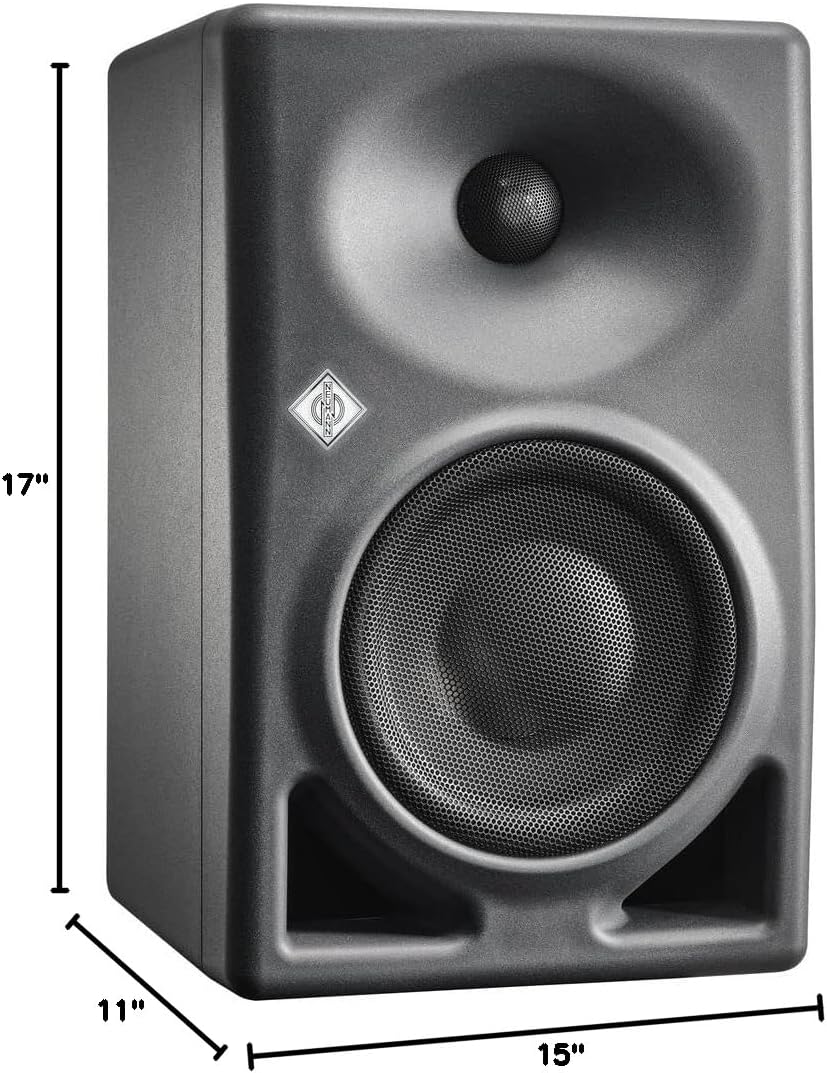
Figura 4: Dimensionalment sobrepassatview of the Neumann KH 120 II monitor, showing its height, width, and depth.
Garantia i Suport
Neumann products are known for their impeccable build quality and are designed to provide dependable service for many years. For detailed warranty information, product registration, or technical support, please visit the official Neumann weblloc web o poseu-vos en contacte amb el vostre distribuïdor autoritzat.
Podeu trobar més informació i recursos de suport visitant la Neumann Store on Amazon or the official Neumann weblloc.


