1. Introducció
The LILYGO T-Display-S3 AMOLED is an advanced development board featuring the ESP32-S3 microcontroller and a vibrant 1.91-inch RM67162 AMOLED display. This board is designed for a wide range of applications requiring wireless connectivity (Wi-Fi and Bluetooth 5 LE) and a high-quality visual interface. It serves as an excellent platform for embedded system development, IoT projects, and custom display solutions.
This manual provides essential information for setting up, operating, maintaining, and troubleshooting your T-Display-S3 AMOLED development board.
2. Informació de seguretat
- Precaucions de descàrrega electrostàtica (ESD): Always handle the board by its edges and use anti-static measures (e.g., anti-static wrist strap, mat) to prevent damage from static electricity.
- Font d'alimentació: Use only appropriate power sources (e.g., USB-C port, battery connector) within the specified voltage range. Incorrect voltagpot danyar la placa.
- Condicions ambientals: Avoid exposing the board to extreme temperatures, humidity, dust, or corrosive substances. Operate within recommended temperature and humidity ranges.
- Manipulació física: Do not apply excessive force to the board or its components. Avoid bending or dropping the board.
- Soldadura: If soldering is required (for unwelded pin versions or custom connections), ensure proper ventilation and use appropriate safety equipment.
3. Contingut del paquet
Verifiqueu que tots els elements siguin presents al vostre paquet:
- 1 x LILYGO T-Display-S3 AMOLED Development Board
- 2 x 14-pin Headers (for welded pin version, these are pre-soldered)
- 1 x Power Cable (JST-SH 1.0mm 4-Pin)
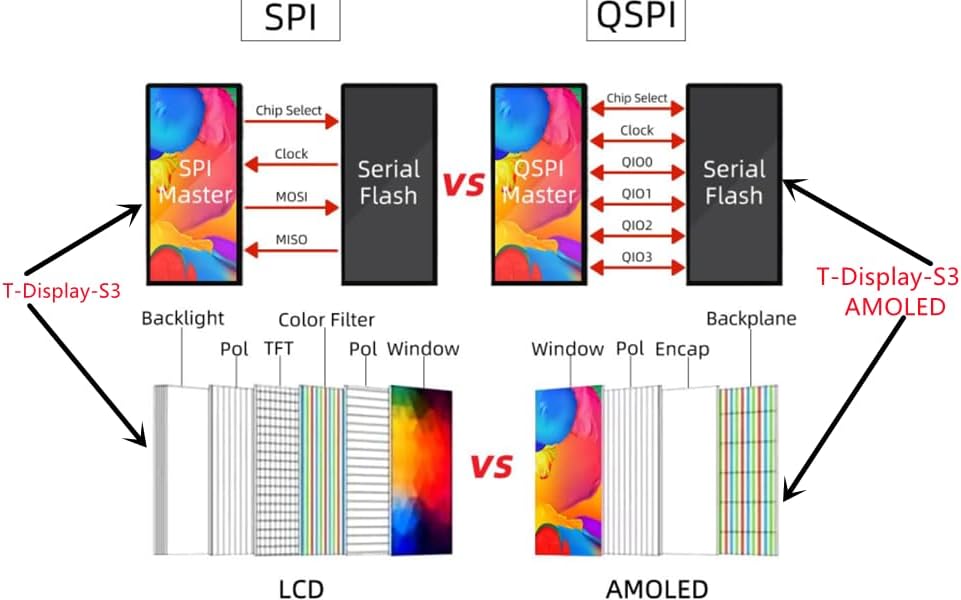
Image: Contents of the LILYGO T-Display-S3 AMOLED package.
4. Producte acabatview
The T-Display-S3 AMOLED integrates an ESP32-S3R8 dual-core LX7 microprocessor with a 1.91-inch AMOLED display. Key features include:
- Upgraded Display: Transition from LCD to AMOLED for superior color, contrast, and power efficiency.
- Faster Interface: Upgraded from SPI to QSPI for improved display data transfer speeds.
- Enhanced Wireless: Features a 3D antenna for better Wi-Fi and Bluetooth signal reception compared to onboard antennas.
- Onboard Functions: Includes Boot (IO0), Reset, and IO21 buttons for easy interaction and programming.
- Gestió de la bateria: Suporta bateria voltage detection (IO04) and includes a JST-SH 1.0mm 4-Pin connector for external battery.

Imatge: Frontal view of the T-Display-S3 AMOLED.

Imatge: Enrere view of the T-Display-S3 AMOLED.

Image: Pinout diagram of the T-Display-S3 AMOLED.

Image: SPI vs QSPI and LCD vs AMOLED comparison.
5. Especificacions
| Característica | Detall |
|---|---|
| Marca | LILYGO |
| Nom del model | T-Display-S3 AMOLED |
| MCU | ESP32-S3R8 Dual-core LX7 microprocessor |
| Tipus de visualització | 1.91 inch RM67162 AMOLED |
| Resolució de visualització | 240(W) x RGB x 536(H) |
| Interfície de visualització | QSPI |
| Connectivitat sense fil | 2.4 GHz Wi-Fi & Bluetooth 5 (LE) |
| Memòria Flash | 16 MB de PSRAM |
| RAM | 8 MB |
| Sistema operatiu | FreeRTOS (supports Arduino, PlatformIO-IDE, Micropython) |
| Dimensions del producte | 2.36 x 1 x 0.39 polzades (60 x 25.5 x 10 mm) |
| Número de model de l'article | AMOLED |
6. Guia de configuració
6.1 Connexió inicial
- Connect the T-Display-S3 AMOLED to your computer using a USB-C cable. The board should power on, and the display may show a default test pattern or remain blank if no firmware is loaded.
- If using an external battery, connect it to the JST-SH 1.0mm 4-Pin battery connector. Ensure correct polarity.
6.2 Software Environment Setup
The LILYGO T-Display-S3 AMOLED can be programmed using various development environments. The most common are Arduino IDE, PlatformIO, and Micropython.
- IDE d'Arduino: Install the ESP32 board package and necessary libraries (e.g., TFT_eSPI). Refer to the official LILYGO GitHub repository for specific board definitions and exampel codi.
- PlatformIO: Set up your PlatformIO environment and configure it for the ESP32-S3 board. Example projects are available on the LILYGO GitHub.
- Micropython: Flash the Micropython firmware to the ESP32-S3 and use a serial terminal or IDE (like Thonny) to interact with the board.
Important: For detailed setup instructions, driver installation, and example code, always refer to the official LILYGO GitHub repository: github.com/Xinyuan-LilyGO/T-Display-S3-AMOLED
7. Instruccions de funcionament
7.1 Uploading Firmware
Once your development environment is set up, you can upload your custom code or example sketches to the board.
- Select the correct board (ESP32-S3 Dev Module) and COM port in your IDE.
- Compile your code.
- Press the "Upload" button in your IDE. You may need to press and hold the Boot (IO0) button while pressing and releasing el Restableix button to put the ESP32-S3 into download mode, then release the Boot button.
7.2 Using the AMOLED Display
The 1.91-inch AMOLED display offers vibrant colors and deep blacks. Libraries like TFT_eSPI are commonly used for graphics operations. Refer to the library documentation and LILYGO examples for drawing text, shapes, images, and managing display updates.
7.3 Connectivitat sense fil
The ESP32-S3 supports 2.4 GHz Wi-Fi and Bluetooth 5 (LE). You can integrate network functionalities into your projects, such as connecting to Wi-Fi networks, hosting web servers, or communicating with Bluetooth devices. Standard ESP-IDF or Arduino Wi-Fi/Bluetooth libraries are compatible.
7.4 Onboard Buttons
- Boot (IO0): Used to put the ESP32-S3 into firmware download mode.
- Restablir: Restarts the board.
- IO21: A general-purpose input/output button that can be programmed for various functions within your application.
8. Manteniment
- Neteja: Use a soft, dry, anti-static cloth to clean the board and display. Avoid using liquids or abrasive materials.
- Emmagatzematge: Store the board in an anti-static bag in a cool, dry place when not in use.
- Actualitzacions de firmware: Regularly check the LILYGO GitHub repository for updated firmware, libraries, and examples to ensure optimal performance and access to new features.
- Pel·lícula protectora: The display may come with a thin protective plastic film. This should be carefully peeled off before use to ensure clear viewing and prevent confusion with potential "dead pixels" as noted by some users.
9. Solució De Problemes
| Problema | Possible causa/solució |
|---|---|
| Display is blank or shows artifacts. |
|
| Cannot upload code to the board. |
|
| El Wi-Fi o el Bluetooth no funcionen. |
|
| Placa no reconeguda per l'ordinador. |
|
For more specific issues or advanced debugging, consult the LILYGO GitHub repository's issues section or community forums.
10. Informació de la garantia
LILYGO products are typically covered by a limited manufacturer's warranty against defects in materials and workmanship. The specific terms and duration of the warranty may vary. Please retain your proof of purchase for warranty claims.
For detailed warranty information and to initiate a claim, please contact the seller or refer to the official LILYGO weblloc.
11. Suport
For technical support, documentation, and community resources, please visit the official LILYGO GitHub repository:
github.com/Xinyuan-LilyGO/T-Display-S3-AMOLED
This repository contains:
- Example code and libraries
- Detailed schematics and datasheets
- Actualitzacions de firmware
- Community discussion and issue tracking
For purchase-related inquiries, returns, or replacements, please contact Amazon customer service directly.


