1. Introducció
This user manual provides comprehensive instructions for the safe and efficient operation of your ZTE MU5120 5G Mobile WiFi Hotspot. Please read this manual thoroughly before using the device to ensure proper setup, usage, and maintenance. Keep this manual for future reference.
2. Producte acabatview
2.1 Característiques clau
- Connectivitat d'alta velocitat: Supports 5G NR and 4G LTE networks for fast and reliable internet access.
- Compatibilitat amb Wi-Fi 6 (802.11ax): Provides high-speed Wi-Fi with a peak rate of up to 3600Mbps for efficient data transfer.
- Gran capacitat de la bateria: Equipped with a 10000mAh battery for extended usage, offering over 16 hours of battery life.
- Funcionalitat del banc d'energia: Features 18W reverse charging to power other devices.
- Càrrega ràpida: Supports 27W fast charging, allowing a full charge in approximately 150 minutes.
- Pantalla tàctil intuïtiva: A 2.4-inch touchscreen for easy device setup, monitoring, and management.
- NFC Quick Connection: Simplifies connecting devices with a single tap.
- Suport multidispositiu: Connecta fins a 32 dispositius simultàniament.
- Unlocked SIM Slot: Compatible with most major 5G and 4G LTE network operators globally.
2.2 Contingut del paquet
Assegureu-vos que tots els elements siguin presents al paquet:
- 1 x ZTE MU5120 5G Mobile WiFi Hotspot
- 1 x cable de càrrega
- 1 x Guia d'inici ràpid
2.3 Disseny del dispositiu

Figura 2.3.1: Davant, lateral i posterior views of the ZTE MU5120, highlighting the power button and charging port.

Figure 2.3.2: The ZTE MU5120's 2.4-inch touchscreen interface, showing data usage, Wi-Fi status, and settings options.
3. Configuració
3.1 Inserció de la targeta SIM
- Assegureu-vos que el dispositiu estigui apagat.
- Localitza la ranura de la targeta SIM al lateral del dispositiu.
- Gently insert a Nano-SIM card into the slot with the gold contacts facing down and the notched corner aligned correctly. Push until it clicks into place.
- Close the SIM card slot cover (if applicable).
3.2 Càrrega inicial
Abans del primer ús, carregueu completament el dispositiu.
- Connect the provided charging cable to the device's USB-C port.
- Connecteu l'altre extrem del cable a un adaptador de corrent USB compatible (no inclòs) o al port USB d'un ordinador.
- The screen will indicate charging status. A full charge takes approximately 150 minutes with a 27W fast charger.
4. Instruccions de funcionament
4.1 Engegada/apagada
- Per encendre: Premeu i manteniu premut el botó d'engegada al lateral del dispositiu fins que la pantalla s'il·lumini.
- Per apagar: Press and hold the Power button until the power-off options appear on the screen, then select 'Power Off'.
4.2 Connexió de dispositius mitjançant Wi-Fi
The ZTE MU5120 supports Wi-Fi 6 for high-speed connections.

Figure 4.2.1: The ZTE MU5120 supports high-speed Wi-Fi 6 with peak rates up to 3600Mbps.
- Ensure the MU5120 is powered on and has an active internet connection.
- On your device (smartphone, laptop, tablet), go to Wi-Fi settings.
- Select the Wi-Fi network name (SSID) displayed on the MU5120's screen.
- Enter the Wi-Fi password (Key) shown on the MU5120's screen.
- El dispositiu ara hauria d'estar connectat a Internet.
4.3 Connecting Devices via NFC
For compatible Android devices, NFC provides a quick connection method.
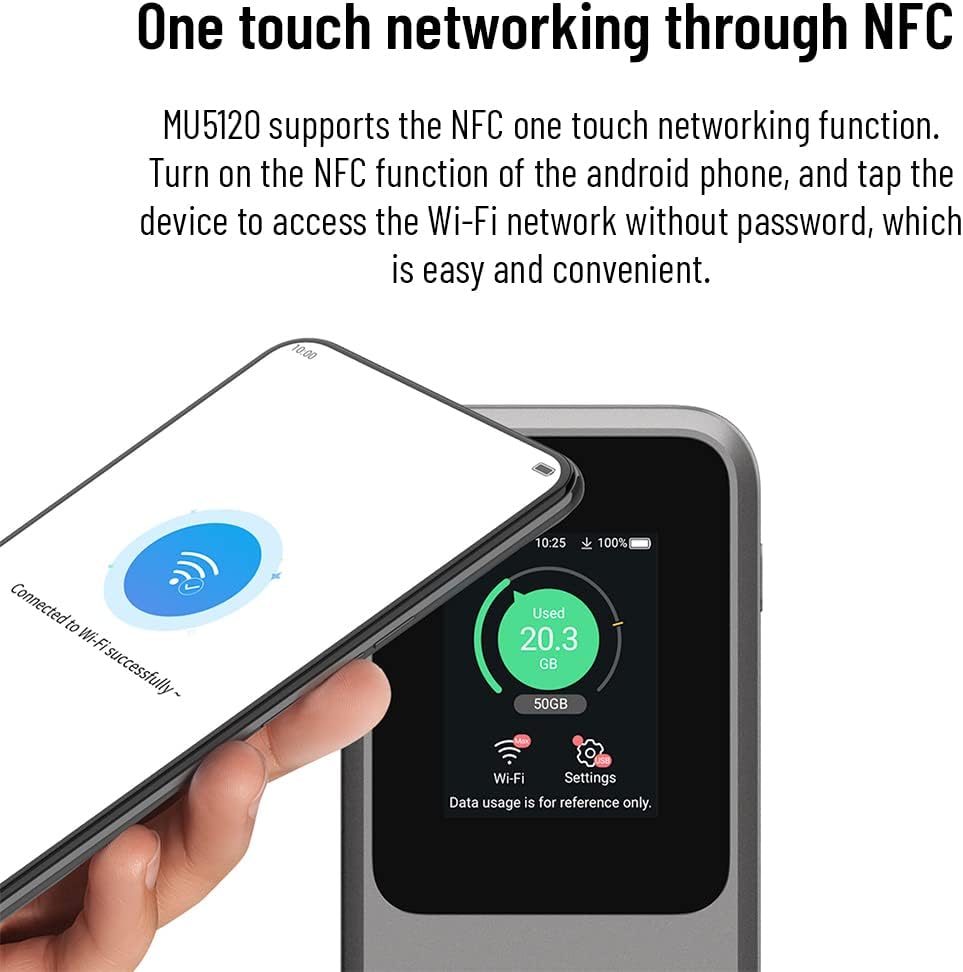
Figure 4.3.1: A smartphone being tapped against the ZTE MU5120 to establish a Wi-Fi connection via NFC.
- Ensure NFC is enabled on your Android phone and on the MU5120 (check device settings).
- Tap your Android phone against the NFC area on the MU5120.
- Your phone will automatically connect to the Wi-Fi network without needing to enter a password.
4.4 Ús com a bateria externa
The MU5120 can charge other devices using its 18W reverse charging feature.

Figure 4.4.1: The ZTE MU5120 connected via cable to a smartphone, demonstrating its power bank capability.
- Connect your device (e.g., smartphone) to the MU5120's USB-C port using a compatible charging cable.
- The MU5120 will begin charging your connected device.
4.5 Managing Settings via Touchscreen
The 2.4-inch touchscreen allows for direct management of the device.
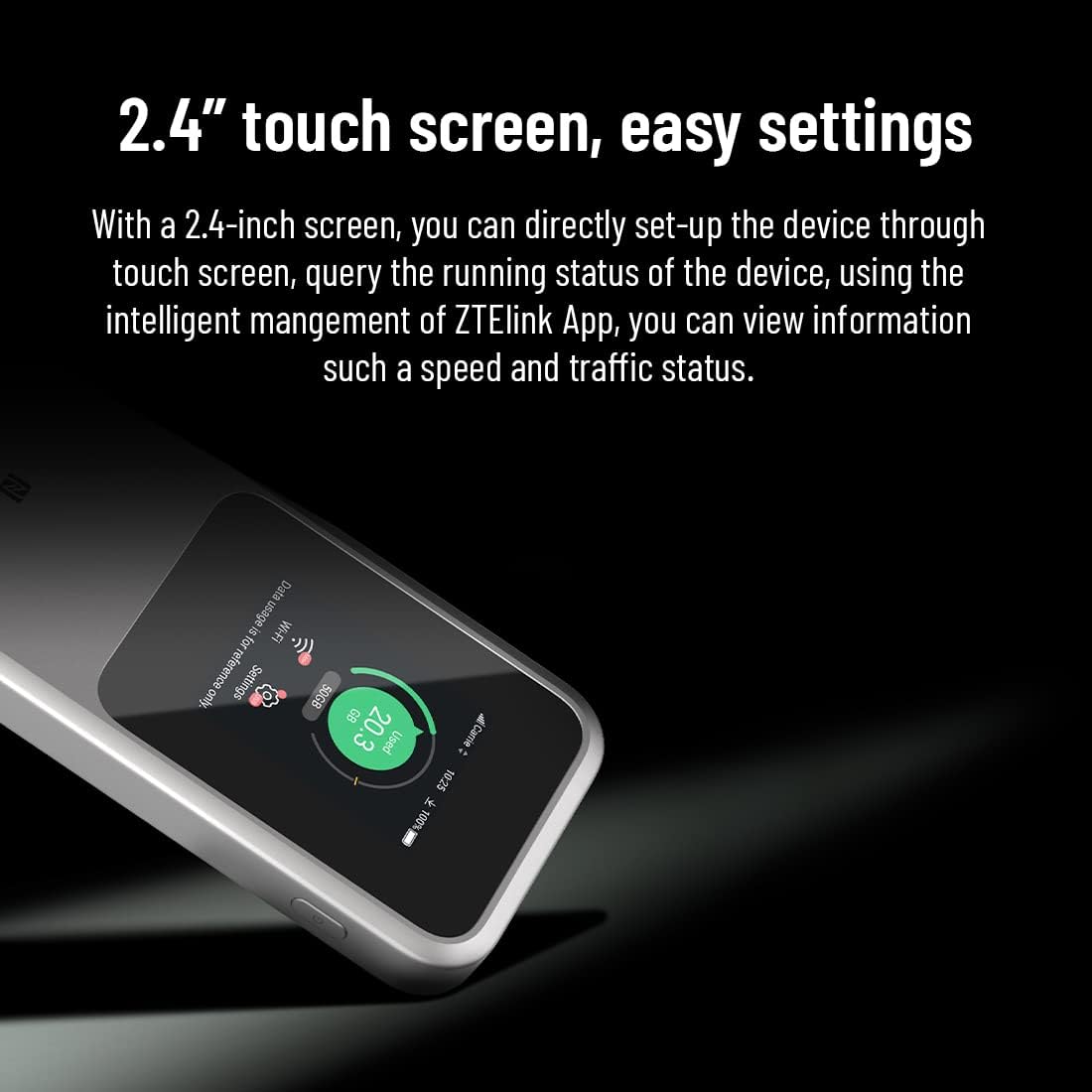
Figura 4.5.1: Un primer pla view of the 2.4-inch touchscreen, illustrating the ease of accessing settings and monitoring device status.
Navigate through the menus by swiping and tapping on the screen. You can view information such as speed, traffic status, connected devices, and adjust Wi-Fi settings directly from the device.
5. Manteniment
5.1 Neteja del dispositiu
- Utilitzeu un drap suau i sec per netejar l'exterior del dispositiu.
- No utilitzeu netejadors líquids ni aerosols.
5.2 Cura de la bateria
- Eviteu exposar el dispositiu a temperatures extremes (calor o fred).
- No punxeu, desmunteu o curtcircuiteu la bateria.
- Si no heu d'utilitzar el dispositiu durant un període prolongat, carregueu-lo al 50% aproximadament abans de guardar-lo.
5.3 Actualitzacions de programari
Periodically check for software updates through the device's settings or the ZTE Link App to ensure optimal performance and security.
6. Solució De Problemes
6.1 Problemes comuns i solucions
| Problema | Causa possible | Solució |
|---|---|---|
| Sense connexió a Internet | No SIM card, incorrect APN settings, no network signal, data limit reached. | Ensure SIM is inserted correctly. Check APN settings. Move to an area with better signal. Check data plan. |
| No es pot connectar a la Wi-Fi | Contrasenya Wi-Fi incorrecta, dispositiu massa lluny, Wi-Fi desactivat. | Verify password. Move closer to the hotspot. Ensure Wi-Fi is enabled on the MU5120. |
| Velocitat d'internet lenta | Senyal feble, massa dispositius connectats, congestió de la xarxa. | Relocate the device for better signal. Disconnect unused devices. Try again during off-peak hours. |
| El dispositiu no es carrega | Faulty cable/adapter, dirty charging port. | Try a different cable and adapter. Clean the charging port gently. |
6.2 Restabliment del dispositiu
If issues persist, you may perform a factory reset. Avís: This will erase all custom settings and data on the device.
- Locate the reset pinhole on the device (often near the SIM slot or charging port).
- With the device powered on, use a paperclip or a SIM ejector tool to press and hold the reset button inside the pinhole for about 5-10 seconds until the device restarts.
7. Especificacions
| Característica | Detall |
|---|---|
| Nom del model | ZTE MU5120 (Internal Model: U10S PRO) |
| Dimensions (L x A x A) | 13.3 x 7.3 x 1.85 cm |
| Pes | 240 g |
| Color | Negre |
| Capacitat de la bateria | Polímer de liti de 10000 mAh |
| Carregant | 27W Fast Charging (approx. 150 min for full charge) |
| Càrrega inversa | 18W |
| Mostra | Pantalla tàctil de 2.4 polzades |
| Suport a la xarxa | 5G NR, 4G LTE |
| Estàndards Wi-Fi | 802.11a/b/g/n/ac/ax (Wi-Fi 6) |
| Velocitat màxima de Wi-Fi | 3600Mbps (Peak Rate) |
| Màxim dispositius connectats | 32 |
| Característiques especials | NFC, Power Bank Function |
| Chipset | Snapdragon X62/65 + WCN6856 |
| Sistema operatiu | RouterOS (firmware) |
| Components inclosos | ZTE MU5120, Charging Cable, Quick Start Guide |
8. Garantia i Suport
8.1 Garantia del producte
The ZTE MU5120 comes with a 2 any de garantia des de la data de compra. Aquesta garantia cobreix defectes de fabricació i avaries en condicions d'ús normal. Conserveu el comprovant de compra per a reclamacions de garantia.
8.2 Suport tècnic
For any technical assistance or inquiries, a 24/7 technical support team is available to help you. Please refer to the contact information provided in your Quick Start Guide or on the official ZTE website for support channels.


