1. Introducció
This manual provides detailed instructions for the installation, operation, and maintenance of your MOUNTUP Single Monitor Desk Mount, model MU0004-W. Please read this manual thoroughly before installation and retain it for future reference. Proper installation and use will ensure optimal performance and safety.
The MOUNTUP MU0004-W is designed to support a single monitor, offering adjustable positioning for an ergonomic workspace. It features a gas spring arm for smooth height adjustments and versatile movement options.
2. Comprovació de compatibilitat
Before proceeding with installation, verify that your monitor and desk meet the following requirements:
- Mida del monitor: Compatible with most LCD LED flat or curved computer screens up to 32 inches.
- Pes del monitor: Supports monitors weighing between 4.4 lbs (2 kg) and 17.6 lbs (8 kg).
- Patró VESA: Supports VESA mounting patterns of 75x75mm and 100x100mm. If your monitor has a different VESA pattern, an adapter (not included) may be required.
- Gruix de l'escriptori (C-cl)amp): Per a C-clamp installation, your desk thickness must be between 0.39 inches (10mm) and 4.52 inches (115mm).
- Gruix de l'escriptori (ulleres): For grommet installation, your desk thickness must be between 0.39 inches (10mm) and 3.15 inches (80mm), and the hole diameter must be between 0.39 inches (10mm) and 2.36 inches (60mm).

Figura 1: Compatibilitat universalview

Figure 2: Detailed Compatibility Checks
Important: Do not install this mount on tempered glass table tops.
3. Configuració i instal·lació
The MOUNTUP MU0004-W offers two installation methods: C-clamp and Grommet mount. All necessary hardware for both options is included.
3.1. Trieu la vostra opció de muntatge

Figure 3: Two Installation Options
3.1.1. C-Clamp Instal·lació
- Enganxeu el C-clamp base to the edge of your desk. Ensure the desk thickness is within 0.39-4.52 inches.
- Apretar el clamp securely using the provided knob until the base is stable.

Figure 4: C-Clamp Detall de muntatge
3.1.2. Grommet Mount Installation
- If your desk has a grommet hole, ensure its diameter is between 0.39-2.36 inches and desk thickness is 0.39-3.15 inches.
- Insert the grommet base through the hole and secure it from underneath the desk using the provided plate and wing nut.

Figure 5: Grommet Mounting Detail
3.2. Attaching the Monitor Arm
- Slide the lower arm onto the installed base pole.
- Attach the upper gas spring arm to the lower arm.
- Secure the VESA plate to the back of your monitor using the appropriate screws and spacers from the hardware kit.
- Carefully slide the monitor (with VESA plate attached) onto the end of the gas spring arm until it clicks into place.
4. Funcionament i ajustos
The MOUNTUP MU0004-W offers a full range of motion for optimal viewcomoditat.

Figure 6: Full Range Motion
4.1. Ajust de la tensió de la molla de gas
The gas spring allows for smooth height adjustments. Adjust the tension to match your monitor's weight for effortless movement.
- Hold the arm in a horizontal position.
- Use the provided Allen key to adjust the gas spring tension screw.
- Gira sentit horari (-) to reduce tension for lighter monitors (monitor raises up).
- Gira en sentit antihorari (+) to increase tension for heavier monitors (monitor drops down).
- Adjust gradually, testing the arm's movement after every few turns, until the monitor stays at the desired height without drifting. Note: It may take up to 17 turns for significant adjustment.

Figure 7: Gas Spring Adjustment
4.2. Tilt Angle Adjustment
Adjust the monitor's vertical angle for optimal viewing.
- Loosen the tilting bolt (turn to "-" direction).
- Adjust the monitor to your desired tilt angle (up to +90° and down to -45°).
- Retighten the tilting bolt (turn to "+" direction) to secure the angle.
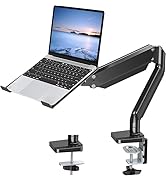
Figure 8: Tilt Angle Adjustment
4.3. Gir i rotació
- Girar: The arm joints allow for 180° swivel, and the VESA plate can swivel 90° left or right.
- Rotació: The VESA plate can rotate 360° for landscape or portrait orientation.
4.4. Gestió de cables
Integrated cable management clips help keep your workspace tidy by concealing monitor cables.
- Route your monitor cables through the designated channels on the underside of the arm.
- Secure the cable covers to keep the cables neatly tucked away.

Figura 9: Gestió de cables
5. Manteniment
Un manteniment regular garanteix la longevitat i el funcionament segur del suport del monitor.
- Neteja: Netegeu la muntura amb un drap suauamp drap. Eviteu productes de neteja o dissolvents abrasius.
- Comprovacions periòdiques: Periodically check all screws and bolts, especially the clamp/grommet base and VESA plate connections, to ensure they remain tight and secure. Re-tighten if necessary.
- Molla de gas: If the gas spring tension feels off, refer to Section 4.1 for adjustment instructions.
6. Solució De Problemes
Refer to the following common issues and solutions. For more detailed assistance, please consult the official Troubleshooting Guide (PDF) available on the product page or contact customer support.
- Monitor Sags or Rises Unintentionally:
This indicates incorrect gas spring tension. Refer to Section 4.1 to adjust the gas spring. Increase tension for heavier monitors (turn counter-clockwise) or decrease for lighter monitors (turn clockwise). - Monitor Tilts Downward:
The tilt bolt may not be sufficiently tightened. Loosen the tilt bolt slightly, adjust the monitor to the desired angle, and then firmly re-tighten the tilt bolt as described in Section 4.2. - La muntanya sembla inestable:
Assegureu-vos que el C-clamp or grommet base is securely fastened to the desk. Check for any wobbling and re-tighten the base screws or clamp knob. Verify that your desk surface is stable and within the specified thickness limits. - Difficulty Moving the Arm:
If the arm is too stiff or too loose, the gas spring tension might need fine-tuning. Refer to Section 4.1. Also, ensure no cables are snagged or obstructing movement.
For further troubleshooting, please refer to the Guia oficial de resolució de problemes (PDF).
7. Especificacions
| Característica | Especificació |
|---|---|
| Número de model | MU0004-W |
| Marca | MONTAGE |
| Material | Acer d'aliatge |
| Color | Blanc |
| Mida de monitor compatible | Fins a 32 polzades |
| Capacitat de pes | 4.4 - 17.6 lliures (2 - 8 kg) |
| Compatibilitat VESA | 75x75mm, 100x100mm |
| Tipus de moviment | Tilt, Rotate, Swivel, Height Adjust, Full Motion |
| Angle d'inclinació | +90° a -45° |
| Angle de gir | 180° (arm joints), 360° (VESA plate) |
| Rotació | 360° |
| Ajust d'alçada màxima | 16.3 polzades (41.4 cm) |
| Extensió màxima | 19.27 polzades (48.9 cm) |
| Opcions de muntatge | C-clamp, Ullera |
| C-clamp Gruix de l'escriptori | 0.39 - 4.52 polzades (10 - 115 mm) |
| Gruix de l'escriptori Grommet | 0.39 - 3.15 polzades (10 - 80 mm) |
| Diàmetre del forat del grommet | 0.39 - 2.36 polzades (10 - 60 mm) |
8. Garantia i Suport
The MOUNTUP Single Monitor Desk Mount MU0004-W is backed by MOUNTUP's 3-year support. For warranty claims, technical assistance, or any questions regarding your product, please contact MOUNTUP customer service through their official channels or the retailer where the product was purchased.
També podeu consultar el Manual d'usuari oficial (PDF) per obtenir informació addicional.


