1. Introducció
The SATLINK SP-2100 is a DVB-S/S2 and MPEG-2/4 H.264 compliant handheld digital satellite finder meter. Designed for ease of use, this compact and lightweight device provides essential functions for the installation and verification of digital satellite TV services. It is suitable for both residential homes and multi-dwelling units, offering signal measurement, channel management, and system configuration capabilities.
2. Informació de seguretat
- Font d'alimentació: Use only the provided DC12V/1.5A power adapter. Using an incorrect adapter may damage the device or cause fire.
- Cura de la bateria: The device contains a Li-Ion battery. Do not expose it to extreme temperatures, puncture, or disassemble. Dispose of batteries according to local regulations.
- Humitat: Mantingueu el dispositiu allunyat de l'aigua i de la humitat elevada. No el feu funcionar amb les mans mullades.
- Ventilació: Assegureu-vos una ventilació adequada per evitar el sobreescalfament. No obstruïu les obertures de ventilació.
- LNB Short Protection: The device features LNB short protection. If a short circuit is detected, disconnect the LNB immediately.
- Neteja: Desconnecteu l'alimentació abans de netejar. Feu servir un drap suau i sec. No utilitzeu netejadors líquids ni aerosols.
3. Producte acabatview
3.1 Panell frontal i controls
The front panel features a 3.5-inch TFT LCD screen for displaying menus and signal information, along with various control buttons and indicator lights.

Imatge 3.1: Davant view of the SP-2100, highlighting the display and control interface.
- Pantalla LCD: 3.5-inch High Definition TFT LCD (320x240 RGB) for menu navigation and signal display.
- Indicadors: Power (red), 13V/18V (green for LNB power), Lock (signal lock), Charge (battery charging status).
- Botons de navegació: MENU, OK, Directional Arrows (Up, Down, Left, Right), EXIT.
- Tecles de funció: F1, F2, F3, F4 (context-sensitive functions).
- Teclat numèric: 0-9 for data entry.
- Botons de funció especial: MUTE, SCAN, SAT, BACK, PAUSE, INFO, TV/R.
3.2 Panell posterior
The rear panel includes product information and the integrated speaker.

Imatge 3.2: posterior view of the SP-2100, indicating the speaker and product label.
3.3 Side and Top Ports
Various input and output ports are located on the sides and top of the device.
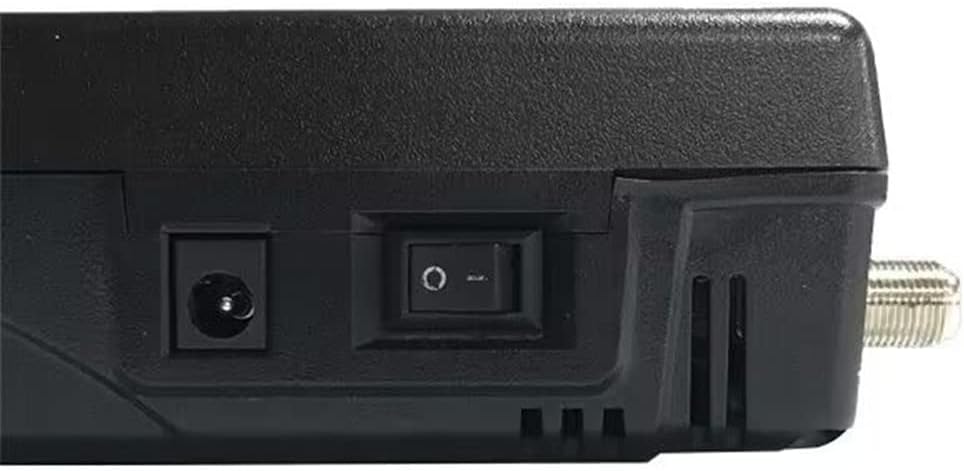
Imatge 3.3: lateral view with HDMI, AV OUT, and AV IN ports.
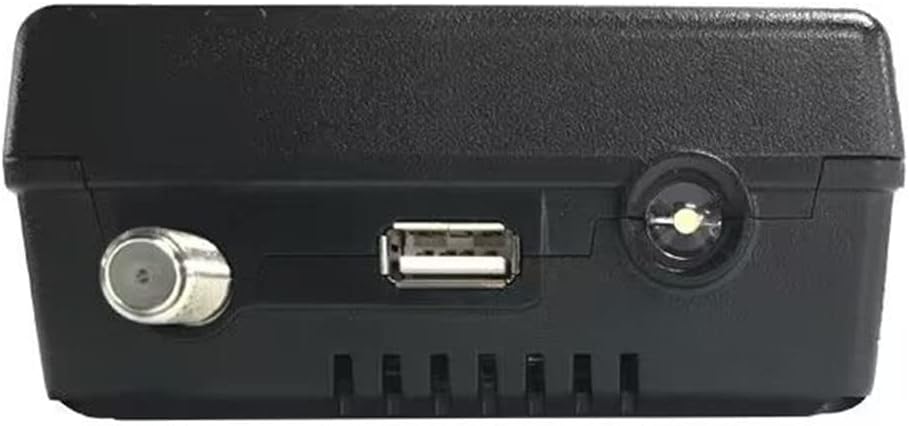
Imatge 3.4: A dalt view with F-connector, USB Type A, and DC power input.
- F-Male Connector: Satellite input (950-2150 MHz).
- USB tipus A: For software upgrades and file transfer (USB 2.0).
- DC IN: Power adapter input (DC12V/1.5A).
- Interruptor d'alimentació: On/Off toggle for the device.
- HD-MI OUT: HD-MI 1.3a output for connecting to an external display.
- SORTIDA AV: 3.5mm jack for composite video (CVBS) and stereo audio (L/R) output.
- AV IN: 3.5mm jack for composite video (CVBS) and stereo audio (L/R) input.
4. Configuració
4.1 Càrrega de la bateria
Before first use, fully charge the internal Li-Ion battery. Connect the provided DC12V/1.5A power adapter to the DC IN port on the device and plug it into a power outlet. The 'Charge' indicator light will illuminate during charging. A full charge typically takes several hours and provides approximately 3 hours of operation time.
4.2 Engegada/apagada
Locate the power switch on the side of the device. Toggle the switch to the 'ON' position to power on the meter. The 'Power' indicator light will turn red. To power off, toggle the switch to the 'OFF' position.
4.3 Connexió a l'LNB
Connect the satellite cable from your LNB (Low Noise Block) to the F-Male connector on the top of the SP-2100. Ensure the connection is secure. The device will supply 13V or 18V to the LNB, indicated by the green '13V/18V' light.

Imatge 4.1: Connection diagram showing LNB, power, and AV/HDMI connections.
5. Instruccions de funcionament
5.1 Navegació de menús
Utilitza el MENÚ button to access the main menu. Navigate through options using the directional arrow buttons (Up, Avall, Esquerra, D'acord). Premeu OK to confirm a selection or enter a submenu. Press Sortida per tornar a la pantalla anterior o sortir del menú.
5.2 Main Menu Functions
- Instal·lació: This section is used for satellite dish alignment and signal acquisition.
- Select a satellite from the predefined list or add a new one.
- Configure LNB type, frequency, and DiSEqC settings (1.0 / 1.1 / 1.2 and 22 kHz Tone supported).
- Perform signal measurement to view signal strength and quality. Adjust the dish until optimal signal levels are achieved. The 'Lock' indicator will illuminate when a signal is acquired.
- Supports Auto, Manual, and NIT Scan modes for channel searching.
- Edició del canal: Manage TV and radio channels. You can move, delete, or lock channels.
- Configuració del sistema: Configure device settings such as OSD language, time, display brightness, and factory reset options.
- Utilitat: Access additional tools or features.
- Media Center: Jugar multimèdia files (wma, mp3, mp4, avi, jpg, jpeg, bmp, img) from a USB storage device connected to the USB Type A port.
- Sobre: Displays device information, including software version and hardware details.
5.3 Signal Measurement
In the 'Installation' menu, after selecting the satellite and transponder, the screen will display real-time signal strength and quality bars. Adjust your satellite dish azimuth and elevation slowly while observing these values. The goal is to maximize both strength and quality. The device will emit an audible tone and the 'Lock' LED will light up when a signal is successfully locked.
5.4 AV In/Out and HD-MI Output
- AV IN: Connect an external video source (e.g., CCTV camera) to the AV IN port to display its output on the SP-2100's screen.
- AV OUT / HD-MI OUT: Connect the SP-2100 to an external display (TV, monitor) using the AV OUT or HD-MI OUT ports to view the meter's screen on a larger display.
6. Manteniment
6.1 Neteja
Ensure the device is powered off and disconnected from all cables before cleaning. Use a soft, dry, lint-free cloth to wipe the screen and casing. Do not use abrasive cleaners, solvents, or spray directly onto the device.
6.2 Cura de la bateria
To prolong battery life, avoid fully discharging the battery frequently. If storing the device for an extended period, charge the battery to approximately 50% and store it in a cool, dry place. Recharge every few months to prevent deep discharge.
6.3 Actualització del programari
Software upgrades can be performed via the USB Type A port. Download the latest firmware from the official Satlink weblloc. Copieu el firmware file to a USB flash drive, insert it into the SP-2100, and follow the on-screen instructions in the 'System Setting' or 'Utility' menu to initiate the upgrade process. Do not power off the device during an upgrade.
7. Solució De Problemes
- Sense energia:
- Comproveu si l'interruptor d'alimentació està en la posició "ON".
- Ensure the battery is charged. Connect the power adapter and check the 'Charge' indicator.
- Verify the power adapter is correctly connected and functioning.
- No Signal / Low Signal Quality:
- Ensure the LNB cable is securely connected to the F-connector.
- Check LNB settings (type, frequency) in the 'Installation' menu.
- Verify DiSEqC settings if using multiple LNBs or a DiSEqC switch.
- Adjust the satellite dish alignment (azimuth, elevation, LNB skew) slowly and observe signal readings.
- Check for any obstructions between the dish and the satellite.
- No Picture/Sound on External Display:
- Ensure the AV or HD-MI cable is correctly connected to both the SP-2100 and the external display.
- Select the correct input source on your external display (e.g., HDMI 1, AV).
- Dispositiu USB no reconegut:
- Ensure the USB device is formatted to NTFS, FAT32, or FAT16.
- Prova un altre dispositiu USB.
8. Especificacions
| Característica | Especificació |
|---|---|
| Normes de transmissió | DVB-S/S2, MPEG-2, MPEG-4, H.264 |
| Connector Type (Satellite Input) | F Male |
| Freqüència d'entrada | 950 a 2150 MHz |
| Nivell d'entrada del senyal | -65 a -25 dBm |
| Control de commutació de banda | 22 KHz |
| Subministrament de LNB | 13V/18V, Imax 400mA |
| Tipus de demodulació | QPSK, 8PSK, 16APSK, 32APSK |
| Taxa de símbols | 2 Msps to 45 Msps |
| Tipus de LCD | Transmissiu TFT |
| Nombre de punts | 320 x 240 (RGB) |
| Àrea activa (amplada x alçada) | 70.0 x 52.5 mm |
| AV Output Connector | 3.5mm jack (CVBS Video, Stereo L/R Audio) |
| Connector d'entrada AV | 3.5mm jack (CVBS Video, Stereo L/R Audio) |
| HD-MI Output Format | HD-MI 1.3a |
| Interfície USB | USB Type A (USB2.0) |
| File Sistema de gestió | NTFS, FAT32, FAT16 |
| Admet File Formats | wma, mp3, mp4, avi, jpg, jpeg, bmp, img |
| Bateria Li-Ion | 7.4 V/2600 mAh |
| Sortida de l'adaptador | DC12V/1.5A |
| Entrada d'adaptador | 100-240VAC, 50/60Hz |
| Consum d'energia | Màxim 10W |
| Dimensions | 86 x 150 x 40 mm |
| Pes net | 0.37 kg |
9. Contingut del paquet
The SATLINK SP-2100 package includes the following items:
- 1x SP-2100 Digital Satellite Meter
- 1 cable AV
- 1x Power Adapter (DC12V/1.5A)
- 1x Bossa de transport
- 1x English User Manual (this document)
10. Garantia i Suport
For warranty information and technical support, please refer to the documentation provided with your purchase or contact your local dealer. Keep your purchase receipt as proof of purchase for warranty claims. Software updates and additional resources may be available on the official Satlink weblloc.


