Introducció
Gràcies per la compraasing the Hoco HC5 Cool Enjoy Sports Wireless Speaker. This manual provides important information regarding the setup, operation, and maintenance of your new speaker. Please read this manual thoroughly before using the product to ensure proper function and to extend its lifespan.
Informació de seguretat
- No exposeu l'altaveu a temperatures extremes, llum solar directa ni humitat elevada.
- Eviteu deixar caure o sotmetre l'altaveu a forts impactes.
- Do not disassemble, repair, or modify the speaker yourself. Refer to qualified service personnel.
- Mantingueu l'altaveu lluny de l'aigua i altres líquids.
- Feu servir només el cable de càrrega i l'adaptador especificats.
- Netegeu l'altaveu amb un drap suau i sec. No utilitzeu productes químics agressius ni netejadors abrasius.
Contingut del paquet

Image: Hoco HC5 speaker in its retail packaging, showing the speaker and its accessories.
Si us plau, reviseu atentament el contingut del paquet. Si falta algun article o hi ha algun dany, poseu-vos en contacte amb el vostre distribuïdor.
- Hoco HC5 Wireless Speaker
- Cable de càrrega USB
- Cable AUX
- Corretja d'espatlla
- Manual d'usuari (aquest document)
Producte acabatview
Familiarize yourself with the various parts and controls of your Hoco HC5 speaker.

Imatge: Frontal view of the Hoco HC5 speaker, showcasing its cylindrical design, speaker grilles, and attached shoulder strap.

Imatge: Primer pla view of one end of the Hoco HC5 speaker, highlighting the speaker driver and the robust casing.
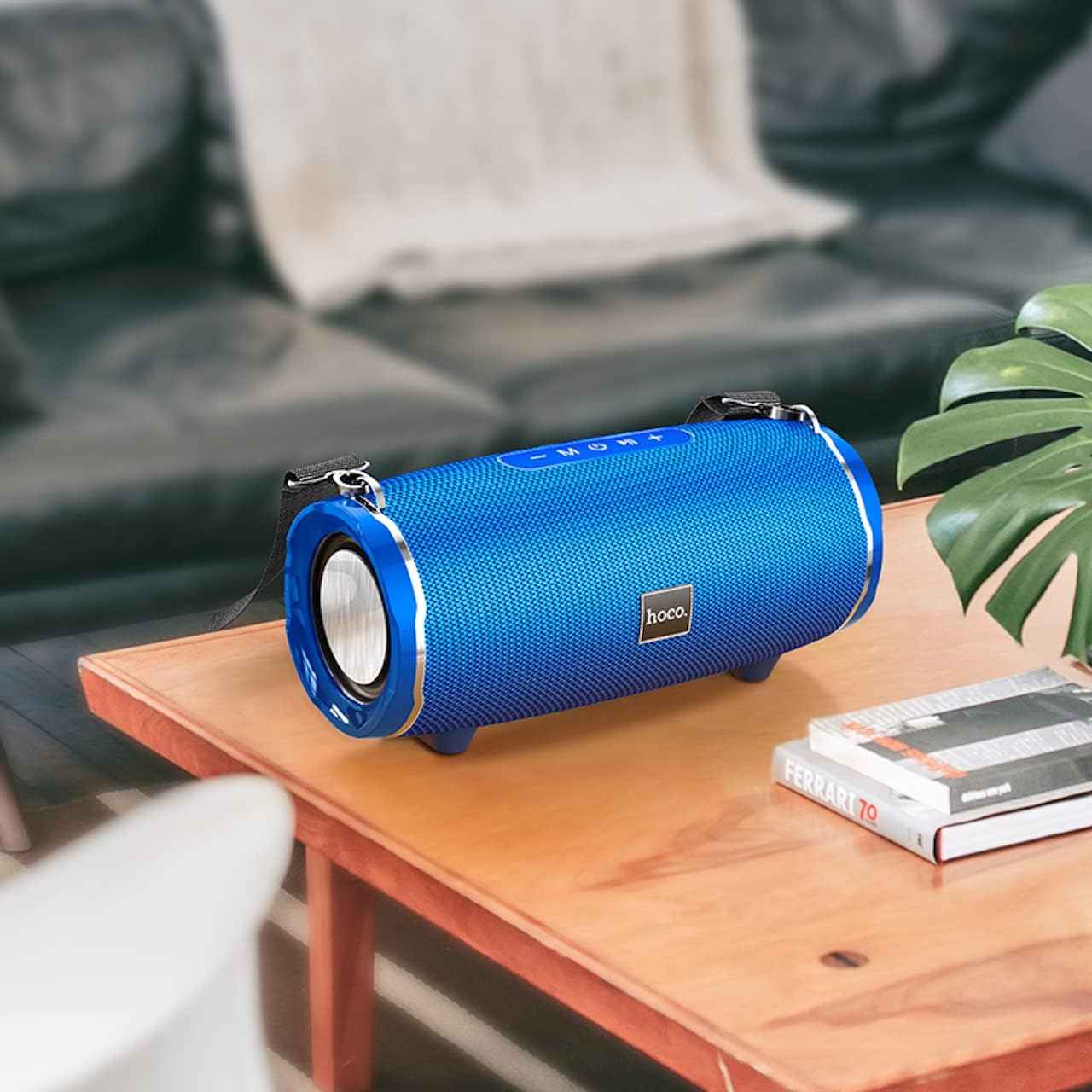
Image: The Hoco HC5 speaker placed on a wooden table, demonstrating its size and how it might appear in a home setting.
Tauler de control (superior/posterior)
- Botó d'encesa: Manteniu premut per activar/desactivar.
- Botó de mode (M): Short press to switch between Bluetooth, TF Card, USB, AUX, and FM modes.
- Play/Pause Button (▶⏸): Short press to play or pause music. In FM mode, short press to auto-scan and save stations.
- Baixar volum / Pista anterior (-): Premeu curt per anar a la pista anterior. Premeu llargament per baixar el volum.
- Pujar volum / Pista següent (+): Premeu curt per a la següent pista. Premeu llargament per augmentar el volum.
Ports (Rear/Side)
- Port USB: Per a la reproducció des d'una unitat flaix USB.
- Ranura per a targetes TF: Per a la reproducció amb targeta TF (MicroSD).
- Port AUX: Per connectar dispositius d'àudio externs mitjançant un cable d'àudio de 3.5 mm.
- Port de càrrega: Per carregar la bateria interna de l'altaveu.
Configuració
Carregant l'altaveu
- Connecteu el cable de càrrega USB al port de càrrega de l'altaveu.
- Connect the other end of the USB cable to a USB power adapter (5V/1A recommended) or a computer's USB port.
- El llum indicador de càrrega s'il·luminarà durant la càrrega i s'apagarà quan estigui completament carregat.
- Una càrrega completa triga aproximadament 3.5 hores.
Encès/Apagat
- Per encendre: Press and hold the Power button for a few seconds until you hear a power-on prompt.
- Per apagar: Press and hold the Power button again for a few seconds until you hear a power-off prompt.
Instruccions de funcionament
Mode Bluetooth
- Engegueu l'altaveu. Entrarà automàticament en mode d'emparellament Bluetooth, cosa que s'indicarà amb un llum LED intermitent.
- Activa el Bluetooth al teu dispositiu (telèfon intel·ligent, tauleta, etc.).
- Cerca "HC5" in the list of available Bluetooth devices and select it to connect.
- Once connected, the LED indicator will stop flashing, and you will hear a connection tone.
- Ara pots reproduir àudio des del teu dispositiu a través de l'altaveu.
- Use the Play/Pause, Volume Up/Down, and Previous/Next Track buttons on the speaker or your device to control playback.
TF Card / USB Mode
- Insert a TF (MicroSD) card or USB flash drive into the corresponding slot on the speaker.
- The speaker will automatically switch to TF Card or USB mode and begin playing audio files. If not, short press the "M" (Mode) button to switch.
- Assegureu-vos el vostre àudio fileestan en un format compatible (per exemple, MP3).
- Use the Play/Pause, Volume Up/Down, and Previous/Next Track buttons to control playback.
Mode AUX
- Connect one end of the 3.5mm AUX cable to the speaker's AUX port.
- Connecteu l'altre extrem a la presa de sortida d'àudio del vostre dispositiu extern (per exemple, reproductor MP3, ordinador).
- The speaker will automatically switch to AUX mode. If not, short press the "M" (Mode) button to switch.
- Audio will now play through the speaker. Control playback from your external device.
Mode de ràdio FM
- Short press the "M" (Mode) button until you enter FM radio mode.
- To auto-scan and save available FM stations, short press the Play/Pause button. The speaker will scan and store stations automatically.
- Feu servir els botons Pista anterior/següent per navegar entre les emissores desades.
TWS (True Wireless Stereo) Function (If Supported)
The Hoco HC5 speaker supports TWS function, allowing you to pair two HC5 speakers together for a true stereo sound experience.
- Ensure both HC5 speakers are powered on and not connected to any Bluetooth device.
- On one of the speakers (this will be the primary speaker), long press the Play/Pause button until you hear a prompt indicating TWS pairing mode.
- Els dos altaveus es cercaran i es connectaran automàticament. Un cop connectats, sentireu un to de confirmació.
- Now, connect your device to the primary speaker via Bluetooth as described in the "Bluetooth Mode" section.
- L'àudio ara es reproduirà en estèreo pels dos altaveus.
Manteniment
- Neteja: Use a soft, dry, lint-free cloth to wipe the surface of the speaker. Do not use liquid cleaners, aerosols, or solvents.
- Emmagatzematge: Quan no l'utilitzeu durant períodes prolongats, guardeu l'altaveu en un lloc fresc i sec, allunyat de la llum solar directa i de temperatures extremes.
- Cura de la bateria: Per allargar la durada de la bateria, eviteu descarregar-la completament amb freqüència. Carregueu l'altaveu regularment, fins i tot si no l'esteu fent servir.
Resolució de problemes
| Problema | Causa possible | Solució |
|---|---|---|
| L'altaveu no s'encén. | La bateria està baixa o esgotada. | Carregueu l'altaveu completament. |
| No es pot emparellar amb un dispositiu Bluetooth. | L'altaveu no està en mode d'emparellament; el Bluetooth del dispositiu està desactivat; l'altaveu ja està connectat a un altre dispositiu. | Assegureu-vos que l'altaveu estigui en mode d'emparellament (LED parpellejant). Desactiveu i activeu el Bluetooth al dispositiu. Desconnecteu-lo d'altres dispositius. |
| No hi ha so de l'altaveu. | Volume is too low; incorrect mode selected; audio source issue. | Increase speaker and device volume. Press "M" button to select correct mode. Check audio source. |
| La recepció de ràdio FM és deficient. | Senyal feble; interferències ambientals. | Relocate the speaker. Re-scan for stations. |
Especificacions
| Característica | Detall |
|---|---|
| Model | HC5 |
| Versió Bluetooth | 5.0 (JL chip) |
| Mida de l'altaveu | 76 mm * 2 |
| Potència de sortida dels altaveus | 15W * 2 (Total 30W) |
| Capacitat de la bateria | 3600 mAh |
| Temps de càrrega | Aproximadament 3.5 hores |
| Música/Temps de conversa | Fins a 4 hores |
| Opcions de connectivitat | Bluetooth, TF card, USB, AUX, FM, TWS |
| Dimensions del producte | 292 x 139 x 132 mm |
| Pes del producte | 1.5 kg |
| Mode de sortida d'àudio | Envoltant |
| Tipus de muntatge | Taula |
Garantia i Suport
The Hoco HC5 speaker comes with a standard manufacturer's warranty. Please refer to the warranty card included in your package for specific terms and conditions. For technical support, troubleshooting assistance, or warranty claims, please contact the retailer where you purchased the product or visit the official HOCO weblloc per obtenir informació de contacte.
Fabricant: Hoco
País d'origen: Xina


