1. Introducció
This manual provides comprehensive instructions for the installation, operation, and maintenance of your Hunter Pro-C P2C-400 Indoor/Outdoor Modular Controller. Designed for efficient irrigation management, this controller offers advanced features for precise watering schedules.
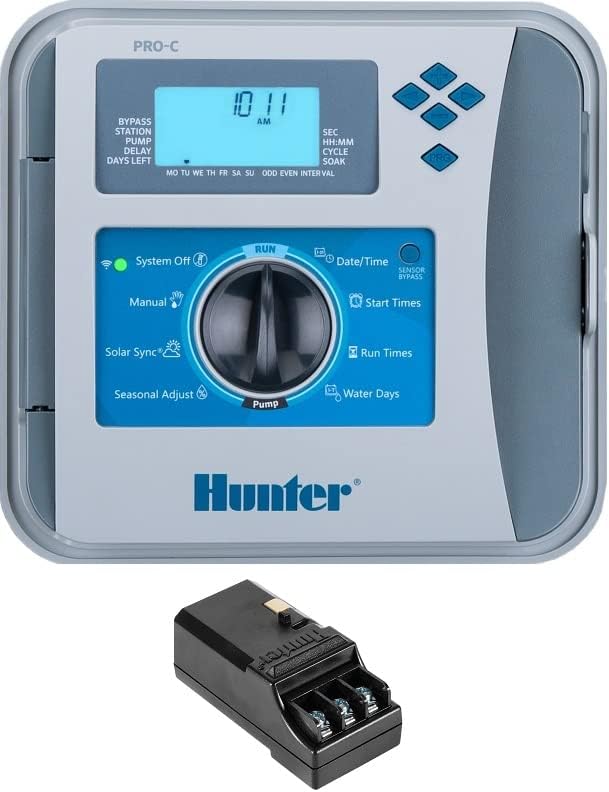
Image: Hunter Pro-C P2C-400 Controller with its main display and control dial, alongside an expansion module. The display shows "10:11 AM" and various programming options are visible around the dial.
2. Característiques clau
- Disseny modular: Base 4-station unit expandable up to 32 stations with optional expansion modules. This specific model comes with 16 stations.
- Easy Retrieve Memory: A manual backup utility that stores complete controller scheduling and setup information.
- Automatic Short Circuit Protection: Detects electrical faults, skipping only affected stations to allow others to water normally.
- QuickCheck: Displays an "ERR" message when a field wiring short is detected on a specific station number, aiding in troubleshooting.
- Ajust estacional: Allows quick adjustment to irrigation run times based on current weather conditions. Can be global or automatic with Solar Sync.
- Retard entre estacions: Programmable delay between stations (from seconds to longer periods) to allow for valve closing or pressure tank recharge.
- Sensor Programmability: Ability to specify which programs are shut down in response to a sensor alarm, allowing unaffected programs to continue.
- Non-Water Days: Program specific days of the week as OFF to prevent watering, regardless of interval schedules.
- Large, Backlit Display: Ensures simple programming and manual operation in various lighting conditions.
- Dual Sensor Inputs: Standard inputs for use with Hunter Clik or Solar Sync Sensors.
- Potència flexible: Pre-wired with a power cord and plug for easy indoor/outdoor installation. The power cord can be removed for hardwired setups.
- SmartPort Wiring Harness: Facilitates quick connection to ROAM and ROAM XL Remotes.
- Múltiples programes: Three independent irrigation programs, each with four start times, for customized scheduling.
- Hybrid EZ Decoder Option: Supports up to 32 total stations (28 maximum if two-wire only) with a separately sold decoder.
3. Configuració i instal·lació
3.1 Muntatge del controlador
The Hunter Pro-C P2C-400 controller is designed for both indoor and outdoor use. Select a suitable location that is protected from direct sunlight and extreme weather conditions if possible. Ensure easy access for programming and maintenance.
3.2 Connexió d'alimentació
The controller comes pre-wired with a power cord and plug for convenient installation. For hardwired installations, the power cord can be removed. Always ensure power is disconnected before performing any wiring.
3.3 Wiring Stations and Sensors
Connect your irrigation valves to the appropriate station terminals. The controller supports conventional wiring from 4 to 23 stations. Utilize the two standard sensor inputs for Hunter Clik or Solar Sync Sensors as needed. Refer to the wiring diagram inside the controller's cover for detailed connections.
For modular expansion, insert additional station modules into the designated slots. Ensure modules are securely seated.
4. Instruccions de funcionament
The Hunter Pro-C P2C-400 features a user-friendly dial and button interface for programming and manual operation.
4.1 Setting Current Date and Time
- Turn the dial to "SET CURRENT DATE / TIME".
- Utilitzeu els botons de fletxa (+ / -) to adjust the values (year, month, day, hour, minute).
- Use the right arrow button to move between settings.
4.2 Programació de programacions de reg
The controller supports three independent programs (A, B, C). Each program can have up to four start times.
- Turn the dial to "SET PROGRAM START TIMES". Select the program (A, B, or C) using the PRG button. Adjust start times using the arrow buttons.
- Turn the dial to "SET STATION RUN TIMES". Select the program and station. Adjust the run time for each station using the arrow buttons.
- Turn the dial to "SET DAYS TO WATER". Select the program. Choose your watering days (e.g., specific days of the week, odd/even days, or interval watering) using the arrow buttons.
4.3 Funcionament manual
For immediate watering or testing:
- Manual - All Stations: Turn the dial to "MANUAL - ALL STATIONS" to manually run all programmed stations.
- Manual - Single Station: Turn the dial to "MANUAL - SINGLE STATION" to select and run a specific station.
- Press the "MANUAL START / PRESS & HOLD" button to initiate manual watering.
4.4 System Off
To halt all automatic irrigation, turn the dial to "SYSTEM OFF". The green indicator light will turn off.
4.5 Funcionament de la bomba
If your system includes a pump, turn the dial to "SET PUMP OPERATION" to configure its activation with irrigation cycles.
4.6 Ajust estacional
Adjust the overall watering duration by turning the dial to "SEASONAL ADJUST". Use the arrow buttons to increase or decrease the percentage of programmed run times. This feature helps conserve water during cooler months or increase watering during hotter periods.
5. Manteniment
Regular maintenance ensures the longevity and optimal performance of your Hunter Pro-C controller.
- Neteja: Netegeu periòdicament l'exterior del controlador amb un drap suau i sec.amp drap. Eviteu productes de neteja o dissolvents abrasius.
- Inspecció: Check wiring connections annually for corrosion or loose terminals. Ensure the enclosure is sealed to prevent moisture ingress.
- Còpia de seguretat de la bateria: While the controller has Easy Retrieve Memory, ensure any internal backup batteries (if applicable to your specific model revision) are checked and replaced as per manufacturer recommendations to maintain time and date during power outages.
- Comprovació del sensor: If using rain or soil sensors, periodically check their functionality and cleanliness.
6. Solució De Problemes
Aquesta secció tracta problemes comuns i les seves solucions.
| Problema | Causa possible | Solució |
|---|---|---|
| "ERR" Message on Display | Field wiring short detected on a station. | Utilitza el Comprovació ràpida feature to identify the specific station. Inspect wiring for shorts or damage. The Automatic Short Circuit Protection will skip the affected station, allowing others to run. |
| No Watering Occurs | System Off mode, power issue, rain sensor active, or programming error. |
|
| Stations Not Turning Off | Faulty valve, low water pressure, or programming error. |
|
7. Especificacions
- Model: P2C-400 With 16 Zones (Base 4 Station Plus one 3 Station & 9 Station Module)
- Marca: SPW (Hunter)
- Expandabilitat: Conventional wiring from 4 to 23 stations; Hybrid EZ Decoder option up to 32 total stations (28 max if two-wire only).
- Programes: 3 independent irrigation programs (A, B, C)
- Horaris d'inici: 4 hores d'inici per programa
- Entrades del sensor: 2 (compatible with Hunter Clik or Solar Sync Sensors)
- Master Valve/Pump Start: 1 P/MV output
- Tipus de visualització: LCD, retroil·luminat
- Potència: Pre-wired with power cord and plug (removable for hardwired installation)
- Voltage: 12 volts (CC)
- Pes de l'article: 7.41 lliures
- Dimensions del paquet: 10.67 x 10.35 x 4.69 polzades
- UPC: 746178856260
8. Garantia i Suport
For specific warranty information and technical support, please refer to the documentation included with your product or visit the official Hunter Industries website. Ensure you have your product model number (P2C-400) and serial number (if applicable) ready when contacting support.
For additional resources and frequently asked questions, you may also visit the pàgina del producte a Amazon.


