1. Introducció
Thank you for choosing the HARDELL Mini Cordless Rotary Tool. This manual provides essential information for the safe and efficient operation, maintenance, and troubleshooting of your new tool. Please read it thoroughly before first use and keep it for future reference.

Image 1.1: HARDELL Mini Cordless Rotary Tool with included accessories. This image displays the main tool unit, various sanding bands, cutting discs, grinding bits, drilling bits, diamond bits, polishing wheels, collets, and a wrench.
2. Instruccions de seguretat
Seguiu sempre les precaucions bàsiques de seguretat per reduir el risc d'incendi, descàrrega elèctrica i lesions personals.
- Wear appropriate personal protective equipment, including safety glasses, gloves, and a dust mask.
- Assegureu-vos que la peça de treball estigui ben ferma clamped abans de l'operació.
- Mantenir la zona de treball neta i ben il·luminada.
- No utilitzeu l'eina en atmosferes explosives, com ara en presència de líquids, gasos o pols inflamables.
- Mantingueu els nens i els espectadors allunyats mentre feu servir una eina elèctrica.
- Eviteu l'arrencada accidental. Assegureu-vos que l'interruptor estigui en la posició d'apagada abans de connectar la bateria, agafar o transportar l'eina.
- No sobrepasseu. Mantingueu els peus i l'equilibri adequats en tot moment.
- Desconnecteu la bateria de l'eina abans de fer qualsevol ajust, canviar accessoris o guardar eines elèctriques.
- Use the tool only with specifically designated battery packs.
- Guardeu les eines inactius fora de l'abast dels nens i no permeteu que persones que no estiguin familiaritzades amb l'eina elèctrica o aquestes instruccions la facin servir.
3. Contingut del paquet
Verifiqueu que tots els elements estiguin presents i en bon estat en obrir el paquet.
- HARDELL Mini Cordless Rotary Tool 4V x 1
- Rotary Tool Accessories x 69 (including sanding bands, sanding shank, sanding paper, HSS cutting discs, wheel mandrel, aluminum oxide grinding wheels, drilling bits, diamond bits, wool polishing wheels, wrench, collets)
- Cable de càrrega tipus C x 1
- Accessories Case x 1
- Black Bag x 1

Image 3.1: Detailed diagram illustrating the 69 included accessories, categorized for sanding, cutting, grinding, drilling, engraving, polishing, and other uses. This includes various bits, discs, and collets.
4. Especificacions
| Marca | HARDELL |
| Número de model | Q0M-DC-4S |
| Voltage | 4 Volts |
| Font d'alimentació | Funciona amb bateria (1 bateria d'ions de liti inclosa) |
| Configuració de velocitat | 5-Speed (5000/8000/11000/14000/18000 RPM) |
| Velocitat de rotació màxima | 18000 RPM |
| Velocitat mínima | 5000 RPM |
| Pes de l'article | 0.35 lliures (aproximadament 5.6 unces) |
| Característiques especials | Compact, Cordless, Keyless Chuck, Multi-Use, Variable Speed, Digital Display |
| Carregant | Type-C USB Charging (1-2 hours for full charge) |
| Chuck Sizes | 3/64", 1/16", 3/32" (1.0mm, 1.6mm, 2.3mm) |
5. Muntatge i muntatge
5.1 Càrrega de l'eina
Before first use, fully charge the rotary tool. Connect the provided Type-C charging cable to the tool's charging port and to a compatible USB power adapter (not included). The digital display will indicate charging status.

Image 5.1: The HARDELL rotary tool connected to a laptop via its Type-C USB cable for charging. The tool's display shows charging progress.
5.2 Installing/Changing Accessories
- Press down the spindle locking button located near the chuck.
- Unscrew the collet nut counter-clockwise.
- Select the appropriate collet size (3/64", 1/16", or 3/32") for your desired accessory and insert it into the chuck.
- Insert the accessory bit into the collet.
- While holding the spindle locking button, screw on the collet nut clockwise until the accessory is securely fastened. Do not overtighten.
- Deixeu anar el botó de bloqueig del cargol.

Image 5.2: A visual guide demonstrating the four steps to install or change accessories: pressing the lock button and unscrewing the nut, choosing a collet, inserting the bit, and tightening the nut.
6. Instruccions de funcionament
6.1 Encès/Apagat
- To turn on: Press the power button briefly. The tool will start at the lowest speed setting.
- Per apagar: premeu i manteniu premut el botó d'engegada durant aproximadament 2 segons.
6.2 Ajust de la velocitat
The HARDELL Mini Cordless Rotary Tool features 5-speed settings. Briefly press the power button to cycle through the speeds (5000, 8000, 11000, 14000, 18000 RPM). The current speed level will be displayed on the screen.
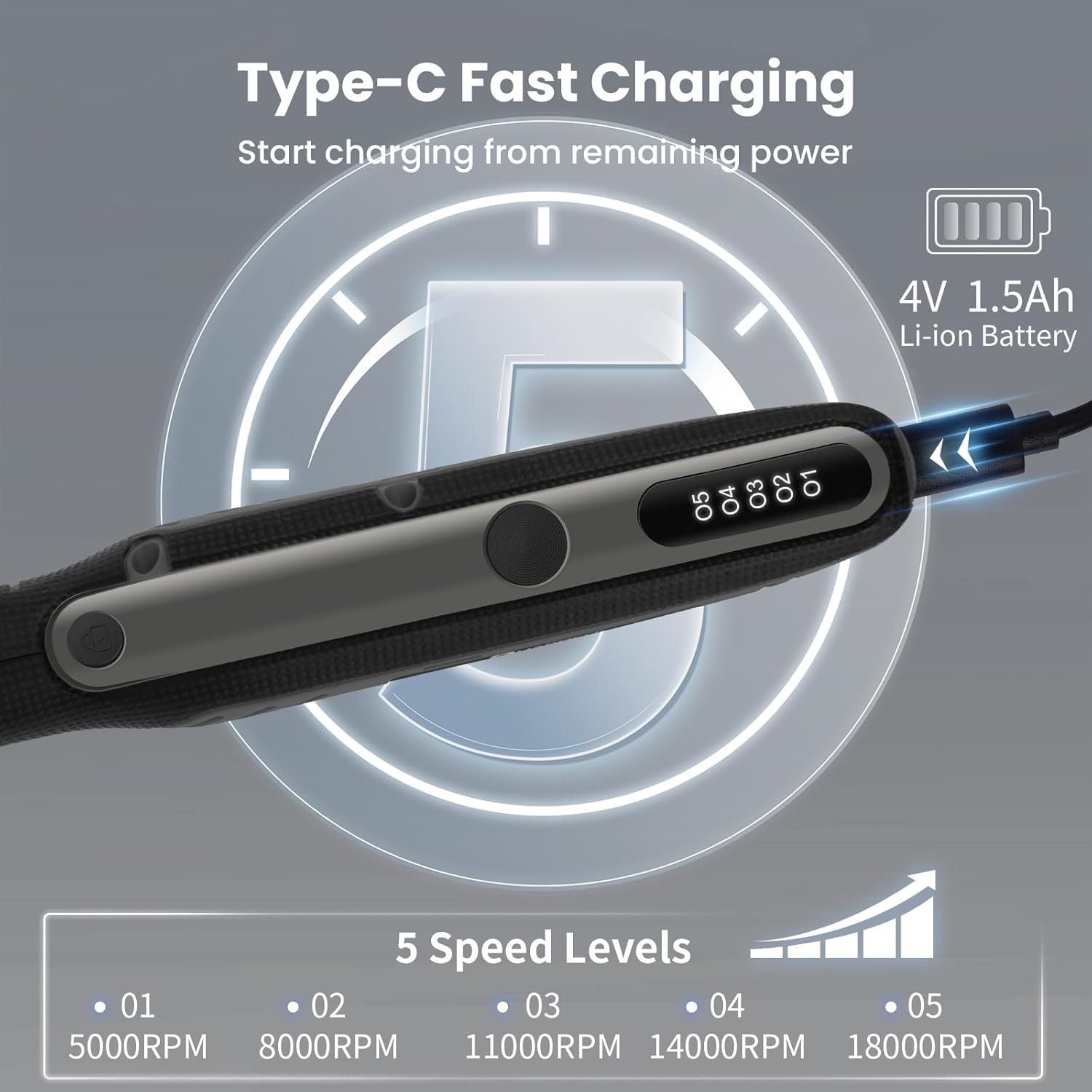
Image 6.1: The HARDELL rotary tool's digital display showing the five available speed levels, ranging from 5000 RPM to 18000 RPM.
6.3 Aplicacions recomanades
This tool is suitable for various light-duty tasks. Always select the appropriate accessory and speed for the material and task.
- Tall: Use HSS cutting discs for thin materials like plastic or soft metals.
- Gravat: Diamond bits are ideal for glass, metal, and stone.
- Poliment: Sanding bands and paper are used for smoothing wood, plastic, and other soft materials.
- Perforació: Small drilling bits are suitable for creating holes in soft materials like wood, plastic, or seashells.
- Polit: Wool polishing wheels can be used with polishing compounds for jewelry or other small items.

Image 6.2: A collage demonstrating the HARDELL rotary tool in use for multiple applications, including cutting, engraving, polishing, grinding, sanding, drilling, cleaning, and carving on different materials.
7. Manteniment
- Neteja: After each use, wipe the tool with a clean, dry cloth. Remove any dust or debris from the ventilation slots. Do not use harsh chemicals or abrasive cleaners.
- Cura d'accessoris: Clean accessories after use. Replace worn or damaged accessories immediately to ensure optimal performance and safety.
- Emmagatzematge: Store the tool and accessories in the provided case or bag in a dry, cool place, away from direct sunlight and out of reach of children.
- Cura de la bateria: Do not store the tool with a completely discharged battery. Charge it periodically if not used for extended periods.
8. Solució De Problemes
| Problema | Causa possible | Solució |
|---|---|---|
| L'eina no s'encén. | La bateria està descarregada. | Carregueu la bateria completament amb el cable tipus C. |
| L'accessori trontolla o està fluix. | Incorrect collet size or improperly tightened nut. | Ensure the correct collet is used and the collet nut is securely tightened. |
| L'eina s'atura durant el funcionament. | Sobrecàrrega o bateria baixa. | Reduïu la pressió sobre l'eina o recarregueu la bateria. |
| Rendiment reduït. | Worn accessory or dirty tool. | Replace the accessory or clean the tool and ventilation slots. |
9. Garantia i Suport
For warranty information or technical support, please refer to the contact details provided with your purchase or visit the official HARDELL weblloc web. Conserveu el comprovant de compra per a reclamacions de garantia.
Official HARDELL Store: HARDELL Store on Amazon


