1. Introducció
Thank you for choosing the SPLITSKY NZFS Kids Alarm Clock. This device combines an alarm clock, white noise sleep aid, and an 8-mode RGB night light, designed to assist with sleep and wake-up routines for children and adults. Please read this manual thoroughly to understand its features and ensure proper operation.
Informació de seguretat:
- Mantingueu el dispositiu allunyat de l'aigua i d'ambients amb molta humitat.
- No intenteu desmuntar o reparar el dispositiu vosaltres mateixos.
- Use only the provided USB-C power cable or a certified equivalent.
- Assegureu-vos una ventilació adequada al voltant del dispositiu.
2. Contingut del paquet
Verifiqueu que tots els elements siguin presents al vostre paquet:
- SPLITSKY NZFS Kids Alarm Clock
- 1.2M (4.7 inch) USB-C Power Cable
- Manual d'usuari (aquest document)
- 1 x CR2032 Lithium Ion Battery (pre-installed for memory backup)
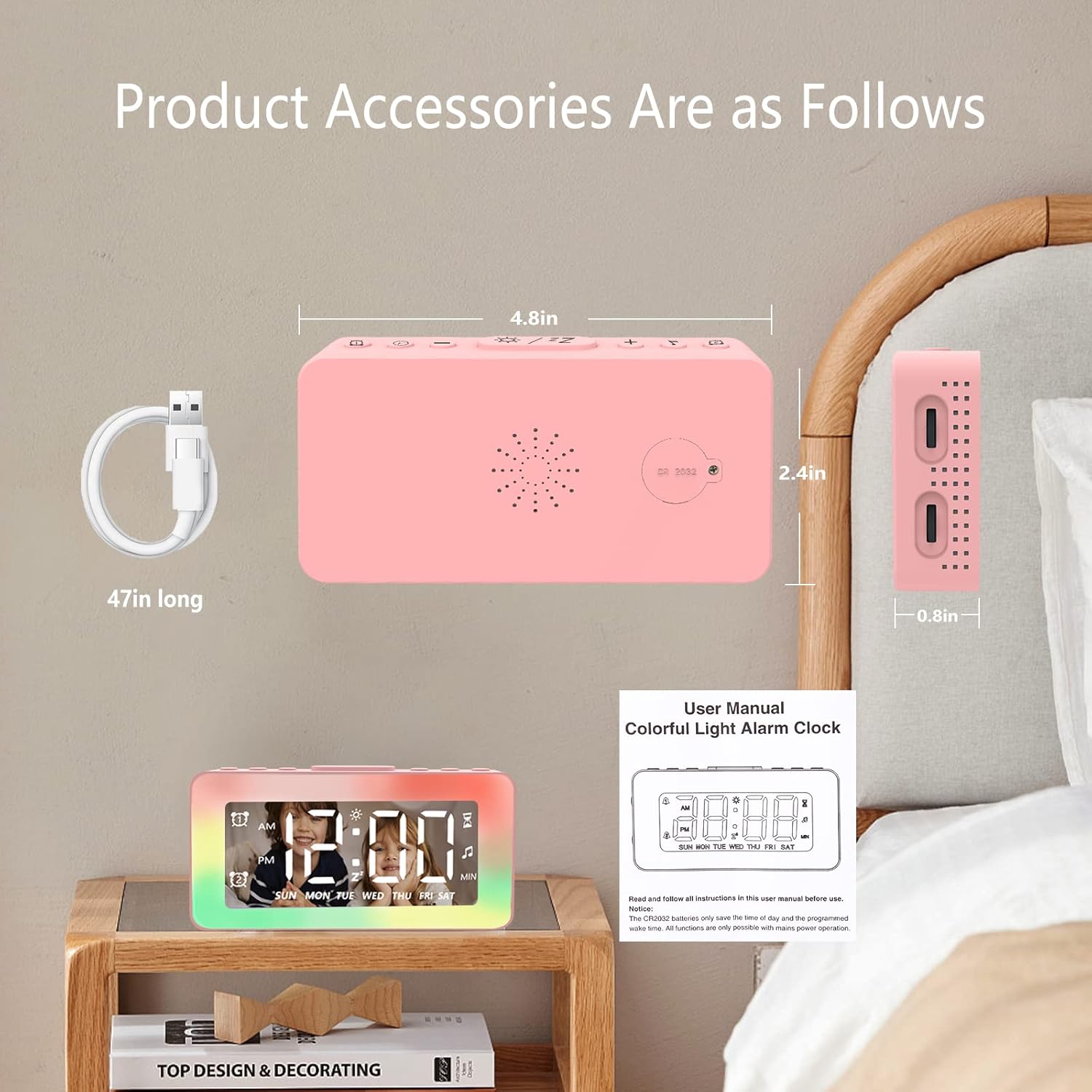
Image: The SPLITSKY NZFS Kids Alarm Clock, a USB-C power cable, and the user manual are included in the package.
3. Producte acabatview
Familiarize yourself with the buttons and ports on your alarm clock:

Imatge: Detallada view of the alarm clock's top buttons and side ports, including Alarm 1, Time Setting, Light Minus/Settings, Snooze/Light Mode Switch, Light Plus/Setup, Music Switch, Alarm 2, Volume Setting, Time Brightness Setting, USB Output Charging Port, and Type-C Input Interface.
- Botó d'alarma 1: Set and activate Alarm 1.
- Botó de configuració de l'hora: Ajusteu l'hora actual.
- Light Minus / Settings Button: Decrease light brightness or navigate settings.
- Snooze / Light Mode Switch Button: Activate snooze, or cycle through light modes.
- Light Plus / Setup Button: Increase light brightness or confirm settings.
- Music Switch Button: Cycle through white noise sounds.
- Botó d'alarma 2: Set and activate Alarm 2.
- Volume Setting Wheel (Side): Adjust alarm and white noise volume.
- Time Brightness Setting Wheel (Side): Ajusteu la brillantor de la pantalla.
- USB Output Charging Port (Side): Charge external devices.
- Type-C Input Interface (Side): Connect power cable to the alarm clock.
4. Configuració
4.1 Connexió d'alimentació
- Connect the provided USB-C power cable to the Type-C Input Interface on the side of the alarm clock.
- Connecteu l'altre extrem del cable USB-C a un adaptador de corrent USB compatible (no inclòs) o a un port USB.
- La pantalla s'il·luminarà, indicant que el rellotge està encès.

Image: The SPLITSKY NZFS Kids Alarm Clock is shown powered on and connected via its USB-C port, also demonstrating its capability to charge a smartphone.
4.2 Battery Installation (Memory Backup)
The alarm clock includes a pre-installed CR2032 battery. This battery serves as a memory backup to retain time and alarm settings during a power outage or when the main power is disconnected. It does not power the clock for regular operation.
- If the battery needs replacement, locate the battery compartment on the back of the unit.
- Utilitzeu un tornavís petit per obrir el compartiment.
- Substituïu-la per una nova CR2032, assegurant la polaritat correcta.
- Tanqueu el compartiment de manera segura.
5. Instruccions de funcionament
5.1 Setting the Time (12H/24H Format)
- Manteniu premut el botó Botó de configuració de l'hora until the hour digits begin to flash.
- Utilitza el Light Minus / Settings Button (a baix) o Light Plus / Setup Button (up) to adjust the hour.
- Premeu el botó Botó de configuració de l'hora again to move to minute adjustment. Adjust minutes using the Light Minus/Plus buttons.
- Premeu el botó Botó de configuració de l'hora a third time to select 12-hour or 24-hour format. Adjust using the Light Minus/Plus buttons.
- Premeu el botó Botó de configuració de l'hora una vegada més per confirmar i sortir del mode de configuració de l'hora.
5.2 Setting Alarms (Dual Alarm, Daily/Weekday/Weekend Mode)
El rellotge admet dues alarmes independents (Alarma 1 i Alarma 2).
- Manteniu premut el botó Botó d'alarma 1 (per a l'alarma 1) o Botó d'alarma 2 (for Alarm 2) until the alarm hour digits flash.
- Utilitza el Light Minus / Settings Button or Light Plus / Setup Button per ajustar l'hora.
- Press the respective Alarm Button again to move to minute adjustment. Adjust minutes using the Light Minus/Plus buttons.
- Press the respective Alarm Button again to select the alarm mode:
- Mode diari: L'alarma sona cada dia.
- Weekday Mode: L'alarma sona de dilluns a divendres.
- Mode de cap de setmana: L'alarma sona dissabte i diumenge.
- Press the respective Alarm Button once more to confirm and exit alarm setting mode.
- To enable/disable an alarm, short press the Botó d'alarma 1 or Botó d'alarma 2Apareixerà/desapareixerà una icona d'alarma a la pantalla.
5.3 Funció de repetició
When an alarm sounds, tap the Snooze / Light Mode Switch Button on top to activate snooze. The alarm will pause for 9 minutes and then sound again. This can be repeated multiple times.
5.4 Night Light (8 Modes RGB, 10-level dimming)
The alarm clock features 6 solid color lights and 2 ambient colorful lights.
- Premeu breument Snooze / Light Mode Switch Button to turn on the night light and cycle through the 8 color modes.
- To adjust the brightness (10 levels), use the Light Minus / Settings Button or Light Plus / Setup Button while the night light is active.
- To turn off the night light, continue pressing the Snooze / Light Mode Switch Button fins que s'apagui el llum.

Image: Multiple SPLITSKY NZFS Kids Alarm Clocks are shown, each displaying a different color from the 8 available RGB night light modes.
5.5 White Noise Sleep Aid (8 Sounds)
The clock offers 8 soothing sounds to aid sleep.
- Premeu breument Botó de canvi de música to turn on the white noise and cycle through the available sounds.
- To adjust the volume (16 levels), use the Volume Setting Wheel on the side of the clock.
- To turn off the white noise, continue pressing the Botó de canvi de música until the sound stops.

Image: The SPLITSKY NZFS Kids Alarm Clock is displayed on a bedside table, with icons illustrating the various white noise options such as rain, cicadas, piano, bonfire, waves, birdsong, and church bells.
5.6 Sleep Timer (10-120 minutes)
The sleep timer allows you to set a duration for the white noise and/or night light to play before automatically turning off.
- While white noise or night light is active, press and hold the Botó de canvi de música (for white noise timer) or Snooze / Light Mode Switch Button (for light timer).
- Utilitza el Light Minus / Settings Button or Light Plus / Setup Button to select the desired timer duration (10, 20, 30, 60, 90, 120 minutes).
- Press the respective button again to confirm the timer setting. The timer icon will appear on the display.
5.7 Ajust de la brillantor de la pantalla
Adjust the brightness of the LED time display using the Time Brightness Setting Wheel on the side of the clock.
5.8 port de càrrega USB
The USB output charging port on the side of the alarm clock can be used to charge other small electronic devices, such as smartphones. Connect your device's charging cable to this port.
6. Manteniment
6.1 Neteja
- Assegureu-vos que el dispositiu estigui desconnectat abans de netejar-lo.
- Netegeu la superfície amb un drap suau i sec.
- No utilitzeu netejadors abrasius, dissolvents ni esprais químics.
6.2 Emmagatzematge
When not in use for extended periods, store the alarm clock in a cool, dry place, away from direct sunlight and extreme temperatures.
7. Solució De Problemes
If you encounter issues with your SPLITSKY NZFS Kids Alarm Clock, refer to the table below for common problems and solutions.
| Problema | Causa possible | Solució |
|---|---|---|
| La pantalla del rellotge està apagada o fosca. | Not connected to power; Time brightness set too low. | Ensure USB-C cable is securely connected to a power source. Adjust the Time Brightness Setting Wheel. |
| L'alarma no sona. | Alarm not activated; Alarm volume too low. | Check if the alarm icon is displayed. If not, short press the respective Alarm Button to activate. Adjust the Volume Setting Wheel. |
| Time/settings reset after power disconnection. | CR2032 backup battery is depleted or missing. | Replace the CR2032 battery in the battery compartment. |
| Night light or white noise not working. | Function not activated; Sleep timer active. | Premeu breument Snooze / Light Mode Switch Button or Botó de canvi de música to activate. Check if a sleep timer is set. |
8. Especificacions
| Característica | Detall |
|---|---|
| Marca | SPLITSKY |
| Número de model | NZFS |
| Tipus de visualització | LED digital |
| Dimensions del producte | 3.17" d'amplada x 3.17" d'alçada (aproximadament 8.05 cm d'amplada x 8.05 cm d'alçada) |
| Pes de l'article | 8.1 unces (aproximadament 230 grams) |
| Font d'alimentació | Corded Electric (USB-C), Battery Powered (CR2032 for memory) |
| Modes de llum nocturna | 8 (6 solid colors, 2 ambient colorful) with 10-level dimming |
| Sons de soroll blanc | 8 sons calmants |
| Tons d'alarma | 7 wake-up alarm tones with 16-level volume control |
| Característiques d'alarma | Dual Alarm, Daily/Weekday/Weekend modes, 9-minute Snooze |
| Funció de temporitzador | 10-120 minute sleep timer for sounds and lights |
| Connectivitat | USB-C Input, USB-A Output (for charging external devices) |
| Material | Estirol acrilonitril butadiè |
9. Garantia i Suport
9.1 Informació de la garantia
Please refer to the warranty information provided at the time of purchase or contact your retailer for details regarding the product warranty. Keep your proof of purchase for any warranty claims.
9.2 Atenció al client
For technical assistance, troubleshooting beyond this manual, or general inquiries, please contact the seller through the platform where you purchased the product. Provide your order number and a detailed description of the issue for prompt support.


