Introducció
The EPOMAKER RT100 is a versatile 97-key mechanical gaming keyboard designed for enhanced typing and gaming experiences. It features a gasket-mount design, multiple connectivity options, a customizable display screen, and hot-swappable switches. This manual provides detailed instructions for setting up, operating, and maintaining your RT100 keyboard.

Image: EPOMAKER RT100 Mechanical Keyboard with its detachable mini display.
Contingut del paquet
Marqueu la casella per als elements següents:
- EPOMAKER RT100 Keyboard
- Extractor de tecles
- Cable USB
Característiques clau
- Exclusive Detachable Smart TFT-LCD Display: A mini display that can show date, time, weather, keyboard battery level, and custom GIFs. It also serves as a hidden storage for the 2.4GHz wireless receiver.
- Connectivitat en triple mode: Supports USB-C wired, Bluetooth 5.0, and 2.4GHz wireless connections for broad compatibility across devices.
- 97 Keys Gasket-Mount Mechanical Keyboard: Features Poron sandwich layer and slow-rebound bottom case foam for a soft typing experience. Includes pre-lubed stabilizers and switch pads.
- 2-in-1 Customizable Knob: Functions as media control (volume up/down, play/pause) by default, with extensive customization options via software.
- Mac & Win Double Layout: A physical switch allows easy toggling between Mac and Windows layouts, supporting different hotkeys and macros.
- Hot-Swappable Kailh Socket: Allows for easy replacement of 3/5-pin mechanical switches without soldering.
- Custom EPOMAKER Switches: Equipped with high-quality switches for a satisfying typing feel.
- 5-Side Dye-sub Premium PBT Keycaps with MDA Profile: Durable, non-greasy keycaps designed for comfort during prolonged typing, with long-lasting legends.
- NKRO & South-facing LED: N-key rollover ensures all simultaneous key presses are registered. South-facing RGB LEDs provide optimal visibility of lighting patterns.
- Bateria de 5000 mAh: High-capacity battery for extended wireless usage.
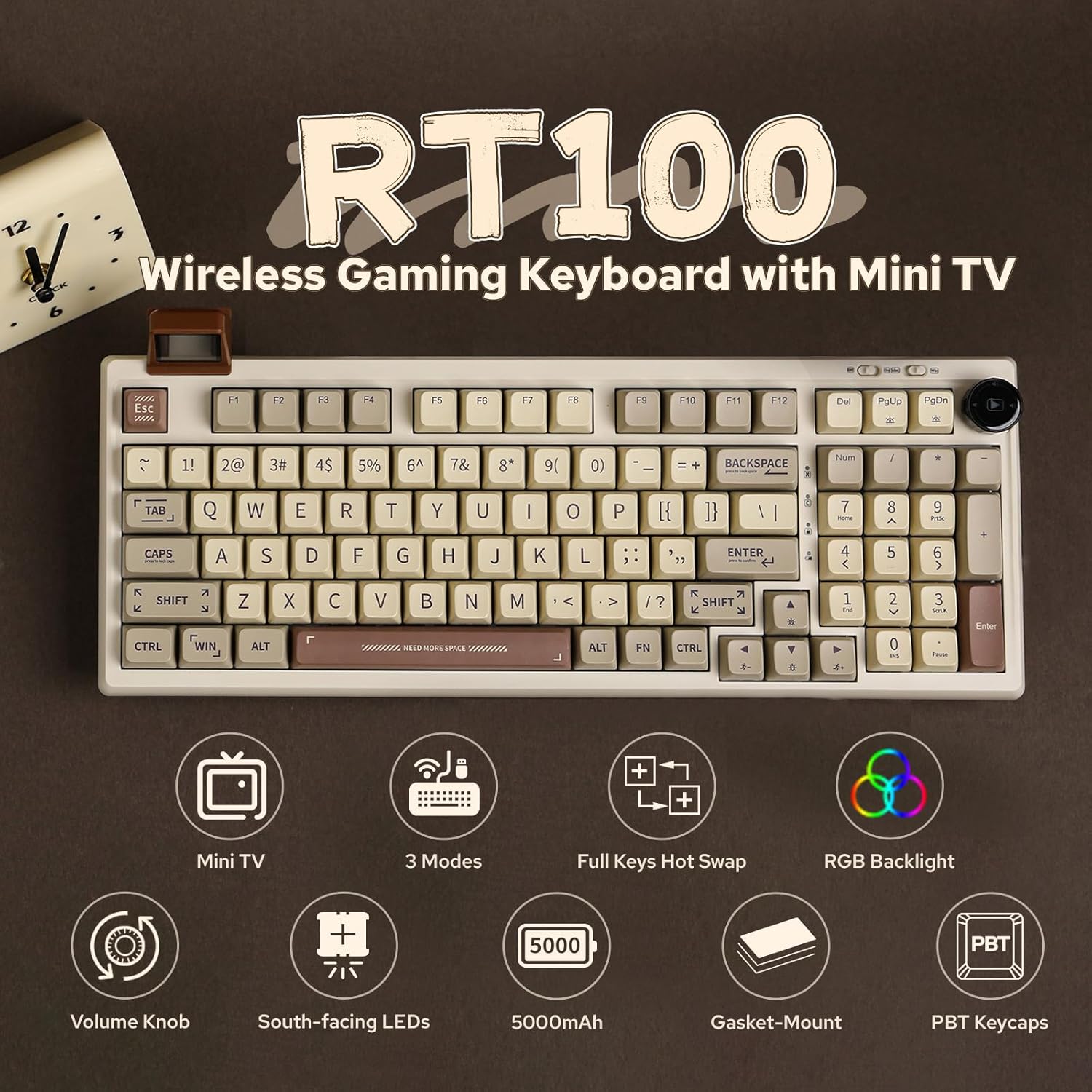
Imatge: Més deview of the EPOMAKER RT100's main features.
Configuració
1. Connexió del teclat
The RT100 keyboard offers three connection methods:
- Connexió amb cable USB-C: Connect the provided USB-C cable to the keyboard and your computer. The keyboard will be recognized automatically.
- Connexió sense fil de 2.4 GHz: Locate the 2.4GHz USB receiver, which is stored in the hidden compartment beneath the detachable mini display. Plug the receiver into an available USB port on your computer. Switch the keyboard to 2.4GHz mode using the mode switch (refer to Operating Instructions).
- Connexió Bluetooth 5.0: Switch the keyboard to Bluetooth mode using the mode switch (refer to Operating Instructions). On your device, search for Bluetooth devices and select "EPOMAKER RT100" to pair.

Image: The three connectivity modes of the RT100 keyboard.
2. Detachable Smart TFT-LCD Display Setup
The mini display can be detached from the keyboard. To customize its content (e.g., upload GIFs, set weather information, synchronize time), you need to download and install the official EPOMAKER driver software from the manufacturer's website. Ensure the software is run as an administrator to obtain system information like CPU usage and weather data.
Video: Instructions on how to upload custom GIFs to the mini display using the EPOMAKER software.

Image: Close-up of the detachable smart TFT-LCD display.
Instruccions de funcionament
1. Canvi de modes de connectivitat
Use the physical switches located on the top right of the keyboard to select between Off, Bluetooth (BT), and 2.4GHz wireless modes. For Bluetooth, you may need to press Fn+Q/W/E per seleccionar un professionalfile. For 2.4GHz, press Fn+R.
2. Customizable Knob
The knob, located on the top right, controls media functions by default. Rotate it to adjust volume and press it to play/pause media. Its functions can be customized further using the EPOMAKER driver software.
3. Mac/Windows Layout Switch
A dedicated physical switch allows you to toggle between Mac and Windows keyboard layouts, adapting key functions to your operating system.
4. Control de retroil·luminació RGB
Control the keyboard's RGB backlighting using the following key combinations:
- Fn + PGDN: Turn RGB backlight On/Off.
- Fn + Supr: Switch RGB effect/pattern.
- Fn + PGUP: Canvia el color RGB.

Image: RGB lighting control key combinations.
5. N-Key Rollover (NKRO)
The RT100 supports N-Key Rollover, ensuring that every key press is registered accurately, even when multiple keys are pressed simultaneously. This is particularly beneficial for fast typing and gaming.
6. Battery Status Check
Premeu Fn + Retrocés a view the current battery level on the mini display.
Manteniment
1. Commutadors intercanviables en calent
The keyboard features hot-swappable Kailh sockets, allowing you to easily replace individual switches without soldering. Use the provided keycap puller and switch puller (if included) to carefully remove keycaps and switches. This enables customization and easy repair.

Image: Illustration of hot-swappable switches and components.
2. Keycap Cleaning
The PBT keycaps can be easily removed for cleaning. Use the keycap puller to gently lift the keycaps. Clean them with a soft cloth and mild cleaning solution if necessary. Ensure keycaps are completely dry before reattaching.
Resolució de problemes
- El teclat no respon: Ensure the keyboard is charged and correctly connected (wired, 2.4GHz receiver, or Bluetooth paired). Try switching between modes.
- Mini display not updating/showing incorrect info: Ensure the EPOMAKER driver software is installed and running as administrator. Check for software updates. Re-sync time and weather through the software.
- Durada de la bateria més curta del que s'esperava: Backlighting and display usage can affect battery life. Adjust RGB brightness or turn off the display when not needed. Ensure the keyboard is switched off when not in use.
- Keys feeling clunky or unresponsive: Check if switches are properly seated. If a switch is faulty, utilize the hot-swappable feature to replace it.
Especificacions
| Característica | Detall |
|---|---|
| Número de model | RT100 |
| Dimensions del producte | 16.77 x 8.11 x 2.32 polzades |
| Pes de l'article | 3.12 lliures |
| Tecnologia de connectivitat | Bluetooth 5.0, sense fil de 2.4 GHz, USB-C amb cable |
| Capacitat de la bateria | 5000 mAh |
| Tipus de clau | Mechanical (Hot-Swappable) |
| Material de claus | PBT (Dye-sub, MDA Profile) |
| Il·luminació de fons | RGB (LED orientats al sud) |
| Característiques especials | Detachable Smart TFT-LCD Display, Customizable Knob, Mac & Win Layout Switch, N-Key Rollover |
Garantia i Suport
Per obtenir informació sobre la garantia, assistència tècnica o més ajuda, visiteu el lloc web oficial d'EPOMAKER. weblloc web o poseu-vos en contacte amb el servei d'atenció al client. Conserveu el rebut de compra per a reclamacions de garantia.