1. Introducció
Thank you for choosing the Guide Sensmart TD410 Thermal Imaging Monocular. This device is designed for outdoor night vision, offering advanced thermal imaging capabilities for various applications including hunting, outdoor sports, search and rescue, law enforcement, and personal security. Its compact design and robust features ensure reliable performance in diverse environments.
This manual provides detailed instructions for the proper use, maintenance, and troubleshooting of your thermal monocular. Please read it thoroughly before operating the device.
2. Què hi ha a la caixa
En desempaquetar, comproveu que hi hagi tots els components següents:
- Thermal Monocular x1
- Carregador de bateria x1
- Single Battery x1
- Cable micro USB x1
- Cable de vídeo x1
- Tapa de l'objectiu x1
- Corretja de canell x1
- Bossa de transport x1
- Guia d'inici ràpid x1

Image: All components included in the TD410 package.
3. Característiques clau
- 400x300 Thermal Camera: Equipped with a 400x300 thermal imaging camera sensor and a 12µm infrared detector, offering a recognition distance up to 800 yards and a detection range up to 2000 yards.
- Rapid Boot-up: Powers on in approximately 2 seconds, allowing for immediate use.
- Pantalla d'alta resolució: Features a 0.4-inch 1280x960 FLCOS display for clear thermal imagery.
- Múltiples modes de visualització: Offers 5 color palettes (white hot, black hot, red hot, iron red, blue heat) and PIP (Picture-in-Picture) mode for enhanced target identification and detail highlighting.
- Llarga vida útil de la bateria: Utilizes a replaceable battery providing over 7 hours of continuous operation.
- Durador i resistent a la intempèrie: IP66 waterproof-rated for protection against heavy rainfall, dust, and impact. Operates in temperatures from -86°F to 140°F.
- Connectivitat WiFi: Connects to a mobile application via WiFi for real-time thermal image viewing i compartir.
- Built-in Laser Indicator: For quick target pinpointing and sharing target locations with partners.
- Zoom digital: Features 1x, 2x, and 4x digital zoom options.
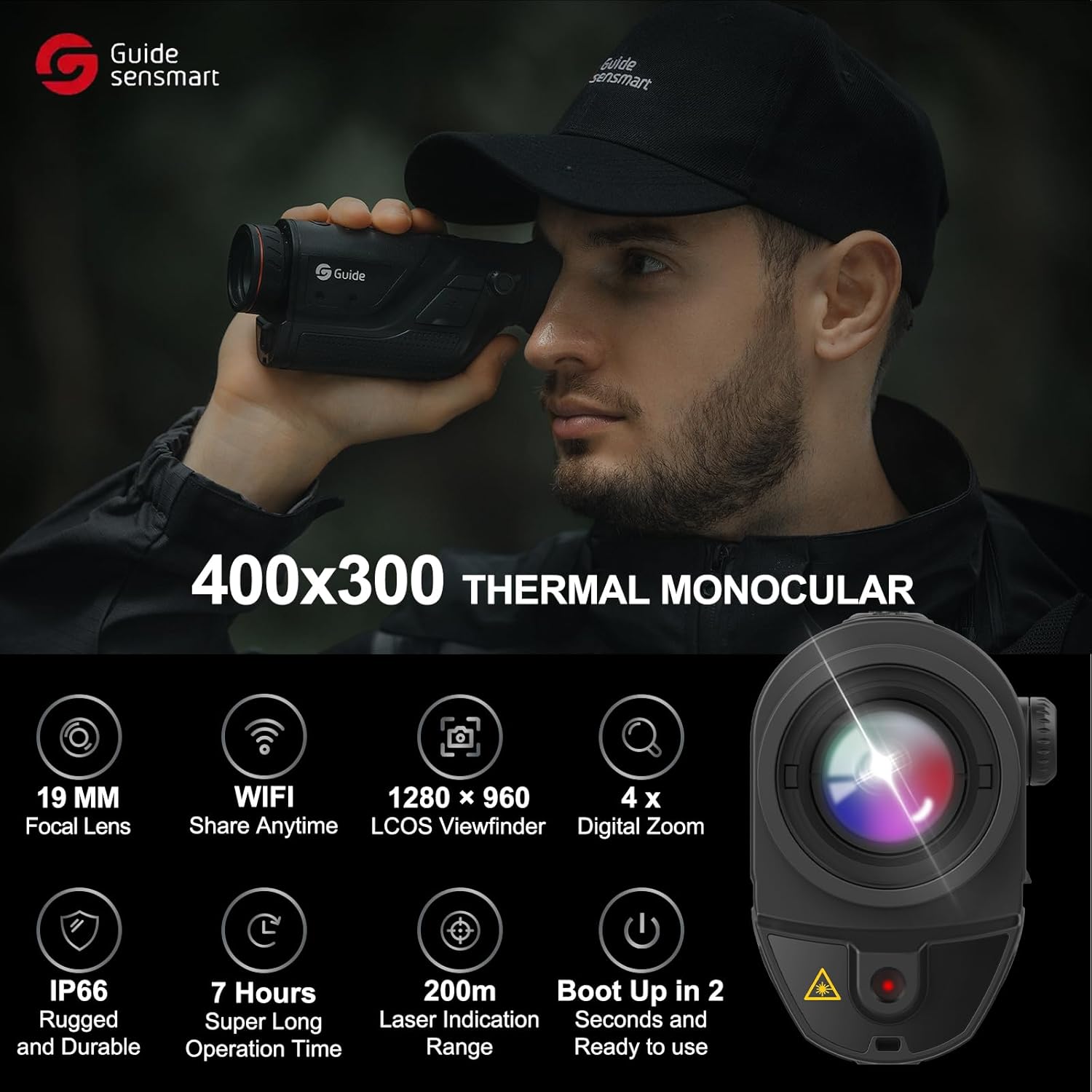
Imatge: Més deview de les característiques i especificacions clau.
4. Configuració
4.1. Instal·lació de la bateria
- Localitzeu el compartiment de la bateria del dispositiu.
- Insert the provided battery, ensuring correct polarity.
- Tanqueu el compartiment de la bateria de manera segura.
4.2. Càrrega del dispositiu
Before first use, fully charge the battery using the provided battery charger and Micro USB cable.
- Connect the Micro USB cable to the charging port on the monocular.
- Connecteu l'altre extrem del cable a una font d'alimentació USB compatible (per exemple, un adaptador de paret, un port USB de l'ordinador).
- L'indicador de càrrega mostrarà l'estat de càrrega.
4.3. Col·locació de la corretja de canell
Attach the wrist strap to the designated loop on the monocular to prevent accidental drops.
5. Instruccions de funcionament
5.1. Encès / apagat
Press and hold the Power Button for approximately 2 seconds to turn the device on. Repeat the action to turn it off.
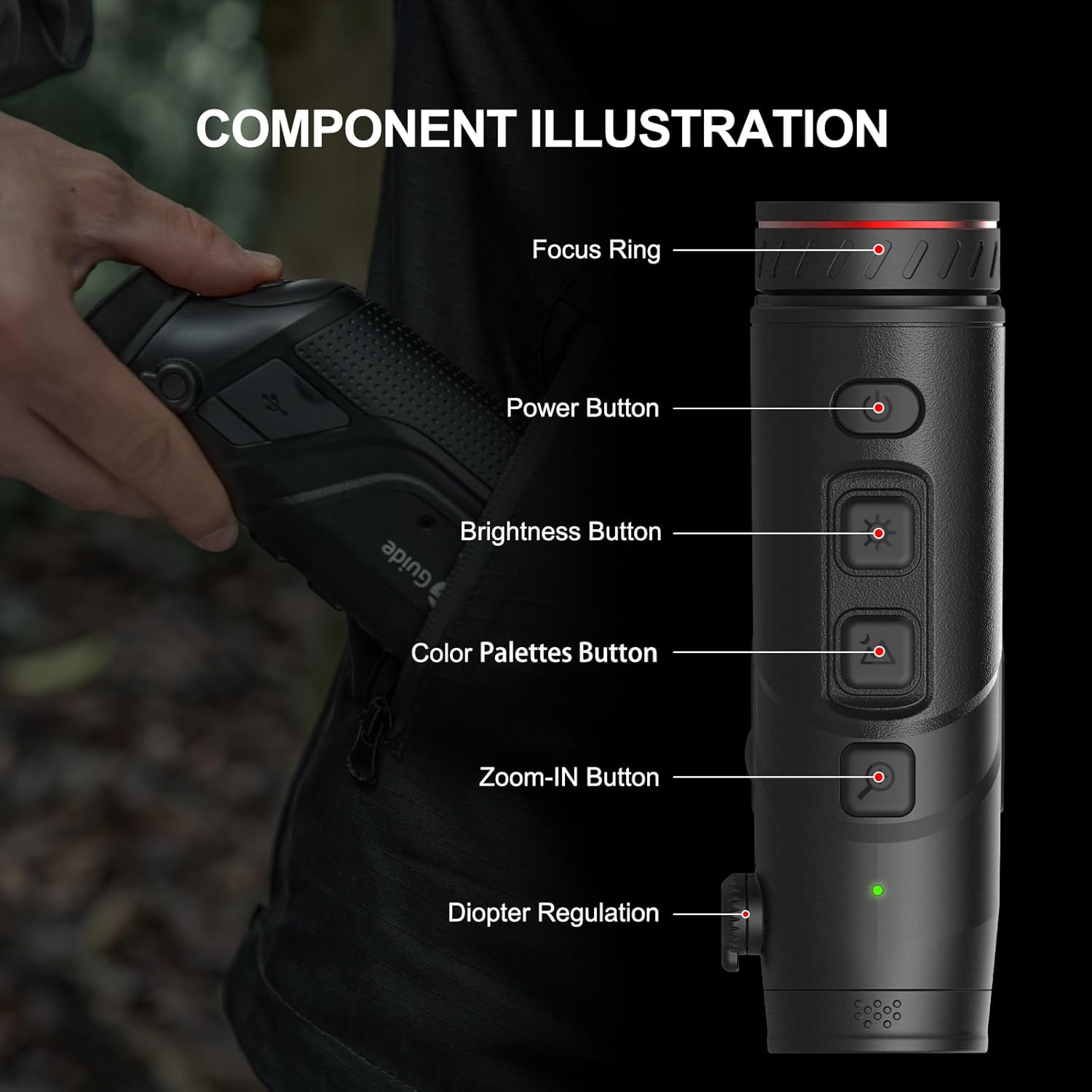
Image: Labeled components of the TD410 monocular.
5.2. Adjusting Focus and Diopter
Rotate the Focus Ring on the objective lens to achieve a clear image of your target. Adjust the Diopter Regulation near the eyepiece to match your eyesight for optimal viewing claredat.
5.3. Changing Display Modes (Color Palettes)
Press the Color Palettes Button to cycle through the available thermal display modes: White Hot, Black Hot, Red Hot, Iron Red, and Blue Heat. Choose the mode that best suits your environment and target identification needs.

Imatge: Examples of different thermal color palettes and scene modes.
5.4. Ús del zoom digital
Press the Zoom-IN Button to cycle through 1x, 2x, and 4x digital zoom levels. This allows for closer inspection of distant objects.
5.5. Activating PIP Mode
The Picture-in-Picture (PIP) mode provides a magnified view of the central area of the main image, displayed in a smaller window. This helps in highlighting target details within complex scenes.
5.6. WiFi Connectivity and App Usage
The monocular features standard WiFi functionality. Download the companion application (e.g., TargetIR) to your smartphone or tablet. Connect your device to the monocular's WiFi network to view and share thermal images in real-time.

Imatge: Example of the mobile application interface for real-time thermal image sharing.
5.7. Using the Laser Indicator
Activate the built-in laser indicator to quickly pinpoint and mark targets. The indication range is up to 200 meters, useful for communicating target locations to partners.
6. Manteniment
- Neteja: Use a soft, lint-free cloth to clean the lens and body of the monocular. For stubborn dirt, a small amount of lens cleaning solution can be applied to the cloth, not directly to the lens.
- Emmagatzematge: Store the device in its carry bag in a cool, dry place when not in use. Avoid extreme temperatures and high humidity.
- Cura de la bateria: Remove the battery if the device will not be used for an extended period. Recharge the battery periodically to maintain its health.
- Resistència a l'aigua: While IP66 rated, avoid submerging the device in water. Ensure all port covers are securely closed when operating in wet conditions.
7. Solució De Problemes
| Problema | Causa possible | Solució |
|---|---|---|
| El dispositiu no s'encén. | Bateria baixa o esgotada. Instal·lació incorrecta de la bateria. | Carregueu la bateria. Torneu a instal·lar la bateria correctament. |
| La imatge és borrosa. | Focus or diopter not adjusted. Dirty lens. | Adjust the focus ring and diopter. Clean the lens. |
| No es pot connectar a la xarxa Wi-Fi. | WiFi not enabled on monocular. Incorrect app settings. | Ensure WiFi is active on the device. Check app connection settings. |
| Durada de la bateria curta. | Frequent use of power-intensive features. Old battery. | Reduce use of high brightness/WiFi. Consider replacing battery if old. |
8. Especificacions
| Característica | Detall |
|---|---|
| Nom del model | Guide Sensmart-TD410 |
| Resolució de càmera tèrmica | 400x300 (50Hz) |
| Detector d'infrarojos | 12 µm |
| Distància de reconeixement | Fins a 800 metres |
| Interval de detecció | Fins a 2000 metres |
| Mostra | 0.4-inch 1280x960 FLCOS |
| Zoom digital | 1x, 2x, 4x |
| Durada de la bateria | > 7 hores de funcionament continu |
| Classificació impermeable | IP66 |
| Temperatura de funcionament | -86 °F a 140 °F (-30 °C a 60 °C) |
| Connectivitat | WiFi |
| Laser Indicator Range | Fins a 200 m |
| Pes de l'article | 0.77 lliures (aprox. 350 g) |
| Dimensions (LxWxH) | 5.9 x 1.57 x 2.76 polzades |
9. Garantia i Suport
The Guide Sensmart TD410 Thermal Imaging Monocular comes with a 3 any de garantia for the entire device.
Lifetime firmware updates and technical support are included to ensure your device continues to perform optimally.
For further assistance or technical inquiries, please refer to the official Guide Sensmart weblloc o poseu-vos en contacte amb el seu servei d'atenció al client.
10. Vídeos de productes
GuideSensmart TD410 Unboxing video
Video: An official unboxing video for the Guide Sensmart TD410 thermal monocular, demonstrating the contents of the package and initial setup.


