1. Introducció
The 1Mii DS500-JP is a high-quality Bluetooth audio receiver designed to upgrade your existing home stereo systems, AV receivers, or powered speakers with advanced Bluetooth connectivity. This device allows you to stream high-fidelity audio wirelessly from your smartphone, PC, or other Bluetooth-enabled music players to your audio equipment within seconds. It features Bluetooth 5.1 technology and supports various high-resolution audio codecs for an immersive listening experience.
2. Producte acabatview
Característiques clau
- High-Fidelity Wireless Audio: Supports advanced audio codecs including LDAC, Qualcomm aptX HD, aptX Low Latency, aptX, and AAC for superior sound quality.
- Tecnologia Bluetooth 5.1: Equipped with a Qualcomm QCC5125 Bluetooth chip for faster and more stable wireless connections.
- Premium Audio DAC: Integrates an ES9018K2M DAC chip for enhanced audio performance.
- Connectivitat versàtil: Features analog RCA, digital optical, and digital coaxial outputs, compatible with most audio equipment. Simultaneous output is supported.
- Interval sense fil ampliat: An external booster antenna provides a stable wireless connection range of over 30 meters.
- Pantalla OLED: A clear OLED screen displays Bluetooth connection status, track name, sampling rate, and audio codec.
- Volume Control & EQ Modes: Easily adjust volume and select from multiple equalizer modes to customize your listening experience.

Image: The 1Mii DS500-JP receiver showcasing its Hi-Res Audio, LDAC, Bluetooth 5.1, and aptX HD capabilities.
Disseny i dimensions
The DS500-JP features a compact and sophisticated design with an all-aluminum body, anodized for high quality. Its dimensions are approximately 86mm (height with antenna) x 76mm (width) x 23mm (depth). The OLED display provides essential information at a glance.
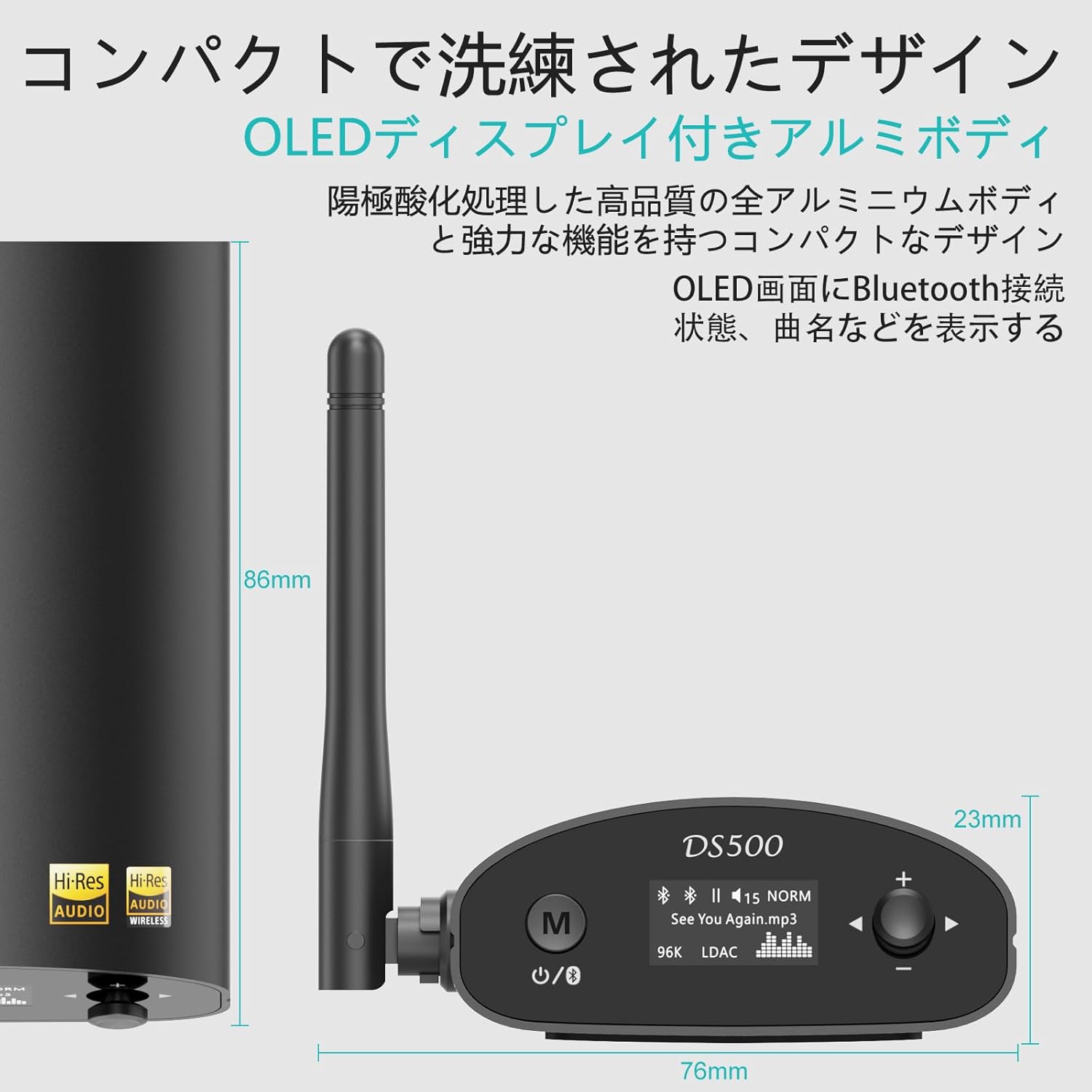
Image: Detailed dimensions of the DS500-JP receiver, highlighting its compact size.
3. Contingut del paquet
En obrir el paquet, assegureu-vos que hi hagi tots els elements següents:
- 1Mii DS500-JP Wireless Audio Adapter
- Cable de càrrega USB
- 3.5mm Male to RCA Male Audio Cable
- RCA Male to RCA Male Audio Cable
- Cable òptic
- Manual d'usuari

Image: All items included in the 1Mii DS500-JP product package.
4. Configuració
4.1 Connexió d'alimentació
- Connect the provided USB charging cable to the DC 5V input port on the DS500-JP.
- Plug the other end of the USB cable into a compatible USB power adapter (not included) or a USB port on your audio equipment.
4.2 Connexió de sortida d'àudio
The DS500-JP offers multiple output options. Choose the appropriate cable and port based on your audio system:
- Analog RCA Output: Use the RCA audio cable to connect the "ANALOG OUT" ports (red for right, white for left) on the DS500-JP to the corresponding RCA input ports on your amplifier o altaveus actius.
- Sortida òptica digital: Use the optical cable to connect the "OPTICAL OUT" port on the DS500-JP to the optical input port on your digital audio receiver or DAC.
- Sortida coaxial digital: Use a coaxial cable (not included) to connect the "COAXIAL OUT" port on the DS500-JP to the coaxial input port on your digital audio receiver or DAC.

Image: The rear panel of the DS500-JP, illustrating the DC 5V, Optical Out, Analog Out (RCA), and Coaxial Out ports.
4.3 Instal·lació de l'antena
Screw the external booster antenna into the antenna port on the back of the DS500-JP. Ensure it is securely tightened for optimal wireless performance.

Image: The DS500-JP with its external antenna, emphasizing enhanced Bluetooth 5.1 connectivity.
5. Instruccions de funcionament
5.1 Encès/Apagat
- To power on, press the power button (usually marked with a circle and a vertical line) on the front panel. The OLED display will light up.
- Per apagar, manteniu premut el botó d'engegada fins que s'apagui la pantalla.
5.2 Vinculació Bluetooth
- Ensure the DS500-JP is powered on. The OLED display will show "Pairing" or a similar indicator.
- Al telèfon intel·ligent, la tauleta o l'ordinador, activeu el Bluetooth i cerqueu els dispositius disponibles.
- Select "DS500" from the list of found devices to initiate pairing.
- Once connected, the OLED display will show the connection status, track name, and the active audio codec (e.g., LDAC, aptX HD).

Image: The OLED display of the DS500-JP, illustrating how track information and connection status are shown.
5.3 Control de volum
Use the "+" and "-" buttons on the front panel to adjust the output volume of the DS500-JP.
5.4 EQ Mode Selection
In Bluetooth connection mode, the DS500-JP supports various EQ modes. To change the EQ mode:
- Press and hold the EQ button (often integrated with the volume knob or a dedicated button) for approximately 2 seconds.
- Rotate the volume knob or press the "+" / "-" buttons to cycle through the available EQ modes (e.g., Normal, Rock, Class, Jazz, Dance, Pop, Bass).
- Release the button to select the desired EQ mode.

Image: Visual guide for selecting different EQ modes on the DS500-JP.
5.5 USB Input (Sound Card Function)
The DS500-JP can also function as a USB sound card when connected to a computer via its USB port. This allows for direct digital audio transfer from your computer to the DS500-JP for playback through your audio system.
6. Manteniment
- Mantingueu el dispositiu net netejant-lo amb un drap suau i sec. Eviteu utilitzar productes de neteja o dissolvents abrasius.
- Assegureu-vos que el dispositiu estigui col·locat en una zona ben ventilada per evitar el sobreescalfament.
- Eviteu exposar el dispositiu a temperatures extremes, humitat o llum solar directa.
- No intenteu desmuntar ni reparar el dispositiu vosaltres mateixos. Per a qualsevol reparació, consulteu personal de servei qualificat.
7. Solució De Problemes
| Problema | Causa possible | Solució |
|---|---|---|
| Sense sortida de so. |
|
|
| No es pot emparellar amb un dispositiu Bluetooth. |
|
|
| Audio quality is poor or drops out. |
|
|
8. Especificacions
| Característica | Detall |
|---|---|
| Número de model | DS500-JP |
| Marca | 1 Mii |
| Versió Bluetooth | 5.1 |
| Xip Bluetooth | Qualcomm QCC5125 |
| Xip DAC | ES9018K2M |
| Còdecs d'àudio compatibles | LDAC, aptX HD, aptX baixa latència, aptX, AAC, SBC |
| LDAC SampTarifa ling | Up to 24-bit/96 kHz (990kbps) |
| aptX HD SampTarifa ling | Up to 24-bit/48 kHz (576kbps) |
| Ports de sortida | Analog RCA, Digital Optical, Digital Coaxial |
| Ports d'entrada | Bluetooth, USB (for PC sound card function) |
| abast sense fils | Over 30 meters (with external antenna) |
| Mostra | OLED |
| Entrada de potència | DC 5V |
| Dimensions (aprox.) | 14.1 x 12.6 x 6.8 cm (Package Size) |
| Pes (aprox.) | 340 g (pes del paquet) |
| Bateria | Not applicable (requires external power) |
9. Garantia i Suport
Per obtenir informació sobre la garantia i assistència tècnica, consulteu la pàgina oficial d'1Mii. website or contact their customer service directly. Details regarding warranty periods and service procedures are typically provided with your purchase documentation or on the manufacturer's support pages.
Assistència en línia: Visit the 1Mii official weblloc web per a preguntes freqüents, descàrregues de controladors i informació de contacte.
Atenció al client: If you encounter any issues not covered in this manual, please reach out to 1Mii customer support for assistance.


