1. Introducció
This manual provides instructions for the assembly, operation, and maintenance of your Gazzyt Flight Simulator Cockpit S-Cockpit-S49. Please read this manual thoroughly before assembly and use to ensure proper function and safety. This cockpit is designed for both flight and racing simulation, offering a versatile platform for various gaming experiences.
2. Característiques del producte
- Disseny multifuncional: Compatible with both flight and racing simulation setups.
- Construcció duradora: Made from thickened square tube with a double-layer black powder coating for stability and easy cleaning.
- Seients còmodes: Features a fabric race seat designed for comfort and breathability.
- Components ajustables: The cockpit length and shifter bracket height are fully adjustable to accommodate various user preferences and setups.
- Àmplia compatibilitat: Supports major flight and racing simulator brands including Logitech, Thrustmaster, Airbus, and A10C.
- Multiple Shift Platforms: Includes three shift lever panels; a smaller panel for gear shifters and handbrakes, and a larger panel for flight joysticks.
3. Contingut del paquet
The Gazzyt Flight Simulator Cockpit S-Cockpit-S49 is shipped in two packages due to its size. Please verify all components are present before beginning assembly.
Note: Wheels, shifters, throttles, joysticks, and other game equipment are not included.
Components inclosos:
- Cockpit Frame (Thickened Square Tube)
- Black Race Seat (Fabric)
- Adjustable Shifter/Joystick Platforms (3 panels)
- Assembly Hardware (Bolts, Nuts, Washers, Adjustment Knobs)
- Assembly Tools (Basic wrenches/hex keys, if provided)
4. Muntatge i muntatge
Follow these steps to assemble your Gazzyt Flight Simulator Cockpit. It is recommended to have a second person assist with assembly.
- Desempaquetar components: Traieu amb cura totes les peces de l'embalatge i col·loqueu-les sobre una superfície neta i plana. Verifiqueu que hi hagi tots els components que figuren a la secció 3.
- Muntar el marc base: Connect the main frame sections using the provided hardware. Ensure all bolts are finger-tightened initially.
- Install Seat Rails: Attach the seat rails to the base frame. These rails allow for forward and backward adjustment of the seat.
- Mount Race Seat: Secure the black race seat onto the installed seat rails. Ensure the seat is oriented correctly.
- Attach Shifter/Joystick Platforms: Install the adjustable platforms to the side supports. There are three panels: one smaller for gear shifters and handbrakes, and two larger for flight joysticks. Choose the appropriate placement for your setup.
- Ajustament final: Once all components are in place and aligned, securely tighten all bolts and adjustment knobs. Do not overtighten.

Image: Fully assembled Gazzyt Flight Simulator Cockpit with a black race seat and two side platforms for joysticks. This image illustrates the complete setup.

Image: Diagram illustrating the various adjustment points of the cockpit, including platform height (8.2" adjust), platform width (9" adjust), and seat left/right adjustment (7.88" adjust). This highlights the customizable nature of the setup.
5. Funcionament i ajustos
The Gazzyt Flight Simulator Cockpit offers multiple adjustment points to optimize your simulation experience.
5.1 Ajustaments del seient
- Seat Position (Forward/Backward): The seat can be adjusted forward and backward along the rails. Loosen the adjustment knobs or levers beneath the seat, slide the seat to the desired position, and re-tighten.
- Seat Backrest Angle: The backrest of the race seat can be reclined between 65° and 135°. Use the recline lever, typically located on the side of the seat, to adjust the angle.
- Seat Lateral Adjustment: The seat slot allows for left and right adjustment of approximately 7.88 inches to center your position.

Image: A black gaming seat demonstrating adjustable recline angles from 65° to 135°. This illustrates the flexibility in seating posture.
5.2 Platform Adjustments
- Alçada de la plataforma: The side platforms for joysticks and the shifter bracket can be adjusted vertically by approximately 8.2 inches. Loosen the adjustment knobs on the vertical supports, raise or lower the platform, and re-tighten.
- Platform Position (In/Out): The platforms can also be adjusted horizontally (in/out) by approximately 9 inches to bring your controllers closer or further away.
- Multiple Shift Platforms: Utilize the three provided panels. The smaller panel is suitable for gear shifters and handbrakes, while the larger panels are designed for flight joysticks. Attach them as needed for your specific peripherals.

Imatge: Primer pla view of the cockpit frame, highlighting the 40mm square tube thickness (41.44mm shown with calipers) made from high-strength alloy steel. This demonstrates the robust construction.
6. Compatibilitat
The Gazzyt Flight Simulator Cockpit is designed for wide compatibility with various flight and racing simulation peripherals.
Perifèrics compatibles:
- Logitech X52, X52 Pro, X56
- Thrustmaster T16000, HOTAS Warthog
- Airbus stick and throttle
- A10C rocker and throttle
- Other similar flight and racing simulator equipment.
Note: This cockpit does not include any simulation peripherals such as wheels, shifters, throttles, or joysticks. These must be purchased separately.
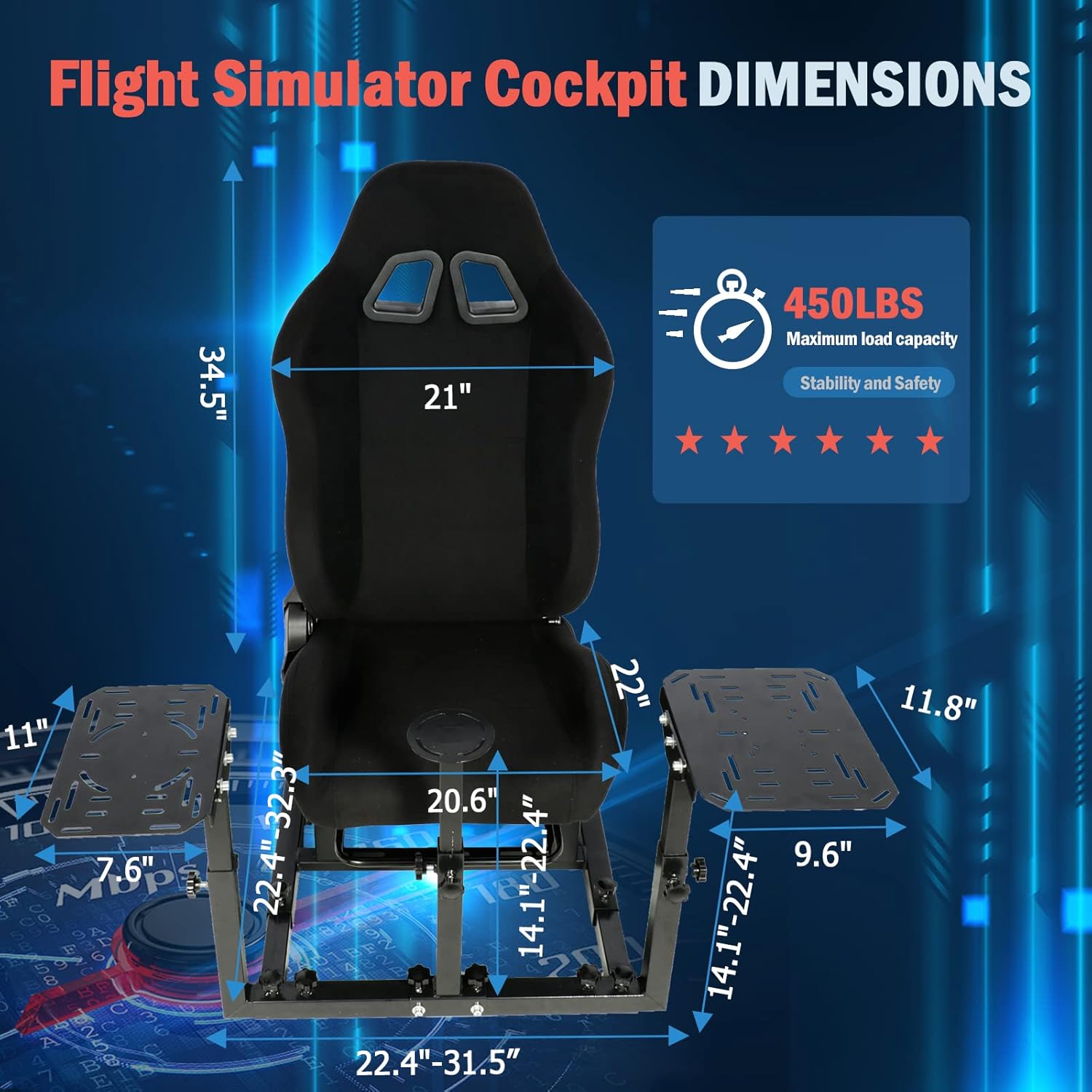
Image: The cockpit setup shown with various compatible joysticks and throttles from brands like Logitech (X52, X52pro, X56) and Thrustmaster. This visually confirms the broad compatibility.
7. Especificacions
| Característica | Detall |
|---|---|
| Número de model | S-Cockpit-S49 |
| ASIN | B0C58WP1ZB |
| Dimensions del producte | 32.3 x 22.8 x 13 polzades (envasat) |
| Pes de l'article | 31.8 lliures |
| Capacitat de càrrega màxima | 450 lliures |
| Material del marc | Thickened Square Tube, High-Strength Alloy Steel |
| Acabat del marc | Double-layer Black Powder Coating |
| Material del seient | Fabric (Cotton breathable fabric) |
| Angle d'inclinació del seient | 65° - 135° |
| Fabricant | Gazzyt |

Image: A detailed diagram showing the overall dimensions of the Gazzyt Flight Simulator Cockpit, including height, width, and depth measurements, along with the 450 lbs maximum load capacity. This provides a clear visual reference for the product's size.
8. Manteniment
Regular maintenance will ensure the longevity and optimal performance of your Gazzyt Flight Simulator Cockpit.
- Neteja del marc: Netegeu el marc metàl·lic amb anunciamp drap i detergent suau. Eviteu productes de neteja abrasius que puguin danyar el recobriment en pols.
- Neteja del seient: The seat fabric is designed to be breathable. The seat cloth can be removed via zipper for regular cleaning. Follow fabric care instructions.
- Comprovació dels elements de fixació: Periodically check all bolts, screws, and adjustment knobs to ensure they are securely tightened. Re-tighten if necessary to maintain stability.
- Lubricació: If any moving parts (e.g., seat rails) become stiff, apply a small amount of silicone-based lubricant.
9. Solució De Problemes
If you encounter any issues with your Gazzyt Flight Simulator Cockpit, please refer to the following common solutions:
- Inestabilitat/Troballament: Ensure all assembly bolts and adjustment knobs are fully tightened. Check that the cockpit is placed on a flat, even surface.
- Dificultat per ajustar els components: Loosen adjustment knobs sufficiently before attempting to move parts. If parts are stiff, check for obstructions or apply a small amount of lubricant to moving mechanisms.
- Peces que falten: If you believe parts are missing, refer to the "Package Contents" section and contact Gazzyt customer support with your purchase details.
10. Garantia i Suport
Gazzyt stands behind the quality of its products. For specific warranty information, please refer to the warranty card included with your purchase or visit the official Gazzyt website. For technical support, replacement parts, or any other inquiries, please contact Gazzyt customer service through the retailer where the product was purchased or via the contact information provided on the Gazzyt brand store.


