1. Introducció
Thank you for choosing the Nobsound M5.1 HiFi 5.1 Channel Bluetooth Amplificador. Això amplifier is designed to provide an immersive home theater audio experience with versatile connectivity options and powerful output. This manual will guide you through the setup, operation, and maintenance of your new amplificador per garantir un rendiment i una longevitat òptims.
2. Què hi ha a la caixa
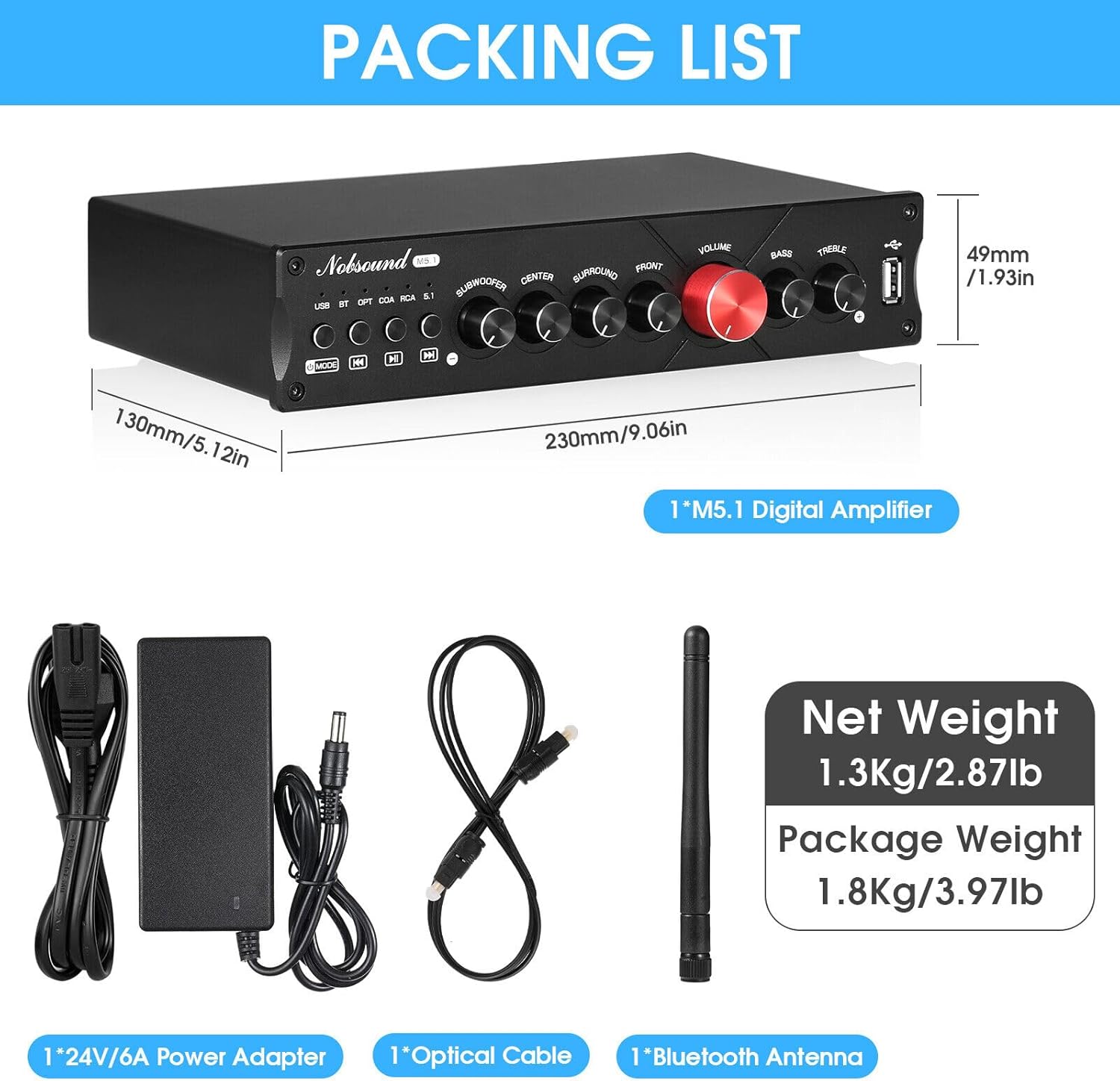
- M5.1 Ampmés viu
- Adaptador de corrent de 24 V/6 A
- Cable òptic
- Antena Bluetooth
- Manual d'usuari
3. Producte acabatview
3.1 Tauler frontal
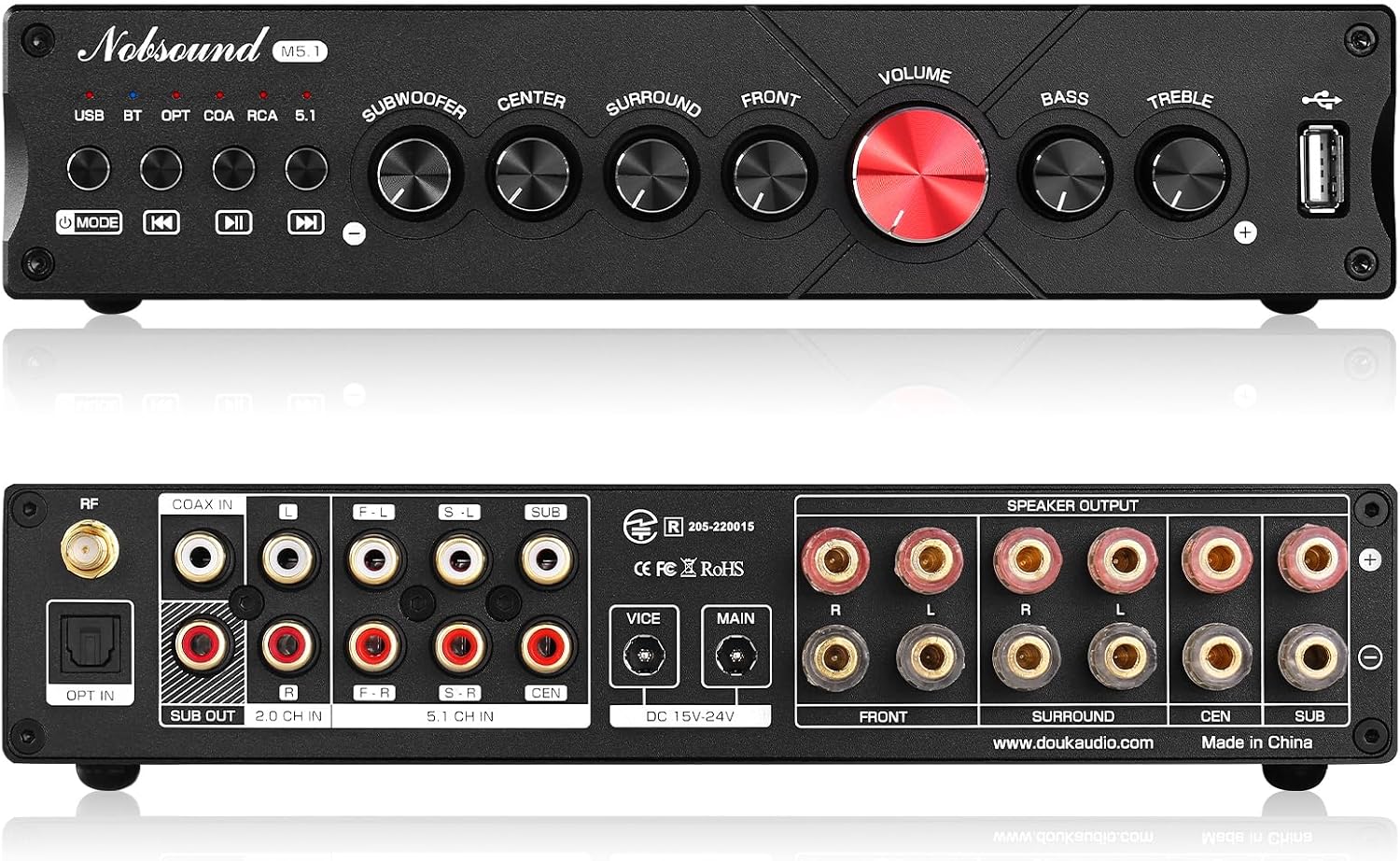
The front panel features various controls and indicators for easy operation:
- Input Selection Buttons: USB, BT (Bluetooth), OPT (Optical), COAX (Coaxial), RCA (2.0 Channel), 5.1 (5.1 Channel RCA). Press to switch between audio sources.
- Botó de mode: Switches between 2.1 and 5.1 channel outputs.
- Controls de reproducció: Previous, Play/Pause, Next (for USB input).
- Botons de volum: Independent controls for Subwoofer, Center, Surround, Front channels, and a large Master Volume knob.
- Controls de to: Bass and Treble adjustment knobs.
- Port USB: For connecting USB drives for audio playback.

3.2 Panell posterior
The rear panel houses all input and output connections:
- Connector d'antena de RF: For the Bluetooth antenna.
- Entrades digitals: OPT IN (Optical), COAX IN (Coaxial).
- Entrades analògiques: 2.0 CH IN (RCA stereo input), 5.1 CH IN (RCA multi-channel input).
- Sub Sortida: Sortida RCA per connectar un subwoofer actiu.
- Sortides dels altaveus: Banana speaker jacks for Front (F-L, F-R), Surround (S-L, S-R), Center (CEN), and Subwoofer (SUB).
- Entrades de potència: MAIN and VICE DC 15V-24V inputs for power adapters.
4. Configuració
4.1 Connectar altaveus
- Assegureu-vos el amplifier is powered off and unplugged.
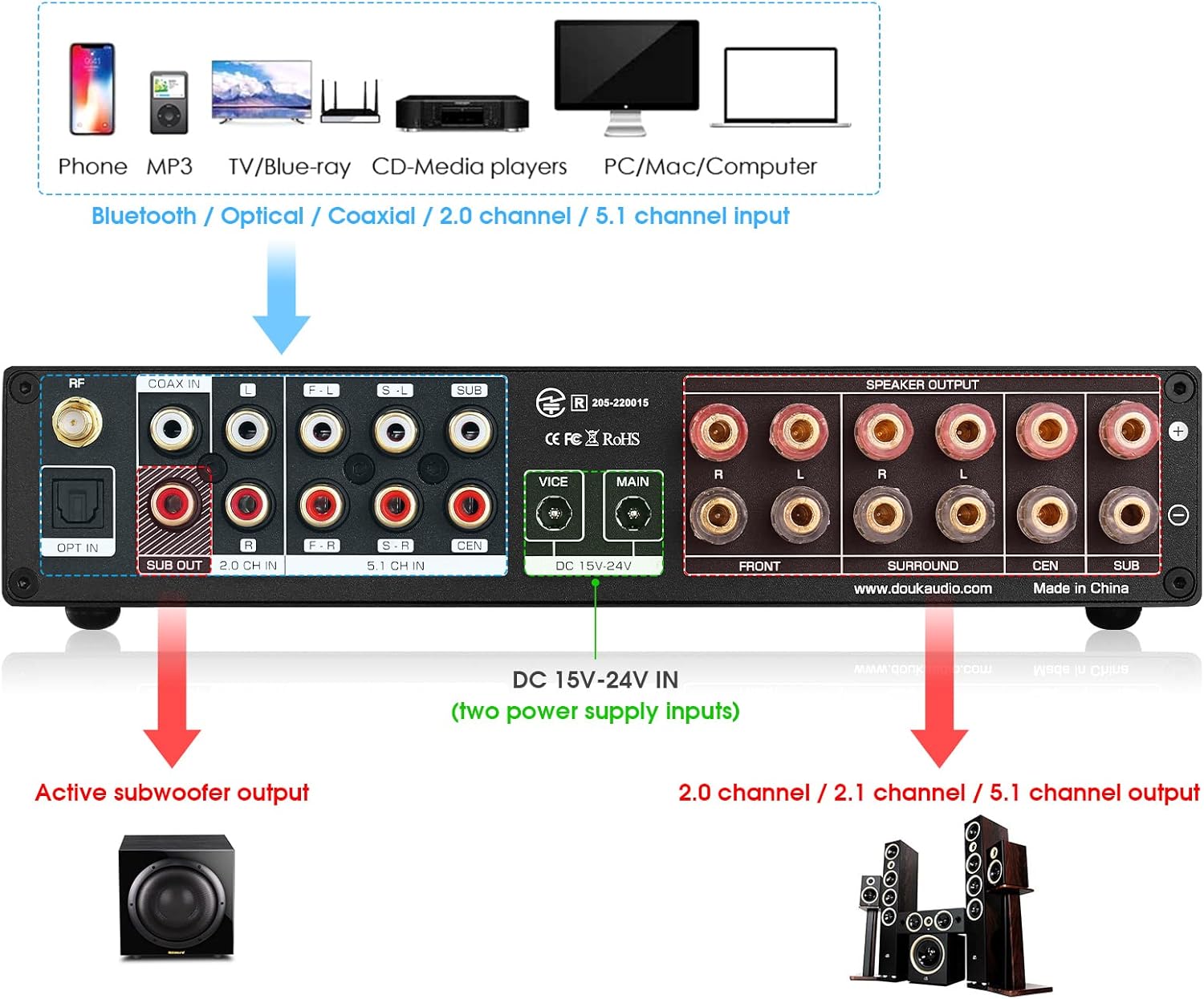
- Connect your passive speakers to the corresponding banana speaker jacks on the rear panel: Front Left (F-L), Front Right (F-R), Surround Left (S-L), Surround Right (S-R), Center (CEN), and Subwoofer (SUB). Ensure correct polarity (+ to + and - to -).
- If using an active subwoofer, connect its input to the "SUB OUT" RCA port on the ampmés viu.
4.2 Connexió de fonts d'àudio
Trieu un dels mètodes següents per connectar la font d'àudio:
- Bluetooth: Attach the provided Bluetooth antenna to the RF connector.
- Òptic/Coaxial: Connect your device (e.g., TV, game console) to the OPT IN or COAX IN ports using an optical or coaxial cable.
- RCA 2.0 Channel: Connect stereo audio devices (e.g., CD player, turntable with pre-amp) to the 2.0 CH IN RCA ports.
- RCA 5.1 Channel: For true 5.1 surround sound from a compatible source (e.g., Blu-ray player), connect the multi-channel RCA outputs to the 5.1 CH IN ports.
- USB: Inseriu una unitat flash USB que contingui àudio files into the front USB port.
4.3 Connexió d'alimentació
Connect the provided 24V/6A power adapter to either the MAIN or VICE DC 15V-24V input on the rear panel. For higher power demands or to drive larger speakers/subwoofers, you may connect a second compatible power adapter to the other input.
5. Instruccions de funcionament
5.1 Encès/Apagat
After all connections are made, plug the power adapter(s) into a wall outlet. The amplifier will power on. To turn off, unplug the power adapter(s).
5.2 Selecció d'entrada
Press the corresponding input selection button (USB, BT, OPT, COAX, RCA, 5.1) on the front panel to choose your desired audio source. The active input will be indicated by an LED light.
5.3 Controls de volum
- Volum mestre: The large red knob controls the overall output volume.
- Individual Channel Volumes: Adjust the Subwoofer, Center, Surround, and Front knobs to balance the sound levels of each channel according to your preference and room acoustics.
- Gravs/Aguts: Use these knobs to fine-tune the low and high frequencies of the audio output.
5.4 Vinculació Bluetooth
- Select the "BT" input on the amplifier. The Bluetooth indicator light will flash, indicating it's in pairing mode.
- Al dispositiu (telèfon intel·ligent, tauleta, ordinador), activeu el Bluetooth i cerqueu els dispositius disponibles.
- Select "Nobsound M5.1" from the list. Once paired, the Bluetooth indicator light will remain solid.
Reproducció USB 5.5
Insert a USB flash drive into the front USB port. The amplifier will automatically switch to USB input and begin playing supported audio files. Use the playback control buttons (Previous, Play/Pause, Next) to navigate your music.
5.6 2.1 vs 5.1 Channel Output
Press the "MODE" button on the front panel to switch between 2.1 channel and 5.1 channel output modes. This allows you to optimize the sound distribution based on your speaker setup and content.
6. Manteniment
- Neteja: Utilitzeu un drap suau i sec per netejar-lo amplifier's exterior. Do not use liquid cleaners or aerosols.
- Ventilació: Assegureu-vos una ventilació adequada al voltant amplifier to prevent overheating. Do not block ventilation openings.
- Medi ambient: Mantenir el ampl'aparell allunyat de la llum solar directa, fonts de calor, pols excessiva, humitat i camps electromagnètics forts.
- Apagar: Apagueu i desconnecteu sempre amplifier before cleaning or making any connections/disconnections.
7. Solució De Problemes
- Sense so:
- Check all cable connections (power, input, speaker).
- Ensure the correct input source is selected on the ampmés viu.
- Verify that the volume is turned up on both the amplificador i la font d'àudio.
- Check speaker wire polarity and ensure no bare wires are touching.
- So distorsionat:
- Redueix el volum.
- Check if the audio source is sending a clean signal.
- Ensure speakers are correctly rated for the ampsortida del lifier.
- Problemes de connexió Bluetooth:
- Assegureu-vos que l'antena Bluetooth estigui ben connectada.
- Assegureu-vos que el amplifier is in Bluetooth input mode.
- Delete "Nobsound M5.1" from your device's Bluetooth list and try pairing again.
- Apropa el dispositiu a la ampmés viu.
- Popping Sound (especially from surround/bass outputs):
- Some outputs may enter a low-power sleep mode if no input is detected for a period. A slight pop may occur when they reactivate. This is generally normal operation.
- Assegureu-vos una font d'alimentació estable.
- USB Playback Not Working:
- Ensure the USB drive is formatted correctly (FAT32 is commonly supported).
- Comproveu que l'àudio files are in a supported format (e.g., MP3, WAV, APE, FLAC, WMA).
- Proveu una unitat USB diferent.
8. Especificacions
| Característica | Especificació |
|---|---|
| Número de model | DZ086-NEW |
| Dimensions del paquet | 15.94 x 8.27 x 3.11 polzades |
| Pes de l'article | 4.11 lliures |
| Fabricant | Nobsound |
| Power Output (Front/Surround) | 50W+50W |
| Power Output (Center/Subwoofer) | 50W |
| Versió Bluetooth | 5.0 |
| Opcions d'entrada | Bluetooth 5.0, Coaxial, Optical, USB, 2.0 Channel RCA, 5.1 Channel RCA |
| Entrada de potència | DC 15V-24V (Dual Inputs) |
9. Garantia i Suport
Nobsound products are designed for reliability and performance. For warranty information and technical support, please refer to the warranty card included with your product or visit the official Nobsound weblloc web. També podeu contactar directament amb el venedor per obtenir ajuda.
Per a més consultes o ajuda, visiteu el Botiga Nobsound a Amazon.


