Introducció
Aquest manual proporciona informació essencial per configurar, fer funcionar i mantenir l'ordinador de sobretaula multifuncional Microsoft Surface Studio 2+. El Surface Studio 2+ està dissenyat per a la productivitat i la creativitat, i inclou una pantalla tàctil PixelSense™ versàtil de 28 polzades.
Si us plau, llegiu atentament aquest manual per garantir un ús correcte i maximitzar la vida útil del vostre dispositiu.
Què hi ha a la caixa
Verifiqueu que tots els elements estiguin presents a l'embalatge:
- Ordinador tot en un Surface Studio 2+
- Bolígraf de superfície
- Teclat de superfície
- Ratolí
- Cable d'alimentació amb cable d'alliberament d'agafada
- Guia d'inici ràpid
- Guia de seguretat i garantia
Configuració
- Desembalatge: Traieu amb cura el Surface Studio 2+ i els seus accessoris de l'embalatge. Col·loqueu l'ordinador sobre una superfície estable i plana.

Imatge: L'ordinador multifuncional Microsoft Surface Studio 2+ que mostra la interfície d'escriptori del Windows 11.
- Connexió d'alimentació: Connecteu el cable d'alimentació al port d'alimentació de la part posterior de la base del Surface Studio 2+ i, a continuació, endolleu l'altre extrem a una presa de corrent.

Imatge: Part posterior view de la base del Surface Studio 2+, destacant els diversos ports, inclosa l'entrada d'alimentació.
- Connecteu els perifèrics: Connecteu el teclat i el ratolí Surface. Aquests dispositius normalment es connecten sense fil mitjançant Bluetooth. Seguiu les instruccions que apareixen a la pantalla durant la configuració inicial per a l'emparellament.
- Arrencada inicial: Premeu el botó d'engegada, que normalment es troba a la part posterior o lateral de la pantalla. L'ordinador us guiarà pel procés de configuració del Windows 11 Pro, incloent-hi la selecció d'idioma, la connexió de xarxa i la creació d'un compte d'usuari.
Instruccions de funcionament
Ajust de la pantalla
El Surface Studio 2+ incorpora una frontissa de gravetat zero única, que permet ajustar la pantalla des d'un mode d'escriptori vertical fins a un mode d'estudi pla per dibuixar i escriure.

Imatge: Una seqüència que mostra l'ajust de la pantalla del Surface Studio 2+ des d'una posició vertical fins a un angle gairebé pla.
- Mode d'escriptori: Empenyeu suaument la part superior de la pantalla cap enrere per inclinar-la i posar-la en posició vertical per a l'ús tradicional d'escriptori.
- Mode d'estudi: Estireu suaument la part superior de la pantalla cap endavant i cap avall, cap a la base, per passar-la a una posició plana i amb angle baix, ideal per a tasques creatives amb el Surface Pen.
Ús del llapis Surface i la pantalla tàctil
La pantalla tàctil PixelSense™ de 28 polzades admet gestos multitàctils i està optimitzada per al seu ús amb el Surface Pen inclòs.
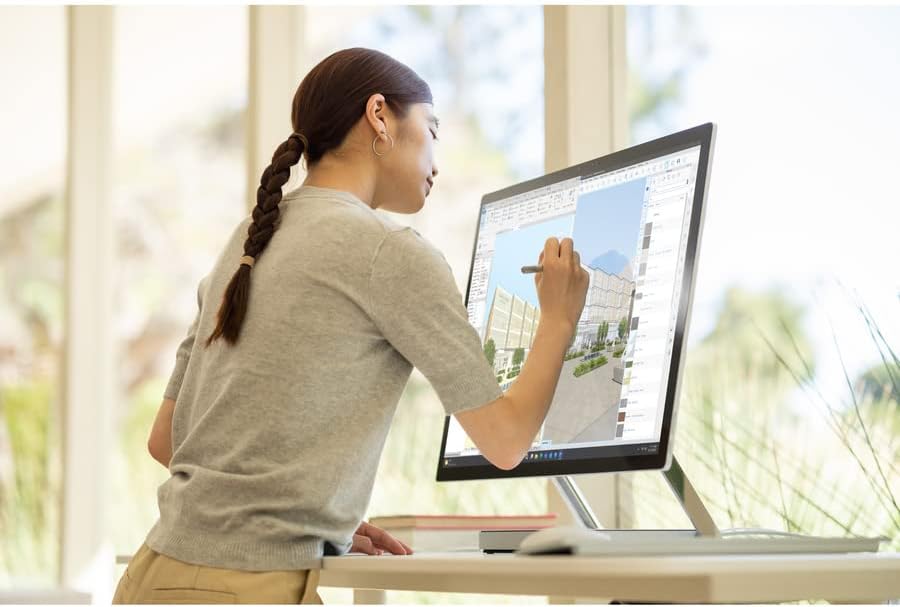
Imatge: Una persona que utilitza el Surface Pen per interactuar amb la pantalla tàctil del Microsoft Surface Studio 2+ en mode estudi.
- Gestos tàctils: Utilitzeu els gestos tàctils estàndard de Windows per a la navegació, el zoom i el desplaçament.
- Llapis Surface: El Surface Pen permet dibuixar, escriure i fer anotacions amb precisió directament a la pantalla. Es pot fixar magnèticament al lateral de la pantalla per emmagatzemar-lo.
Windows 11 Pro
El Surface Studio 2+ ve preinstal·lat amb Windows 11 Pro. Familiaritzeu-vos amb la interfície i les funcions del sistema operatiu per obtenir una productivitat òptima.
- Menú d'inici: Accediu a les aplicacions, la configuració i les opcions d'energia des del menú Inici.
- Barra de tasques: Fixa les aplicacions que fas servir amb freqüència a la barra de tasques per accedir-hi ràpidament.
- Configuració: Personalitza el teu dispositiu, gestiona comptes i configura la privadesa a través de l'aplicació Configuració.
Característiques
El Microsoft Surface Studio 2+ està equipat amb components avançats per a un alt rendiment:
- Processador: Processador Intel Core i7 a 3 GHz per a tasques exigents.
- Memòria: 32 GB de RAM DDR4 per a una multitasca fluida.
- Emmagatzematge: Disc dur d'estat sòlid (SSD) d'1 TB per a temps d'arrencada i càrrega d'aplicacions ràpids.
- Gràfics: NVIDIA GeForce RTX 3060 amb 6 GB de memòria dedicada per a aplicacions i jocs amb un consum intensiu de gràfics.
- Visualització: Pantalla tàctil PixelSense™ de 28 polzades amb una resolució de 4500 x 3000.
- Sistema operatiu: Windows 11 Professional.
- Connectivitat: Wi-Fi 802.11ax i Bluetooth integrats per a connexions sense fil.
Manteniment
Neteja del dispositiu
- Pantalla: Utilitzeu un drap suau i sense pelusa lleugerament dampNetegeu amb aigua o un netejador de pantalles dissenyat específicament per a electrònica. Eviteu productes químics agressius.
- Cos: Netegeu les superfícies exteriors amb un drap suau i sec.
- Ventilació: Assegureu-vos que les obertures de ventilació de la base estiguin lliures de pols i obstruccions per evitar el sobreescalfament.
Actualitzacions de programari
Comproveu i instal·leu regularment si hi ha actualitzacions de Windows per assegurar-vos que el vostre sistema tingui els pegats de seguretat i les millores de rendiment més recents.
- Vés a Configuració > Actualització de Windows.
- Feu clic Comproveu si hi ha actualitzacions i instal·leu les actualitzacions disponibles.
Resolució de problemes
| Problema | Possible solució |
|---|---|
| L'ordinador no s'encén. | Assegureu-vos que el cable d'alimentació estigui connectat correctament tant a l'ordinador com a una presa de corrent que funcioni. Proveu una altra presa de corrent. |
| La pantalla està en blanc. | Comproveu la connexió d'alimentació. Assegureu-vos que l'ordinador estigui engegat. Si esteu connectat a una pantalla externa, verifiqueu la configuració d'entrada de la pantalla. |
| El llapis Surface o el ratolí no responen. | Comproveu els nivells de la bateria. Torneu a emparellar els dispositius mitjançant la configuració de Bluetooth a Windows. |
| Rendiment lent. | Tanqueu les aplicacions innecessàries. Comproveu i instal·leu actualitzacions de Windows. Executeu un netejador de disc. |
| Problemes de connectivitat Wi-Fi. | Reinicieu el router i el Surface Studio 2+. Comproveu la configuració del Wi-Fi al Windows per assegurar-vos que estigui activat i connectat a la xarxa correcta. |
Especificacions
| Característica | Detall |
|---|---|
| Número de model | SBG-00001 |
| Mida de la pantalla | 28 polzades |
| Resolució de pantalla | 4500 x 3000 |
| Processador | Intel Core i7 (3 GHz) |
| RAM | 32 GB DDR4 |
| Disc dur | SSD de 1 TB |
| Coprocessador gràfic | NVIDIA GeForce RTX 3060 |
| Mida de la RAM de la targeta gràfica | 6 GB |
| Sistema operatiu | Windows 11 Pro |
| Tipus sense fil | 802.11ax, Bluetooth |
| Pes de l'article | 21.1 lliures |
| Dimensions del producte (LxWxH) | 25.1 x 0.5 x 17.3 polzades |
| Color | Plata |
Garantia i Suport
El vostre Microsoft Surface Studio 2+ està cobert per la garantia del fabricant. Consulteu la "Guia de seguretat i garantia" inclosa per obtenir informació detallada sobre els termes, les condicions i el registre de la garantia.
Per obtenir assistència tècnica, descàrregues de controladors o més ajuda, visiteu el lloc web oficial de suport tècnic de Microsoft. weblloc web o poseu-vos en contacte amb el servei d'atenció al client de Microsoft.
Assistència en línia: support.microsoft.com/surface


