1. Introducció
The Moman H4C is an advanced motorcycle helmet headset designed to enhance your riding experience with integrated communication and video recording capabilities. This manual provides comprehensive instructions for installation, operation, and maintenance of your device, ensuring optimal performance and longevity.
2. Informació de seguretat
Si us plau, llegiu atentament tots els avisos i instruccions de seguretat abans d'utilitzar aquest producte per evitar lesions o danys. Conserveu aquest manual per a futures consultes.
- No desmunteu: Unauthorized disassembly may void the warranty and cause damage.
- Resistència a l'aigua: The device is IPX6 waterproof, meaning it is protected against powerful water jets. Do not submerge the device in water.
- Temperatura: Eviteu exposar el dispositiu a temperatures extremes.
- Càrrega: Use only the provided charging cable. Ensure the charging port is dry before connecting.
- Protecció auditiva: L'exposició prolongada a sons forts pot causar danys auditius. Ajusteu el volum a un nivell segur.
- Seguretat vial: Prioritzeu sempre la seguretat viària. No feu servir el dispositiu de manera que us distregui de la conducció.
3. Contingut del paquet
Verifiqueu que tots els elements que s'enumeren a continuació s'inclouen al vostre paquet:
- Unitat d'auriculars Moman H4C
- Interchangeable Microphone (Boom and Soft Wire Microphones)
- Clip posterior
- Targeta TF de 32 GB
- Cable de càrrega tipus C.
- Manual d'usuari
- Velcro Clip Kit
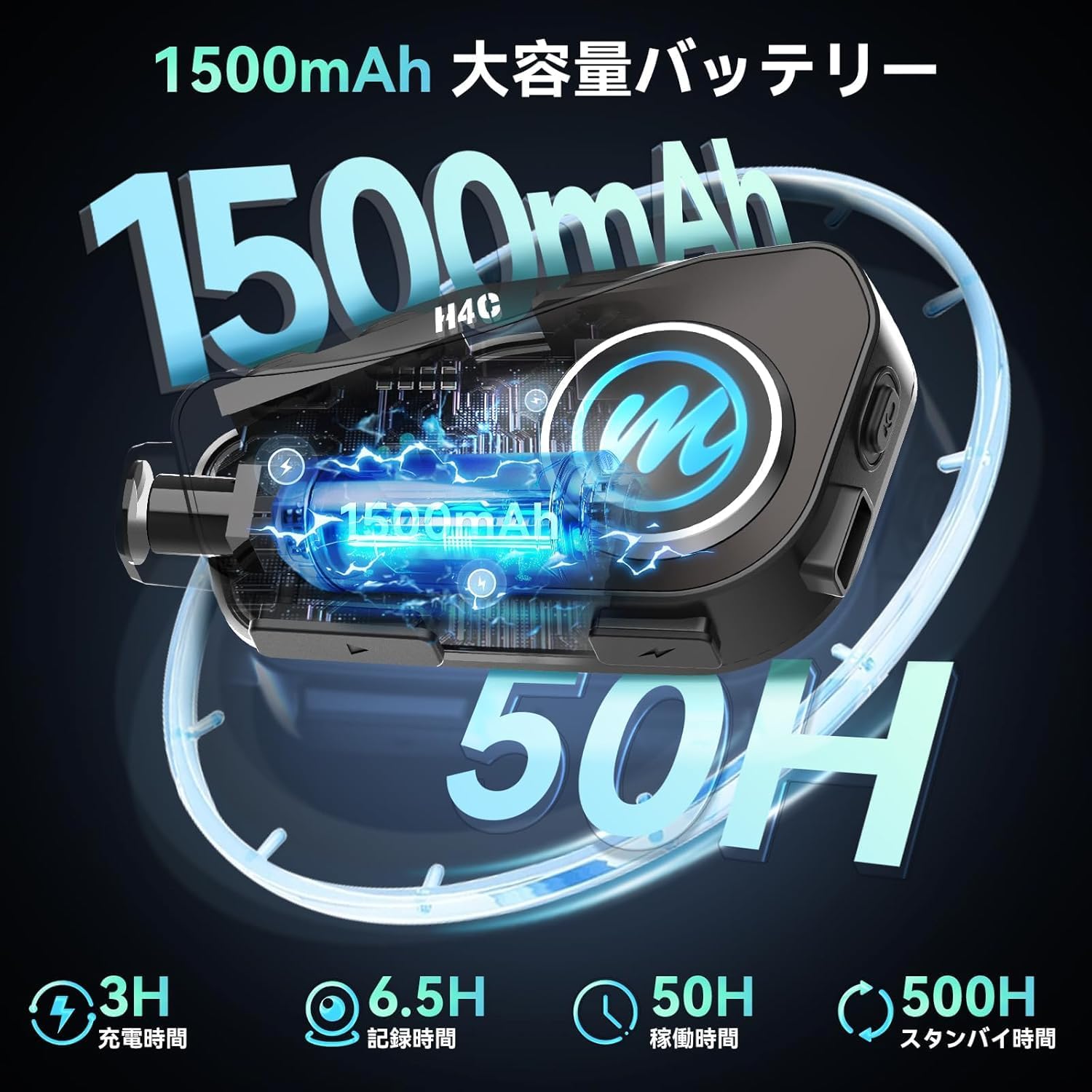
Image: Moman H4C Helmet Headset and included accessories, such as microphones, charging cable, and mounting clips.
4. Característiques del producte
- 1080P HD Camera & 120° Wide Angle: Records vivid moments during your ride with a 1080P HD camera. Features a 120° wide-angle lens and 360° body rotation for comprehensive coverage. Supports up to 6.5 hours of continuous video recording. Convenient WiFi function allows viewing and downloading recorded videos and photos via the "RoadCam" app on your smartphone.
- Reliable Loop Recording: The camera's loop recording function automatically overwrites the oldest unprotected files when the TF card is full, ensuring continuous recording of your cycling journey. Supports up to 256GB memory cards, with a 32GB memory card included.
- Bluetooth 5.3 Chip & Dual Phone Connection: Utilizes Bluetooth 5.3 technology for stable connections, effectively reducing disconnections and noise. The Moman H4C can connect to two smartphones simultaneously, allowing you to manage navigation, calls, and music playback concurrently. (Note: This product does not include an intercom function.)
- HiFi Stereo Sound & 40mm Speaker: Equipped with upgraded 40mm HiFi speakers, delivering powerful bass, higher volume, and superior sound quality. The stereo effect creates an immersive and realistic audio environment, providing an excellent music experience for riders.
- 1500mAh Battery Life & IPX6 Waterproof: Features an upgraded 1500mAh large-capacity battery that charges in approximately 3 hours, offering up to 50 hours of music playback and 6.5 hours of video recording. The IPX6 waterproof rating ensures the headset can be used in various weather conditions, making it ideal for motorcycles, dirt bikes, and snowmobiles.
- One-Click Voice Assistant Activation: Incorporates an intelligent voice assistant system. Simply press the dedicated Voice Assistant button (or a specific combination as per device markings) once to easily activate your voice assistant or Siri, allowing you to perform actions without diverting attention from the road. Also supports hands-free automatic call answering for safer and more convenient driving. Large buttons ensure easy operation of these functions.
5. Guia de configuració
5.1. Instal·lació
The Moman H4C offers easy installation using the provided clip kit.
- Trieu la ubicació de muntatge: Select a suitable flat surface on the side of your helmet, preferably on the left side for easier access to controls.
- Attach Back Clip: Secure the back clip to the helmet using either the adhesive mount or the clamp mount. Ensure it is firmly attached.
- Mount Headset: Slide the Moman H4C unit onto the attached back clip until it clicks into place.
- Instal·lar altaveus: Open the helmet's inner lining. Attach the HiFi speakers to the ear pockets using the Velcro pads. Ensure they are positioned directly over your ears for optimal sound.
- Instal·lar el micròfon: Choose the appropriate microphone (boom for open-face helmets, soft wire for full-face helmets). Route the microphone cable discreetly under the helmet lining and attach the microphone near your mouth.
- Connectar els cables: Connect the speaker and microphone cables to the corresponding ports on the Moman H4C unit.

Image: Visual guide for installing the Moman H4C headset onto a motorcycle helmet, showing clip attachment and unit mounting.
5.2. Càrrega del dispositiu
Before first use, fully charge the Moman H4C. A full charge takes approximately 3 hours.
- Connect the provided Type-C charging cable to the charging port on the headset.
- Connecteu l'altre extrem del cable a un adaptador de corrent USB (no inclòs) o al port USB d'un ordinador.
- El llum indicador de càrrega s'il·luminarà durant la càrrega i s'apagarà quan estigui completament carregat.

Image: Illustration of the Moman H4C's 1500mAh battery, showing 3 hours charging time, 6.5 hours recording time, and 50 hours operating time.
5.3. Emparellament Bluetooth
Pair your Moman H4C with your smartphone for communication and media functions.
- Encès: Press and hold the Power button on the headset until you hear a voice prompt indicating "Power On".
- Introduïu el mode de vinculació: With the device powered on, press and hold the Multi-function button until the LED indicator flashes blue and red alternately, indicating pairing mode.
- Activa el Bluetooth al telèfon: Al teu telèfon intel·ligent, vés a la configuració de Bluetooth i activa el Bluetooth.
- Seleccioneu el dispositiu: Look for "Moman H4C" in the list of available devices and select it to connect.
- Confirmació de connexió: Once successfully paired, the LED indicator will turn solid blue, and you will hear a voice prompt "Connected".
- Connexió de telèfon dual: To connect a second phone, repeat steps 2-5 with the second device. The headset can maintain connection with two phones simultaneously.
6. Instruccions de funcionament
6.1. Funcions bàsiques
- Encès/apagat: Manteniu premut el botó d'engegada durant 3 segons.
- Control de volum: Premeu els botons d'augmentar el volum (+) o de baixar el volum (-).
- Reproduir/pausar música: Premeu el botó multifunció una vegada.
- Pista següent: Premeu i manteniu premut el botó de pujar el volum (+) durant 2 segons.
- Pista anterior: Premeu i manteniu premut el botó per baixar el volum (-) durant 2 segons.
6.2. Gestió de trucades
- Respon a la trucada: Press the Multi-function button once when a call comes in.
- Finalitzar la trucada: Premeu el botó multifunció una vegada durant una trucada.
- Rebutja la trucada: Press and hold the Multi-function button for 2 seconds when a call comes in.
- Torna a marcar l'últim número: Premeu dues vegades el botó multifunció.
- Resposta automàtica: The device supports automatic call answering after a few rings. This feature can typically be toggled in the associated mobile application if available.
6.3. Funcionament de la càmera
The Moman H4C features an integrated 1080P HD camera for recording your rides.
- Iniciar/Aturar la gravació: Locate the dedicated camera button (often marked with a camera icon) and press it once to start recording. Press again to stop.
- Enregistrament en bucle: The device automatically manages storage. When the 32GB TF card (expandable to 256GB) is full, the oldest unprotected files es sobreescriurà.
- Viewing/Downloading Footage (WiFi):
- Download the "RoadCam" app from Google Play Store or Apple App Store.
- Enable WiFi on your Moman H4C (refer to app instructions for specific steps).
- Connect your smartphone to the Moman H4C's WiFi hotspot.
- Open the "RoadCam" app to view viu footage, browse recorded videos/photos, and download them to your phone.

Image: The Moman H4C's 1080P HD camera capturing clear video footage.

Image: Demonstrates the 120-degree wide-angle view and 360-degree adjustable camera on the Moman H4C.

Image: Visual representation of the loop recording functionality, ensuring continuous video capture.

Image: Smartphone screen showing the "RoadCam" app interface for controlling the Moman H4C via WiFi.
6.4. Assistent de veu
Activate your smartphone's voice assistant (e.g., Siri, Google Assistant) directly from the Moman H4C.
- Activa l'Assistent de veu: Press the dedicated Voice Assistant button (or a specific combination as per device markings) once. You will hear a prompt indicating activation.
- Issue Commands: Speak your command clearly after the prompt. For example, "Hey Siri, what's the weather like tomorrow?" or "Play music."

Image: Rider interacting with the Moman H4C's AI voice assistant for hands-free control of music, calls, and navigation.
7. Manteniment
Proper maintenance ensures the longevity and optimal performance of your Moman H4C headset.
- Neteja: Utilitzeu un suau, damp cloth to wipe the exterior of the unit. Do not use harsh chemicals or abrasive cleaners.
- Port de càrrega: Ensure the Type-C charging port is free of dust and debris. Keep it dry before charging.
- Emmagatzematge: Guardeu el dispositiu en un lloc fresc i sec, allunyat de la llum solar directa i de temperatures extremes quan no l'utilitzeu durant períodes prolongats.
- Cura de la bateria: For long-term storage, charge the battery to about 50% every three months to prevent deep discharge.
8. Solució De Problemes
Si teniu problemes amb el vostre Moman H4C, consulteu els següents problemes i solucions habituals:
| Problema | Causa possible | Solució |
|---|---|---|
| El dispositiu no s'encén. | Bateria baixa; dispositiu bloquejat. | Charge the device fully. If still unresponsive, perform a reset (refer to manual for reset procedure, if any, or hold power button for extended time). |
| No es pot emparellar amb el telèfon intel·ligent. | El dispositiu no està en mode d'emparellament; Bluetooth desactivat al telèfon; interferències. | Ensure headset is in pairing mode (flashing blue/red). Turn Bluetooth off and on on your phone. Move closer to the headset. Forget previous pairings on phone and try again. |
| No hi ha so dels altaveus. | Volume too low; speakers not connected properly; faulty speakers. | Increase volume. Check speaker cable connections. Test with another audio source if possible. |
| El micròfon no funciona. | Microphone not connected properly; microphone faulty. | Check microphone cable connection. Ensure microphone is positioned correctly. |
| Problemes amb l'enregistrament de vídeo (per exemple, no s'enregistra, mala qualitat). | TF card full or corrupted; camera lens dirty; low light conditions. | Check TF card storage and format if necessary (backup data first). Clean the camera lens. Ensure adequate lighting for recording. |
| Problemes de connexió WiFi amb l'aplicació. | WiFi not enabled on headset; incorrect password; app issues. | Ensure headset WiFi is active. Re-enter WiFi password. Restart the app and headset. |
9. Especificacions
| Característica | Detall |
|---|---|
| Número de model | H4C |
| Marca | mare |
| Resolució de captura de vídeo | 1080p |
| Angle de la lent | Gran angular de 120° |
| Body Rotation | 360° |
| Capacitat de la bateria | 1500 mAh |
| Temps de càrrega | Aprox. 3 hores |
| Temps de gravació de vídeo | Fins a 6.5 hores |
| Temps de reproducció de música | Fins a 50 hores |
| Classificació impermeable | IPX6 |
| Versió Bluetooth | 5.3 |
| Suport per a targetes de memòria | Up to 256GB (32GB TF card included) |
| Dimensions del producte | 8 x 10.8 x 13.8 cm |
| Pes del producte | 330 g |
10. Garantia i Suport
Moman products are designed for reliability and performance. For warranty information and technical support, please refer to the official Moman weblloc web o contacteu directament amb el seu servei d'atenció al client.
- Oficial Weblloc: www.moman.co
- Atenció al client: Consulteu la informació de contacte que apareix a l'embalatge del producte o a la fitxa oficial website for support inquiries.


