1. Introducció
This manual provides detailed instructions for the installation, operation, and maintenance of your NGTeco AL40 Smart Fingerprint Keyless Entry Door Lock. Please read this manual thoroughly before installation and use to ensure proper function and security.

Imatge 1.1: Davant i darrere view of the NGTeco AL40 Smart Fingerprint Keyless Entry Door Lock. The front panel features a fingerprint sensor and a numeric keypad, while the back panel shows the battery compartment and manual lock/unlock knob.
2. Producte acabatview i Característiques
The NGTeco AL40 is an advanced keyless entry door lock designed for enhanced security and convenience. It offers multiple unlocking methods and smart features.
Característiques principals:
- 5 maneres de desbloquejar: Access your door using fingerprint, Bluetooth APP, electronic touchscreen keypad passcode, IC card, or a traditional backup key.
- Capacitive Fingerprint Identification: Recognizes your fingerprint in approximately 0.3 seconds for quick access. Stores up to 100 fingerprints and allows viewing of unlock log records via the APP.
- Auto Re-lock & Privacy Mode: Features a built-in sensor that automatically re-locks the door 10-30 seconds after closing. Privacy mode prevents unauthorized entry from the outside.
- Tamper Alerta: Constructed with a robust Zinc Alloy casing, the lock is designed to withstand significant force (up to 2050kg). An audible alert is triggered upon detection of attempted forced entry or external damage.
- Instal·lació senzilla de bricolatge: Designed for easy installation without drilling, suitable for doors 1.38 to 2.09 inches (35 to 53mm) thick, requiring only a screwdriver.

Imatge 2.1: Illustration of the five unlocking methods: Fingerprint, Passcode, App Bluetooth, IC Card, and Backup Key, shown alongside the installed smart lock.
3. Contingut del paquet
Please verify that all components are present before beginning installation. If any parts are missing or damaged, contact customer support.
- Exterior Lock Assembly (with keypad and fingerprint sensor)
- Conjunt de pany interior (amb compartiment de bateria i polze)
- Pestillo de cèrcol
- Placa i caixa de cop
- Cargols de muntatge
- Tecles de còpia de seguretat (2)
- IC Cards (2)
- Guia d'instal·lació (aquest document)
4. Instal·lació i configuració
The NGTeco AL40 is designed for straightforward DIY installation. Ensure your door meets the thickness requirements of 1.38 to 2.09 inches (35 to 53mm).
4.1 Instal·lació física
- Prepara la porta: Ensure your door has a standard deadbolt bore hole. No additional drilling is typically required.
- Instal·leu el pestell de forrellat: Insert the deadbolt latch into the door edge and secure it with screws. Ensure the latch bolt faces the correct direction.
- Instal·lació del conjunt exterior: Route the cable from the exterior assembly through the door bore hole and align the assembly with the deadbolt latch.
- Instal·lació del conjunt interior: Connect the cable from the exterior assembly to the interior assembly. Secure the interior assembly to the door using the provided mounting screws.
- Instal·leu les bateries: Insert 4 AA alkaline batteries (not included) into the battery compartment of the interior assembly.
- Prova de funcionament: Manually test the deadbolt operation using the thumb turn.

Imatge 4.1: Visual guide indicating compatible door types for DIY installation, showing that the NGTeco AL40 can directly replace existing lever or knob locks on standard doors.
4.2 App Setup (Bluetooth)
- Download the NGTeco Security APP: Cerca "NGTeco Security" in your smartphone's app store and download it.
- Crea un compte: Segueix les instruccions de l'aplicació per registrar un nou compte d'usuari.
- Afegeix un dispositiu: In the app, select to add a new device. Ensure Bluetooth is enabled on your smartphone and the lock is powered on.
- Emparellar el cadenat: Follow the app's prompts to pair your AL40 lock via Bluetooth.
- Configura la configuració: Once paired, you can set up administrator fingerprints, passcodes, IC cards, and other lock settings through the app.
5. Instruccions de funcionament
The NGTeco AL40 offers multiple convenient ways to unlock your door.
5.1 Mètodes de desbloqueig
- Empremta digital: Place your registered finger on the fingerprint sensor located at the top of the exterior assembly. The lock will unlock upon successful recognition.
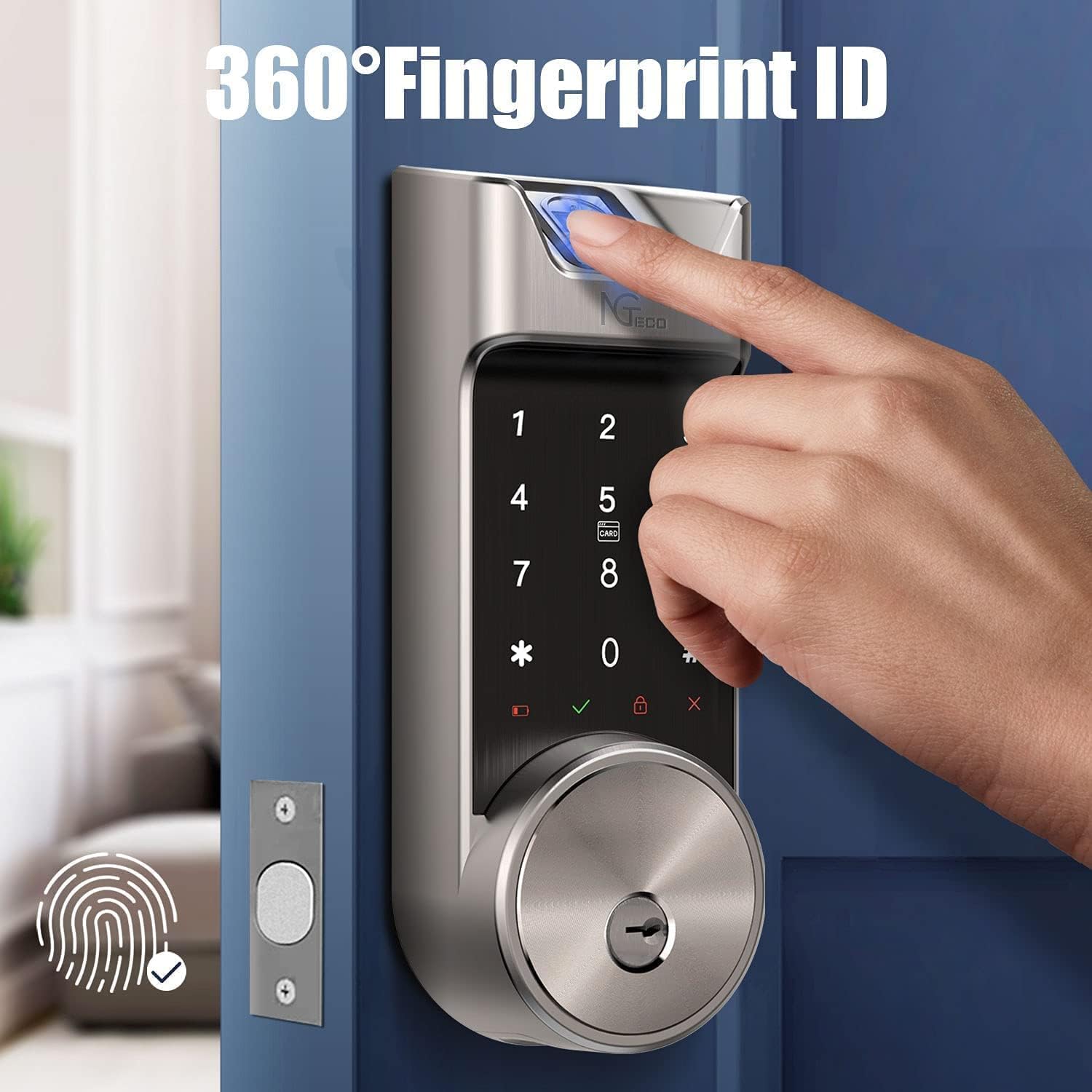
Imatge 5.1: A hand demonstrating the use of the 360° fingerprint ID sensor on the NGTeco AL40 smart lock for quick and secure access.
- Contrasenya: Introduïu el codi d'accés registrat al teclat numèric de la pantalla tàctil i premeu la tecla '#'.
- Random Passcode: To enhance security, you can enter random digits before or after your actual passcode. For example, if your passcode is '123456', you can enter '7891234560#' where '789' and '0' are random digits.

Imatge 5.2: An illustration explaining the 'Random Passcode' feature, which allows users to input extra digits before or after their actual code to prevent others from guessing the sequence.
- Targeta IC: Tap your registered IC card against the designated card reader area on the keypad.
- APP Bluetooth: Open the NGTeco Security APP on your smartphone, ensure Bluetooth is connected, and tap the unlock button within the app.
- Clau de còpia de seguretat: In case of emergency or battery depletion, insert the physical backup key into the keyhole and turn to unlock.
5.2 Automatic Re-lock
The lock will automatically re-lock itself 10-30 seconds after the door is closed. This feature ensures your home remains secure even if you forget to lock it manually.

Imatge 5.3: A visual representation of the 'Auto-Locks' feature, showing the lock automatically securing the door after a set period, providing convenience for users.
5.3 Mode de privadesa
To activate Privacy Mode, press and hold the privacy button on the interior assembly. This will prevent anyone from unlocking the door from the outside, even with valid credentials, until the mode is deactivated.
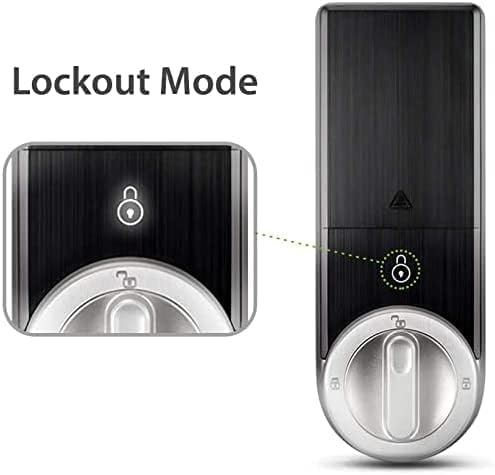
Imatge 5.4: Close-up of the NGTeco AL40 smart lock's interior assembly, highlighting the 'Lockout Mode' indicator, which signifies when the privacy function is active.
5.4 Temporary Passcodes (via App)
The NGTeco Security APP allows you to generate temporary passcodes for guests or service providers. These passcodes can be set with specific durations for access.

Imatge 5.5: Screenshot of the NGTeco Security app interface showing the option to generate a temporary password for remote access, including setting its duration.
6. Manteniment
Regular maintenance ensures the longevity and optimal performance of your NGTeco AL40 smart lock.
- Substitució de la bateria: The lock requires 4 AA alkaline batteries. When the battery level is low, the lock will provide an audible or visual alert. Replace all four batteries simultaneously. Do not mix old and new batteries or different battery types.
- Neteja: Wipe the lock's exterior surfaces with a soft, dry cloth. Avoid using abrasive cleaners, solvents, or harsh chemicals, as these can damage the finish and electronic components.
- Cura del sensor d'empremtes dactilars: Keep the fingerprint sensor clean and dry. If it becomes dirty, gently wipe it with a lint-free cloth.
- Comprovació mecànica: Periodically check that all screws are tight and the deadbolt operates smoothly. Lubricate the deadbolt mechanism if necessary with a silicone-based lubricant.
7. Solució De Problemes
If you encounter issues with your NGTeco AL40 smart lock, refer to the following common solutions:
| Problema | Causa possible | Solució |
|---|---|---|
| El bloqueig no respon | Bateries esgotades | Substituïu les 4 piles AA. |
| No es reconeix l'empremta digital | Finger is wet/dirty, sensor is dirty, or fingerprint not properly registered. | Ensure finger and sensor are clean and dry. Re-register fingerprint if issue persists. |
| El teclat no respon | Low battery, keypad malfunction. | Replace batteries. If issue persists, contact support. |
| Bluetooth APP cannot connect | Bluetooth off, app not updated, lock too far from phone. | Ensure Bluetooth is on. Update app. Move closer to the lock. Restart phone/app. |
| Auto re-lock not working | Sensor obstruction, feature disabled in app. | Check for obstructions around the door sensor. Verify auto re-lock is enabled in the NGTeco Security APP. |
| Tamper alert sounds frequently | False alarm, physical impact. | Ensure the lock is securely installed. If false alarms persist, contact support. |
8. Especificacions
| Característica | Detall |
|---|---|
| Número de model | AL40 |
| Fabricant | NGTeco |
| Material | Metal (Zinc Alloy casing) |
| Color | Plata |
| Tipus d'acabat | Polit |
| Estil | Modern |
| Tipus de bloqueig | Keypad, Fingerprint, IC Card, Bluetooth, Key |
| Font d'alimentació | 4 piles AA (no incloses) |
| Compatibilitat del gruix de la porta | De 1.38 a 2.09 polzades (35 a 53 mm) |
| Dimensions del producte (L x A x A) | 7.62 x 5.08 x 17.78 cm (3 x 2 x 7 polzades) |
| Pes de l'article | 2.9 kg |
| Característiques especials | Fingerprint, Smart Lock, Touchscreen, Tamper Alert, Auto Re-lock, Privacy Mode |
9. Garantia i Suport
The NGTeco AL40 Smart Fingerprint Keyless Entry Door Lock comes with a 1 any de garantia. NGTeco also provides assistència tècnica gratuïta de per vida.
For technical assistance, warranty claims, or any questions regarding your product, please refer to the contact information provided on your product packaging or visit the official NGTeco weblloc.


