Introducció
This manual provides detailed instructions for the TELE System 27-inch Full HD LED TV, model palco hevc s2. Please read this manual carefully before using the product to ensure proper operation, maximize its lifespan, and understand its features. Keep this manual for future reference.
1. Configuració
1.1 Desembalatge
Traieu amb cura el televisor i tots els accessoris de l'embalatge. Assegureu-vos que hi hagi tots els components:
- TELE System 27-inch Full HD LED TV
- Control remot
- Cable d'alimentació
- Manual d'usuari (aquest document)
- Components del suport de TV (si escau)
1.2 Fixació del suport o del muntatge a la paret
Per a la instal·lació del suport:
- Col·loqueu la pantalla del televisor amb la pantalla cap avall sobre una superfície suau i neta per evitar ratllades.
- Alineeu els components del suport amb els forats de muntatge de la part inferior del televisor.
- Fixeu el suport amb els cargols proporcionats. No l'estrenyeu massa.
Per al muntatge a la paret:
This TV supports wall mounting. Refer to the specific instructions provided with your wall mount kit for proper installation. Ensure the wall mount is compatible with the TV's VESA mounting pattern and weight.
1.3 Connexió de potència
Connect the power cable to the TV's power input, then plug the other end into a suitable electrical outlet. The TV will enter standby mode.
1.4 Connexió de dispositius externs
Use the available ports on the TV to connect your external devices:
- HDMI: Per a vídeo i àudio d'alta definició des de dispositius com ara reproductors de Blu-ray, consoles de jocs o descodificadors.
- USB: Per connectar dispositius d'emmagatzematge USB per reproduir contingut multimèdia files.
- Antena/cable: Connect your DVB-T2 antenna for digital terrestrial television reception.
1.5 Configuració inicial
En engegar-lo per primera vegada, el televisor us guiarà a través d'un procés de configuració inicial. Això normalment inclou:
- Selecció de la llengua.
- Selecció de país/regió.
- Automatic channel scanning for DVB-T2 broadcasts.
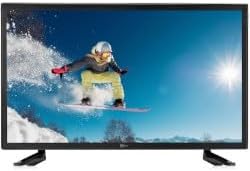
Aquesta imatge mostra la part frontal view of the TELE System 27-inch Full HD LED TV, model palco hevc s2, with its stand attached. The screen displays a vibrant image of a snowboarder in action, highlighting the display quality.
2. Instruccions de funcionament
2.1 Controls bàsics
Use the remote control to operate your TV. Key functions include:
- Botó d'encesa: Encén o apaga el televisor (mode d'espera).
- Pujar/baixar el volum: Ajusta el nivell de so.
- Canal amunt/avall: Canvia els canals de televisió.
- Botons numèrics (0-9): Selecció directa de canals.
- Silenciar: Silencia el so del televisor.
2.2 Selecció d'entrada
Premeu el botó FONT or ENTRADA button on your remote control to cycle through available input sources (e.g., HDMI1, HDMI2, USB, DVB-T2). Select the desired input for your connected device.
2.3 Navegació de menús
Premeu el botó MENÚ button to access the TV's main menu. Use the arrow buttons (Up, Down, Left, Right) to navigate through options and the OK or ENTRAR button to confirm selections. The menu allows you to adjust picture settings, sound settings, channel settings, and more.
2.4 DVB-T2 Tuner Usage
After completing the channel scan during initial setup, you can access digital terrestrial channels. Use the Channel Up/Down buttons or direct number input to switch channels. The TV supports DVB-T2 for high-quality digital broadcast reception.
2.5 Reproducció multimèdia USB
Insert a USB storage device into the TV's USB port. The TV should automatically detect the device and prompt you to open the media browser. You can then navigate and play supported video, audio, and image files'emmagatzemen al dispositiu USB.
3. Manteniment
3.1 Cleaning the Screen and Casing
- Pantalla: Netegeu suaument la pantalla amb un drap suau i sense borrissol. Per a marques difícils, netegeu lleugerament.ampNetegeu el drap amb aigua o amb un netejador de pantalles especialitzat. No ruixeu mai líquid directament sobre la pantalla.
- Casing: Feu servir un drap suau i sec per netejar el televisor.asing. Avoid using abrasive cleaners, waxes, or solvents as they can damage the finish.
Important: Desendolleu sempre el televisor de la presa de corrent abans de netejar-lo.
3.2 Actualitzacions de programari
The TV's software may receive updates to improve performance or add new features. Check the TV's menu for a 'Software Update' or 'System Update' option. Follow the on-screen instructions carefully if an update is available. (Note: Software update guarantee information is not available for this model.)
3.3 Precaucions de seguretat
- No bloquejar les obertures de ventilació.
- No exposeu el televisor a la pluja o la humitat.
- Eviteu col·locar el televisor sota la llum solar directa o a prop de fonts de calor.
- No obriu el televisor casing; demaneu totes les tasques de manteniment a personal qualificat.
4. Solució De Problemes
Abans de contactar amb el servei d'assistència, prova les solucions següents per a problemes comuns:
| Problema | Possible solució |
|---|---|
| Sense poder | Ensure the power cable is securely plugged into both the TV and the wall outlet. Check if the outlet is working by plugging in another device. |
| No hi ha imatge, però hi ha so | Comproveu la font d'entrada. Premeu el botó FONT button on the remote to ensure the correct input (e.g., HDMI1) is selected. |
| No hi ha so, però hi ha imatge | Check the volume level and ensure the TV is not muted. If using external audio, ensure it is correctly connected and powered on. |
| El control remot no funciona | Substituïu les piles del comandament a distància. Assegureu-vos que no hi hagi cap obstacle entre el comandament a distància i el sensor d'infrarojos del televisor. |
| Poor DVB-T2 Signal/No Channels | Check your antenna connection. Try repositioning the antenna or performing a new channel scan in the TV's menu. |
| El suport USB no es reprodueix | Ensure the USB device is formatted correctly (e.g., FAT32) and the media files are in a supported format. Try another USB device. |
5. Especificacions
The following are the technical specifications for the TELE System 27-inch Full HD LED TV (Model: palco hevc s2):
- Nom del model: palco hevc s2
- Mida de la pantalla: 27 polzades
- Tecnologia de visualització: LED
- Resolució: 1080p (Full HD)
- Freqüència d'actualització: 120 hertz
- Tecnologia del sintonitzador: DVB-T2
- Interfície de maquinari: HDMI
- Ports USB totals: 1
- Relació d'aspecte: 16:9
- Mode de sortida d'àudio: estèreo
- Surround Configuration: 2.0
- Tipus de muntatge: Muntatge de paret
- Característica especial: Pantalla plana
- Any model: 2010
Specifications are subject to change without notice. For the most up-to-date information, please refer to the product packaging or manufacturer's weblloc.
6. Informació de la garantia
This TELE System TV comes with a manufacturer's warranty. The specific terms and duration of the warranty may vary by region and retailer. Please retain your proof of purchase for warranty claims. For detailed warranty information, refer to the warranty card included with your product or visit the official TELE System weblloc.
7. Atenció al client
If you encounter issues that cannot be resolved using the troubleshooting guide, or if you require further assistance, please contact TELE System customer support. Contact details can typically be found on the official TELE System weblloc web o a l'embalatge del producte.
Assistència en línia: Visit the official TELE System weblloc web amb preguntes freqüents, articles de suport i formularis de contacte.
Suport telefònic: Check the TELE System weblloc per als números de contacte regionals.