1. Introducció
Welcome to the Titan Evoke Smart Watch user manual. This guide provides essential information for setting up, operating, maintaining, and troubleshooting your new smart watch. The Titan Evoke combines advanced technology with elegant design, featuring a vibrant AMOLED display, Bluetooth calling, and comprehensive health tracking capabilities.
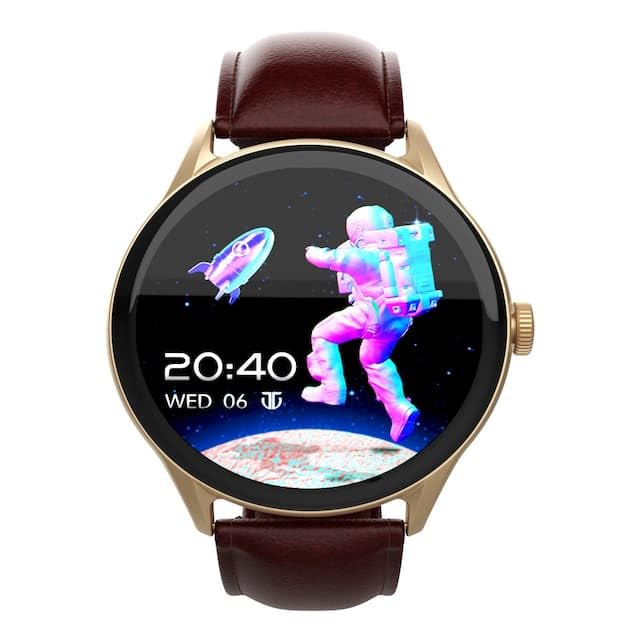
Imatge: Frontal view of the Titan Evoke Smart Watch displaying a digital clock and an astronaut graphic.

Image: A Titan Evoke Smart Watch with a colorful watch face, accompanied by the text 'Titan Evoke: Function Meets Fashion'.
2. Què hi ha a la caixa
Si us plau, comproveu el contingut del paquet per assegurar-vos que hi hagi tots els elements:
- Titan Evoke Smart Watch
- Cable de càrrega magnètica
- Guia d'inici ràpid
- Targeta de garantia
3. Configuració
3.1. Càrrega del dispositiu
Before initial use, fully charge your Titan Evoke Smart Watch. Connect the magnetic charging cable to the charging points on the back of the watch and plug the USB end into a compatible power adapter (not included) or a computer's USB port. The watch display will indicate charging status.
3.2. Encendre/apagar
- Encès: Press and hold the functional crown (side button) for a few seconds until the Titan logo appears.
- Apagar: From the watch face, swipe down to access quick settings, or navigate to 'Settings' > 'System' > 'Power Off'. Alternatively, press and hold the functional crown and select 'Power Off'.
3.3. Emparellament amb el telèfon intel·ligent
To unlock the full functionality of your Titan Evoke Smart Watch, pair it with your smartphone via Bluetooth.
- Download and install the companion app (e.g., 'Titan Smart' app) from your smartphone's app store (Google Play Store for Android, Apple App Store for iOS).
- Assegureu-vos que el Bluetooth estigui habilitat al vostre telèfon intel·ligent.
- Obriu l'aplicació complementària i seguiu les instruccions que apareixen a la pantalla per crear un compte o iniciar la sessió.
- Select 'Add Device' or 'Pair New Device' within the app.
- The app will search for available devices. Select 'Titan Evoke' from the list.
- Confirma la sol·licitud d'emparellament tant al rellotge com al telèfon intel·ligent.
4. Com utilitzar el rellotge intel·ligent
4.1. Navegació
- Pantalla tàctil: Swipe left, right, up, or down to navigate through menus, notifications, and widgets. Tap to select items.
- Functional Crown: Rotate the crown to scroll through lists or adjust settings. Press the crown to return to the watch face or confirm selections.
4.2. SingleSync Bluetooth Calling
The Titan Evoke supports direct Bluetooth calling, allowing you to make and receive calls directly from your wrist.
- Fer una trucada: Access the 'Phone' or 'Dialer' app on your watch. You can dial numbers directly or select contacts synced from your smartphone.
- Recepció d'una trucada: Quan rebi una trucada, el rellotge mostrarà l'identificador de la persona que truca. Toqueu la icona verda per respondre o la icona vermella per rebutjar-la.
- Ensure your watch is connected to your smartphone via Bluetooth for calling functionality.

Image: Two Titan Evoke Smart Watches, one displaying an incoming call and the other a dial pad, illustrating the SingleSync BT Calling feature.
4.3. Esferes de rellotge
Personalize your watch with over 100 available watch faces. To change the watch face, press and hold the current watch face, then swipe left or right to browse and tap to select your preferred design.
4.4. Health Suite
The Titan Evoke monitors various health metrics:
- Monitor de freqüència cardíaca: Provides continuous or on-demand heart rate readings.
- Seguiment d'activitats: Records steps, distance, and calories burned throughout the day.
- Seguiment de l'estrès: Monitors stress levels based on heart rate variability.
- Monitor de son: Fa un seguiment dels patrons i la qualitat del son.
Access these features by swiping on the watch face or through the main menu. For detailed analysis, refer to the companion app.
4.5. Multisport Modes
Engage in your favorite activities with dedicated multisport modes. The watch offers over 60 sports modes to accurately track your workouts.
- To start a workout, navigate to the 'Workout' or 'Sports' app on your watch.
- Select your desired activity (e.g., running, cycling, basketball).
- Tap to begin tracking. The watch will display real-time metrics such as duration, heart rate, and calories.

Image: A Titan Evoke Smart Watch with a basketball player on its screen, surrounded by icons representing various sports modes, illustrating the 'Aspire to Excel' feature.
4.6. Característiques addicionals
- Protecció amb contrasenya: Protegeix el teu rellotge amb una contrasenya.
- SOS Emergency Dial: Configure emergency contacts for quick access in critical situations.
- In-Built Calculator and Games: Access these utilities from the main menu.
5. Característiques clauview
5.1. 1.43" AMOLED Display
Experience clear visuals on the 1.43-inch AMOLED display with a resolution of 466 x 466 pixels and up to 1000 Nits brightness, ensuring readability even in bright sunlight.

Image: A close-up of the Titan Evoke Smart Watch screen, highlighting its 1000 Nits Brightness and 466x466 pixel resolution, with the text 'A Screen Made For Greatness'.
5.2. Functional Crown
The integrated functional crown provides an intuitive way to navigate menus, scroll through content, and interact with your watch, complementing the touchscreen interface.

Image: A close-up of the Titan Evoke Smart Watch, emphasizing its functional crown and a vibrant watch face displaying health metrics, with the text 'Dial Up The Function & Style'.
5.3. 24x7 Health Suite
The watch continuously monitors your heart rate, tracks your activity, and assesses stress levels, providing a comprehensive overview del teu benestar.
6. Manteniment
6.1. Neteja del rellotge
Regularly clean your watch to maintain its appearance and functionality. Use a soft, lint-free cloth to wipe the screen and watch body. For stubborn dirt, slightly dampRenta el drap amb aigua. Evita utilitzar productes químics agressius o materials abrasius.
6.2. Cura de la corretja
If your watch has a leather strap, avoid prolonged exposure to water or direct sunlight to prevent damage. Clean with a dry, soft cloth. For silicone or metal straps, a damp cloth is suitable.
7. Solució De Problemes
If you encounter issues with your Titan Evoke Smart Watch, refer to the following common solutions:
- El rellotge no s'encén: Ensure the watch is fully charged. Connect it to the magnetic charging cable and allow it to charge for at least 30 minutes before attempting to power on again.
- No es pot emparellar amb el telèfon intel·ligent:
- Assegura't que el Bluetooth estigui activat tant al rellotge com al telèfon intel·ligent.
- Assegureu-vos que el rellotge estigui dins de l'abast del Bluetooth del telèfon.
- Reinicia tant el rellotge com el telèfon intel·ligent.
- Esborra la memòria cau de Bluetooth del telèfon (si escau) i torna a intentar emparellar-lo.
- Dades de salut inexactes: Ensure the watch is worn snugly on your wrist, about one finger's width above the wrist bone. Clean the sensor on the back of the watch.
- Autonomia curta de la bateria: Reduce screen brightness, disable unnecessary notifications, and limit continuous heart rate monitoring if not required. Ensure background app usage is optimized on your phone.
- La pantalla tàctil no respon: Restart the watch. If the issue persists, contact customer support.
8. Especificacions
| Característica | Detall |
|---|---|
| Marca | Tità |
| Nom del model | Titan Evoke |
| Número de model | 90172AL01 |
| Tipus de visualització | AMOLED |
| Mida de la pantalla | 1.43 polzades |
| Resolució | 466 x 466 píxels |
| Brillantor | Fins a 1000 nits |
| Connectivitat | Bluetooth |
| Tipus de bateria | Polímer de liti |
| Capacitat de la bateria | 300 mAh |
| Durada mitjana de la bateria | 5 dies |
| Característiques especials | Activity Tracker, Heart Rate Monitor, Multisport Tracker, Phone Call, Stress Tracking, Password Protection, SOS Emergency Dial |
| Dispositius compatibles | Smartphone |
| Dimensions del producte | 9.4 x 5.9 x 9.5 cm |
| Pes de l'article | 48.5 g |
9. Garantia i Suport
9.1. Informació de la garantia
The Titan Evoke Smart Watch comes with a 1 anys de garantia from the date of purchase. Please retain your purchase receipt and the warranty card for any warranty claims. The warranty covers manufacturing defects but does not cover damage caused by misuse, accidents, or unauthorized repairs.
9.2. Atenció al client
For any queries, technical assistance, or warranty claims, please contact Titan customer care:
- Telèfon: 1800-266-0123
- Correu electrònic: customercare@titan.co.in
- Fabricant / importador: Titan Company Limited, 3 Sipcot Industries complex, Hosur- 635126


