Introducció
This manual provides comprehensive instructions for the setup, operation, and maintenance of your Trevi T-FIT 230 CALL Smartwatch. Please read this manual carefully before using the device to ensure proper functionality and to maximize your user experience. Keep this manual for future reference.
Contingut del paquet
- Trevi T-FIT 230 CALL Smartwatch
- Cable de càrrega USB magnètic
- Manual d'usuari (aquest document)
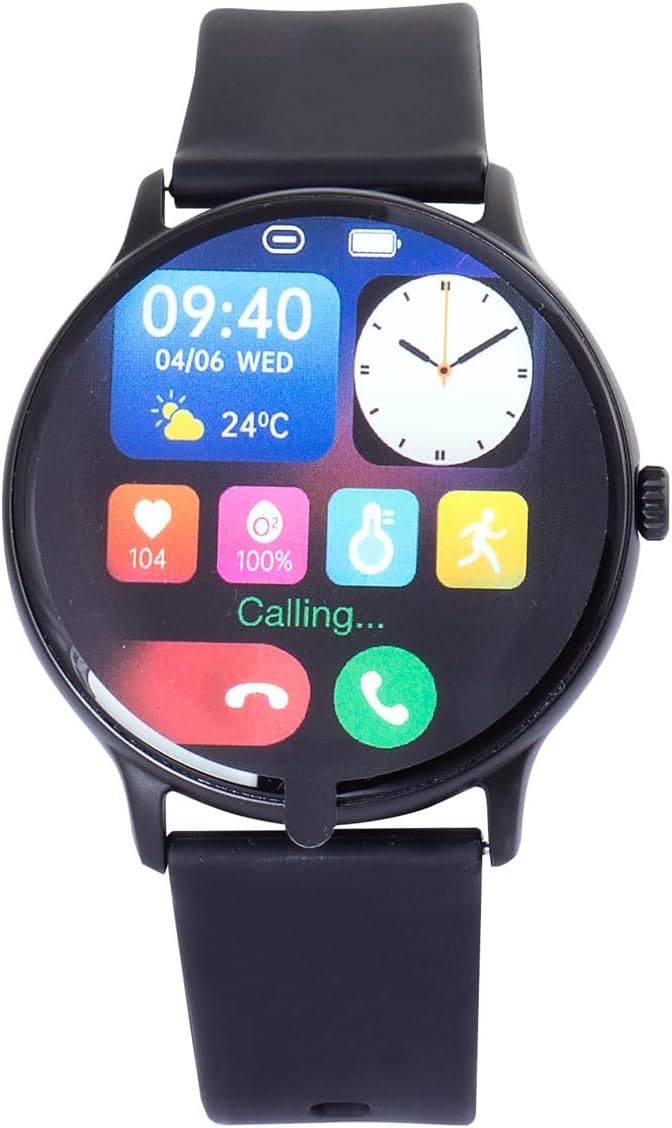
Figure 1: Trevi T-FIT 230 CALL Smartwatch retail packaging. The box contains the smartwatch, charging cable, and user manual.
Configuració
1. Càrrega inicial
Before first use, fully charge your Trevi T-FIT 230 CALL Smartwatch. Connect the magnetic USB charging cable to the charging contacts on the back of the watch and plug the USB end into a standard USB power adapter (not included) or a computer USB port.

Figura 2: posterior view of the smartwatch, highlighting the heart rate sensor and magnetic charging contacts.
2. Instal·lació de l'aplicació
Per desbloquejar tot el potencial del teu rellotge intel·ligent, descarrega i instal·la DaFit application on your smartphone. The app is compatible with Android OS 4.4 and above, and iOS 9.0 and above.
- Scan the QR code provided in the quick start guide (if available) or search for "DaFit" in your smartphone's app store (Google Play Store for Android, Apple App Store for iOS).
- Instal·leu l'aplicació.
- Segueix les instruccions que apareixen a la pantalla per crear un compte i configurar el teu profile.
3. Vinculació de dispositius
Ensure Bluetooth is enabled on your smartphone. Open the DaFit app and follow the pairing instructions. The smartwatch uses Bluetooth 5.0 for a stable connection.
- Open the DaFit app on your smartphone.
- Navegueu fins a la secció "Dispositiu" o "Afegeix dispositiu" dins de l'aplicació.
- The app will search for nearby devices. Select "T-FIT 230 CALL" from the list.
- Confirma la sol·licitud d'emparellament tant al teu telèfon intel·ligent com al rellotge intel·ligent si se't demana.
Instruccions de funcionament
1. Pantalla i navegació
The Trevi T-FIT 230 CALL Smartwatch features a 1.39-inch Full Touch display. Swipe across the screen to navigate through different functions and menus. Tap to select options.

Figure 3: The smartwatch display showing time, date, and various activity metrics.
2. Funcionalitat de trucada
The smartwatch allows you to make and receive calls directly from your wrist, thanks to its integrated microphone and speaker.
- Recepció de trucades: When a call comes in, the watch will display the caller's number or name (if in your contacts). Swipe or tap to answer or decline.
- Fer trucades: Use the virtual dial pad on the watch to dial numbers. You can also store up to 8 frequent contacts for quick dialing via the DaFit app.
- Notificacions: Receive notifications for calls, SMS, and messages from social media platforms like WhatsApp, Facebook, Instagram, and Twitter directly on your watch screen.

Figure 4: The smartwatch displaying an incoming call, showing options to answer or reject.
3. Fitness and Wellness Tracking
Monitor your physical activity and well-being with the integrated sensors.
- Health Parameters: The watch tracks heart rate, blood pressure, blood oxygen saturation, steps taken, calories burned, and distance covered.
- Monitorització del son: Automatically monitors your sleep patterns, providing insights into sleep duration and quality.
- Sincronització de dades: All collected data is synchronized with the DaFit app, where you can view detailed reports and track your progress over time.
4. DaFit App Features
The DaFit app enhances your smartwatch experience with additional functionalities:
- Esferes de rellotge personalitzades: Download and set new watch faces from the app.
- Establiment d'objectius: Define personalized fitness goals. The watch will vibrate upon achievement.
- Recordatoris: Activate sedentary and hydration alerts to promote a healthy and active lifestyle.
- Eines: Access stopwatch, timer, music control, and a smartphone reminder function (to locate your phone by making it emit a sound).
Manteniment
1. Neteja
Netegeu regularment el vostre rellotge intel·ligent per garantir un rendiment i una higiene òptims. Feu servir un drap suau i sense borrissol per netejar la pantalla i la carcassa. Per a la brutícia resistent, netegeu-lo lleugerament.ampRenta el drap amb aigua. Evita utilitzar productes químics agressius o materials abrasius.
2. Resistència a l'aigua (IP67)
The Trevi T-FIT 230 CALL Smartwatch is water-resistant with an IP67 rating. This means it is protected against dust ingress and can withstand immersion in water up to 1 meter for up to 30 minutes. While it can handle splashes, rain, and brief immersion, it is not recommended for swimming, showering with hot water, or diving. Always dry the watch thoroughly after exposure to water.
3. Càrrega
To maintain battery health, charge the smartwatch using only the provided magnetic USB cable. Avoid using damaged cables or chargers. Do not leave the watch charging for extended periods after it has reached full charge.
Resolució de problemes
If you encounter issues with your Trevi T-FIT 230 CALL Smartwatch, please refer to the following common solutions:
| Problema | Causa possible | Solució |
|---|---|---|
| El rellotge no s'encén | Bateria baixa; dispositiu bloquejat. | Charge the watch for at least 30 minutes. If still unresponsive, perform a hard reset (refer to device specific instructions if available, or hold power button for 10-15 seconds). |
| No es pot emparellar amb el telèfon intel·ligent | Bluetooth desactivat; problema amb l'aplicació; rellotge no detectable. | Ensure Bluetooth is on for both devices. Restart both the watch and smartphone. Clear DaFit app cache/data or reinstall. Ensure watch is in pairing mode. |
| Dades de salut inexactes | Improper fit; sensor obstruction; movement during measurement. | Ensure the watch is worn snugly on your wrist, not too tight or too loose. Clean the sensor on the back of the watch. Remain still during measurements. Note that this device is not a medical instrument. |
| No s'han rebut notificacions | Permisos d'aplicació; Bluetooth desconnectat; configuració de notificacions. | Check notification permissions for the DaFit app in your phone settings. Ensure Bluetooth connection is active. Verify notification settings within the DaFit app. |
Especificacions
| Característica | Detall |
|---|---|
| Marca | Trevi |
| Nom del model | T-FIT 230 CALL |
| Número de model | T-FIT 230 |
| Color | Negre |
| Mida de la pantalla | 1.39 inches Full Touch |
| Connectivitat | Bluetooth 5.0 |
| Compatibilitat de sistemes operatius | Android OS 4.4 and above, iOS 9.0 and above |
| Tipus de bateria | Polímer de liti |
| Mètode de càrrega | USB magnètic |
| Resistència a l'aigua | IP67 |
| Característiques especials | Bluetooth Calling, Heart Rate Monitoring, Blood Oxygen Monitoring, Blood Pressure Monitoring, Step Counter, Calorie Tracker, Distance Tracker, Sleep Monitoring, Sedentary Reminder, Hydration Reminder, Music Control, Smartphone Finder, Customizable Watch Faces. |
Garantia i Suport
For warranty information, please refer to the documentation included with your purchase or contact the retailer or manufacturer directly. Warranty terms and conditions may vary by region and seller.
For technical support, frequently asked questions, or further assistance, please visit the official Trevi website or consult the DaFit application's help section. Ensure your DaFit app is updated to the latest version for optimal performance and support resources.
You can also refer to the manufacturer's weblloc: www.trevi.it


