Introducció
This manual provides detailed instructions for the setup, operation, and maintenance of your AJAZZ AK871 75% Mechanical Gaming Keyboard. Designed for versatility, this non-backlit keyboard features dual-mode connectivity (Bluetooth 5.0 and 2.4G wireless), hot-swappable MX switches, and a compact TKL layout, making it suitable for PC, Windows, and Mac users.
Contingut del paquet
- 1x AJAZZ AK871 Mechanical Keyboard
- 1x cable USB-C a USB-A
- 1x 2.4G Wireless Receiver (stored in keyboard)
- 1x Keycap/Switch Puller
- Extra Switches (for replacement)
- Extra Keycaps (for customization)
- 1 x manual d'usuari

Image: The AJAZZ AK871 keyboard shown with its included USB cable, keycap/switch puller, and extra keycaps/switches.
Producte acabatview
The AK871 features a compact 75% TKL layout with 87 keys, saving desktop space while retaining essential functionality. It includes a detachable magnetic upper cover for aesthetic versatility and protection. The keyboard is equipped with hot-swappable 3-pin switches, allowing for easy customization of your typing experience.

Imatge: Més deview of the AJAZZ AK871's key features including compact 80% layout, BT/2.4G dual mode, full keys hot-swappable, magnetic keyboard cover, 19 keys anti-ghosting, three-color ABS keycaps, and Win/Mac system compatibility.

Image: The compact TKL 80% layout of the AK871 keyboard, highlighting its 87-key design for space efficiency.
Configuració
Instal·lació de la bateria
The keyboard operates on two AAA batteries (not included). Locate the battery compartment on the underside of the keyboard, insert the batteries, and close the cover. Ensure correct polarity.

Image: Close-up of the keyboard's underside showing the battery compartment for two AAA batteries.
Connexió del teclat
The AK871 supports three connection modes: wired USB-C, 2.4G wireless, and Bluetooth 5.0 (up to 3 devices).
- Mode per cable: Connect the provided USB-C to USB-A cable from the keyboard to your computer's USB port. The keyboard will automatically switch to wired mode.
- Mode sense fil 2.4G: Locate the 2.4G wireless receiver stored magnetically on the underside of the keyboard. Plug the receiver into your computer's USB port. Switch the mode toggle on the keyboard's underside to '2.4G'. The keyboard should connect automatically.
- Mode Bluetooth: Switch the mode toggle on the keyboard's underside to 'BT'. Press and hold 'Fn + W', 'Fn + E', or 'Fn + R' for 3-5 seconds to enter pairing mode for BT1, BT2, or BT3 respectively. The corresponding key will flash, indicating it's ready to pair. On your device, search for 'AK871' in Bluetooth settings and connect.

Image: Illustrates the dual-mode connection options: low-latency Bluetooth 5.0 and convenient 2.4GHz wireless.

Image: Shows the keyboard's ability to connect up to 3 devices simultaneously via Bluetooth (BT1, BT2, BT3) and 2.4G wireless (RF), with instructions for switching modes using Fn+Q, Fn+W, Fn+E.
Instruccions de funcionament
Tecles de funció
The AK871 keyboard utilizes the 'Fn' key in combination with other keys to access various functions. Refer to the user manual for a complete list of key combinations for multimedia control, backlight adjustments, and system switching.
Compatibilitat del sistema
The keyboard is compatible with Windows (7/8/10/11) and Mac OS. Use the switch on the underside of the keyboard to select the appropriate operating system mode (Win/Mac).

Image: The keyboard connected to a PC, demonstrating its wide compatibility with Windows and Mac operating systems, with Fn+A to switch to Mac and Fn+S to switch to Win.
Personalització del programari
For advanced customization, including key remapping, macro creation, and detailed lighting control, download the official AJAZZ software from their website. The software allows for multiple profiles and per-key adjustments.
Video: An official video from HXSJ US demonstrating the AJAZZ AK871 Mechanical Keyboard's features and software customization options.
Manteniment
Hot-Swappable Switches and Keycaps
The AK871 features a hot-swappable PCB compatible with most 3-pin mechanical switches. This allows you to easily replace switches without soldering, customizing your typing feel or replacing faulty switches. Keycaps can also be easily removed and replaced.
- Eliminació de les tecles: Use the provided keycap puller to gently lift keycaps off the switches.
- Eliminació dels interruptors: Use the provided switch puller to grip the top and bottom of the switch, then gently pull upwards until it detaches from the PCB.
- Instal·lació d'interruptors: Align the pins of the new switch with the holes on the PCB and press down firmly until it clicks into place. Ensure pins are not bent.
- Instal·lació de les tecles: Alineeu la tapa de les tecles amb la tija de l'interruptor i premeu suaument fins que quedi fixada.
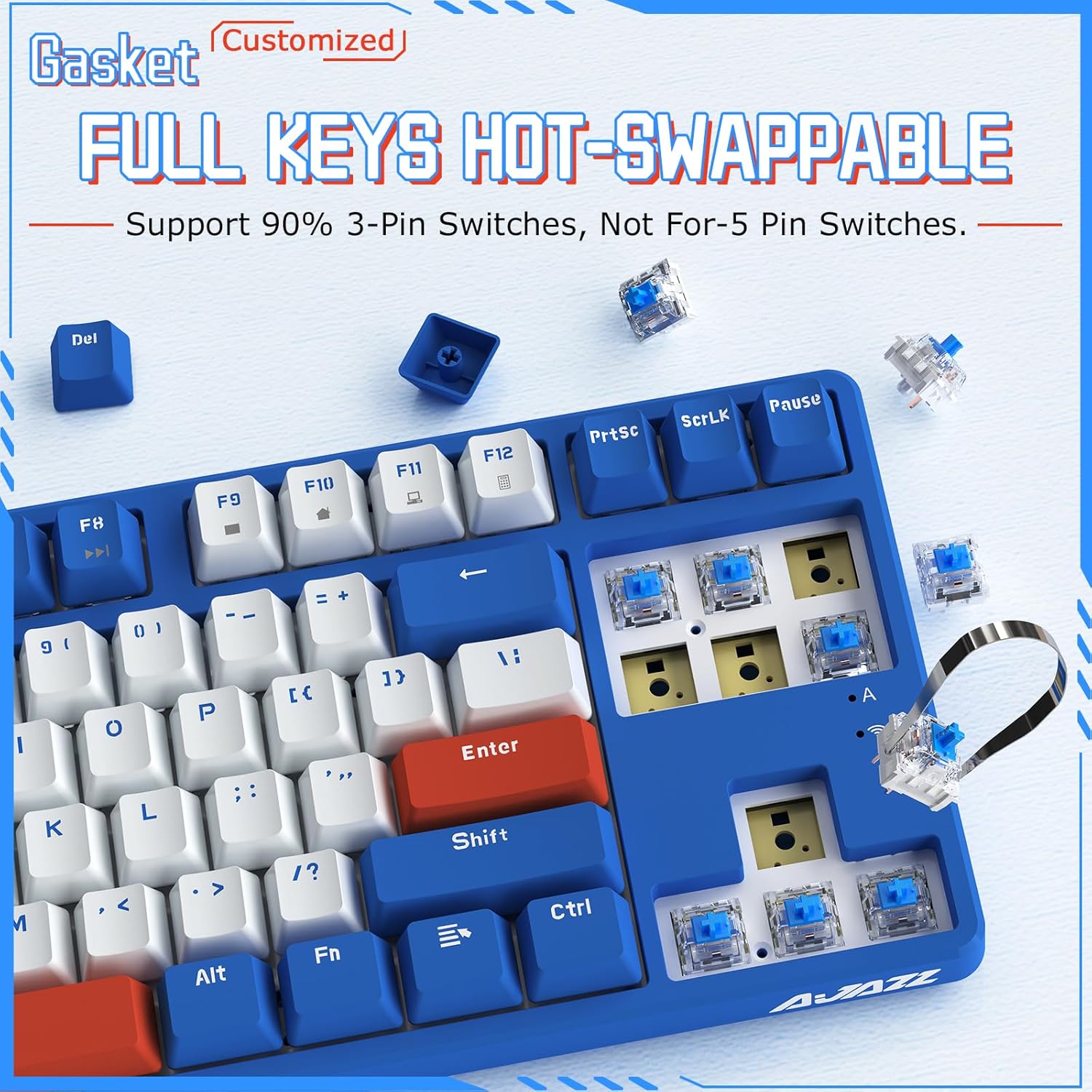
Image: Demonstrates the hot-swappable nature of the AK871, showing switches being removed and replaced, compatible with 90% of 3-pin switches.
Consells de neteja
Regularly clean your keyboard to prevent dust and debris buildup. Use a soft brush or compressed air to remove loose particles. For deeper cleaning, remove keycaps and gently wipe them with a damp cloth. Ensure the keyboard is completely dry before reassembling or use.
Resolució de problemes
- El teclat no respon: Ensure the USB cable is securely connected or the wireless receiver is properly plugged in. Check the battery level if using wireless modes. Try switching between wired/wireless/Bluetooth modes.
- Problemes de connexió Bluetooth: Ensure the keyboard is in pairing mode (flashing indicator). Remove the keyboard from your device's Bluetooth list and attempt to re-pair. Ensure your device's Bluetooth is enabled.
- Claus que no es registren: Check if any switches are loose or damaged. Use the switch puller to reseat or replace faulty switches.
- Connectivitat intermitent: Ensure the keyboard is within range of the wireless receiver or Bluetooth device. Avoid sources of interference.
Especificacions
| Marca | Ajazz |
| Model | AK871 |
| Disseny | 75% TKL (87 Keys) |
| Connectivitat | Bluetooth 5.0, sense fil 2.4G, USB-C amb cable |
| Tipus de canvi | MX Switch Hot Swappable (3-pin compatible) |
| Taps de claus | OEM Profile, 3 Colors Mixed |
| Característica especial | Magnetic Detachable Upper Cover |
| Dispositius compatibles | PC (Windows 7/8/10/11), Mac |
| Pes de l'article | 2.44 lliures |
| Dimensions del paquet | 15.47 x 7.24 x 2.24 polzades |
Garantia i Suport
For warranty information and technical support, please refer to the documentation included in your package or visit the official Ajazz weblloc web. Conserveu el comprovant de compra per a qualsevol reclamació de garantia.