Introducció
Welcome to the user manual for your new Dragon Touch Notepad 102 Android Tablet. This guide provides detailed instructions on setting up, operating, maintaining, and troubleshooting your device to ensure you get the most out of its powerful features. The Notepad 102 is designed for versatile use, offering a seamless experience for entertainment, productivity, and communication.
Key features include a large 128GB storage capacity, 8GB RAM, an Octa-Core 2.0GHz processor, a vibrant 10-inch IPS HD display, and a 13MP camera, all running on the latest Android 12 operating system.
Què hi ha a la caixa
Si us plau, comproveu el contingut del paquet per assegurar-vos que hi hagi tots els elements:
- 1 x Dragon Touch Notepad 102 Tablet
- 1 x Carregador
- 1 x cable USB
Producte acabatview
Característiques clau
- 128GB Large Storage Capacity: Expandable up to 256GB via microSD card slot for all your media and files.
- 2.0 Ghz Octa-Core Processor and 8GB RAM: Ensures powerful and fast performance for streaming and multitasking.
- Versatile Use As Tablet Or Laptop: Easily connect to a docking keyboard (not included) for a laptop-like experience.
- Llarga vida útil de la bateria: Powered by a 6000mAh battery, offering up to 6 hours of video playback.
- 8MP Front + 13MP Rear Camera: For video calls, selfies, and capturing moments.
- Native and Latest Android OS: GMS certified Android 12 for a smooth, fast, and customizable user experience with full Google Play access.
- Ultra-fast 2.4GHz and 5GHz WiFi: Provides top-of-the-line connectivity.
- GPS integrat: Supports offline GPS navigation.
Components
Familiaritzeu-vos amb els components físics de la vostra tauleta:

Figura 1: Davant i darrere view of the Dragon Touch Notepad 102 tablet.

Figura 2: Frontal view of the Dragon Touch Notepad 102 tablet, showcasing its 10-inch IPS HD display.

Figura 3: lateral view of the Dragon Touch Notepad 102 tablet, highlighting its slim profile i ubicacions portuàries.

Figura 4: posterior view of the Dragon Touch Notepad 102 tablet, showing the camera and Dragon Touch branding.
Configuració
1. Càrrega inicial
Before first use, fully charge your tablet. Connect the included USB cable to the tablet's USB Type-C port and the other end to the charger. Plug the charger into a power outlet. The battery indicator on the screen will show charging progress.
2. Encès / apagat
- Per encendre: Press and hold the Power button located on the side of the tablet until the Dragon Touch logo appears.
- Per apagar: Premeu i manteniu premut el botó d'engegada fins que aparegui el menú d'opcions d'engegada. Seleccioneu "Apagar" i confirmeu.
- Per reiniciar: Al menú d'opcions d'energia, seleccioneu "Reiniciar" i confirmeu.
3. Initial Android Setup
Upon first power-on, the tablet will guide you through the initial Android 12 setup process. This includes selecting your language, connecting to a Wi-Fi network, setting up your Google account, and configuring basic settings.
4. Connexió a Wi-Fi
- Vés a Configuració > Xarxa i Internet > Wi-Fi.
- Activa/desactiva el Wi-Fi On.
- Seleccioneu la xarxa Wi-Fi que vulgueu de la llista.
- Introduïu la contrasenya de xarxa si us demana i, a continuació, toqueu Connecta't.
5. Optional Docking Keyboard Connection
The Notepad 102 is compatible with a docking keyboard (sold separately) for enhanced productivity. The tablet features smart absorption technology for a strong and comfortable connection.
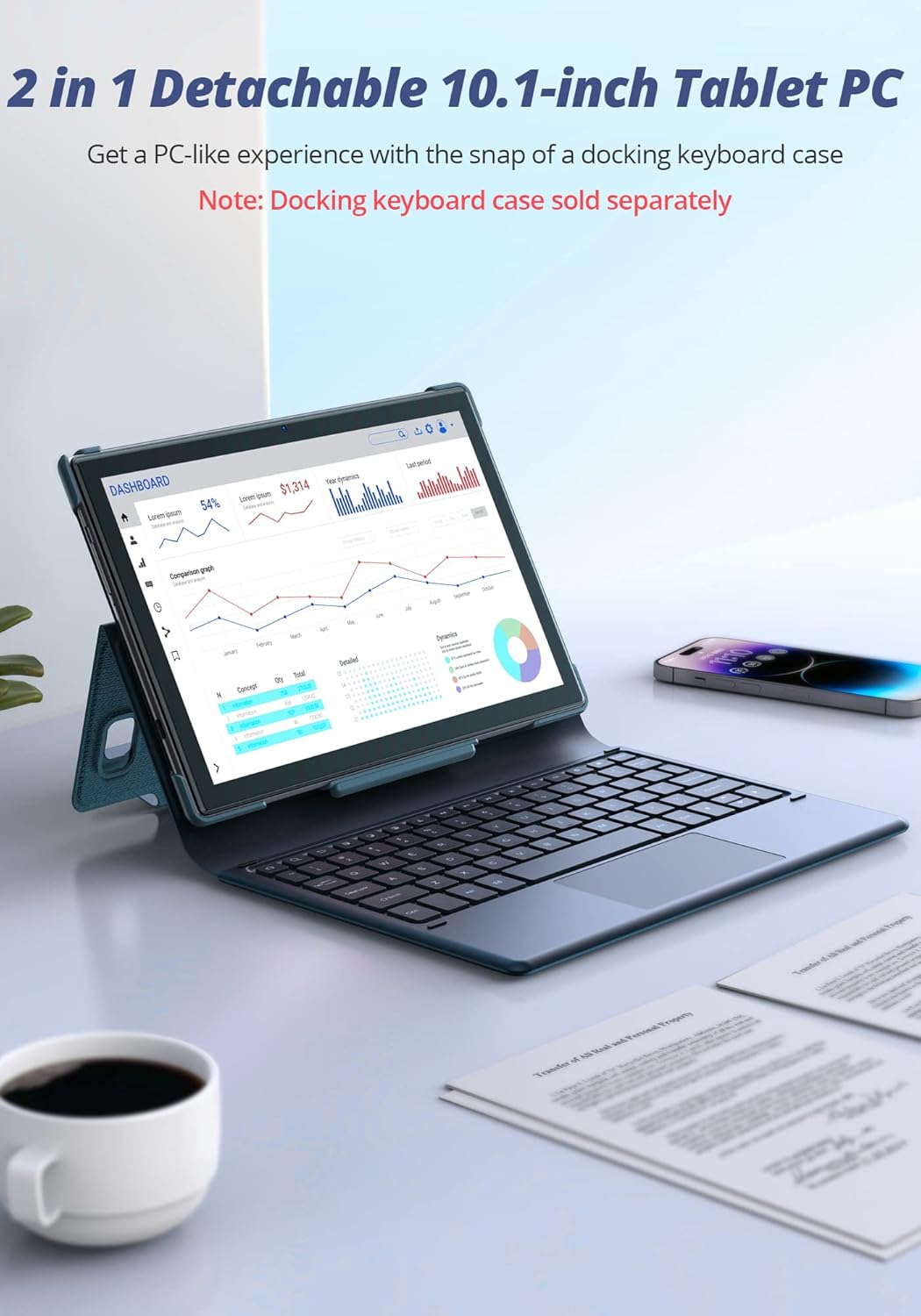
Figure 5: The Dragon Touch Notepad 102 tablet connected to an optional docking keyboard, transforming it into a laptop-like device.
Funcionament de la tauleta
Navegació i gestos
- Toca: Selecciona un element o obre una aplicació.
- Llisca: Scroll through screens, web pages, or lists.
- Pessiga per fer zoom: Apropa o allunya les fotos i web pàgines.
- Premsa llarga: Accediu als menús contextuals o moveu les icones de les aplicacions.
Gestió d'aplicacions
The tablet runs on Android 12, providing full access to the Google Play Store. You can download and install a wide variety of applications.
- Instal·leu aplicacions: Open the Google Play Store app, search for your desired app, and tap "Install".
- Desinstal·lar aplicacions: Long-press the app icon on the home screen or app drawer, then drag it to "Uninstall" or select "App info" and then "Uninstall".
Ús de la càmera
The tablet features an 8MP front camera and a 13MP rear camera for photos and video calls.

Figure 6: A user taking a photo with the Dragon Touch Notepad 102 tablet's rear camera.

Figure 7: A video call in progress on the Dragon Touch Notepad 102 tablet, demonstrating its front camera capabilities.
Gestió d'emmagatzematge
Your tablet comes with 128GB of internal storage, which can be expanded up to 256GB using a microSD card (not included). To manage your storage:
- Vés a Configuració > Emmagatzematge a view ús d'emmagatzematge i alliberar espai.
- Insert a microSD card into the designated slot to expand storage for photos, videos, and other files.

Figure 8: The tablet offers 128GB of internal storage, expandable up to 512GB with a microSD card.
Durada de la bateria
The 6000mAh battery provides extended usage times. For optimal battery performance:
- Charge the tablet fully before first use.
- Eviteu temperatures extremes.
- Tanca les aplicacions no utilitzades que s'executen en segon pla.
- Ajusteu la brillantor de la pantalla a un nivell còmode.

Figure 9: The 6000mAh battery provides up to 6 hours of video playback, 10 hours of daily use, and 15 hours of music playback.
Performance and Display
The Octa-Core 2.0GHz processor and 8GB RAM ensure smooth performance for all your tasks. The 10-inch IPS HD display offers clear and vibrant visuals.

Figure 10: The tablet's powerful Octa-Core processor and 8GB RAM deliver an ultimate entertainment experience.

Figure 11: The 10.1-inch IPS HD display features 2.5D curved glass and eye protection for comfortable viewing.
Manteniment
Neteja de la tauleta
Per mantenir la tauleta en condicions òptimes:
- Feu servir un drap suau i sense borrissol per netejar la pantalla i la carcassa.
- Eviteu utilitzar productes químics o materials abrasius.
- Do not spray cleaners directly onto the screen.
Actualitzacions de programari
Regularly check for and install system updates to ensure your tablet has the latest features, security patches, and performance improvements.
- Vés a Configuració > Sistema > Actualització del sistema.
- Seguiu les instruccions que apareixen a la pantalla per descarregar i instal·lar les actualitzacions disponibles.
Cura de la bateria
Per allargar la durada de la bateria:
- Eviteu descarregar completament la bateria amb freqüència.
- Do not leave the tablet plugged in for extended periods after it's fully charged.
- Store the tablet in a cool, dry place when not in use for long periods.
Resolució de problemes
This section addresses common issues you might encounter with your Dragon Touch Notepad 102 tablet.
La tauleta no s'encén
- Comproveu la bateria: Ensure the tablet is charged. Connect the charger and wait a few minutes before attempting to power on.
- Restabliment dur: Premeu i manteniu premut el botó d'engegada durant 10-15 segons per forçar un reinici.
Problemes de connectivitat Wi-Fi
- Reinicieu l'encaminador: Apagueu i torneu a apagar el router Wi-Fi.
- Oblida't de la xarxa: Go to Wi-Fi settings, forget the network, and reconnect.
- Senyal de comprovació: Ensure you are within range of your Wi-Fi router.
Les aplicacions es bloquegen o es bloquegen
- Close App: Force close the app from recent apps or through Settings > Apps.
- Esborra la memòria cau: Go to Settings > Apps > [App Name] > Storage & cache > Clear cache.
- Actualitza l'aplicació: Assegureu-vos que l'aplicació estigui actualitzada a la seva darrera versió des de Google Play Store.
- Reinicia la tauleta: Un simple reinici sovint pot resoldre errors temporals de programari.
Rendiment lent
- Tanca les aplicacions en segon pla: Too many apps running can slow down the tablet.
- Alliberar emmagatzematge: Elimineu-les innecessàries files o aplicacions per alliberar espai.
- Restabliment de fàbrica: As a last resort, if issues persist, you may perform a factory reset (Settings > System > Reset options > Erase all data). Warning: This will erase all data on your tablet. Back up important information first.
Especificacions tècniques
| Característica | Especificació |
|---|---|
| Marca | Toc de Drac |
| Nom del model | Notepad 102 |
| Sistema operatiu | Android 12 |
| Mida de la pantalla | 10 polzades |
| Resolució de pantalla | 1280 x 800 píxels |
| Processador | 2 GHz Octa-Core (MediaTek) |
| RAM | 8 GB |
| Emmagatzematge intern | 128 GB |
| Emmagatzematge ampliable | Fins a 256 GB mitjançant targeta microSD |
| Càmera posterior | 13 MP |
| Càmera frontal | 8 MP |
| Tipus sense fil | 802.11g (2.4GHz & 5GHz WiFi) |
| Durada mitjana de la bateria | 6 hores (reproducció de vídeo) |
| Pes de l'article | 2.01 lliures |
| Dimensions del producte | 9.5 x 6.37 x 0.31 polzades |
| Color | Plata |
Garantia i Suport
Your Dragon Touch Notepad 102 tablet comes with a standard manufacturer's warranty. Please refer to the warranty card included in your product packaging for specific terms and conditions.
For technical support, warranty claims, or further assistance, please visit the official Dragon Touch website or contact their customer service department. Contact details are typically available on the brand's official support page or in the product packaging.
També podeu visitar el Botiga Dragon Touch a Amazon per a més informació i recursos.


