Introducció
This manual provides comprehensive instructions for the setup, operation, maintenance, and troubleshooting of your DXPICR Smart Watch. Please read this manual carefully to ensure proper use and to maximize the functionality of your device.
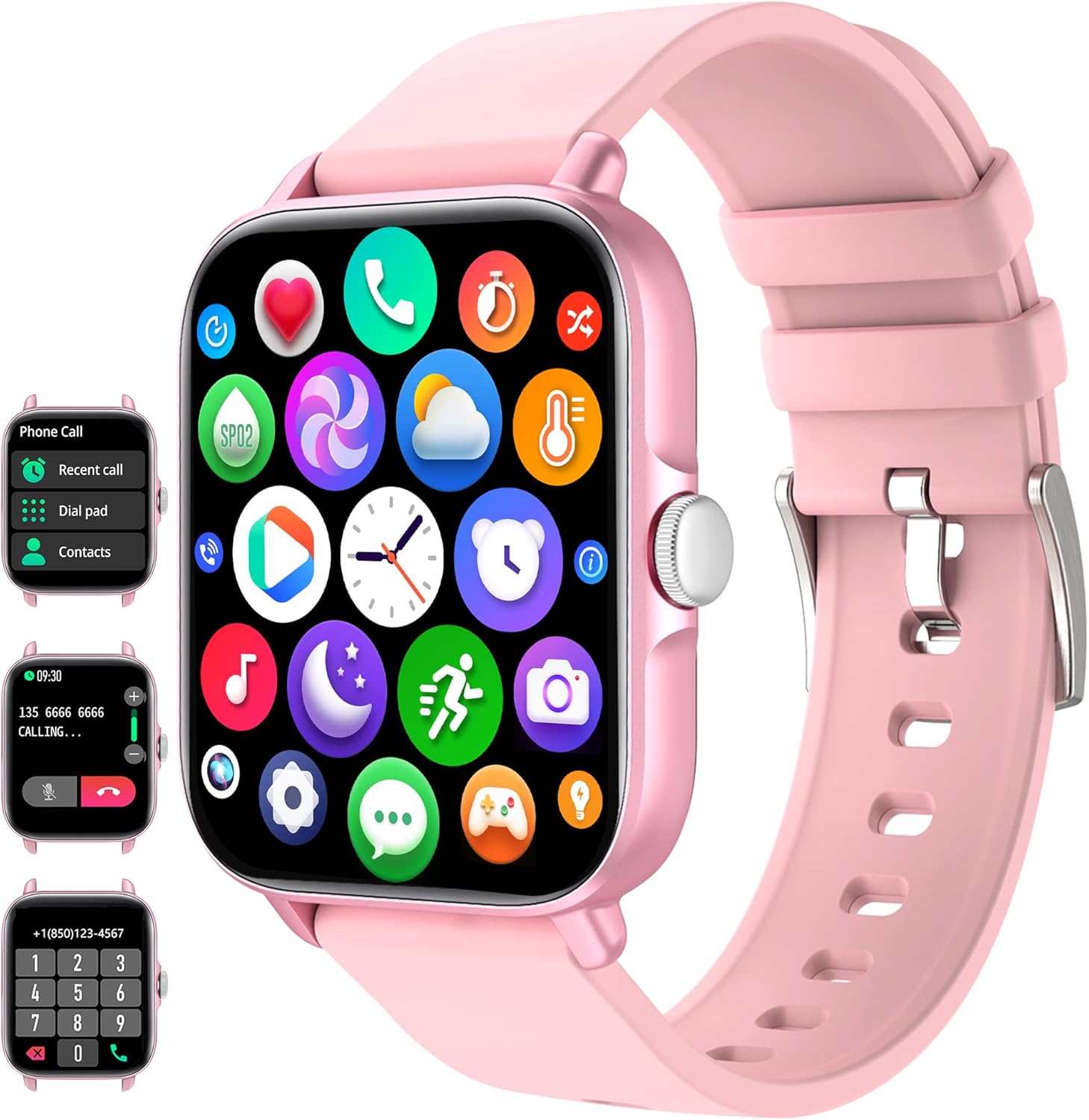
Figure 1: DXPICR Smart Watch Overview
The DXPICR Smart Watch features a full touch screen, Bluetooth call capabilities, and a range of health and fitness tracking functions. The image displays the watch's main interface, including icons for various applications and a detailed view of the call and dial pad screens.
Configuració
1. Càrrega inicial
Before first use, fully charge your DXPICR Smart Watch. Connect the magnetic charging cable to the charging points on the back of the watch and plug the USB end into a standard USB power adapter (not included).
- Una càrrega completa sol trigar aproximadament 2 hores.
- La pantalla del rellotge indicarà l'estat de càrrega.
2. Descàrrega i instal·lació d'aplicacions
To unlock the full features of your smartwatch, download the companion application on your smartphone.
- Scan the QR code provided in the watch's quick start guide or search for the app name (usually indicated on the watch screen or packaging) in your phone's app store (Google Play Store for Android, Apple App Store for iOS).
- Instal·la l'aplicació al teu telèfon intel·ligent.
- Grant necessary permissions when prompted by the app for full functionality (e.g., Bluetooth, notifications, location).
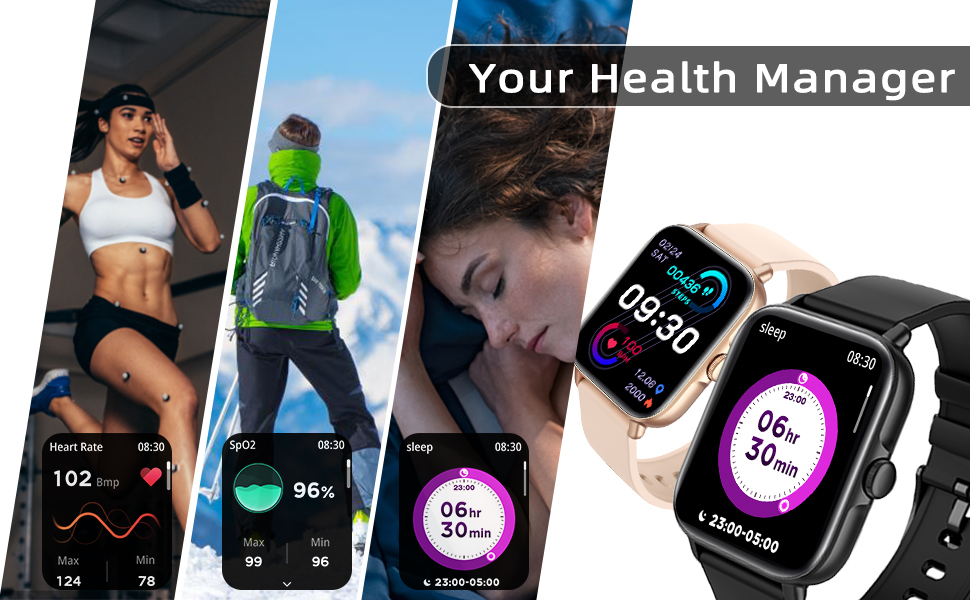
Figure 2: Smart Watch Connection Guide
This diagram illustrates the step-by-step process for connecting your DXPICR Smart Watch to your smartphone. It highlights downloading the app, enabling Bluetooth, and pairing the device for full functionality, including call answering and dialing.
3. Emparellament de dispositius (connexió Bluetooth)
After installing the app, pair your smartwatch with your phone via Bluetooth.
- Assegureu-vos que el Bluetooth estigui habilitat al vostre telèfon intel·ligent.
- Open the installed app and navigate to the "Add Device" or "Connect Device" section.
- The app will search for available devices. Select "DXPICR Smart Watch" or a similar device name (e.g., "Y20 GT") from the list.
- Follow any on-screen prompts to confirm the pairing on both your phone and the watch.
- For the Bluetooth call function, you may need to connect to a second Bluetooth device named "Y20 GT_Phone" in your phone's Bluetooth settings after the initial app connection. This enables call audio through the watch.
Instruccions de funcionament
1. Navegació bàsica
- Pantalla tàctil: Llisca esquerra/dreta, amunt/avall per navegar pels menús i les funcions. Toca per seleccionar.
- Botó lateral: Typically used to return to the home screen, wake/sleep the display, or access the main menu.
2. Bluetooth Call and Smart Notifications
The DXPICR Smart Watch allows you to make and receive calls directly from your wrist and receive notifications from your smartphone.
- Fer/Rebre trucades: Once the "Y20 GT_Phone" Bluetooth connection is established, you can dial numbers or answer incoming calls directly on the watch.
- Notificacions: The watch will vibrate and display notifications for incoming calls, messages (SMS), and app alerts (e.g., Facebook, WhatsApp, Twitter) from your connected phone. Ensure notification permissions are enabled in the app.

Figura 3: Funcionalitat de trucades Bluetooth
This image demonstrates the convenience of answering or dialing calls directly from your DXPICR Smart Watch, highlighting the watch's call interface and its integration with your phone's Bluetooth.

Figure 4: Smart Notifications Display
The DXPICR Smart Watch provides timely smart notifications, ensuring you stay updated with messages, calls, and app alerts directly on your wrist, as depicted by the various notification icons.
3. Monitorització de la salut
The watch is equipped with sensors to monitor various health metrics.
- Monitorització de la freqüència cardíaca: Access the heart rate function on the watch to measure your current heart rate. The app provides historical data and analysis.
- Monitorització d'oxigen en sang (SpO2): Measure your blood oxygen saturation levels. Ensure the watch is worn snugly on your wrist for accurate readings.
- Monitorització del son: The watch automatically tracks your sleep patterns, including awake time, light sleep, and deep sleep. View Anàlisi detallada del son a l'aplicació.

Figura 5: Monitorització de la freqüència cardíaca
The DXPICR Smart Watch continuously monitors your heart rate, providing real-time data and historical trends to help you understand your cardiovascular health during various activities and rest periods.

Figura 6: Monitorització del son
The watch tracks your sleep quality, differentiating between awake time, light sleep, and deep sleep, providing insights into your rest patterns for improved well-being.
4. Modes esportius i seguiment d'activitat
The watch supports 28 sports modes to track your workouts and daily activity.
- Select the desired sport mode (e.g., walking, running, cycling, swimming) before starting your activity.
- The watch will record data such as steps, calories burned, distance, and active hours in real-time.
- Review your fitness data analysis in the app to track progress and achieve exercise goals.

Figure 7: 28 Sports Modes and Activity Tracking
The DXPICR Smart Watch offers 28 dedicated sports modes to accurately track your physical activities, providing detailed metrics such as steps, calories, distance, and heart rate to help you monitor and improve your performance.
5. Altres funcions pràctiques
Your DXPICR Smart Watch includes several additional features for daily convenience:
- Assistent de veu AI: Interactua amb l'assistent de veu del teu telèfon directament des del rellotge.
- Entrenament de la respiració: Exercicis de respiració guiats per ajudar-te a relaxar-te.
- Control de música: Controla la reproducció de música al teu telèfon intel·ligent (reproduir, pausar, saltar pistes).
- Control de la càmera: Feu servir el rellotge com a disparador remot per a la càmera del telèfon.
- Cerca el telèfon: Locate your misplaced phone by triggering an alarm sound.
- Recordatoris de sedentarisme: Rep alertes per moure't si has estat inactiu durant massa temps.
- Despertador: Set alarms that vibrate on your wrist.
- Cronòmetre i temporitzador: Funcions bàsiques de cronometratge.
- Visualització del temps: View condicions meteorològiques actuals i previsions.
- Llanterna: A simple screen-based flashlight function.

Figure 8: Life Partner Features
This image highlights the DXPICR Smart Watch's practical features that enhance daily life, such as weather updates, blood oxygen tracking, music playback control, and alarm functionalities.
6. Personalitza la cara del rellotge
Personalize your watch by choosing from various watch faces available in the app, or upload your own photos.
Manteniment
1. Neteja del rellotge
- Wipe the watch screen and strap regularly with a soft, damp, drap sense pelusa.
- Eviteu utilitzar productes químics agressius, netejadors abrasius o dissolvents.
- Assegureu-vos que els contactes de càrrega estiguin nets i secs abans de carregar.
2. Millors pràctiques de cobrament
- Feu servir només el cable de càrrega magnètic proporcionat.
- Do not charge the watch in wet conditions.
- Avoid exposing the watch to extreme temperatures during charging.
3. Resistència a l'aigua
The DXPICR Smart Watch is designed to be waterproof, suitable for daily use like hand washing or light rain. However, it is not recommended for hot showers, saunas, or diving, as steam and hot water can compromise the seals.
Resolució de problemes
If you encounter issues with your DXPICR Smart Watch, refer to the following common problems and solutions:
1. Connectivity Issues (Frequent Disconnections)
- Assegureu-vos que el Bluetooth estigui activat: Verify Bluetooth is active on both your watch and smartphone.
- App Running in Background: Make sure the companion app is running in the background and not closed by your phone's system.
- Reemparella el dispositiu: If disconnections persist, try unpairing the watch from your phone's Bluetooth settings and then re-pairing it through the app.
- Configuració del telèfon: Check your phone's battery optimization settings; some phones may restrict background app activity, affecting connectivity.
2. Watch Not Charging
- Comprovació del cable i l'adaptador: Ensure the charging cable is securely connected to both the watch and the power adapter. Try a different USB port or power adapter.
- Contactes nets: Inspect the magnetic charging contacts on the watch and cable for dirt or debris. Clean gently with a dry cloth.
- Restart Watch: Sometimes a simple restart of the watch can resolve charging issues.
3. Notifications Not Appearing/Vibrating
- Permisos de l'aplicació: Verify that the companion app has all necessary notification permissions enabled in your phone's settings.
- App Notification Settings: Within the app, ensure that notifications for specific applications (e.g., SMS, social media) are turned on.
- Watch Do Not Disturb: Check if "Do Not Disturb" mode or a similar silent mode is active on your watch.
- Connexió Bluetooth: Ensure the watch is properly connected via Bluetooth to your phone.
4. Inaccurate Activity/Health Readings (Steps, Heart Rate, Sleep)
- Ajust adequat: Ensure the watch is worn snugly on your wrist, about one finger's width above the wrist bone. It should not be too loose or too tight.
- Movement for Steps: For step tracking, ensure natural arm swing. Excessive stillness or very slight movements may not be registered.
- Neteja del sensor: Keep the optical sensors on the back of the watch clean and free from sweat or dirt.
- Sincronització d'aplicacions: Regularly sync data with the app to get the most accurate and updated readings.
5. Bluetooth Audio Conflicts (Car/Earbuds)
- Selecció manual: When connecting to car Bluetooth or wireless earbuds, you may need to manually select the desired audio output device in your phone's Bluetooth settings. The watch's call audio connection ("Y20 GT_Phone") might take precedence.
- Disable Watch Call Audio: If you primarily use other devices for calls, you can disable the "Y20 GT_Phone" Bluetooth connection in your phone's settings to prevent conflicts, while keeping the main watch connection active for data sync and notifications.
Especificacions
| Característica | Especificació |
|---|---|
| Marca | DXPICR |
| Model | DXPICR Smart Watch |
| Sistema operatiu | Android and iOS (Compatible with iOS 8.0+/Android 4.4+ and Bluetooth 4.0+) |
| Mida de la pantalla | 1.7 polzades |
| Tipus de visualització | LCD digital |
| Connectivitat | Bluetooth |
| Tipus de bateria | Polímer de liti (inclòs) |
| Característiques especials | Bluetooth Call, Heart Rate Monitor, Sleep Monitor, Blood Oxymeter (SpO2), Music Player, Camera Control, Sedentary Reminder, Alarm Clock, Calorie Tracker, Time Display, Voice Call, Waterproof, Multisport Tracker (28 modes), Notifications, Activity Tracker, Breath Monitor |
| Dimensions del producte | 9.4 x 8.64 x 4.32 cm |
| Pes de l'article | 100 g |
Garantia i Suport
DXPICR provides a standard warranty for its products. For specific warranty terms and conditions, please refer to the warranty card included with your product or contact the seller directly.
If you require technical assistance, have questions about your device, or need to report an issue, please contact DXPICR customer support or the retailer from whom you purchased the product. Provide your model number and a detailed description of the issue for faster service.


