1. Introducció
This manual provides instructions for the proper use and care of your Docooler Portable USB Cassette Player. This device allows you to play audio cassettes and convert their content into digital MP3 files via a USB connection to a computer. Please read this manual thoroughly before operating the device to ensure optimal performance and longevity.
2. Producte acabatview
The Docooler Portable USB Cassette Player is a compact, handheld device designed for playing and digitizing audio cassettes. It features a transparent casing, allowing visibility of the internal mechanism.
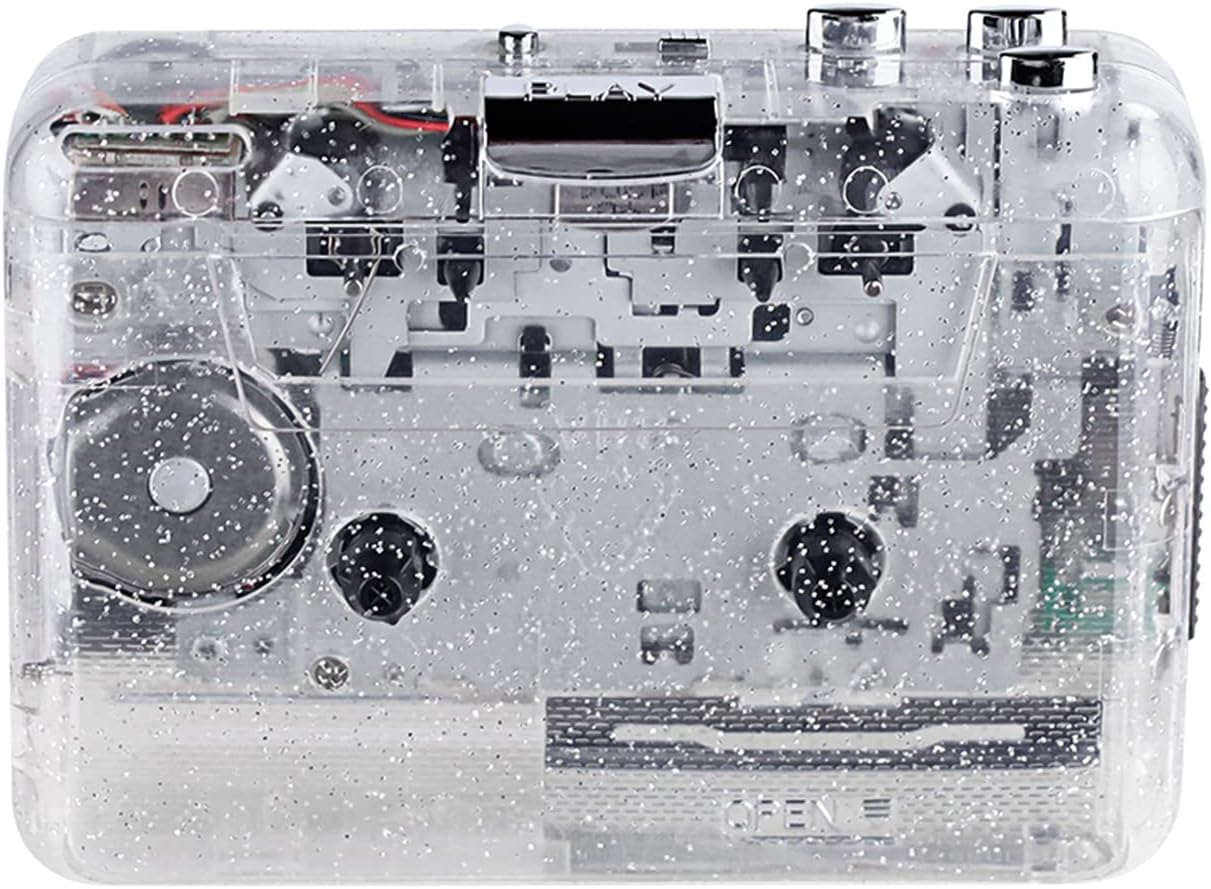
Figura 1: Frontal view of the Docooler Portable USB Cassette Player, showcasing el seu disseny transparent.

Figure 2: Various angles of the cassette player, including top, side, and open views.
Contingut del paquet:
- Docooler Portable USB Cassette Player
- Cable USB
- Manual d'usuari (aquest document)
- Headphones (may vary by package)
3. Configuració
3.1 Font d'alimentació
The cassette player can be powered by either batteries or a USB connection.
Instal·lació de la bateria:
- Localitzeu el compartiment de la bateria del dispositiu.
- Obriu la tapa del compartiment de la bateria.
- Introduïu 2 piles AA (no incloses), assegurant-vos de la polaritat correcta (+/-).
- Tanqueu bé la tapa del compartiment de la bateria.
Potència USB:
Connect the provided USB cable to the player's USB port and the other end to a powered USB port on your computer or a USB wall adapter. The device will draw power from the USB connection.
4. Instruccions de funcionament
4.1 Playing a Cassette Tape
- Obriu la tapa del compartiment del casset.
- Insert an audio cassette tape with the open edge facing upwards.
- Close the cassette compartment cover firmly.
- Connect headphones or external speakers to the 3.5mm audio output jack.
- Premeu el botó JUGAR botó per començar la reproducció.
- Utilitza el STOP botó per aturar la reproducció.
- Utilitza el FF (Avançament ràpid) i REW (rebobina) botons per navegar per la cinta.
- Adjust the volume using the volume control dial.
- The "DIR" button allows you to quickly flip the tape direction. The "play mode" button can be used to reverse playback once or an unlimited number of times.

Figure 3: The cassette player in use, demonstrating tape insertion and playback setup.

Figure 4: Users listening to audio through headphones connected to the cassette player.
4.2 Converting Tapes to MP3 Files
The Docooler Portable USB Cassette Player can convert your analog cassette audio into digital MP3 files. This process requires a computer and compatible audio recording software (not included).
- Ensure the cassette player is powered (via batteries or USB).
- Connect the cassette player to your computer using the provided USB cable.
- Install and open your preferred audio recording software on your computer. Software such as Audacity (free and open-source) is commonly used for this purpose.
- Configure your recording software to recognize the cassette player as an audio input device.
- Insert the cassette tape you wish to convert into the player.
- Start recording in your software, then press the JUGAR button on the cassette player.
- Monitor the recording process. Once the tape has finished playing, stop the recording in your software.
- Save the recorded audio as an MP3 file al teu ordinador.

Figure 5: Illustration of the process to convert cassette audio to MP3 files using the player and a computer.
5. Manteniment
5.1 Neteja del dispositiu
- Netegeu l'exterior del reproductor amb un drap suau i sec.
- Do not use liquid cleaners or abrasive materials, as they may damage the surface.
- Periodically clean the tape heads and pinch rollers using a cotton swab lightly dampEnriquit amb alcohol isopropílic per garantir una qualitat de so òptima i evitar danys a la cinta.
5.2 Emmagatzematge
- When not in use for extended periods, remove batteries to prevent leakage.
- Guardeu el reproductor en un lloc fresc i sec, allunyat de la llum solar directa i de temperatures extremes.
6. Solució De Problemes
| Problema | Causa possible | Solució |
|---|---|---|
| Sense poder | Dead batteries; USB cable not connected properly. | Replace batteries; ensure USB cable is securely connected. |
| Sense so | Headphones/speakers not connected; volume too low; dirty tape heads. | Connect audio output device; increase volume; clean tape heads. |
| Poor sound quality (hissing, muffled) | Dirty tape heads; worn-out tape; low battery. | Clean tape heads; try a different tape; replace batteries. |
| Tape not playing or moving | Tape jammed; mechanism issue; low battery. | Check tape for damage; replace batteries. |
| Cannot convert to MP3 | USB connection issue; software not configured correctly; no recording software. | Ensure USB is connected; check software settings; install compatible recording software. |
7. Especificacions
- Model: B0C69FDZF6
- Font d'alimentació: 2 x AA Batteries or USB 5V DC
- Interfície: USB 2.0
- Sortida d'àudio: Jack estèreo de 3.5 mm
- Dimensions: 7.2 x 5.91 x 1.54 polzades (aprox.)
- Pes: 9.6 unces (aprox.)
- Fabricant: Docooler
8. Informació de seguretat
- No exposeu el dispositiu a l'aigua ni a una humitat excessiva.
- Eviteu deixar caure o sotmetre el dispositiu a forts impactes.
- No intenteu desmuntar ni reparar el dispositiu vosaltres mateixos. Poseu-vos en contacte amb personal de servei qualificat.
- Mantenir fora de l'abast dels nens.
- Eliminar les bateries segons la normativa local.
9. Garantia i assistència
For warranty information or technical support, please refer to the documentation included with your purchase or contact Docooler customer service through their official website or the retailer where the product was purchased. Please have your model number (B0C69FDZF6) and purchase date available when contacting support.


