1. Introducció
The COMFAST CF-726B is a versatile 2-in-1 USB adapter designed to provide both Bluetooth 4.2 and dual-band Wi-Fi connectivity to your computer. This device allows you to connect to wireless networks at speeds up to 650Mbps and pair with various Bluetooth peripherals, enhancing your system's wireless capabilities.
This manual provides essential information for the proper setup, operation, and maintenance of your CF-726B adapter.
2. Característiques del producte
- Funcionalitat 2 en 1: Combines Wi-Fi and Bluetooth capabilities in a single USB device.
- Wi-Fi de doble banda: Supports 2.4GHz and 5.8GHz frequencies for flexible network connections.
- High Speed Data Transfer: Achieves Wi-Fi speeds up to 650Mbps.
- Bluetooth 4.2: Enables stable and efficient connection with Bluetooth devices.
- Disseny compacte: Small form factor for portability and discreet use.
- Àmplia compatibilitat: Supports Windows, macOS, and Linux operating systems.
3. Configuració i instal·lació
Before using your COMFAST CF-726B adapter, driver installation is required. The product is supplied with documentation and an installation CD. It is recommended to use the provided CD for driver installation or download the latest drivers from the official COMFAST weblloc.
3.1 Requisits del sistema
- Sistemes operatius: Windows 7/8/8.1/10 (32 or 64-bit), MacOS 10.6~10.11, Linux Kernel 2.6.18~3.10.
- Nota: The Bluetooth driver is no compatible with Windows XP/Vista.
- Interfície: Port USB 2.0 disponible.
3.2 Driver Installation Steps
- Insert the COMFAST CF-726B adapter into an available USB port on your computer.
- Insert the provided installation CD into your computer's CD/DVD drive.
- Follow the on-screen instructions to install the Wi-Fi and Bluetooth drivers. If an auto-run feature does not start, navigate to the CD drive in 'My Computer' or 'This PC' and run the setup executable (e.g., 'setup.exe' or 'install.exe').
- Alternatively, download the latest drivers from the official COMFAST support website. Ensure you select the correct model (CF-726B) and operating system.
- Després de la instal·lació, reinicieu l'ordinador si se us demana.

Figure 1: COMFAST CF-726B USB adapter. This image shows the compact blue casing of the adapter with its USB connector, ready for insertion into a computer's USB port.
4. Instruccions de funcionament
4.1 Connexió a una xarxa Wi-Fi
- Ensure the CF-726B adapter is securely plugged into a USB port.
- On Windows, click the Wi-Fi icon in the system tray (usually bottom-right corner). On macOS, click the Wi-Fi icon in the menu bar (top-right corner). For Linux, consult your distribution's network manager.
- Seleccioneu la xarxa Wi-Fi desitjada de la llista de xarxes disponibles.
- Introduïu la clau de seguretat de xarxa (contrasenya) si se us demana.
- Click 'Connect'. The adapter will establish a connection to the Wi-Fi network.
4.2 Connexió de dispositius Bluetooth
- Ensure the CF-726B adapter is securely plugged into a USB port.
- On Windows, go to 'Settings' > 'Devices' > 'Bluetooth & other devices'. On macOS, go to 'System Preferences' > 'Bluetooth'. For Linux, use your desktop environment's Bluetooth settings.
- Activa el Bluetooth a l'ordinador.
- Put your Bluetooth device (e.g., headphones, mouse, keyboard) into pairing mode. Refer to your device's manual for specific instructions.
- On your computer, click 'Add Bluetooth or other device' (Windows) or wait for the device to appear in the Bluetooth settings (macOS/Linux).
- Seleccioneu el dispositiu de la llista i seguiu les instruccions que apareixen a la pantalla per completar el procés d'emparellament.
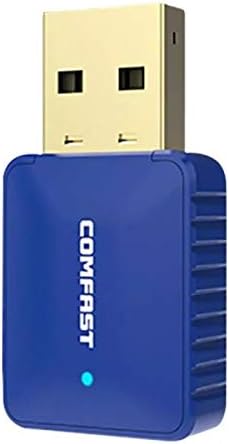
Figura 2: lateral view of the COMFAST CF-726B adapter. This image highlights the compact profile of the device, making it suitable for various USB ports.
5. Manteniment
The COMFAST CF-726B adapter is designed for durability. To ensure its longevity and optimal performance, consider the following maintenance tips:
- Mantenir net: Periodically clean the USB connector with a dry, lint-free cloth to remove dust or debris.
- Eviteu danys físics: Do not bend, drop, or expose the adapter to excessive force. Avoid pulling the adapter out by its casing; always grasp the USB connector firmly.
- Protegir dels líquids: Mantingueu l'adaptador allunyat de l'aigua i altres líquids.
- Emmagatzematge: Quan no l'utilitzeu, guardeu l'adaptador en un lloc fresc i sec, allunyat de la llum solar directa i de temperatures extremes.

Figura 3: frontal i lateral view of the COMFAST CF-726B adapter. This perspective shows the overall dimensions and the blue LED indicator light.
6. Solució De Problemes
If you encounter issues with your COMFAST CF-726B adapter, refer to the following common troubleshooting steps:
- Adaptador no detectat:
- Prova de connectar l'adaptador a un port USB diferent.
- Reinicieu l'ordinador.
- Ensure drivers are correctly installed. Reinstall drivers if necessary.
- Sense connexió Wi-Fi:
- Verify that your Wi-Fi network is active and broadcasting.
- Comproveu si heu introduït la contrasenya de Wi-Fi correcta.
- Ensure the Wi-Fi function is enabled on your computer.
- Prova de reiniciar el teu encaminador/mòdem.
- Bluetooth Not Working:
- Assegureu-vos que el Bluetooth estigui habilitat a la configuració de l'ordinador.
- Confirm your Bluetooth device is in pairing mode.
- Remember that the Bluetooth driver is no compatible with Windows XP/Vista.
- Remove and re-pair the Bluetooth device.
- Velocitat Wi-Fi lenta:
- Ensure you are connected to the optimal frequency band (5.8GHz generally offers faster speeds if your router supports it).
- Reduce interference by moving closer to your Wi-Fi router or away from other electronic devices.
- Check for updated drivers.

Figura 4: Explotat view of the COMFAST CF-726B adapter. This image illustrates the internal chip (RTL8821CU) responsible for its dual Wi-Fi and Bluetooth functionalities.
7. Especificacions
| Marca | CFMODES |
| Model | CF-726B |
| Component principal | RTL8821CU |
| Estàndards sense fil | IEEE802.11a/b/g/n/ac |
| Versió Bluetooth | 4.2 |
| Interfície | USB 2.0 |
| Bandes de freqüència | 2.4GHz / 5.8GHz (Dual Frequency) |
| Velocitat de dades màxima | 650 Mbps |
| Seguretat de dades | WPA-PSK/WPA2-PSK, WPA/WPA2, WEP |
| Dimensions | 36 mm x 19 mm x 9 mm |
| Color | Blau |
| Sistema operatiu compatible | Windows 7/8/8.1/10 (32/64-bit), MacOS 10.6~10.11, Linux Kernel 2.6.18~3.10 |
| Dispositius compatibles | Ordinador d'escriptori |
8. Garantia i Suport
8.1 Informació de la garantia
The COMFAST CF-726B adapter comes with a 12 mesos de garantia from the date of purchase. This warranty covers manufacturing defects and ensures the product functions as described under normal use. Please retain your proof of purchase for warranty claims.
8.2 Atenció al client
For technical assistance, driver updates, or further inquiries, please refer to the official COMFAST website or contact their customer support channels. The product is supplied with additional documentation that may contain specific support contact details.


