Introducció
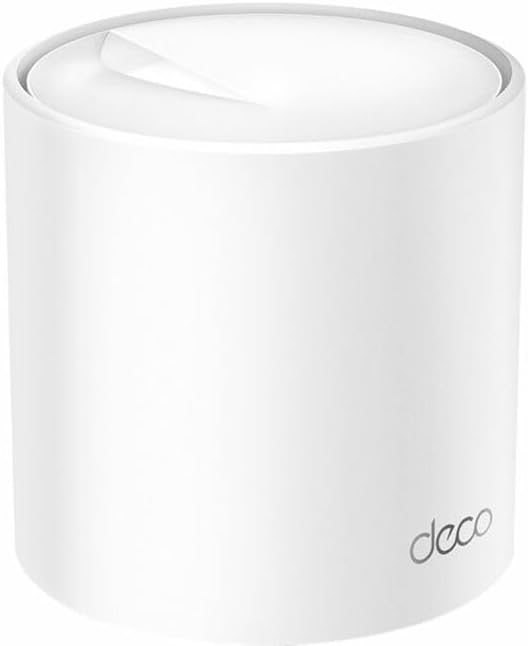
This manual provides detailed instructions for setting up, operating, maintaining, and troubleshooting your TP-Link Deco X50 Wi-Fi 6 Mesh Router. Please read this guide carefully to ensure optimal performance and a seamless whole-home Wi-Fi experience.
Contingut del paquet
Comproveu que el vostre paquet contingui els elements següents:
- TP-Link Deco X50 Unit(s)
- Adaptador(s) de corrent
- Cable Ethernet
- Guia d'instal·lació ràpida
Configuració
Follow these steps to set up your TP-Link Deco X50 Mesh Wi-Fi System:
- Descarrega l'aplicació Deco: Cerca 'TP-Link Deco' in the App Store or Google Play, or scan the QR code in the Quick Installation Guide.
- Prepara el teu mòdem: Power off your modem and remove its backup battery if it has one.
- Connecteu la primera unitat Deco: Connect one end of the Ethernet cable to your modem's LAN port and the other end to any Ethernet port on your Deco unit.
- Encès: Engegueu el mòdem i, a continuació, la unitat Deco. Espereu que el LED de la unitat Deco parpellegi en blau.
- Configuració mitjançant l'aplicació: Open the Deco app, log in or sign up for a TP-Link ID, and follow the on-screen instructions to set up your Deco network.
- Add More Deco Units: If you have multiple Deco units, place them in desired locations and add them to your network using the Deco app.
Operating Your Deco X50 System
The Deco X50 system creates a unified Wi-Fi network for your entire home, ensuring seamless roaming and strong signal coverage.
Característiques principals:
- AX3000 Dual-Band Wi-Fi: Provides speeds up to 2402 Mbps on the 5 GHz band and 574 Mbps on the 2.4 GHz band, supporting Wi-Fi 6 (802.11ax) for faster and more efficient connections.
- Mesh Technology: Automatically connects your devices to the fastest Deco unit as you move around your home, ensuring uninterrupted streaming and browsing.
- PoE compatible: Power over Ethernet (PoE) simplifies network deployment by allowing power and data to be transmitted over a single Ethernet cable.
- Deco App Control: Manage your network, set up parental controls, prioritize devices, and monitor network activity directly from the intuitive Deco app.
- Múltiples opcions d'instal·lació: The Deco X50 can be placed on a tabletop or installed on a ceiling or wall using adaptive accessories (sold separately).
Manteniment
To ensure the longevity and optimal performance of your Deco X50 system, consider the following maintenance tips:
- Actualitzacions de firmware: Comproveu i instal·leu regularment si hi ha actualitzacions de firmware a través de l'aplicació Deco. Les actualitzacions sovint inclouen millores de rendiment, pegats de seguretat i noves funcions.
- Col·locació òptima: Ensure Deco units are placed in open areas, away from large metal objects, thick walls, and interference sources like microwaves or cordless phones.
- Neteja: Gently clean the exterior of the Deco units with a soft, dry cloth. Avoid using liquid cleaners or abrasive materials.
- Reiniciant: Periodically restarting your Deco units and modem can help resolve minor network issues and improve performance.
Resolució de problemes
If you encounter issues with your Deco X50 system, try the following solutions:
- Sense connexió a Internet:
- Comproveu si el vostre mòdem funciona correctament.
- Assegureu-vos que tots els cables Ethernet estiguin connectats correctament.
- Reinicieu el mòdem i la unitat Deco principal.
- Velocitat Wi-Fi lenta:
- Verify the placement of your Deco units for optimal coverage.
- Check for any background downloads or bandwidth-intensive applications.
- Use the Deco app to run a network optimization test.
- El LED de la unitat Deco és vermell: A solid red LED indicates a problem with the internet connection. Refer to the 'No Internet Connection' steps above.
- Cannot Connect to Deco Wi-Fi:
- Ensure you are selecting the correct Wi-Fi network name (SSID) and entering the correct password.
- Try restarting the Deco unit.
Per obtenir més ajuda, visiteu el servei d'assistència oficial de TP-Link. weblloc o poseu-vos en contacte amb el seu servei d'atenció al client.
Especificacions
| Característica | Detall |
|---|---|
| Marca | TP-Link |
| Nom del model | Sistema Wi-Fi 5000 de malla per a tota la casa AX6 |
| Dimensions del producte | 4.49 x 4.33 x 4.49 polzades |
| ASIN | B0C6C5SPZN |
| Característica especial | WPS |
| Classe de banda de freqüència | Doble banda |
| Comunicació sense fils estàndard | 802.11g (compatible with a/b/g/n/ac/ax) |
| Dispositius compatibles | Tauleta (i altres dispositius amb Wi-Fi) |
| Usos recomanats per al producte | Casa |
| Tecnologia de connectivitat | Ethernet, Wi-Fi |
| Color | Blanc |
| Tipus d'antena | Interna |
Garantia i Suport
TP-Link products come with a limited warranty. For detailed warranty information, technical support, and product registration, please visit the official TP-Link weblloc a www.tp-link.com/support.
Avís legal: This product may contain chemicals known to the State of California to cause cancer and birth defects or other reproductive harm, as per Proposition 65.


