1. Introducció
This manual provides instructions for the installation, configuration, and operation of the Grandstream GWN7802 16-Port Gigabit Ethernet Layer 2+ Managed Network Switch. Please read this manual thoroughly before attempting to install or operate the device.
2. Producte acabatview
The Grandstream GWN7802 is a Layer 2+ managed network switch designed for small to medium-sized businesses. It features 16 Gigabit Ethernet ports and 4 SFP ports, providing high-performance connectivity and advanced management capabilities for robust network infrastructure.
2.1 Característiques clau
- 16 Gigabit Ethernet ports for high-speed wired connections.
- 4 SFP ports for fiber optic uplinks.
- Layer 2+ management features including VLAN, QoS, IGMP Snooping.
- Metall robust casing per a la durabilitat.
- Easy management via web user interface or console port.
3. Maquinari acabatview
Familiarize yourself with the physical components of the GWN7802 switch.
3.1 Tauler frontal
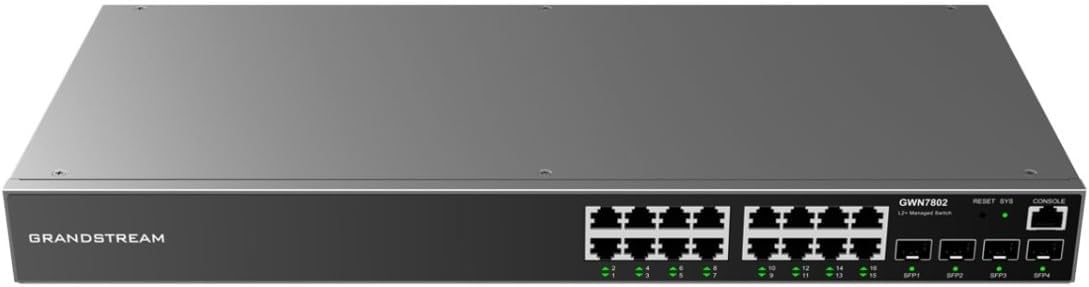
Figura 1: Davant view of the Grandstream GWN7802 switch. This image displays the 16 Gigabit Ethernet ports, 4 SFP ports, RESET button, SYS LED indicator, and CONSOLE port.
- Ports Ethernet (1-16): Ports RJ45 per connectar dispositius de xarxa.
- SFP Ports (SFP1-SFP4): Slots for SFP transceivers to establish fiber optic connections.
- Botó de reset: Used to reset the device to factory defaults (press and hold for 10 seconds).
- LED SYS: Indicador d'estat del sistema.
- Port de la CONSOLA: Port RJ45 per a accés a la interfície de línia d'ordres (CLI).
3.2 Panell posterior

Figura 2: posterior view of the Grandstream GWN7802 switch. This image highlights the AC power input connector and the grounding screw.
- Entrada d'alimentació de CA: Connector for the power cord (100-240V AC, 50/60Hz).
- Cargol de presa de terra: For connecting a grounding wire (recommended for safety).
4. Configuració i instal·lació
4.1 Contingut del paquet
Verifiqueu que els elements següents estiguin inclosos al vostre paquet:
- Grandstream GWN7802 Network Switch
- Cable d'alimentació
- Suports de muntatge en bastidor (si escau)
- Guia d'instal·lació ràpida
If any items are missing or damaged, please contact your vendor for assistance.
4.2 Muntatge de l'interruptor
The GWN7802 can be placed on a desktop or mounted in a standard 19-inch equipment rack.
4.2.1 Col·locació de l'escriptori
Col·loca l'interruptor sobre una superfície plana i estable. Assegura't que hi hagi una ventilació adequada al voltant del dispositiu per evitar el sobreescalfament.
4.2.2 Muntatge en bastidor (opcional)
If rack-mounting, attach the provided rack-mount brackets to the sides of the switch using the included screws. Secure the switch into a standard 19-inch equipment rack.
4.3 Connexió de potència
- Connect one end of the power cord to the AC power input on the rear panel of the switch.
- Connecteu l'altre extrem del cable d'alimentació a una presa de corrent amb connexió a terra.
- Assegureu-vos que la font d'alimentació estigui dins del volum especificattagrang e (100-240 V AC).
- The SYS LED on the front panel will illuminate when power is supplied.
4.4 Connexió de cables de xarxa
- Connect Ethernet cables from your network devices (computers, servers, other switches) to the RJ45 Ethernet ports (1-16) on the front panel.
- For fiber optic connections, insert compatible SFP transceivers into the SFP ports (SFP1-SFP4) and connect fiber optic cables.
- Verify that the link/activity LEDs for the connected ports are illuminated, indicating a successful connection.
5. Funcionament de l'interruptor
5.1 Indicadors LED
Els LED del panell frontal proporcionen informació d'estat:
- LED SYS:
- Verd sòlid: El dispositiu funciona amb normalitat.
- Verd intermitent: Device is booting up or performing an operation.
- Apagat: El dispositiu està apagat.
- Port LEDs (Ethernet/SFP):
- Verd sòlid: Enllaç establert.
- Verd intermitent: Activitat de dades.
- Apagat: Sense enllaç.
5.2 Accés a la configuració inicial
The GWN7802 can be managed via a webinterfície gràfica d'usuari (GUI) basada en o una interfície de línia d'ordres (CLI) a través del port de consola.
5.2.1 Web Accés a la GUI
- Connect a computer to any Ethernet port of the GWN7802.
- Ensure your computer's IP address is in the same subnet as the switch's default IP address (refer to the Quick Installation Guide or manufacturer's documentation for the default IP).
- Obre a web navegador i introduïu l'adreça IP del commutador.
- Enter the default username and password (typically "admin" for both, but verify with documentation).
- Follow the on-screen prompts to configure your network settings.
5.2.2 Console Port Access
For advanced configuration, connect a console cable (RJ45 to DB9) from the switch's CONSOLE port to your computer's serial port. Use a terminal emulation program (e.g., PuTTY, Tera Term) with the following settings:
- Velocitat de transmissió: 115200
- Bits de dades: 8
- Paritat: cap
- Bits d'aturada: 1
- Control de flux: cap
6. Manteniment
6.1 actualitzacions de microprogramari
Regularly check the Grandstream website for the latest firmware versions. Firmware updates can provide new features, performance improvements, and security enhancements. Follow the instructions provided with the firmware package for the update process.
6.2 Neteja
To maintain optimal performance, keep the switch clean. Use a soft, dry cloth to wipe the exterior. Do not use liquid or aerosol cleaners. Ensure ventilation openings are free from dust and obstructions.
6.3 Consideracions ambientals
Operate the switch within its specified environmental limits (temperature, humidity). Avoid exposing the device to direct sunlight, excessive heat, or moisture.
7. Solució De Problemes
7.1 Sense poder
- Assegureu-vos que el cable d'alimentació estigui connectat correctament tant a l'interruptor com a la presa de corrent.
- Verify the electrical outlet is functional.
- Comproveu el cable d'alimentació per si hi ha danys.
7.2 Sense enllaç al port
- Verify the Ethernet or fiber optic cable is properly connected at both ends.
- Comproveu el cable per si hi ha danys.
- Assegureu-vos que el dispositiu connectat estigui encès i funcioni correctament.
- Prova de connectar-te a un port diferent del commutador.
7.3 No es pot accedir Web GUI
- Ensure your computer's IP address is in the same subnet as the switch.
- Verify the switch's IP address is correct.
- Esborra la memòria cau del navegador o prova un altre navegador.
- Desactiveu temporalment qualsevol programari de tallafocs de l'ordinador.
- If the IP address is unknown or forgotten, consider using the console port for access or performing a factory reset (see 7.4).
7.4 Restabliment de fàbrica
If you encounter persistent issues or forget the management credentials, you can reset the switch to its factory default settings. Warning: This will erase all custom configurations.
- With the switch powered on, locate the RESET button on the front panel.
- Using a paperclip or a similar pointed object, press and hold the RESET button for approximately 10 seconds.
- Release the button when the SYS LED starts flashing rapidly.
- El commutador es reiniciarà amb la configuració predeterminada de fàbrica.
8. Especificacions
Detailed technical specifications for the Grandstream GWN7802 switch.
| Característica | Valor |
|---|---|
| Marca | Grandstream |
| Nom del model | GWN7802 |
| Número de model intern | IN-TISA-NSWSAR0377 |
| Ports | 16x Gigabit Ethernet, 4x SFP |
| Velocitat de transferència de dades | 16 gigabits per segon |
| Material de la caixa | Metall |
| Dimensions del producte (L x A x A) | 19.69 x 19.69 x 11.02 polzades |
| Pes de l'article | 7.13 lliures |
| Entrada de potència | 100-240V AC, 50/60Hz |
| Dispositius compatibles | Desktop, Servers, Network Devices |
9. Informació de seguretat
- No exposeu el dispositiu a l'aigua ni a la humitat.
- No obriu ni intenteu reparar el dispositiu. Envieu totes les tasques de manteniment a personal qualificat.
- Assegureu-vos una correcta connexió a terra per a la seguretat elèctrica.
- Utilitzeu només l'adaptador d'alimentació subministrat amb el dispositiu.
- Mantingueu el dispositiu lluny de fonts de calor i de la llum solar directa.
- Assegureu-vos una ventilació adequada per evitar el sobreescalfament.
10. Garantia i Suport
For warranty information and technical support, please refer to the official Grandstream website or contact your authorized Grandstream reseller. Keep your purchase receipt for warranty claims.
Grandstream Official Weblloc: www.grandstream.com


