Introducció
This manual provides detailed instructions for the safe and effective use of your Dylanto Kids Instant Print Camera, Model BLL2. Please read this manual thoroughly before operating the device and retain it for future reference.
Producte acabatview
The Dylanto Kids Instant Print Camera is designed for children aged 3-12, offering both digital photography and instant black-and-white printing capabilities. It features a 2.4-inch screen, 1080P video recording, 16x digital zoom, and various creative functions.

Figure 1: Dylanto Kids Instant Print Camera and included accessories.
Contingut del paquet:
- Dylanto Kids Instant Print Camera (Model BLL2)
- 3 Rolls of Thermal Printing Paper
- Targeta de memòria de 32 GB
- Corda
- Cable USB-Type C
- Manual d'usuari (aquest document)
Informació de seguretat
- Ensure the camera is fully charged before first use and after each use to prolong battery life.
- The thermal printing paper is BPA-free.
- Do not expose the camera to extreme temperatures or moisture.
- Supervise young children during use to prevent accidental damage or misuse.
- Keep small parts, such as the memory card, out of reach of very young children to prevent choking hazards.
Configuració
1. Càrrega de la càmera
Before initial use, fully charge the camera. Connect the provided USB Type-C cable to the camera's charging port and the other end to a compatible USB power adapter (not included) or computer USB port. The charging indicator will show the charging status.
The camera has a 2000 mAh battery capacity, providing approximately 3-4 hours of continuous use after a full charge.
2. Installing the Memory Card
Locate the memory card slot on the camera. Insert the provided 32GB memory card into the slot until it clicks into place. Ensure the card is inserted in the correct orientation.
3. Loading Printing Paper
The camera uses thermal printing paper. Follow these steps to load a new roll:
- Gently push up the part with the lens to open the paper slot.
- Insert a roll of thermal printing paper into the slot. Ensure the paper feeds from the bottom of the roll and the end of the paper is facing upwards, ready to be pulled out.
- Close the two parts of the camera until they click securely.
- To avoid blank prints, pull the paper out by approximately 1 inch before the first print.

Figure 2: Steps for loading thermal printing paper.

Figure 3: Detailed instructions for paper installation, including a tip for blank prints.
Instruccions de funcionament
Encès/Apagat
Premeu i manteniu premut el botó d'engegada per encendre o apagar la càmera.
Navegació i menú
Use the directional buttons and the OK/Shutter button to navigate through the camera's menu and select options on the 2.4-inch IPS screen.

Figure 4: Camera interface showing main functions.
Fer Fotos
In photo mode, frame your shot using the screen. Press the shutter button to capture a photo. The camera supports 16x digital zoom.
The camera can capture color photos digitally and simultaneously print black-and-white thermal photos.
Modes d'impressió:
The camera offers three printing modes for thermal prints: Low, Middle, and High, which likely refer to print density or quality.

Figure 5: Available printing modes.
Gravació de vídeos
Switch to video mode. Press the shutter button to start recording 1080P video. Press it again to stop recording.

Figure 6: Video recording capabilities and storage.
Video 1: Demonstration of the camera's instant print and video recording features. This video highlights the camera's ability to capture moments and print them instantly.
Característiques especials
- Fotografia de lapse de temps: Set intervals for automatic photo capture (e.g., 2s, 5s, 10s).
- Tret continu: Captura diverses fotos en una successió ràpida.
- Jocs: The camera includes built-in puzzle games for entertainment.
- Filter Frames & Stickers: Apply various frames and stickers to photos before printing or saving.
- Reproductor mp3: The camera supports MP3 playback.
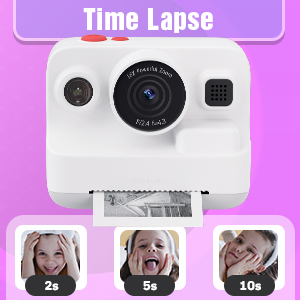
Figure 7: Time-lapse settings.

Figure 8: Built-in games and DIY photo features.

Figure 9: Creative frame and sticker options.
Manteniment
- Neteja: Feu servir un drap suau i sec per netejar el cos i la pantalla de la càmera. No utilitzeu netejadors líquids ni materials abrasius.
- Emmagatzematge: Guardeu la càmera en un lloc fresc i sec, allunyat de la llum solar directa quan no la feu servir.
- Cura de la bateria: Fully charge the camera regularly, even if not in frequent use, to maintain battery health.
- Emmagatzematge de paper: Store thermal paper rolls in a cool, dark place to prevent premature fading or damage.
Resolució de problemes
| Problema | Causa possible | Solució |
|---|---|---|
| La càmera no s'encén. | Bateria baixa. | Charge the camera fully using the provided USB Type-C cable. |
| Printed photos are blank. | Thermal paper installed incorrectly (wrong side up). | Open the paper slot, rotate the paper roll 180 degrees, and re-install it correctly. Ensure the paper feeds from the bottom of the roll and the end is facing upwards. |
| Poca qualitat d'impressió. | Low battery; paper quality; print mode setting. | Ensure camera is fully charged. Use recommended thermal paper. Check print mode settings (Low, Middle, High) and adjust to High for better quality. |
| No es poden desar fotos/vídeos. | Memory card full or not inserted correctly. | Check if the 32GB memory card is properly inserted. Delete unnecessary files to free up space or replace the card if full. |
| La càmera es bloqueja o no respon. | Error de programari. | Press and hold the power button for 10-15 seconds to force a restart. If the issue persists, contact customer support. |
Especificacions
| Característica | Detall |
|---|---|
| Nom del model | BLL2 |
| Pantalla de visualització | 2.4-inch IPS Color Screen |
| Resolució fotogràfica | Up to 12 MP Effective Still Resolution |
| Resolució de vídeo | 1080P (AVI format) |
| Zoom òptic | Zoom digital de 16x |
| Estabilització d'imatge | Digital |
| Tecnologia del sensor fotogràfic | CMOS (1/4-inch sensor size) |
| Admet File Format | JPEG (photos) |
| Capacitat de la bateria | 2000 mAh d'ions de liti |
| Durada de la bateria | Approx. 3-4 hours continuous use |
| Interfície de càrrega | USB tipus C |
| Emmagatzematge de memòria | 32 GB (inclòs) |
| Connectivitat | USB, Wi-Fi |
| Flash | Built-In, Automatic |
| Tir continu | 30 fps |
| Franja d'edat | Kid (3-12 years old recommended) |
| Dimensions (aprox.) | 3.9 polzades (amplada) x 3.1 polzades (alçada) |

Figure 10: Camera dimensions and included accessories.
Informació de la garantia
The Dylanto Kids Instant Print Camera comes with a 6 mesos de garantia des de la data de compra. Aquesta garantia cobreix els defectes de fabricació i els mals funcionaments en condicions d'ús normal. No cobreix els danys causats per un mal ús, accidents, reparacions no autoritzades o desgast normal.
Conserveu el vostre comprovant de compra per a reclamacions de garantia.
Atenció al client
For any questions, technical assistance, or warranty claims, please contact Dylanto customer support through the retailer where you purchased the product or visit the official Dylanto brand store on Amazon:


