1. Introducció
This manual provides essential information for the safe and efficient use of your Xiaomi TV Q2 65 Inch Ultra HD 4K QLED television. Please read this manual thoroughly before operating the device and retain it for future reference. The Xiaomi TV Q2 features a 65-inch QLED display, 4K resolution, Google TV operating system, Dolby Vision IQ, and Dolby Atmos audio technology.
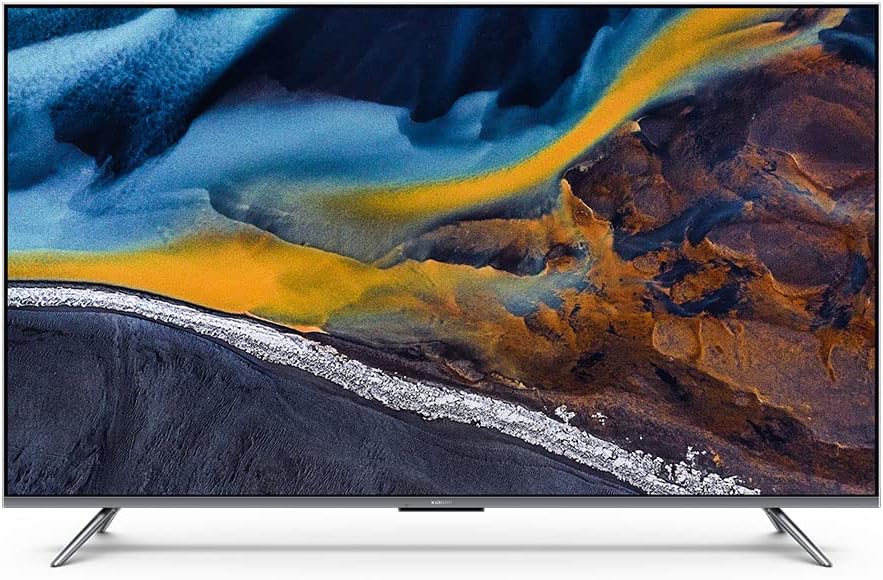
Figura 1: Frontal view of the Xiaomi TV Q2 65 Inch television.
2. Informació de seguretat
Observe the following safety precautions to prevent damage to the TV and ensure user safety:
- Col·locació: Position the TV on a stable, level surface or mount it securely to a wall. Ensure adequate ventilation around the TV to prevent overheating. Do not block ventilation openings.
- Potència: Use only the provided power cord. Connect the power cord to a grounded outlet. Do not overload power outlets. Disconnect the power cord during lightning storms or when unused for extended periods.
- Aigua i humitat: Do not expose the TV to rain or moisture. Do not place objects filled with liquids, such as vases, on or near the TV.
- Neteja: Unplug the TV before cleaning. Use a soft, dry cloth to clean the screen and exterior. Do not use liquid cleaners or aerosol sprays directly on the TV.
- Manteniment: No intenteu fer la reparació del televisor vosaltres mateixos. Envieu totes les tasques de manteniment a personal de servei qualificat.
3. Contingut del paquet
Verifiqueu que tots els components siguin presents al paquet:
- Xiaomi TV Q2 65 Inch Unit
- Control remot (Bluetooth)
- Moble per a TV (2 peces)
- Cable d'alimentació
- Cargols per a la instal·lació del suport
- Manual d'usuari (aquest document)
4. Configuració
4.1 Desembalatge
- Carefully remove the TV from its packaging. It is recommended to have two people for this process due to the size and weight of the unit.
- Place the TV screen-down on a soft, flat surface (e.g., a blanket or foam) to protect the screen during stand installation.
4.2 Instal·lació de l'estand
To attach the included stand:
- Identifica les peces esquerra i dreta del suport.
- Alineeu cada peça del suport amb les ranures corresponents de la part inferior del televisor.
- Fixeu cada peça del suport amb els cargols proporcionats. Assegureu-vos que estiguin ben ajustats.

Figura 2: Angle view of the TV, illustrating the stand attachment points.
4.3 Muntatge a la paret (opcional)
The Xiaomi TV Q2 is compatible with VESA wall mounts. Consult a professional for wall mounting installation to ensure safety and proper alignment. Refer to the wall mount manufacturer's instructions for specific details.
4.4 Connexió de perifèrics
Locate the input ports on the side or rear of the TV. Connect your devices as follows:
- Dispositius HDMI: Connect gaming consoles, Blu-ray players, or set-top boxes to the HDMI ports.
- Dispositius USB: Connect USB drives for media playback or external storage to the USB ports.
- Potència: Connecteu el cable d'alimentació a l'entrada d'alimentació del televisor i després a una presa de corrent.

Figura 3: Pro lateralfile of the TV, highlighting the connectivity ports.

Figure 4: Opposite side profile of the TV, emphasizing its thinness.
4.5 Engegada inicial i assistent de configuració
- Premeu el botó d'engegada del comandament a distància o del televisor.
- Follow the on-screen instructions to complete the initial setup, including language selection, network connection (Wi-Fi), Google account login, and channel scanning.
5. Funcionament del televisor
5.1 Control remot
The Xiaomi TV Q2 comes with a 360° Bluetooth remote control. Ensure the remote is paired with the TV for full functionality. Refer to the on-screen guide during initial setup for pairing instructions.
5.2 Interfície de Google TV
Navigate the Google TV interface using the directional pad and select button on your remote. The home screen provides access to installed apps, recommended content, and settings.
5.3 Configuració de la imatge
Access the picture settings menu to adjust:
- Mode d'imatge: Select from various presets (e.g., Standard, Vivid, Movie, Game).
- Brillantor/Contrast: Ajusta la luminància general i la diferència entre les zones clares i fosques.
- Color/Tint: Fine-tune color saturation and hue.
- Configuració avançada: Explore options like local dimming, motion smoothing, and color temperature.
The QLED display technology provides vibrant colors and high contrast. Dolby Vision IQ dynamically adjusts picture settings based on ambient light and content.
5.4 Configuració de so
Access the sound settings menu to adjust:
- Mode de so: Choose from presets like Standard, Music, Movie, Voice.
- Equalitzador: Manually adjust audio frequencies.
- Dolby Atmos: Enable or disable Dolby Atmos for immersive audio experiences.
5.5 Control de veu
Utilize the built-in voice control feature by pressing the dedicated microphone button on your remote and speaking commands. This allows for hands-free control of the TV, app launching, and content search.
5.6 Connectivitat
The TV supports Bluetooth for connecting wireless accessories and Wi-Fi for internet access. Supported internet services include Netflix, YouTube, Amazon Prime Video, and Disney+.
6. Manteniment
6.1 Neteja
- Pantalla: Netegeu suaument la pantalla amb un drap suau i sense borrissol. Per a marques difícils, netegeu suaument.ampen the cloth with water or a screen-specific cleaning solution (do not spray directly).
- Marc i suport: Use a soft, dry cloth to wipe dust from the aluminum-alloy frame and stand.
6.2 Actualitzacions de programari
The TV may receive periodic software updates to improve performance and add new features. To check for updates, navigate to the settings menu, then select System > About > System update. Ensure your TV is connected to the internet for updates.
7. Solució De Problemes
If you encounter issues with your Xiaomi TV Q2, refer to the following common problems and solutions:
| Problema | Possible solució |
|---|---|
| Sense poder | Ensure the power cord is securely connected to both the TV and a working power outlet. Try a different outlet. |
| No hi ha imatge, però hi ha so | Comproveu la font d'entrada. Assegureu-vos que els dispositius externs estiguin encesos i connectats correctament. |
| No hi ha so, però hi ha imatge | Check the volume level and mute status. Verify audio output settings. Ensure external audio devices are connected and functioning. |
| El comandament a distància no respon | Replace the batteries. Re-pair the Bluetooth remote control (refer to initial setup instructions). |
| Operating system is slow or unresponsive | Restart the TV by unplugging it from the power outlet for 30 seconds and plugging it back in. Close unused applications. Check for system updates. |
| Problemes de connexió Wi-Fi | Reinicieu el router i el mòdem. Assegureu-vos que el televisor estigui dins de l'abast de la vostra xarxa Wi-Fi. Torneu a introduir la contrasenya del Wi-Fi. |
8. Especificacions
Key technical specifications for the Xiaomi TV Q2 65 Inch:
| Característica | Detall |
|---|---|
| Marca | XIAOMI |
| Model | Q2 65 Inch |
| Mida de la pantalla | 65 polzades (166 cm diagonal visible) |
| Tecnologia de visualització | QLED |
| Resolució | 4K (Ultra HD) |
| Freqüència d'actualització | 60 Hz |
| Sistema operatiu | Google TV |
| Tecnologia d'àudio | Dolby Atmos |
| Tecnologia de vídeo | QI de Dolby Vision |
| Tecnologia de connectivitat | Bluetooth, WiFi |
| Relació d'aspecte | 16:9 |
| Dimensions del producte (amb suport) | 8 x 8.7 x 84.3 cm (aproximadament, segons les dades del producte) |
| Pes | 18.6 kg (aproximadament) |
| Components inclosos | Remote Control, Stand, TV |
9. Garantia i Suport
Your Xiaomi TV Q2 65 Inch is covered by a limited warranty. Please refer to the warranty card included with your product for specific terms and conditions, including the warranty period and coverage details. For technical support, service inquiries, or to report issues, please contact Xiaomi customer service through their official weblloc web o la informació de contacte que es proporciona a la documentació de la garantia.


