1. Introducció
Gràcies per la compraasing the CANYON BSP-8 Bluetooth Speaker. This manual provides essential information for the safe and efficient use of your device. Please read it thoroughly before operation and retain it for future reference.
Característiques principals:
- 10W Audio Output: Ofereix un so clar i potent.
- Bluetooth 5.2: For stable and energy-efficient wireless connection up to 10 meters.
- Retroil·luminació RGB: Integrated lighting for enhanced ambiance.
- True Wireless Stereo (TWS): Connect two BSP-8 speakers for a full stereo sound experience.
- Múltiples opcions de reproducció: Supports Bluetooth, AUX, USB, and MicroSD card inputs.
- Disseny portàtil: Compact size with a convenient hanger for easy transport.
- Llarga vida útil de la bateria: Fins a 3 hores de joc amb una sola càrrega.
2. Informació de seguretat
- No exposeu l'altaveu a temperatures extremes, llum solar directa ni humitat elevada.
- Eviteu deixar caure o sotmetre l'altaveu a forts impactes.
- Do not disassemble or attempt to repair the speaker yourself. Contact qualified service personnel.
- Mantingueu l'altaveu allunyat de l'aigua i altres líquids. No és impermeable.
- Feu servir només el cable de càrrega proporcionat o un cable de tipus C certificat per carregar.
- Desfeu-vos de la bateria i l'altaveu d'acord amb la normativa local.
3. Contingut del paquet
- CANYON BSP-8 Bluetooth Speaker
- Cable de càrrega USB tipus C
- Manual d'usuari
4. Producte acabatview
Familiaritzeu-vos amb els components i els controls de l'altaveu.
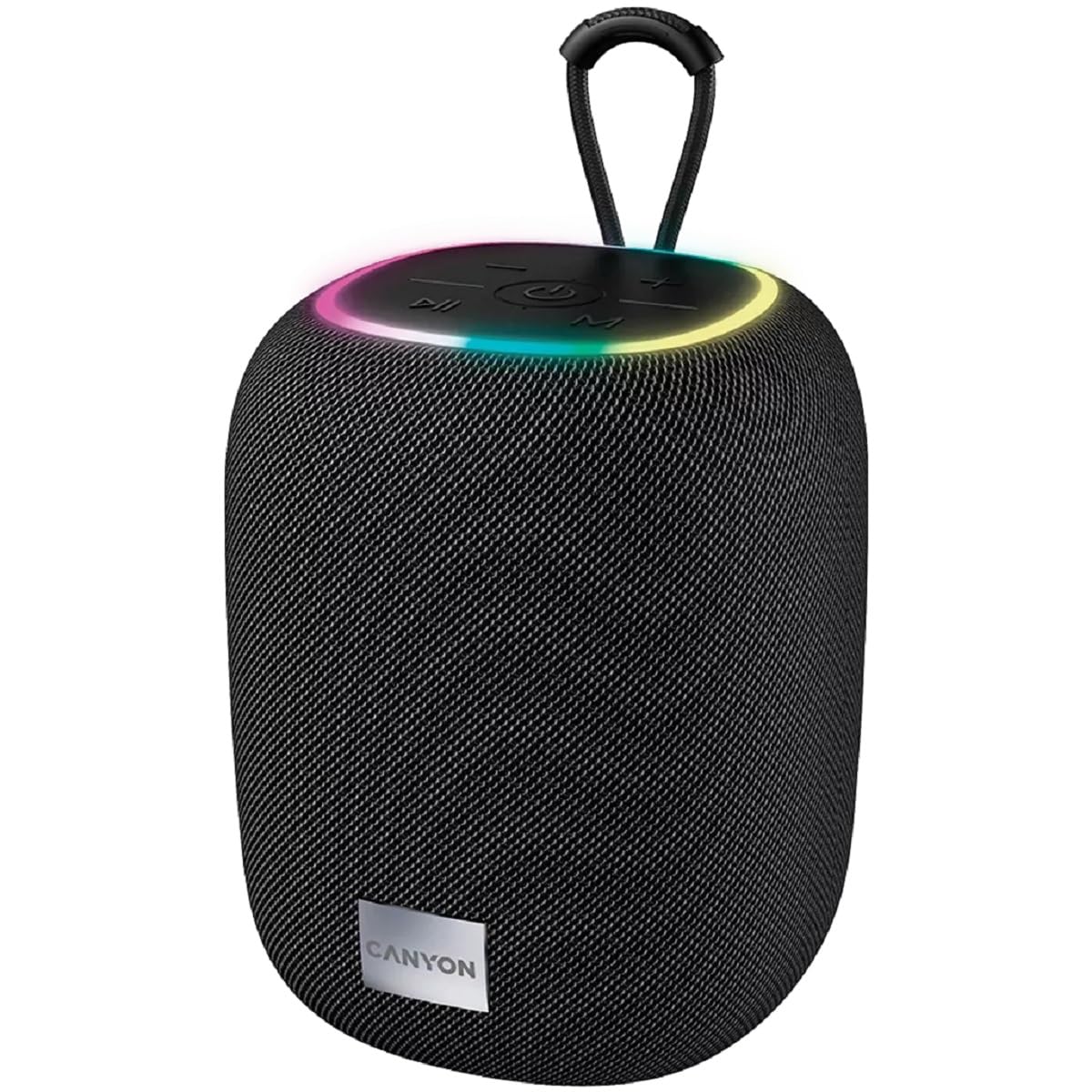
Imatge 1: Part superior view of the CANYON BSP-8 speaker, showing the control buttons, RGB backlight, and integrated hanger.
Botons de control (panell superior):
- Botó d'encesa: Premeu i manteniu premut per encendre/apagar. Premeu curt per reproduir/pausar.
- Botó per baixar el volum / pista anterior: Prem curt per baixar el volum. Prem llarg per anar a la pista anterior.
- Botó Pujar volum / Pista següent: Prem curt per pujar el volum. Prem llarg per passar a la següent pista.
- Botó de mode (M): Short press to switch between Bluetooth, AUX, USB, and MicroSD modes.

Imatge 2: posterior view of the CANYON BSP-8 speaker, illustrating the various input ports including AUX, USB, TF (MicroSD) card slot, and DC5V Type-C charging port.
Input Ports (Rear Panel):
- Port AUX: Per connectar dispositius d'àudio externs mitjançant un cable d'àudio de 3.5 mm.
- Port USB: Per reproduir àudio des d'una unitat flash USB.
- Ranura per a targetes TF (MicroSD): Per reproduir àudio des d'una targeta MicroSD.
- Port de 5 V CC (tipus C): Per carregar l'altaveu.
5. Configuració
5.1 Càrrega de l'altaveu
- Connect the provided USB Type-C cable to the DC5V port on the speaker.
- Connecteu l'altre extrem del cable a un adaptador de corrent USB (es recomana 5 V/1 A) o al port USB d'un ordinador.
- El llum indicador de càrrega s'il·luminarà. S'apagarà o canviarà de color un cop estigui completament carregat.
Note: For optimal battery life, fully charge the speaker before first use.

Image 3: Illustration showing the 1800 mAh battery capacity and up to 3 hours of playtime for the CANYON BSP-8 speaker.
5.2 Engegada/apagada
- Per encendre: Press and hold the Power button for approximately 3 seconds. You will hear an audible prompt.
- Per apagar: Press and hold the Power button for approximately 3 seconds. You will hear an audible prompt.
5.3 Vinculació Bluetooth
- Engegueu l'altaveu. Entrarà automàticament en mode d'emparellament Bluetooth, cosa que s'indicarà amb un llum LED intermitent.
- Enable Bluetooth on your mobile device (smartphone, tablet, computer).
- Cerca available Bluetooth devices and select "CANYON BSP-8" from the list.
- Once paired, the LED light will stop flashing, and you will hear a confirmation sound.
Nota: L'altaveu es tornarà a connectar automàticament al darrer dispositiu emparellat si es troba dins del rang i el Bluetooth està activat.

Image 4: Illustration highlighting the stable and energy-efficient Bluetooth 5.2 connection with an operating range of up to 10 meters.
5.4 Emparellatge estèreo sense fil veritable (TWS)
To connect two CANYON BSP-8 speakers for a stereo sound experience:
- Ensure both BSP-8 speakers are powered on and not connected to any Bluetooth device.
- En un altaveu (aquest serà l'altaveu principal), premeu dues vegades el botó d'engegada. Entrarà en mode d'emparellament TWS.
- The two speakers will automatically search for and connect to each other. You will hear a confirmation sound once connected.
- Once TWS is established, connect your mobile device to the primary speaker via Bluetooth as described in section 5.3.
Note: TWS mode only works with two identical CANYON BSP-8 speakers.
6. Instruccions de funcionament
6.1 Reproducció d'àudio
- Mode Bluetooth: Després de l'emparellament correcte, l'àudio del dispositiu connectat es reproduirà a través de l'altaveu.
- Mode AUX: Connect a 3.5mm audio cable from your external audio device to the AUX port on the speaker. Press the 'M' button to switch to AUX mode.
- Mode USB: Insert a USB flash drive into the USB port. The speaker will automatically switch to USB mode and begin playing audio files. If not, press the 'M' button.
- Mode de targeta MicroSD: Insert a MicroSD card into the TF card slot. The speaker will automatically switch to MicroSD mode and begin playing audio files. If not, press the 'M' button.
6.2 Control de reproducció
- Reproduir/pausa: Premeu breument el botó d'engegada.
- Pujar el volum: Premeu breument el botó d'apujar el volum (+).
- Baixar el volum: Premeu breument el botó per baixar el volum (-).
- Pista següent: Premeu llargament el botó d'apujar el volum (+).
- Pista anterior: Premeu llargament el botó per baixar el volum (-).
6.3 RGB Backlight
The speaker features an integrated RGB backlight on the top panel. The backlight activates automatically when the speaker is powered on. There are no specific controls for changing the RGB pattern or turning it off/on independently of the speaker's power state.


