Introducció
This manual provides comprehensive instructions for setting up, operating, and maintaining your ADE Digital Weather Station (Model WS2301). This innovative device combines functionality with elegant design, offering precise weather forecasts, indoor and outdoor temperature and humidity readings, barometer data, and time. It also serves as a reliable radio alarm clock and provides useful features like comfort zone indication and ventilation recommendations. Please read this manual carefully before use to ensure optimal performance and longevity of your device.
Contingut del paquet
Abans de començar, comproveu que tots els elements estiguin presents al paquet:
- 1 x ADE Digital Weather Station (Base Unit)
- 1 x Radio External Sensor
- 2 x AAA 1.5V Batteries (for Base Unit)
- 2 x AAA 1.5V Batteries (for External Sensor)

Image: The weather station, a set of AAA batteries, and an icon representing the instruction manual, indicating easy setup and included power sources.
Producte acabatview i Característiques
The ADE Digital Weather Station is designed for clarity and functionality. Its frameless display provides a clear view of all essential data.
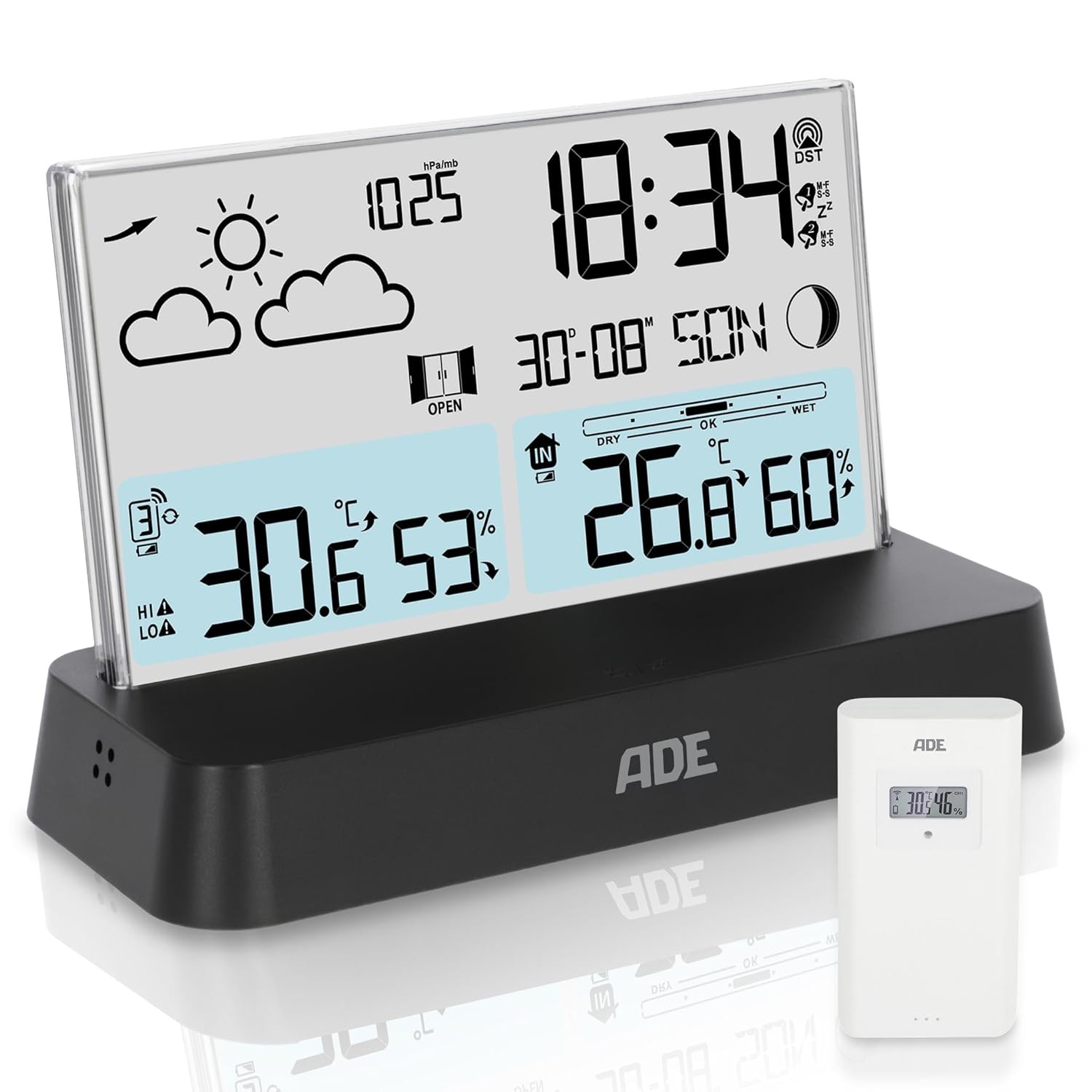
Image: The ADE Digital Weather Station base unit with its clear display showing time, weather forecast, indoor and outdoor temperature, and humidity. An external sensor is visible to the right.
Característiques principals:
- Disseny innovador: Transparent, frameless display on a matte black base.
- Pantalla LCD clara: Shows weather forecast with trend, barometer, time, calendar (7 languages), moon phase, indoor/outdoor temperature and humidity.
- Radio Alarm Clock: Two adjustable alarm times, snooze function, and illumination on demand.
- Funcions addicionals: Ventilation recommendation, comfort zone indicator, frost and heat alarm, 12/24-hour display, option to disable radio reception.
- Ampliable: Supports up to 3 external sensors (one included).

Image: Visual representation of the weather station's practical functions, including weather forecasting, air pressure measurement, humidity detection, temperature display, and ventilation recommendations.

Image: Icons illustrating additional features such as the radio-controlled clock, capability for two distinct alarm times, a calendar display, and moon phase tracking.

Image: The weather station's display demonstrating its backlight feature, showing how the screen illuminates for visibility in both daytime and nighttime conditions with a button press.
Configuració
1. Instal·lació de la bateria
For the Base Unit:
- Locate the battery compartment on the back of the base unit.
- Obriu la tapa de la bateria.
- Insert two (2) AAA 1.5V batteries, observing the correct polarity (+/-).
- Tanqueu la tapa de la bateria amb seguretat.
For the External Sensor:
- Locate the battery compartment on the back of the external sensor.
- Obriu la tapa de la bateria.
- Insert two (2) AAA 1.5V batteries, observing the correct polarity (+/-).
- Tanqueu la tapa de la bateria amb seguretat.
2. Initial Pairing and Placement
The base unit and external sensor should automatically pair once batteries are installed. Allow a few minutes for them to establish a connection. If pairing does not occur, refer to the Troubleshooting section.
External Sensor Placement:
- Place the external sensor in a shaded, dry location outdoors, away from direct sunlight and rain, to ensure accurate temperature and humidity readings.
- Ensure it is within the wireless range of the base unit.

Imatge: Examples of external sensor placement, showing one mounted outdoors under a carport for weather monitoring and another indoors in a laundry room, demonstrating versatility for various environments like basements, garages, or bathrooms.
Instruccions de funcionament
Mostra informació:
The clear LCD display provides the following information:
- Pronòstic del temps: Icons indicating sunny, cloudy, rainy, etc., with trend display.
- Baròmetre: Air pressure readings.
- Hora i data: Radio-controlled time (DCF), calendar with day of the week (7 languages).
- Fase de la Lluna: Current moon phase display.
- Temperatura i humitat interiors: Readings from the base unit.
- Temperatura i humitat exteriors: Readings from the external sensor.
- Comfort Zone Indicator: Shows if indoor conditions are dry, comfortable, or wet.
- Recomanació de ventilació: Suggests when to ventilate for optimal indoor climate.
- Frost/Heat Alarm: Alerts for extreme temperatures.
Configuració del despertador:
The weather station features two individually adjustable alarm times.
- Premeu el botó ALARMA button to cycle through alarm settings.
- Utilitza el UP i ABAIX botons per ajustar l'hora i els minuts.
- Premeu SET or ALARMA de nou per confirmar i passar a la configuració següent.
- To activate the snooze function when the alarm sounds, press any button (except the alarm off button). The alarm will sound again after the set snooze duration (approx. 8 seconds).
Time Display (12/24-hour):
To switch between 12-hour (AM/PM) and 24-hour format, press the TEMPS button (or similar button as per device markings).
Disabling Radio Reception (DCF):
If you prefer to set the time manually or are in an area with poor DCF signal, you can disable the radio reception function. Refer to the specific button on your device (often labeled RCC or ONADA) and hold it down for a few seconds to toggle this feature.
Manteniment
Neteja:
Netegeu la pantalla i casing amb un suau, damp cloth. Do not use abrasive cleaners or solvents, as these may damage the surface.
Substitució de la bateria:
Replace batteries in both the base unit and external sensor when the low battery indicator appears on the display. Always replace all batteries at the same time with new ones of the same type (AAA 1.5V).
Cura del sensor:
Ensure the external sensor remains free from debris, dust, and moisture buildup to maintain accurate readings. Periodically check its placement to ensure it is still in an optimal location.
Resolució de problemes
| Problema | Causa possible | Solució |
|---|---|---|
| No display on base unit | Les piles estan gastades o incorrectament inserides. | Check battery polarity and replace with new AAA 1.5V batteries. |
| Outdoor temperature/humidity not displayed or incorrect | External sensor not paired or out of range; sensor batteries low. | Ensure sensor batteries are fresh. Move sensor closer to base unit. Re-pair by removing and reinserting batteries in both units. |
| Time is incorrect or not updating | Poor DCF radio signal; radio reception disabled. | Relocate the base unit to a window or open area. Ensure DCF reception is enabled. Manually set the time if necessary. |
| Weather forecast seems inaccurate | Weather forecast is based on barometric pressure trends, not real-time satellite data. | Allow the unit 24-48 hours to calibrate after initial setup. Forecasts are predictions and may not always be 100% accurate. |
Especificacions

Image: A diagram illustrating the compact dimensions of the ADE Digital Weather Station, with measurements of 9.6 cm (height), 15.4 cm (width), and 6.5 cm (depth), highlighting its easy placement.
| Característica | Detall |
|---|---|
| Fabricant | ADE |
| Número de model | WS2301 |
| Dimensions del producte | 6.5 x 15.4 x 9.6 cm |
| Pes | 285 g |
| Usos recomanats | Ús interior |
| Usos específics del producte | Pressure, Weather determination, Temperature, Humidity, Ventilation recommendations |
| Font d'alimentació | Battery powered (4 x AAA 1.5V included) |
| Característica especial | Transparent, frameless display on a stylish, matte black base |
| Material | Acrylonitrile Butadiene Styrene (ABS) Terpolymer |
| Tecnologia de connectivitat | Bluetooth (Note: Product description mentions radio reception, not Bluetooth for sensor. This might be a data discrepancy. Sticking to provided spec.) |
| Estil | Modern, elegant |
| Tipus d'acabat | Mat |
Garantia
Specific warranty details for this product are not provided in the available information. Please refer to the product packaging or contact ADE customer support for warranty information.
Suport
For further assistance, technical support, or inquiries regarding your ADE Digital Weather Station, please visit the official ADE weblloc web o poseu-vos en contacte amb el seu departament d'atenció al client. La informació de contacte normalment es pot trobar a l'embalatge del producte o a la fitxa del fabricant. weblloc.


