Introducció
Thank you for choosing the THOMSON D528 Computer Speakers. This manual provides essential information for the proper setup, operation, and maintenance of your new soundbar. Featuring Bluetooth 5.0 connectivity, 10W stereo sound, dynamic RGB lighting, and versatile 3.5mm Aux-in and USB power options, these speakers are designed to enhance your audio experience for PC, desktop monitors, laptops, and tablets.
Si us plau, llegiu aquest manual detingudament abans d'utilitzar el producte per garantir un rendiment i una seguretat òptims.
Què hi ha a la caixa
- THOMSON D528 Computer Speakers
- Manual d'usuari

Configuració
Follow these steps to set up your THOMSON D528 Computer Speakers:
- Col·locació: Position the soundbar on a stable, flat surface, such as your desktop, beneath your monitor. Ensure adequate space for cable connections.
- Connexió d'alimentació: Connect the USB cable from the speaker to a USB port on your computer, laptop, or a USB power adapter (not included). The speakers are USB powered.
- Connexió d'àudio: Trieu un dels mètodes següents:
- Entrada auxiliar de 3.5 mm: Connect the 3.5mm audio cable from the speaker to the audio output jack on your device (PC, laptop, tablet, etc.).
- Bluetooth 5.0: Ensure the speaker is powered on. Activate Bluetooth on your device and search for "THOMSON D528" in the list of available devices. Select it to pair.
- Encesa inicial: Long press the multi-function knob to turn on the speakers.


Instruccions de funcionament
The THOMSON D528 speakers feature a multi-function knob for easy control:
- Encès/apagat: Long press the knob to turn the speakers on or off.
- Ajust de volum: Rotate the knob clockwise to increase volume and counter-clockwise to decrease volume.
- Canvia els modes de llum: Short press the knob once to cycle through the dynamic RGB lighting modes.
- Switch Bluetooth/AUX Mode: Short press the knob twice to switch between Bluetooth and 3.5mm Aux-in audio input modes.

Il·luminació RGB dinàmica
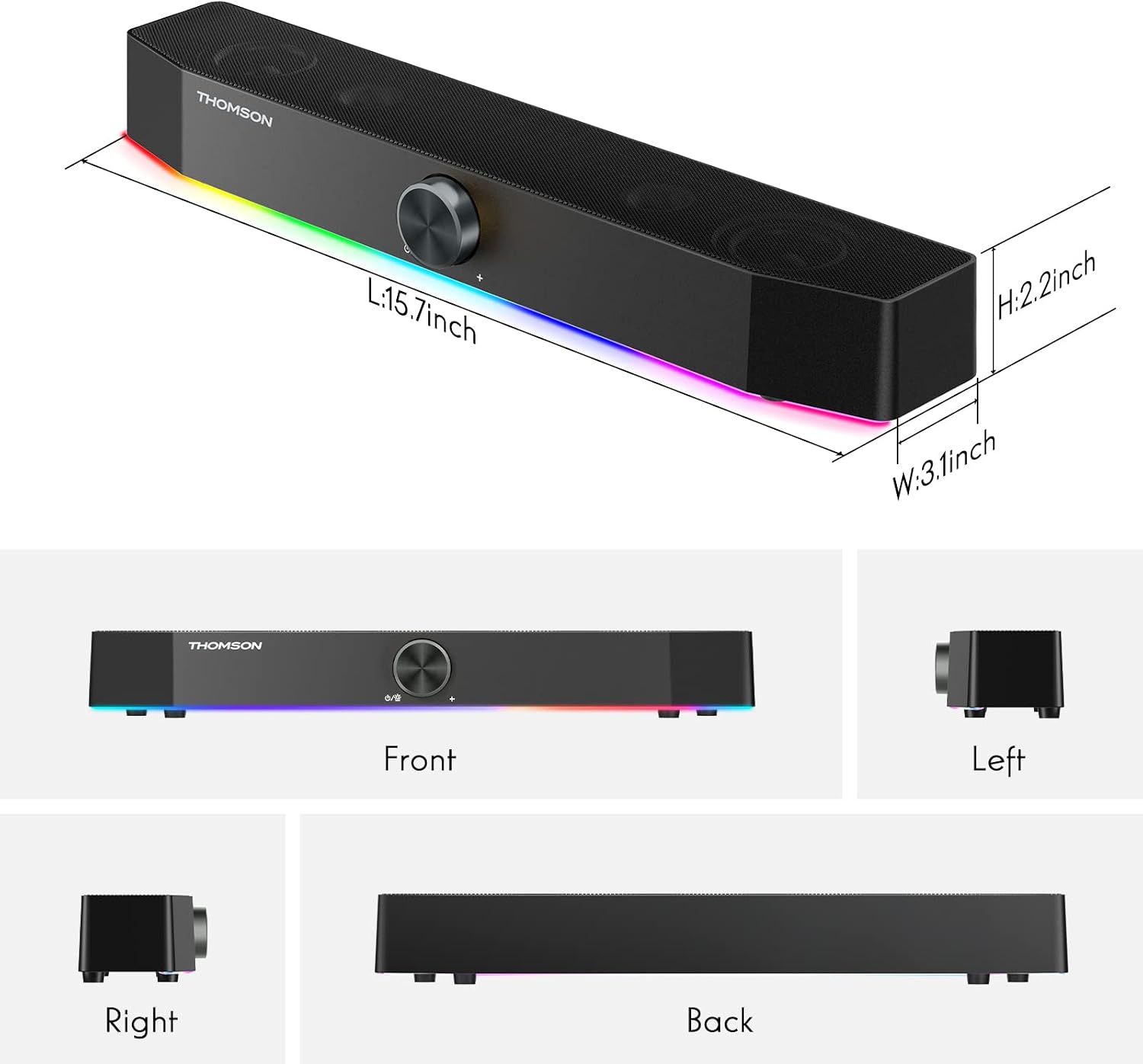
The THOMSON D528 speakers are equipped with dynamic RGB lighting effects to enhance your listening, gaming, or movie-watching experience. The light strip at the bottom of the soundbar can display multiple colors and modes.
- Canvi de modes de llum: Short press the multi-function knob once to cycle through the available light modes and colors.
- Turning Lights Off: Continue pressing the knob until the lights turn off, or select a static color if preferred.

Connectivitat
The THOMSON D528 offers flexible connectivity options:
- Bluetooth 5.0: Provides wide compatibility and a stable wireless connection for devices like smartphones, tablets, and laptops. The Bluetooth range is up to 60 meters.
- Entrada auxiliar de 3.5 mm: For wired connections to any device with a standard 3.5mm audio jack, including PCs, desktop monitors, laptops, and MP3 players.
- Alimentat per USB: The speakers draw power directly from a USB port, eliminating the need for an external power adapter.

Manteniment
Per garantir la longevitat i el rendiment òptim dels altaveus, seguiu aquestes pautes de manteniment:
- Neteja: Feu servir un drap suau i sec per netejar l'exterior dels altaveus. No utilitzeu netejadors líquids ni materials abrasius.
- Emmagatzematge: Quan no els utilitzeu durant períodes prolongats, guardeu els altaveus en un lloc fresc i sec, allunyats de la llum solar directa i de temperatures extremes.
- Manipulació: Avoid dropping the speakers or subjecting them to strong impacts.
- Cura del cable: Do not pull on the cables forcefully. Always grasp the plug when disconnecting.

Resolució de problemes
If you encounter any issues with your THOMSON D528 speakers, refer to the following common problems and solutions:
- Sense so:
- Ensure the speakers are powered on and the volume is turned up.
- Check that the audio cable (3.5mm Aux-in) is securely connected to both the speaker and your device, or that Bluetooth is successfully paired.
- Verify that your device's audio output is set to the correct source (e.g., external speakers, Bluetooth).
- Desconnexió Bluetooth:
- Ensure the speakers are within the 60-meter Bluetooth range of your device.
- Try unpairing and re-pairing the speakers with your device.
- Restart both the speakers and your Bluetooth device.
- Les llums RGB no funcionen:
- Short press the multi-function knob to cycle through light modes; ensure it's not set to the 'off' mode.
- Verify the speakers are receiving power via USB.
- Distorsió del so:
- Reduce the volume on both the speakers and your connected device.
- Assegureu-vos que el cable d'àudio no estigui malmès i que estigui completament inserit.
- Allunyeu els altaveus d'altres dispositius electrònics que puguin causar interferències.
Especificacions
| Característica | Especificació |
|---|---|
| Nom del model | Altaveus d'ordinador |
| Tipus d'altaveu | Barra de so |
| Tecnologia de connectivitat | Auxiliar, Bluetooth, USB |
| Tecnologia de comunicació sense fils | Bluetooth 5.0 |
| Interval Bluetooth | 60 metres |
| Mode de sortida d'àudio | estèreo |
| Potència de sortida màxima dels altaveus | 10 watts |
| Característica especial | USB Port, Dynamic RGB Lighting |
| Mètode de control | Pom |
| Dimensions del producte | 3.07 "P x 15.62" W x 2.01" H |
| Pes de l'article | 1.74 lliures |
| Dispositius compatibles | Telèfon intel·ligent, tauleta, reproductor MP3, ordinador de sobretaula, televisió, projector, ordinador portàtil |

Garantia i Suport
The THOMSON D528 Computer Speakers come with a 12-month worry-free warranty. For any product-related inquiries, technical assistance, or warranty claims, please contact THOMSON customer service. Our team is committed to providing lifetime friendly customer service.
For further assistance, please refer to the contact information provided on the product packaging or the official THOMSON weblloc.
Vídeos oficials de productes
Video: A customer demonstrates the THOMSON D528 speaker in use, showcasing its features and sound quality in a real-world setting. This video is provided by NUOWEI STORE.
Video: A short demonstration of the THOMSON D528 Computer Speakers, highlighting their design and RGB lighting effects. This video is provided by NUOWEI STORE.


