Introducció
This manual provides detailed instructions for the CHONCHOW Gaming Wireless Keyboard and Mouse Combo, Model US-G311. This combo offers a seamless wireless experience with RGB backlighting, a mechanical feel keyboard, and a responsive gaming mouse. Please read this manual thoroughly to ensure proper setup, operation, and maintenance of your device.
The CHONCHOW US-G311 is designed for a wide range of devices, including PCs, laptops, PS3, PS4, PS5, Xbox, and Mac systems, offering plug-and-play convenience without the need for additional drivers.

Image: The CHONCHOW Gaming Wireless Keyboard and Mouse Combo, featuring RGB backlighting on both devices and the compact USB receiver.
Instruccions de configuració
Follow these steps to set up your CHONCHOW Gaming Wireless Keyboard and Mouse Combo:
- Desempaquetar els dispositius: Carefully remove the keyboard, mouse, USB receiver, and charging cable from the packaging.
- Localitza el receptor USB: The 2.4G USB receiver is conveniently stored in a compartment on the back of the mouse. Gently remove it.
- Connecteu el receptor: Plug the USB receiver into an available USB port on your computer, laptop, or gaming console. The system should automatically detect and install the necessary drivers.
- Encès: Ensure both the keyboard and mouse are charged. The mouse has a power switch on its underside. The keyboard typically powers on automatically when a key is pressed after the receiver is connected.
- Càrrec inicial: For optimal performance, it is recommended to fully charge both the keyboard and mouse before first use. Use the provided USB charging cable and a stable 5V/2A power supply.

Imatge: Detallada view of the rechargeable mouse, highlighting the DPI buttons, roller, side keys, charging port, and the storage location for the USB receiver on the underside, along with the power switch.

Image: Diagram illustrating the wireless connectivity of the keyboard and mouse combo to various devices such as laptops, desktop computers, and smart TVs via the 2.4G USB receiver.
Instruccions de funcionament
Funcions del teclat
- Control de la llum de fons: The keyboard features 4 changeable backlight colors, 4 adjustable brightness levels, and 3 breathing modes. Specific key combinations (e.g., Fn + Light key) are used to cycle through these options. Refer to the keyboard's keycap legends for exact controls.
- Tecles multimèdia: Utilize the 12 dedicated multimedia keys (F1-F12) by pressing the Fn key simultaneously with the desired function key. These control media playback, volume, and other system functions.
- Anti-fantasma: The keyboard supports 19 anti-ghosting keys, ensuring that multiple key presses are registered accurately during intense gaming sessions.
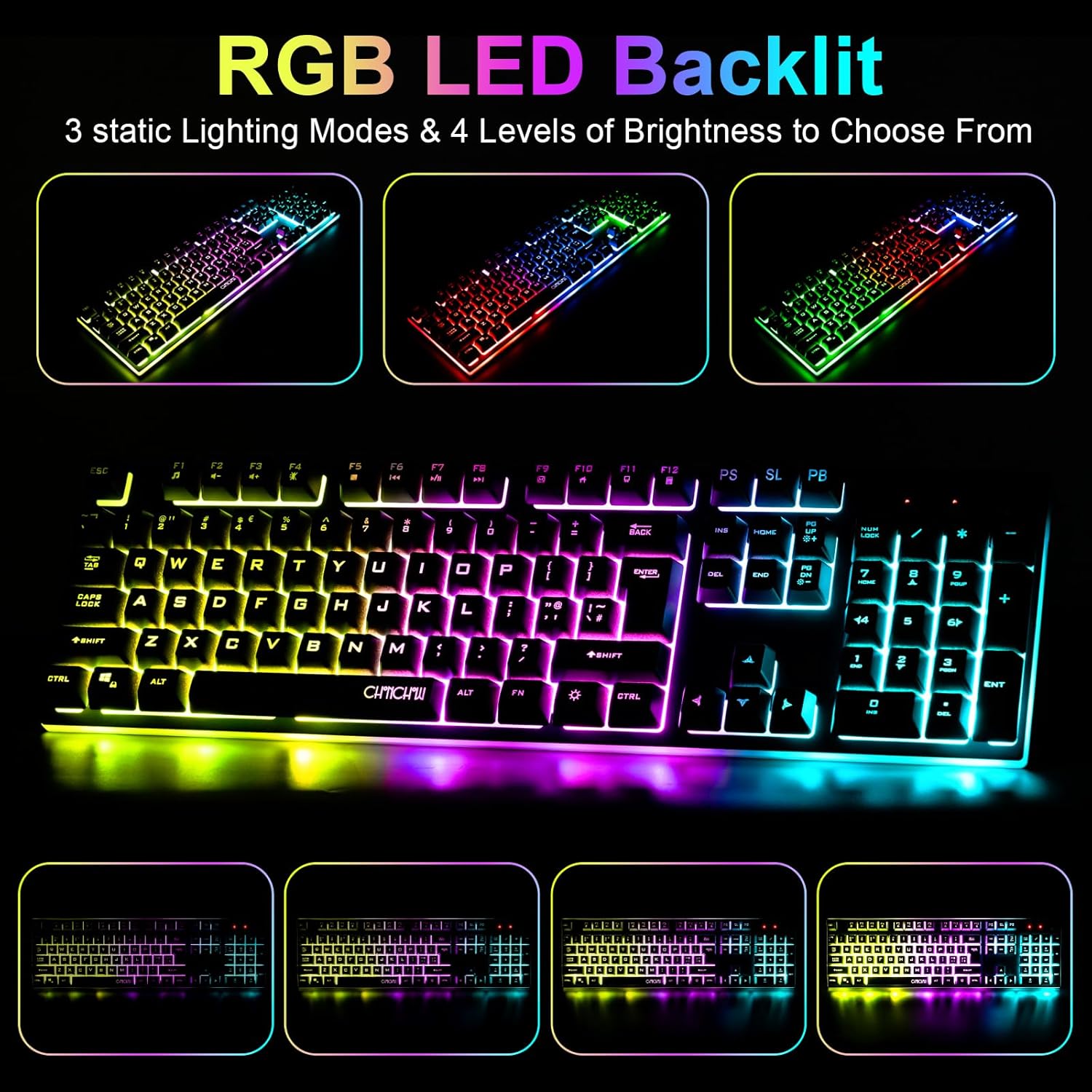
Image: The keyboard displaying various RGB LED backlight modes, including different static colors and breathing effects, demonstrating the 3 static lighting modes and 4 levels of brightness.

Image: The keyboard layout highlighting the 12 multimedia keys accessible via the Fn key, and indicating the 19 anti-ghosting keys for enhanced gaming performance.
Funcions del ratolí
- Ajust de DPI: The mouse features 3 adjustable DPI levels: 800, 1200, and 1600. Use the DPI+ and DPI- buttons (typically located near the scroll wheel) to cycle through these settings to match your preference and game requirements.
- Il·luminació de fons: El ratolí té un efecte d'il·luminació gradual cíclica de 7 colors integrat, que funciona automàticament.
- Botons laterals: The mouse includes side buttons for additional functionality, often used for forward/backward navigation in web browsers or custom actions in games.
- Interruptor d'alimentació: A physical power switch is located on the underside of the mouse to conserve battery when not in use.
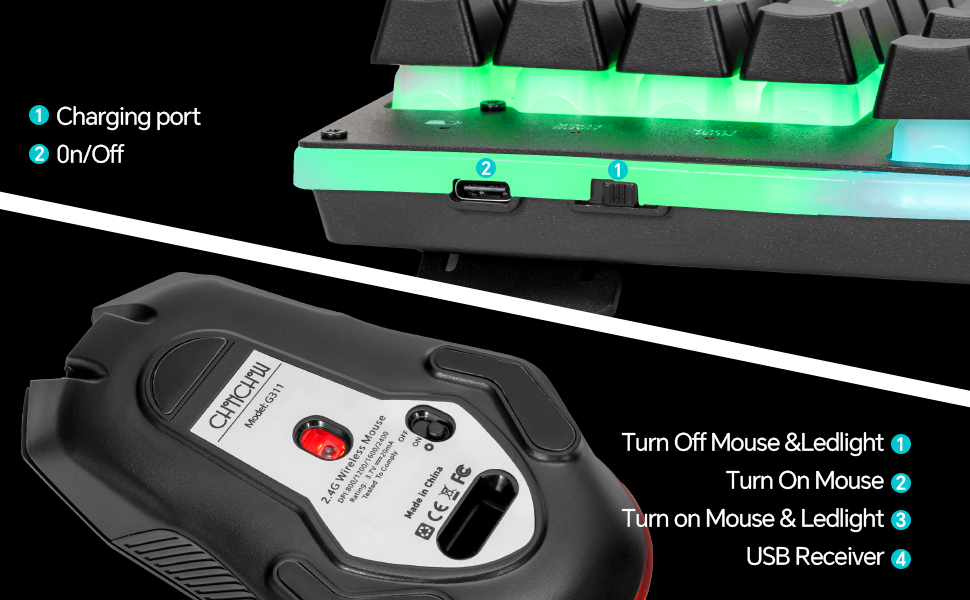
Image: A diagram illustrating the three adjustable DPI settings for the mouse: 800, 1200, and 1600, indicating how users can switch between them for different precision needs.
Manteniment
Proper maintenance ensures the longevity and performance of your CHONCHOW Gaming Wireless Keyboard and Mouse Combo:
- Càrrega: Charge the keyboard (2000 mAh battery) and mouse (400 mAh battery) using the provided USB cable. Ensure your power adapter provides a stable 5V/2A output. The keyboard can last over 10 hours with lights on, and the mouse approximately 12 hours of continuous use.
- Energy-Saving Sleep Mode: Both devices support an energy-saving sleep mode to extend battery life when idle. They will wake up with a key press or mouse movement.
- Neteja: Feu servir un drap suau i sec per netejar les superfícies del teclat i el ratolí. Per a una neteja més profunda, feu servir un drap lleugerament sec.amp es pot fer servir un drap, assegurant-se que no entri líquid als components interns. Eviteu productes químics agressius o materials abrasius.
- Emmagatzematge: When not in use for extended periods, store the devices in a cool, dry place. It is advisable to turn off the mouse using its power switch.

Image: A visual representation of the battery capacities: 2000 mAh for the keyboard and 400 mAh for the mouse, highlighting their 'Super Battery Life' for extended usage.
Resolució de problemes
If you encounter issues with your CHONCHOW Gaming Wireless Keyboard and Mouse Combo, refer to the following common solutions:
| Problema | Solució |
|---|---|
| Els dispositius no responen |
|
| Keyboard keys not working or delayed response |
|
| Mouse movement is erratic or unresponsive |
|
| La llum de fons no funciona |
|
Especificacions
- Número de model: EUA-G311
- Connectivitat: 2.4G sense fil
- Bateria del teclat: 2000 mAh (recarregable)
- Bateria del ratolí: 400 mAh (recarregable)
- Mouse DPI Levels: 800, 1200, 1600
- Il·luminació del teclat: 4 colors, 4 brightness levels, 3 breathing modes
- Retroiluminació del ratolí: Efecte gradual cíclic de 7 colors
- Anti-fantasma: 19 claus
- Compatibilitat: Windows 2000/2003/XP/Vista/Win7/Win8/Win10/Win11, Mac, PS3, PS4, PS5, Xbox
- Dimensions del paquet: 17.8 x 8.19 x 1.73 polzades
- Pes de l'article: 2.01 lliures
Garantia i Suport
Specific warranty details are not provided in this manual. For warranty information, please refer to the product packaging or contact the retailer where the product was purchased. For technical support or further assistance, please contact CHONCHOW customer service through their official channels or the retailer's support services.


