1. Producte acabatview
The POWERWIN MPPT 50A Solar Charge Controller is designed to efficiently manage power flow from your solar panels to your battery system. It features advanced Maximum Power Point Tracking (MPPT) technology to maximize solar charging speed and optimize energy collection.

Imatge: Frontal view of the POWERWIN MPPT 50A Solar Charge Controller with LCD display and connection terminals.
- 12V/24V Adaptive: Automatically adjusts to 12V or 24V battery systems, providing essential charge and discharge information via multiple indicators. Ensure adequate battery voltage for correct identification during initial use.
- Lightweight & Efficient: Weighs less than 1 pound, offering up to 99% tracking efficiency and 96% conversion efficiency. Includes a lithium battery wake-up function.
- Múltiples opcions de càrrega: Supports USB 5V/2.5A and DC input/output, allowing direct connection of DC and USB devices to optional load terminals for power consumption monitoring.
- Proteccions intel·ligents: Equipped with comprehensive safety features including over-current, open-circuit, short-circuit, reverse polarity, and device protection. The regulator automatically shuts down if battery voltage drops below 11.5V to protect battery life.
- Optimized Charging Speed: Designed to track and concentrate charging functions, maximizing solar charging speed by collecting energy from solar panels.
2. Guia de configuració
2.1 Initial Battery Identification
Before connecting, ensure your battery has sufficient voltage for the solar charge regulator to correctly identify its type (12V or 24V). The controller will automatically adapt.
2.2 Connecting Your System
Follow these steps to connect your solar charge controller. Always connect the battery first, then the solar panels, and finally the load.
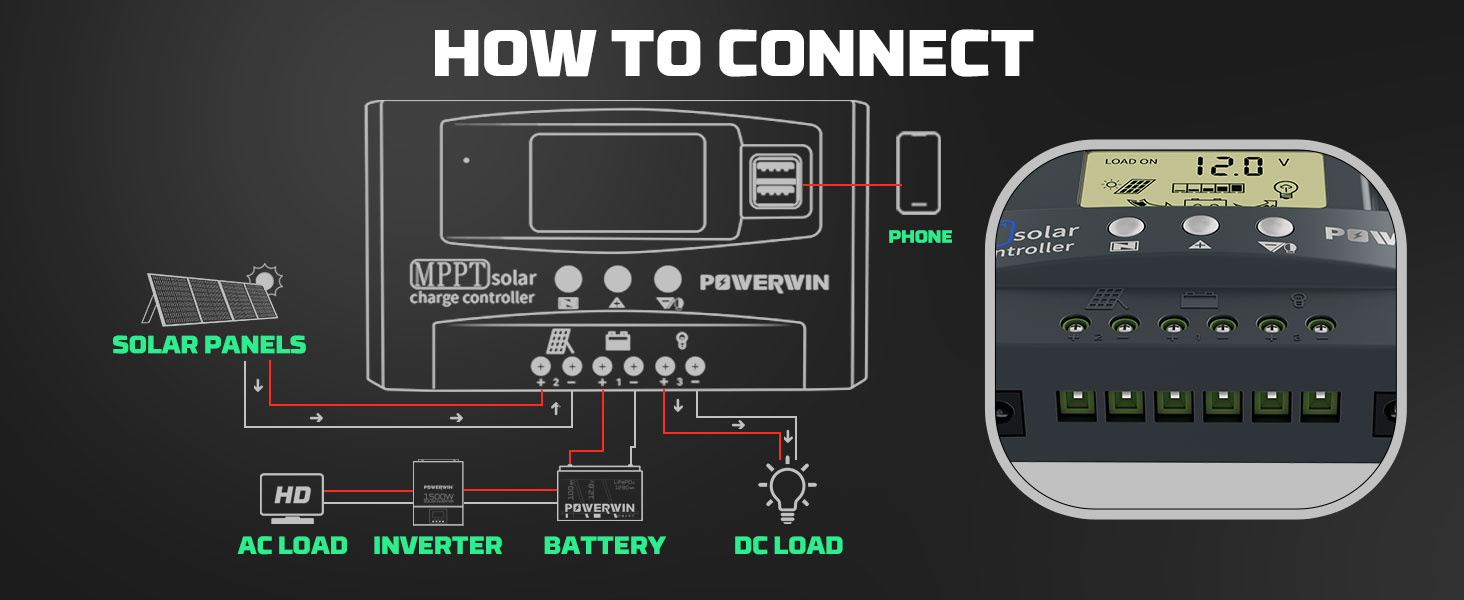
Image: Connection diagram illustrating the wiring sequence for solar panels, battery, and DC/AC loads to the MPPT solar charge controller.
- Connecta la bateria: Connect the battery to the battery terminals on the controller. Ensure correct polarity (+ to + and - to -).
- Connecteu els panells solars: Connect your solar panels to the PV input terminals. Again, observe correct polarity.
- Connect Load (Optional): If using the controller's load output, connect your DC load or inverter to the load terminals.
2.3 Setting Up Battery Type
The controller supports Lead Acid (b1), Li-ion (b2), and LiFePO4 (b3) batteries. Follow the steps below to select the correct battery type for optimal charging.

Image: Visual guide for selecting battery type (Lead Acid, Li-ion, LiFePO4) using the controller's buttons.
- Feu clic a Menú key to switch to the battery type interface.
- Mantingueu el Menú key until the number blinks.
- Feu clic a Up or Avall key to switch battery mode (b1, b2, or b3).
- Premeu el botó Menú key again to confirm and save.
3. Instruccions de funcionament
3.1 LCD Display and Button Functions
The LCD display provides real-time information about your solar system. The buttons allow navigation and adjustment of settings.

Imatge: Detallada view of the controller's interface, labeling the Menu, Up, Down keys, USB output, Battery Interface, PV Input, and DC5521 Output ports.
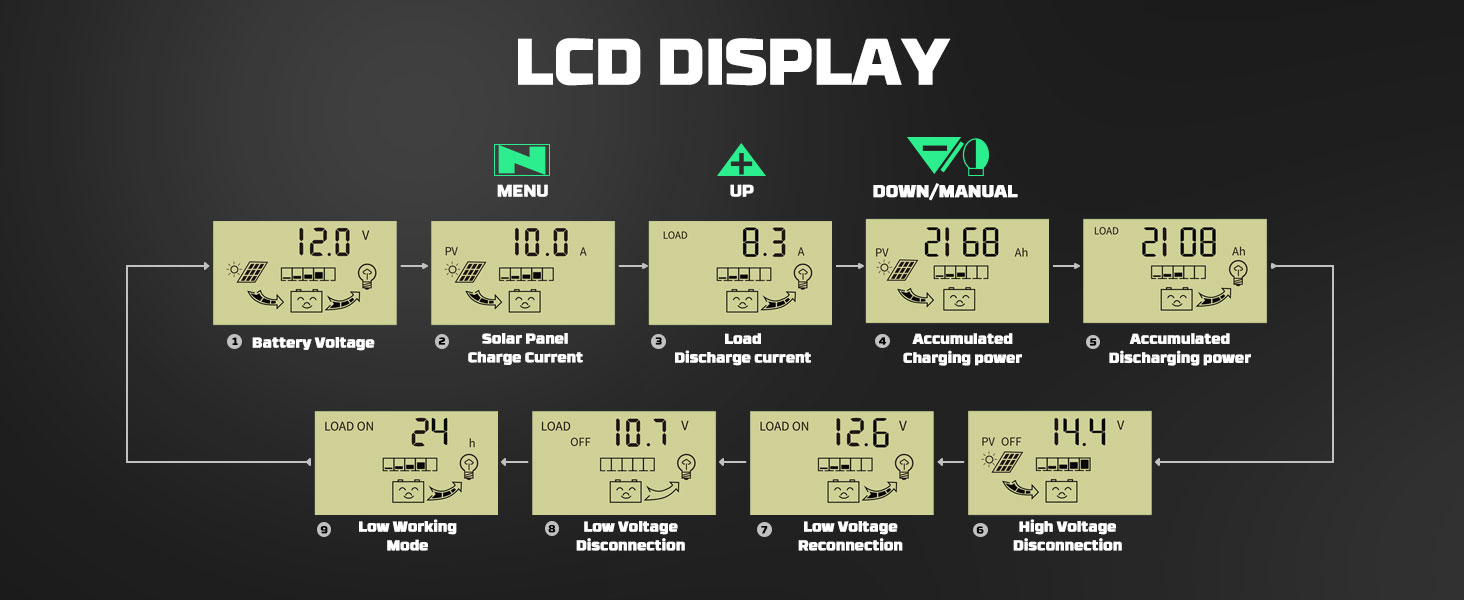
Imatge: Més deview of the LCD display screens, showing Battery Voltage, Solar Panel Charge Current, Load Discharge Current, Accumulated Charging Power, Accumulated Discharging Power, Low Working Mode, Low Voltage Disconnection, Low Voltage Reconnection, and High Voltage Disconnection.
3.2 Adjusting Lithium Battery Parameters
For LiFePO4 and Lithium batteries, you can adjust specific parameters like discharge recovery, charging cutoff, and discharge cutoff voltages.
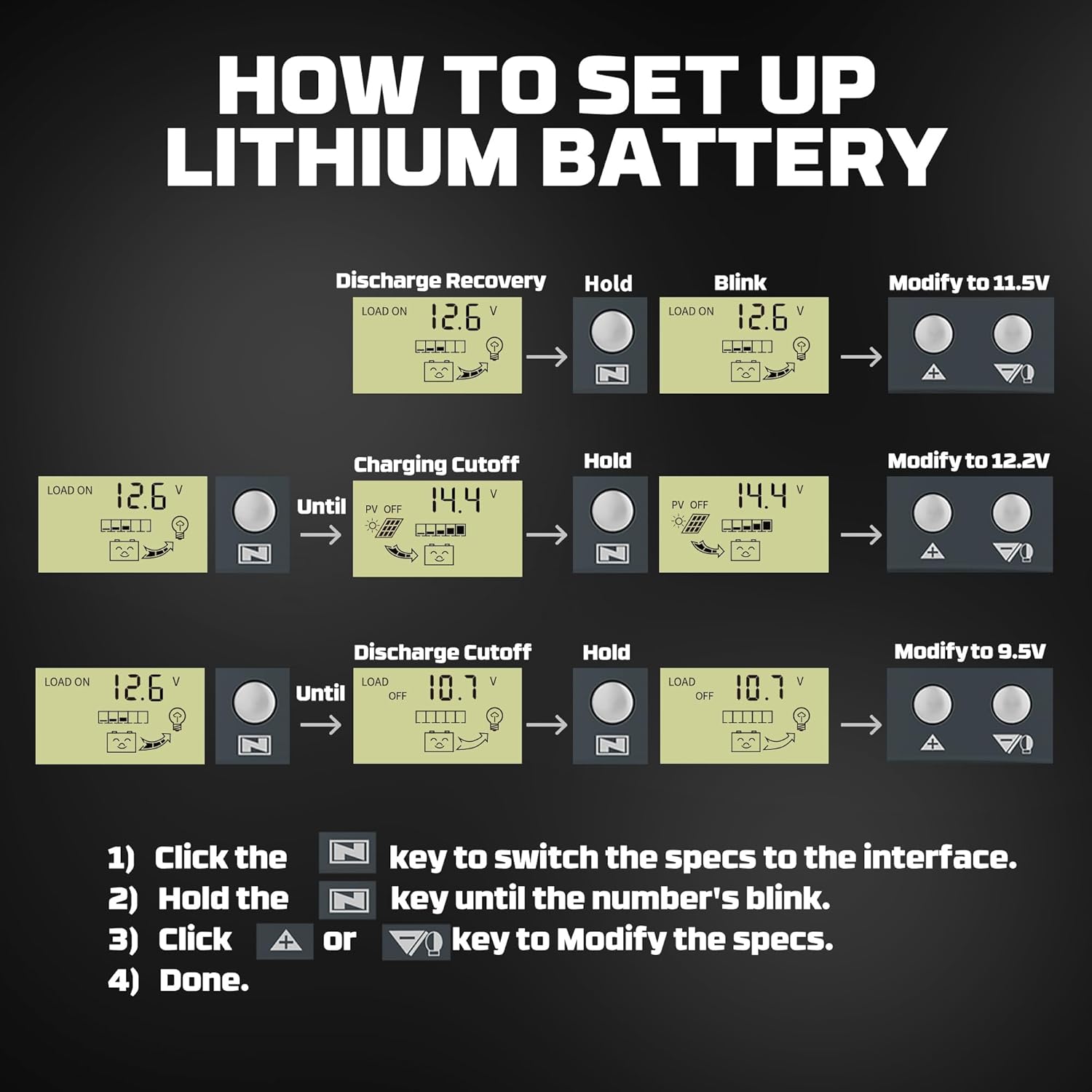
Image: Step-by-step guide to modify lithium battery parameters such as Discharge Recovery, Charging Cutoff, and Discharge Cutoff voltages.
- Feu clic a Menú key to switch to the desired specification interface (e.g., Discharge Recovery, Charging Cutoff, Discharge Cutoff).
- Mantingueu el Menú key until the displayed number blinks.
- Feu clic a Up or Avall key to modify the blinking value.
- Premeu el botó Menú key again to confirm and save the new setting.
3.3 How to Reboot/Reset the Controller
If you need to reset the controller to its factory default settings, follow the procedure shown in the video below. This can resolve certain operational issues.
Video: Demonstrates the process of resetting the solar charge controller to its default settings. Hold the menu button for 10 seconds until "FF" appears, indicating a successful reset.
4. Manteniment
Un manteniment regular garanteix la longevitat i el rendiment òptim del vostre controlador de càrrega solar.
- Inspeccionar connexions: Periodically check all wiring connections (solar panels, battery, load) to ensure they are secure and free from corrosion. Loose connections can lead to power loss or overheating.
- Controlador net: Mantingueu el controlador net i lliure de pols, brutícia i deixalles. Feu servir un drap suau i sec per netejar-lo. No utilitzeu netejadors abrasius ni dissolvents.
- Ventilació: Ensure the controller has adequate ventilation to prevent overheating. Do not block the ventilation holes.
- Control ambiental: Verifiqueu que l'entorn operatiu es mantingui dins dels rangs de temperatura i humitat especificats.
5. Solució De Problemes
This section addresses common issues you might encounter with your solar charge controller.
| Problema | Causa possible | Solució |
|---|---|---|
| LCD Screen Blank | No power from battery or solar panels; internal fault. | Comproveu les connexions de la bateria i el voltage. Ensure solar panels are receiving sunlight. Try resetting the unit (refer to Section 3.3). If the issue persists, contact customer support. |
| Battery Not Charging / Low Amps | Insufficient solar input; incorrect battery type setting; faulty connections; controller malfunction. | Verify solar panel output. Confirm correct battery type setting (Section 2.3). Check all wiring for secure connections and correct polarity. Ensure panels are not shaded. |
| Controller Overheating / Melting | Overload; inadequate ventilation; internal short circuit; undersized controller for the system. | Reduce load. Ensure proper ventilation around the controller. Verify that the total current from solar panels and load does not exceed the controller's rated amperage (50A). If overheating persists, discontinue use and contact customer support. |
| Vol incorrectetage Lectura | Loose connections; calibration issue; faulty sensor. | Check all wiring connections. Compare readings with a multimeter. If discrepancies persist, a factory reset (Section 3.3) might help. |
If you encounter problems not listed here or if the suggested solutions do not resolve the issue, please contact POWERWIN customer support for assistance.
6. Especificacions del producte
| Característica | Detall |
|---|---|
| Fabricant | POWERWIN |
| Número de model | MPPT50 |
| Pes de l'article | 10.5 unces |
| Dimensions del producte | 7.48 x 3.86 x 1.77 polzades |
| Mida | 50A |
| Tipus de port de càrrega | USB and DC input |
| Font d'alimentació | Funciona amb piles, elèctric amb cable |
| AmpCapacitat d’estalvi | 30 Amps (Note: Product title states 50A, but specifications list 30 Amps. User should verify actual capacity from product packaging or direct inquiry if critical.) |
| Voltage | 12V/24V Auto Adaptation (24 Volts listed as a specific value, but product is adaptive) |
| Tipus de visualització | LCD |
| Color | Negre |
| UPC | 732767197272 |
Note: Some specifications may vary slightly. Always refer to the product packaging for the most accurate and up-to-date information.
7. Garantia i Suport
The POWERWIN MPPT Solar Charge Controller comes with a garantia de dos anys des de la data de compra. Aquesta garantia cobreix els defectes de materials i de mà d'obra en ús normal.
For any issues, questions, or warranty claims, please contact POWERWIN customer service. You can typically find contact information on the product packaging, the seller's page (TOPTECH AE on Amazon), or the official POWERWIN weblloc.
When contacting support, please have your product model number (MPPT50) and proof of purchase readily available to expedite the process.


