1. Introducció
This manual provides detailed instructions for the installation, operation, and maintenance of your XTRONS 10.25 Inch IPS Touch Screen Car Stereo. This unit is specifically designed for BMW 5 Series E60, E61, and M5 models manufactured between 2005 and 2008, equipped with the CCC (Car Communication Computer) system.
The XTRONS car stereo integrates advanced Android 13 functionality, GPS navigation, and multimedia capabilities while retaining your vehicle's original features.
1.1 Models aplicables
This unit is compatible with the following BMW 5 Series models:
- BMW 5 Series E60 (2005-2008) with CCC System
- BMW 5 Series E61 (2005-2008) with CCC System
- BMW 5 Series M5 (2005-2008) with CCC System
Nota important:
If your car does not have an AUX-IN port, an adapter (e.g., ASIN: B0841Z1LTV) is required for proper audio integration. Ensure your vehicle has the CCC system, identifiable by a 10-pin LVDS port and a CD/DVD slot.

Figure 1.1: Applicable Models and System Identification. This image illustrates the visual difference before and after installation, and helps identify if your BMW has a CCC system (with 10-pin LVDS port and CD/DVD slot) or a CIC system (with 4-pin LVDS port and CD button), indicating compatibility.
2. Característiques clau
The XTRONS car stereo offers a range of advanced features to enhance your driving experience:
- Sistema operatiu Android 13: Latest Android version with an Octa-core processor, 8GB DDR4 RAM, and 128GB Solid State ROM for responsive performance.
- Pantalla tàctil IPS d'10.25 polzades: A 1920x720 HD full laminated display with a 178° viewAngle d'inclinació per a unes imatges clares.
- CarPlay sense fil i Android Auto: Seamless integration with your smartphone for navigation, calls, and music. Supports both wireless and wired connections for Android Auto.
- Retains Original Car Functions: Maintains iDrive system control, original fiber optical sound system, radio, CD player, Bluetooth, steering wheel controls, and backup camera display.
- DSP (processador de so digital) integrat: Customize your audio experience with equalizer, filter, and delay settings.
- Banda Wi-Fi dual: Supports 2.4GHz and 5GHz Wi-Fi for faster and more stable internet connectivity.
- Bluetooth 5.1: Enhanced stability and higher quality for hands-free calls and music streaming.
- 4G LTE Support: Integrated 4G antenna for mobile data connectivity.
- Multiple UI Themes: Choose from 4 different user interface themes, including XTRONS Q series special and BMW Style UI.
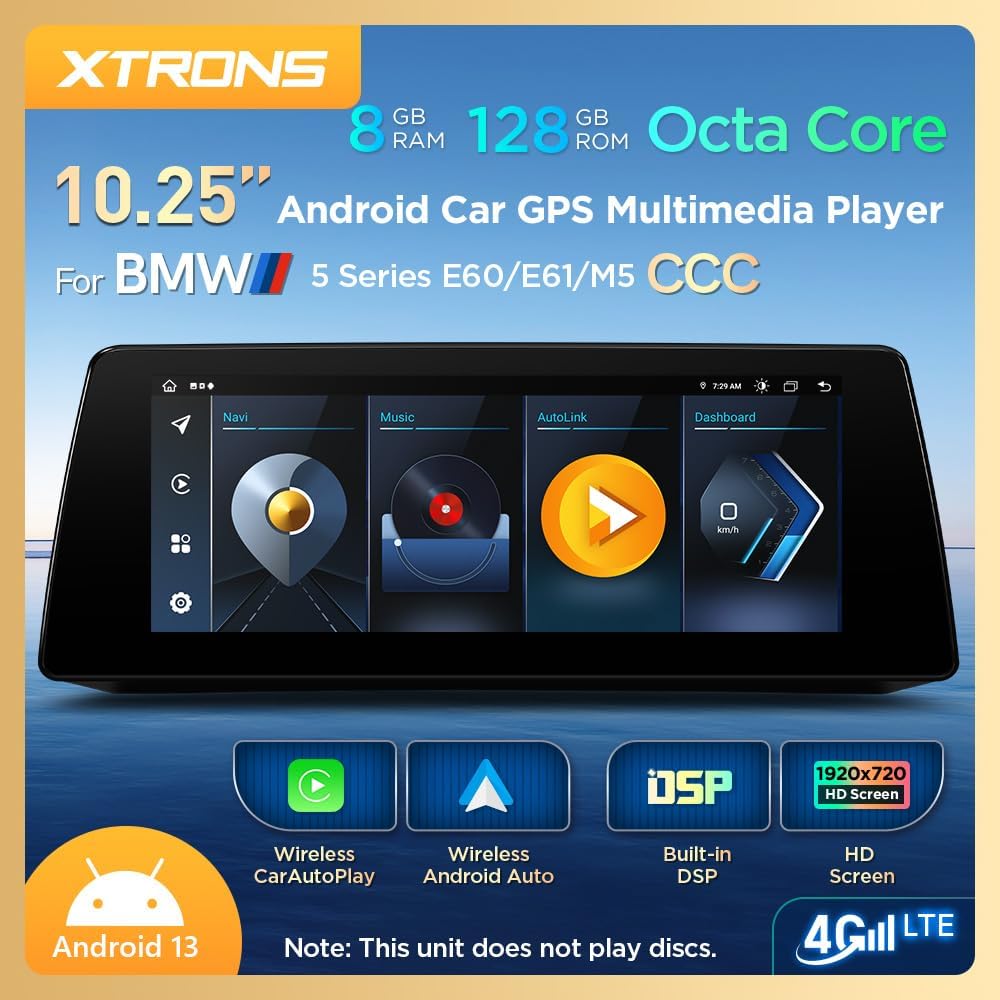
Figura 2.1: Mésview of XTRONS Car Stereo Key Features. This image displays the main screen interface and highlights core specifications and functionalities such as Android 13, Wireless CarPlay, Android Auto, DSP, and 4G LTE connectivity.

Figure 2.2: Perfect Integration and Retained Original Functions. This image demonstrates how the new display integrates seamlessly into the BMW dashboard and confirms that essential vehicle functions like iDrive, amplifier, Bluetooth, radio, CD player, and backup camera are preserved.
3. Contingut del paquet
Si us plau, verifiqueu que tots els elements que s'enumeren a continuació estiguin inclosos al vostre paquet:
- 1 × Arnès de cablejat ISO
- 1 × cable d'àudio
- 1 × Antena 4G
- 1 cable USB
- 1 × Antena GPS
- 1 × Muntatge fix
- 1 × pinces
- 3 × Cargols
- 1 × Manual d'usuari (aquest document)
- 1 × Instruccions d'instal·lació

Figure 3.1: Included Accessories. This image displays all components provided in the product package, ensuring users can verify their contents against the list.
4. Guia d'instal·lació
Professional installation is recommended. Refer to the separate "Installation Instructions" document for detailed steps. Below is an overview of the wiring connections.
4.1 Connexions de cablejat
Carefully connect the provided wiring harness and antennas to the corresponding ports on the unit and your vehicle.

Figure 4.1: Wiring Harness Diagram. This diagram provides a visual guide to connecting the various cables and antennas to the main unit, including the LVDS port, USB ports, GPS antenna, 4G antenna, reverse camera input, microphone, and the main ISO wiring harness.
Connexions clau:
- LVDS Port (1): Connects to the vehicle's original display cable.
- USB Ports (2, 3): For connecting USB devices, including for wired Android Auto.
- GPS Antenna (4): Connect for navigation functionality.
- 4G Antenna (5): Connect for mobile data access.
- REVERSE-IN (6): Connect to the reverse signal cable for automatic camera display.
- Microphone Port (7): For external microphone connection (if applicable).
- CAM IN (8): Connect for a reverse camera input.
- ACC (9): Accessory power.
- P-CAM (10): Power for camera.
- Audio OUT (11): Audio output. If your car has no audio AUX input, you will need an adapter.
- ISO Wiring Harness (13): Connexions d'alimentació principal i altaveus.
Important Note on Audio:
If your BMW 5 Series E60/E61/M5 does not have an AUX-IN port, you must purchase and install an AUX adapter (e.g., XTRONS ASIN: B0841Z1LTV) to enable audio output from the Android unit to your car's original sound system. Without this, you will not hear audio from the new unit.
5. Configuració inicial
Després d'una instal·lació correcta, seguiu aquests passos per a la configuració inicial:
- Encès: Start your vehicle. The unit should power on automatically.
- Selecció d'idioma: On the first boot, you may be prompted to select your preferred language.
- Hora i data: Set the correct time zone and synchronize the time and date.
- Connexió Wi-Fi: Vés a Configuració > Xarxa i Internet > Wi-Fi. Connect to your home Wi-Fi or a mobile hotspot for internet access and app downloads.
- 4G LTE (opcional): If you have inserted a 4G SIM card (not included), ensure the 4G antenna is connected and configure network settings if necessary.
- Sortida de so: Ensure the audio output is correctly routed to your car's AUX input. If using an AUX adapter, select the AUX source on your original BMW iDrive system.
- Actualitzacions del sistema: Check for system updates via Configuració > Sobre el dispositiu > Actualització del sistema to ensure you have the latest software.
6. Instruccions de funcionament
6.1 Navegació per la interfície
The unit features a touch-screen interface. You can also use your original iDrive controller to navigate the Android system. Swipe left/right to access different home screens or app drawers. Tap icons to open applications.
6.2 CarPlay sense fil i Android Auto
This unit supports both wireless CarPlay for iPhones and wireless/wired Android Auto for Android phones.
- Activa el Bluetooth: On your phone and the car stereo, ensure Bluetooth is enabled.
- Parella el dispositiu: On the car stereo, go to the CarPlay or Android Auto application. Follow the on-screen instructions to pair your phone via Bluetooth.
- Connectar: Once paired, your phone should automatically connect to CarPlay or Android Auto wirelessly. For wired Android Auto, connect your phone via a USB cable to one of the unit's USB ports.
- Funcionalitat: Access navigation, music, calls, and messaging apps directly from the car stereo display.

Figure 6.1: Wireless CarPlay and Android Auto. This image demonstrates the user interfaces for both Apple CarPlay and Android Auto, highlighting their wireless connectivity via Bluetooth and the option for wired Android Auto via USB.
Processador de so digital 6.3 (DSP)
The built-in DSP allows for advanced audio customization:
- Equalitzador: Adjust frequency bands to fine-tune the sound profile (e.g., Flat, Pop, Rock, Jazz, Classic, User-defined).
- Filtre: Set High-Pass Filter (HPF) and Low-Pass Filter (LPF) for front and rear speakers to optimize sound delivery.
- Retard: Adjust sound delay for each speaker to create a precise sound stage within the vehicle.

Figure 6.2: Built-in Professional DSP Interface. This image illustrates the various audio customization options available through the DSP, including a graphic equalizer, high-pass and low-pass filters, and time delay adjustments for individual speakers.
6.4 User Interface (UI) Themes
Personalize your display with different UI themes:
- Navegueu fins a Configuració menú.
- Busca UI Theme or Configuració de la pantalla.
- Select from the available themes, including XTRONS Q series special and BMW Style UI, to match your preference.

Figure 6.3: Available UI Themes. This image showcases four distinct user interface themes, allowing users to customize the visual appearance of their car stereo display.
6.5 Retaining Original iDrive Control
The unit fully retains the functionality of your original BMW iDrive controller. You can use the iDrive knob and buttons to navigate both the original BMW system and the new Android interface.
- Premeu el botó MENÚ button on the iDrive controller to switch between the original BMW system and the Android system.
- Use the knob to scroll and press to select items.
7. Manteniment
Per garantir la longevitat i el rendiment òptim del vostre estèreo de cotxe XTRONS, seguiu aquestes pautes de manteniment:
- Neteja de pantalla: Utilitzeu un drap suau i sense pelusa lleugerament dampNetegeu-ho amb aigua o amb un netejador de pantalles dissenyat específicament per a electrònica. Eviteu productes químics agressius o materials abrasius.
- Actualitzacions de programari: Regularly check for and install system updates to benefit from new features, performance improvements, and security patches.
- Eviteu temperatures extremes: No exposeu la unitat a temperatures extremes de calor o fred durant períodes prolongats.
- Protegir dels líquids: Prevent any liquids from entering the unit.
- Ventilació: Assegureu-vos que les zones de ventilació de la unitat no estiguin bloquejades per evitar el sobreescalfament.
8. Solució De Problemes
Si teniu problemes amb la vostra unitat, consulteu els següents problemes i solucions habituals:
8.1 No Sound from Android System
- Check AUX Connection: Ensure the audio cable is correctly connected and the car's original system is set to the AUX input.
- AUX Adapter: Confirm if your vehicle requires an AUX adapter and if it is correctly installed and functioning.
- Nivells de volum: Verify that the volume on both the Android unit and your car's original system is turned up.
8.2 Screen Too Bright at Night
- Configuració de brillantor: Adjust the screen brightness in the Android system settings. Look for a "Night Mode" or "Dimmer" option if available.
- Brillantor automàtic: If an automatic brightness feature is enabled, ensure the light sensor is not obstructed.
8.3 Bluetooth Issues (e.g., Auto-Switching to Car's Bluetooth)
- Configuració de Bluetooth: Check the Bluetooth settings on the Android unit for options related to automatic switching or hands-free profiles.
- Canvi manual: If automatic switching fails, manually switch the audio output on your phone to the car's original Bluetooth system during a call.
- Reemparella el dispositiu: Try unpairing and re-pairing your phone's Bluetooth connection.
8.4 Steering Wheel Controls / iDrive Knob Not Working
- Comprovació del cablejat: Ensure all wiring harness connections, especially CANBUS related wires, are secure.
- Configuració del sistema: Verify that steering wheel control settings are correctly configured in the Android unit's settings.
8.5 Music Stops When Switching to Original CCC Interface
- This behavior is normal as the audio source switches back to the original BMW system. To continue listening to music from the Android unit, switch back to the Android interface.
8.6 Unit Does Not Power On
- Connexions d'alimentació: Check all power connections, including the ISO wiring harness, for secure fitment.
- Vehicle Fuse: Inspect the vehicle's fuse box for any blown fuses related to the car stereo or accessory power.
9. Especificacions
| Característica | Especificació |
|---|---|
| Número de model | CCC |
| Mida de la pantalla | 10.25 polzades |
| Resolució | 1920 x 720 |
| Sistema operatiu | Android 13 |
| Processador | Octa-core |
| RAM | 8 GB DDR4 |
| ROM | 128 GB d'estat sòlid |
| GPU | Mali-G52 |
| Tecnologia de connectivitat | Bluetooth 5.1, Cellular (4G LTE), USB, Wi-Fi (2.4GHz/5GHz) |
| Característiques especials | Touchscreen, Wireless CarPlay, Wireless/Wired Android Auto, Built-in DSP |
| Tipus de mapa | North America (pre-installed, if applicable) |
| Mode de sortida d'àudio | AUX, Stereo |
| Tipus de muntatge | Muntatge al quadre de comandament |
| Tipus de servei del vehicle | Car (BMW 5 Series E60 E61 M5 CCC System) |
Figure 9.1: Product Dimensions. This image provides the physical measurements of the head unit, useful for installation planning.
10. Garantia i assistència
10.1 Garantia del producte
This XTRONS product comes with a 1 any de garantia from the date of purchase. This warranty covers manufacturing defects and malfunctions under normal use. It does not cover damage caused by improper installation, misuse, accidents, or unauthorized modifications.
Conserveu el vostre comprovant de compra per a reclamacions de garantia.
10.2 Atenció al client
For technical assistance, troubleshooting beyond this manual, or warranty inquiries, please contact XTRONS customer support through the retailer where you purchased the product or visit the official XTRONS weblloc per obtenir informació de contacte.
When contacting support, please have your product model number (CCC) and purchase details ready.


