Introducció
Thank you for choosing the Vividia CXM-4010 Flexible Joystick Articulation Video Borescope. This device is designed for detailed visual inspection in hard-to-reach areas, featuring a flexible probe with joystick-controlled articulation and a high-resolution camera. This manual provides essential information for the safe and effective operation, maintenance, and troubleshooting of your borescope.
Si us plau, llegiu aquest manual detingudament abans d'utilitzar el producte i conserveu-lo per a futures consultes.
Informació de seguretat
Observeu sempre les següents precaucions de seguretat per evitar lesions o danys al dispositiu:
- Do not immerse the main unit (monitor and handle) in water. Only the probe is waterproof (IP67 rated).
- Avoid bending the flexible probe beyond its natural articulation limits.
- Do not use the device in environments with explosive gases or liquids.
- Mantingueu el dispositiu allunyat de camps magnètics forts.
- Feu servir només l'adaptador de càrrega especificat.
- Guardeu el dispositiu en un lloc fresc i sec quan no l'utilitzeu.
Contingut del paquet
Verifiqueu que tots els elements siguin presents al paquet:
- Vividia CXM-4010 Borescope Main Unit (with 4.5" LCD Monitor)
- Flexible Articulating Probe (4mm camera head diameter, 1 meter length)
- Cable de càrrega USB
- Manual d'usuari (aquest document)
- Targeta MicroSD (preinstal·lada o inclosa per separat)
Producte acabatview

Figure 1: Labeled diagram of the Vividia CXM-4010 Borescope, showing the display, joystick, snapshot button, brightness control, power buttons, card slot, charge jack, insertion tube, and lock button.
The Vividia CXM-4010 consists of a main handle unit with an integrated 4.5-inch LCD monitor and a flexible probe with a camera head. Key components include:
- Visualització: LCD de 4.5 polzades per a viewing live feed and recorded media.
- Palanca de control: Controls the 360-degree articulation of the camera head.
- Botó d'instantània: Captura imatges fixes.
- Control de brillantor: Adjusts the intensity of the LED lights on the camera head.
- Botons d'encesa/apagada: Located on the handle and the display unit.
- Ranura per a targetes: For inserting the microSD card.
- Jack de càrrega: Port USB per carregar el dispositiu.
- Insertion Tube: The flexible, metal-mesh covered probe containing the camera.
- Botó de bloqueig: Locks the articulation angle of the camera head.

Figura 2: Frontal view of the Vividia CXM-4010 Borescope, showing the main unit with the monitor displaying an image from the probe, and the flexible probe extending from the top.

Figura 3: lateral view of the Vividia CXM-4010 Borescope, illustrating the ergonomic handle and the flexible probe's connection point.
Configuració
1. Càrrega del dispositiu
Before first use, fully charge the borescope. Connect the USB charging cable to the charge jack on the device and to a suitable USB power adapter (not included). The charging indicator lights will show the charging status.

Figura 4: Primer pla view of the charging port and battery indicator lights located at the bottom of the borescope handle.
2. Inserció de la targeta MicroSD
The device comes with a microSD card for storing images and videos. Locate the card slot on the side of the monitor unit. Gently insert the microSD card until it clicks into place. Ensure the card is inserted in the correct orientation.
3. Attaching the Probe
The flexible probe is typically pre-attached. If not, align the connector of the probe with the port on the main unit and secure it firmly.
Instruccions de funcionament
1. Encès / apagat
Press and hold the Power ON/OFF button on the handle or the display unit for a few seconds to turn the device on. The LCD monitor will illuminate. To turn off, press and hold the same button until the display shuts down.
2. Adjusting Camera Articulation
Use the joystick located on the main unit to control the direction of the camera head. Moving the joystick will articulate the camera head 360 degrees, allowing for precise viewing angles. To lock the camera head at a specific angle, press the lock button.
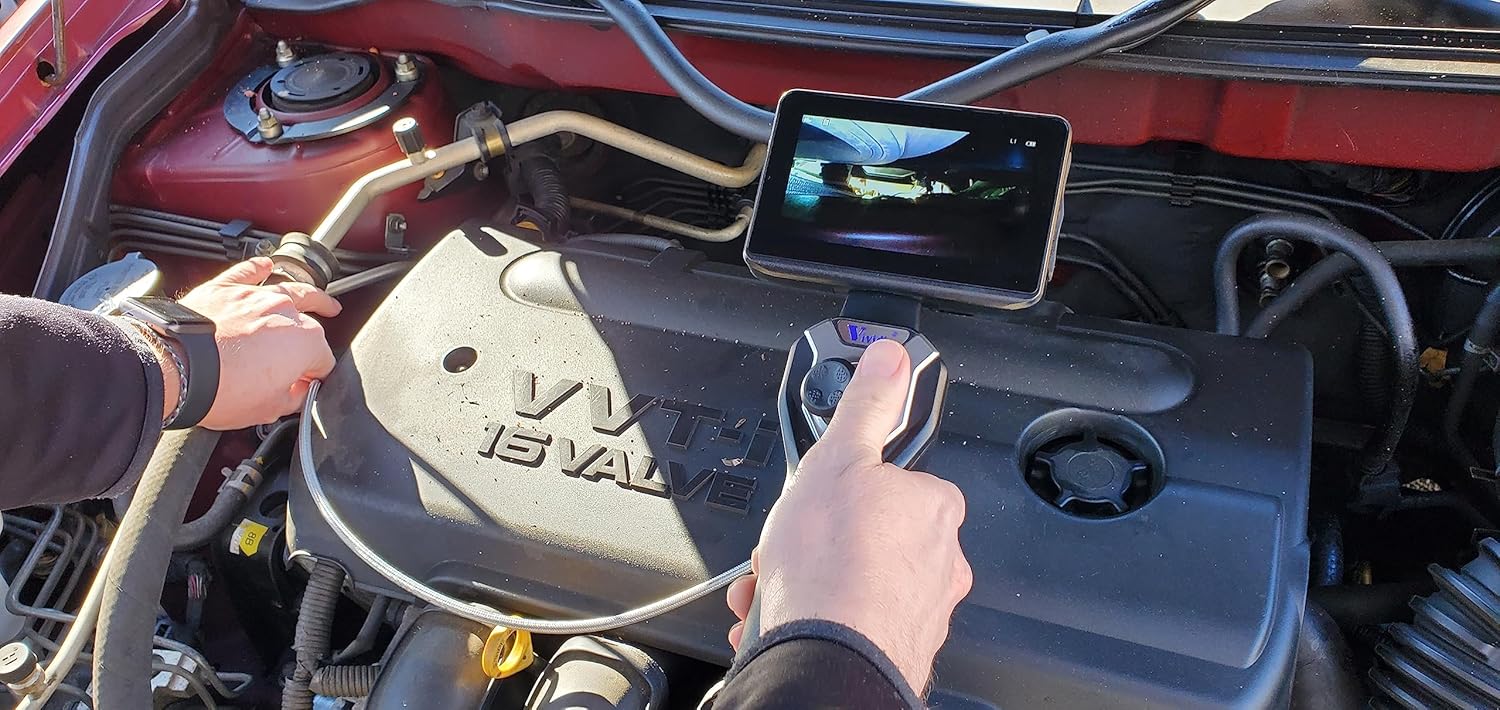
Figure 5: A user demonstrating the operation of the borescope, adjusting the joystick to maneuver the probe within an engine compartment.
3. Ajust de la brillantor del LED
Press the Brightness control button to cycle through different LED light intensity levels. This helps illuminate dark inspection areas effectively.
4. Captura d'imatges i vídeos
- Per fer una foto: Press the Snapshot button once. The image will be saved to the microSD card.
- Per gravar un vídeo: Press and hold the Snapshot button to start recording. Press and hold again to stop recording. Videos are saved to the microSD card.

Figura 6: Un primer pla view of the flexible probe, highlighting its metal-mesh covering and the small camera head, demonstrating its maneuverability.
5. Viewing Media
Access the menu on the display to browse and playback saved images and videos. You can also connect the device to a computer via USB to transfer files.
Manteniment
1. Cleaning the Probe and Camera Head
After each use, especially in dirty or oily environments, gently wipe the flexible probe and camera head with a soft, damp cloth. For stubborn residue, a mild, non-abrasive cleaning solution can be used. Ensure the camera lens is clean for clear images.
2. Cura de la bateria
To prolong battery life, avoid fully discharging the battery frequently. If storing the device for an extended period, charge the battery to approximately 50% and recharge every few months.
3. Emmagatzematge
Store the borescope in its original packaging or a protective case in a cool, dry place, away from direct sunlight and extreme temperatures. Avoid coiling the flexible probe too tightly.
Resolució de problemes
| Problema | Causa possible | Solució |
|---|---|---|
| El dispositiu no s'encén. | Bateria baixa. | Carregueu el dispositiu completament. |
| Cap imatge a la pantalla. | Probe not connected properly. | Ensure the probe is securely connected. |
| La imatge és borrosa o fosca. | Camera lens dirty; insufficient lighting. | Clean the camera lens; increase LED brightness. |
| No es poden desar fotos/vídeos. | MicroSD card full or not inserted correctly. | Check microSD card insertion; delete old files or replace card. |
| Joystick articulation not working. | Articulation lock engaged; mechanical obstruction. | Release the lock button; check for obstructions in the probe path. |
Especificacions
| Característica | Detall |
|---|---|
| Número de model | CXM-4010 |
| Diàmetre del capçal de la càmera | 4 mm (0.16") |
| Longitud de la sonda | 1 metres (3.3 peus) |
| Material de la sonda | Metal-mesh covered flexible tube |
| Classificació impermeable | IP67 (probe and camera head) |
| Articulació | Joystick-controlled, 360-degree all-direction, 180-degree bending back |
| Resolució de la càmera | 1280x720 (1MP HD CMOS sensor) |
| Mostra | Monitor LCD de 4.5 polzades |
| Il·luminació | 6 llums LED brillants |
| Mitjans d'emmagatzematge | MicroSD Card (included) |
| Bateria | Rechargeable Lithium battery (more than 3h working time) |
| Pes de l'article | 12 lliures |
| Dimensions del paquet | 20.5 x 16 x 6 polzades |
Garantia i Suport
Warranty and specific support contact information are not available in the provided product data. Please refer to the product packaging or the manufacturer's official weblloc web per obtenir més informació sobre la cobertura de la garantia i l'atenció al client.


